How to Improve Email Deliverability: 18 Best Practices That Actually Work
 BounceCheck Team
Before your next send Find the addresses that will bounce.
Verify an email freeYour emails can't get opened, clicked, or converted if they never reach the inbox in the first place.
Email deliverability is the foundation of every successful email program. It doesn't matter how compelling your subject lines are or how beautiful your templates look if your messages land in spam folders instead of inboxes.
Fortunately, improving email deliverability isn't complicated. You don't need advanced technical skills or a massive budget. You just need to follow proven best practices, maintain good sending habits, and treat your subscribers right.
Below, we'll walk you through strategies to improve your email deliverability and keep your messages landing where they belong.
What Is Email Deliverability?
Email deliverability refers to the ability of your emails to successfully reach recipients' inboxes. It's not just about whether an email gets sent. It's about whether it lands where it's supposed to.
Deliverability is the process of effectively reaching the inboxes of each of your subscribers. Undelivered emails generate zero engagement, zero clicks, and zero conversions, no matter how good the content inside them is.
Here's a breakdown of key components:
- Delivery: When an email is accepted by the recipient's mail server.
- Deliverability: When an email actually reaches the inbox, not the spam or junk folder.
- Delivery rate: The percentage of emails accepted by recipient servers.
- Deliverability rate: The percentage of emails that land in inboxes.
You can have a 99% delivery rate but only 70% deliverability if most of your emails end up in spam folders. The goal is to maximize both.
How Email Delivery Works Behind the Scenes
When you send an email, it goes through several steps before it reaches the recipient:
- Your email client or sending platform composes the message and hands it to an SMTP server.
- The SMTP server looks up the recipient's domain through DNS servers to find the correct mail server.
- The recipient's mail server receives the message and decides where to place it: inbox, spam folder, or reject it entirely.
That decision is based on a combination of factors including your sender reputation, email authentication, content quality, and subscriber engagement history. If the receiving server doesn't recognize your sending IP yet, it may even temporarily defer the message - see our explainer on how greylisting works for the full mechanism.
Factors That Affect Email Deliverability
Before diving into best practices, it helps to understand the factors that determine whether your emails reach the inbox:
Internet Service Providers (ISPs): ISPs like Gmail, Yahoo, and Outlook use complex algorithms to filter incoming emails. They evaluate your sending history, domain reputation, and subscriber engagement to decide whether your email belongs in the inbox or spam.
Email Service Providers (ESPs): The platform you use to send emails plays a role. Reputable ESPs have established relationships with ISPs and maintain shared or dedicated IP pools with good reputations.
IP and domain reputation: Both your sending IP and your sending domain carry independent reputation scores. High bounce rates, spam complaints, and low engagement damage either one and reduce deliverability. We unpack the full scoring model in Email Sender Reputation Explained.
Engagement metrics: ISPs monitor how recipients interact with your emails. Opens, clicks, replies, and forwards are positive signals. Spam complaints, deletes without reading, and lack of engagement are negative signals.
Email content and formatting: The content of your email, including subject lines, body text, images, and links, is scanned by spam filters. Poorly formatted emails, broken links, or content that resembles spam can trigger filtering.
How to Improve Email Deliverability
Improving your email deliverability isn't just about technical fixes. It's about creating a holistic strategy that prioritizes subscriber engagement and sender reputation. Here are proven techniques to prevent failures and improve your email delivery rates for the long term.
1. Authenticate Your Email Domain
Email authentication proves to ISPs that you are who you say you are and that your emails are legitimate. Without proper authentication, you risk falling victim to email spoofing (someone impersonating your domain) and experiencing poor delivery rates.
There are three key authentication protocols to implement:
- SPF (Sender Policy Framework): Specifies which mail servers are authorized to send email on behalf of your domain. Add an SPF record to your DNS settings that lists your authorized sending IPs.
- DKIM (DomainKeys Identified Mail): Adds a digital signature to your outgoing emails. The recipient's server verifies this signature against a public key in your DNS records to confirm the email hasn't been tampered with.
- DMARC (Domain-based Message Authentication, Reporting and Conformance): Builds on SPF and DKIM by telling receiving servers what to do when authentication fails (quarantine, reject, or allow). DMARC also provides reporting so you can monitor authentication results.
Work with your IT team to add these records to your DNS. If your organization uses a DMARC policy, make sure all necessary records are updated when you add new sending services.
Since 2024, Gmail and Yahoo require bulk senders to authenticate their mail, so these records are no longer optional. See the Gmail and Yahoo bulk sender requirements for the exact thresholds. Work with your IT team to add these records to your DNS. If your organization uses a DMARC policy, make sure all necessary records are updated when you add new sending services.
2. Choose the Right Sending IP
Shared IPs put your deliverability partly in the hands of everyone else on the pool. Dedicated IPs give you full control over your own sender reputation. Once you reach roughly 25,000 daily emails, a dedicated IP becomes worth the extra setup. Don't spread sending across multiple IPs to dilute penalties - ISPs detect this and may block the entire pool.
Sender reputation is the larger system that sits behind IP choice. Read Email Sender Reputation Explained for the full breakdown of how IP and domain scores are calculated and why they matter.
3. Warm Up New Sending Infrastructure
New IPs and new domains start with zero reputation. Sending full volume from day one looks like spam behavior and gets you throttled or blocked fast. The fix is a 30 to 60 day ramp where you start with your most engaged subscribers and gradually scale volume while monitoring opens, clicks, and complaints.
For a week-by-week schedule, signals to watch, and when to extend or accelerate the ramp, see How Long to Warm Up a New Email Domain.
4. Perfect the Opt-In Process
How you collect email addresses plays a large role in your deliverability rates. An optimized opt-in process ensures that your email list is full of engaged users.
If you are sending email to people who didn't agree to receive messages from you, they will mark your emails as spam. ISPs will then treat your entire sending as potentially unwanted, even for subscribers who actually want your email.
Use double opt-in. Double opt-in involves two verifications: the user submits their email address, then receives a confirmation email with a link to verify their subscription. This extra step helps you avoid fake or misspelled email addresses and ensures that all new contacts in your database are actively engaged. Double opt-in signup also helps validate new contacts and prevent hard bounces from invalid addresses.
5. Write Non-Spammy Subject Lines
Your subject lines determine whether a user opens your email. Although ISP filtering systems have become more sophisticated and certain phrases won't automatically land you in spam, it's still wise to avoid common spam triggers.
Phrases to avoid:
- "Eliminate your debt"
- "Risk-free"
- "FREE!!!"
- "Act now" or "Limited time offer" with excessive punctuation
- ALL CAPS subject lines
There is no absolute list of banned words that will guarantee inbox placement. But when writing subject lines, focus on the genuine value of the message without sounding pushy or salesy. Clear, honest subject lines build trust with both your subscribers and ISP spam filters.
6. Create Good Quality Content
High-quality, relevant content is the best way to keep subscribers engaged and ISPs happy. To improve engagement:
- Test your emails before sending. Use test-in-email-client features to make sure your email renders correctly across devices, especially mobile.
- Use personalization. Add personalization tokens (first name, company name, relevant details) to tailor your messaging to specific contacts.
- Send measured email volumes. Avoid sudden spikes in send volume, which can trigger spam filters.
- Keep content relevant. Send content that matches what subscribers signed up for. Irrelevant content drives unsubscribes and spam complaints.
All of your email content, including imagery and links, will be reviewed by ISPs to determine whether it looks like spam, a phishing attempt, or other malicious email. Watch out for broken links, misspellings, missing email headers, or excluding options to unsubscribe. These mistakes increase the odds that your email is flagged as spam. If mail is already getting filtered, this breakdown of why emails land in spam helps you find the cause.
7. Provide a Preference Center
Once your recipients have agreed to receive email from you, give them control over their experience. A preference center lets subscribers decide:
- How frequently they want to receive emails (daily, weekly, monthly)
- What types of content they want (product updates, promotions, newsletters)
- Which channels they prefer
Putting recipients in control keeps them happy. This happiness translates to better engagement, which ISPs notice and reward with better inbox placement.
8. Keep the Conversation Going
It is a very positive signal to ISPs when your contacts reply to your emails. For that reason:
- Monitor replies and respond in a timely manner.
- Avoid sending emails from a no-reply address that cannot receive responses.
- Encourage two-way communication where appropriate (ask questions, request feedback).
Replies tell ISPs that your subscribers are actively engaged with your emails, which strengthens your sender reputation.
9. Segment Your Email Lists
Segmentation allows you to send relevant content to specific groups within your audience. Tailoring your communications to the interests and behaviors of different segments helps improve engagement rates, which positively impacts your deliverability.
Segmented lists often see:
- Higher open rates
- Higher click-through rates
- Lower unsubscribe rates
- Fewer spam complaints
All of these contribute to a better sender reputation. Segment by purchase history, engagement level, signup source, geographic location, or any other data points relevant to your business.
10. Clean Up Your List Regularly
Don't let your ego get in the way of your email deliverability. A smaller, engaged list is far more valuable than a large list of unresponsive subscribers. The longer you keep inactive and unengaged users on your email list, the more you risk damage to your reputation and deliverability rates.
List hygiene best practices:
- Remove hard bounces immediately. Hard bounced addresses will never work again. Keeping them on your list signals poor audience management to ISPs.
- Provide a clear unsubscribe option. A visible, easy-to-use unsubscribe link in every email automates list cleanup and complies with anti-spam laws (CAN-SPAM, GDPR, CCPA).
- Scrub your list regularly. Remove inactive subscribers, unknown users, and contacts who haven't given you explicit permission to email them.
- Use graymail suppression. Graymail is email that sits unopened in your recipients' inbox. Automatically excluding contacts that aren't engaging with your emails instantly improves your deliverability results.
11. Avoid Spam Traps
Spam traps are email addresses planted by ISPs and blocklist operators specifically to catch senders who don't practice good list hygiene. Hitting even one can land your domain on a blocklist that takes weeks or months to escape - so the goal is to never email one in the first place. If you suspect it has already happened, check if you are blacklisted before your next send.
For the full taxonomy (pristine, recycled, typo traps), how spam traps end up on real lists, and the detection signals BounceCheck uses to flag them, read Spam Traps Explained.
12. Keep Bounce Rates Low
Hard bounces signal poor audience management and chip away at your sender reputation with every send. Soft bounces are usually temporary but can turn into hard bounces if the underlying issue persists. Most ISPs want to see your bounce rate stay under 2%.
Two reads to go deeper: Hard Bounce vs Soft Bounce covers the difference and how to handle each, and Email Bounce Rate Too High? walks through diagnosis and recovery when the rate has already spiked.
13. Monitor Your Sender Score
Your sender score is the number ISPs use to decide whether your mail belongs in the inbox or the spam folder. Check it regularly using a service like Validity Sender Score or Google Postmaster Tools, and act on declines before they compound.
If the score has already dropped, see How Many Days to Recover Sender Reputation for the realistic timeline and the steps that actually move the needle.
14. Monitor Your Email Metrics
Keep a close eye on your email performance metrics to maintain and improve your deliverability. Regular monitoring helps you spot potential problems before they become critical.
Key metrics to track:
- Bounce rate: High bounce rates harm your sender reputation. Track both hard and soft bounces.
- Spam complaint rate: If this rises, it's a red flag that your content or sending practices need adjustment.
- Open rates and click-through rates: These engagement signals influence how ISPs view your emails. Low open rates might indicate issues with subject lines or sender name.
- Inbox placement rate: The percentage of your emails actually reaching the inbox.
- Unsubscribe rate: A rising unsubscribe rate signals content or frequency problems.
Use data-driven insights to refine your email marketing approach. By varying your email's send time, subject line, or content, you can run A/B tests to systematically improve these metrics. Small improvements compound over time to significantly boost your overall deliverability.
15. Implement a Sunset Policy
A sunset policy is a strategic approach to managing inactive subscribers. ISPs view consistent sending to inactive addresses as a red flag, which can harm your reputation.
How to implement a sunset policy:
- Define inactivity: Determine what constitutes an inactive subscriber for your business (e.g., no opens or clicks in 6 months).
- Create a re-engagement campaign: Before removing inactive subscribers, try to win them back with a targeted campaign offering a reason to re-engage.
- Set up an automated process: Use email automation to tag and manage inactive subscribers over time.
- Remove with care: If re-engagement fails, remove inactive subscribers from your main list. Consider keeping them in a separate suppression list.
By focusing on active subscribers, your overall engagement metrics will improve, which in turn improves your deliverability.
16. Perform Deliverability Tests
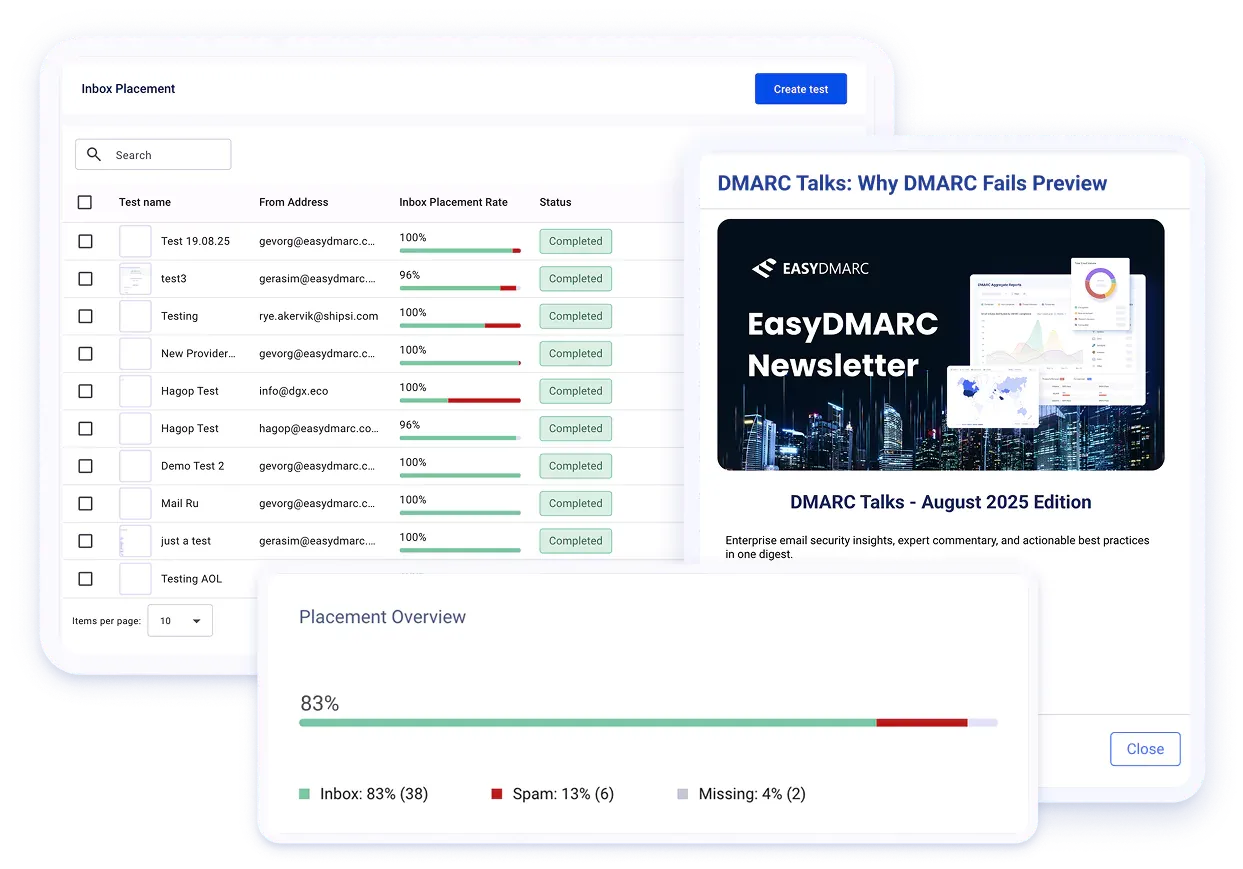
Before sending out large campaigns, conduct deliverability tests to identify potential issues. These tests help you spot problems with your email content, formatting, or sender authentication that might trigger spam filters.
An email deliverability test, also called an inbox placement test, sends a copy of your campaign to a seed list of real addresses across providers like Gmail, Yahoo, Outlook, and Apple Mail, then reports where each copy landed. Running one takes five steps:
- Pick an inbox placement tester: choose a tool that predicts inbox-versus-spam placement before you send, rather than trusting the delivery rate your ESP reports.
- Build the real email: use your actual subject line, content, and design, not filler copy, so the result reflects real-world performance.
- Send to the seed list: copy the addresses the tool provides into your recipient field, paste its tracking code into the body, and send as you normally would.
- Read the results by provider: the report shows inbox, spam, or promotions placement per provider, plus details like time to receive and the detected sender IP. A message that reaches Gmail's Primary tab can still land in Outlook's spam folder.
- Fix and re-test: adjust the issues the test flags, then run it again until placement is clean across providers.
A deliverability test typically checks for:
- Inbox placement: Does your email land in the primary inbox, promotions tab, or spam folder?
- Rendering: How does your email look across different email clients and devices?
- Authentication: Are your SPF, DKIM, and DMARC records set up correctly?
- Content analysis: Does your email content contain elements that might trigger spam filters?
- Link checking: Are all the links in your email working and not blacklisted?
The numbers tell you whether a result is healthy. Aim for these benchmarks before a large send:
| Metric | Healthy | Investigate |
|---|---|---|
| Inbox placement | Above 90% | Below 85% |
| Bounce rate | Below 2% | Above 5% |
| Spam complaints | Below 0.1% | Above 0.3% |
Those targets matter because average deliverability sits around 81%, so nearly one in five emails never reaches the inbox, and marketers who monitor inbox placement are 22% more likely to run a successful email program. Once a test returns results, our guide to the email deliverability report breaks down what each metric means. Regularly performing these tests before campaigns helps you catch and fix deliverability issues early.
17. Send Email That People Love
You have to please two parties when trying to improve your email deliverability: the ISPs and your recipients. But if you please the latter, the former will already be taken care of.
ISPs protect the end-user. If your recipients indicate they are happy by opening, clicking, replying, and forwarding, ISPs will keep placing your email in the inbox.
Above all, if your recipients enjoy and derive value from your email, they will interact with your messages. That engagement is the strongest deliverability signal you can send.
18. Stay Updated with Email Deliverability Best Practices
ISPs and email clients frequently update their algorithms and policies. Staying informed is essential to maintaining high deliverability rates.
- Follow industry resources. Read blogs and newsletters from email marketing platforms and deliverability experts for timely updates on industry changes.
- Monitor ISP postmaster pages. Major ISPs like Gmail, Yahoo, and Microsoft publish guidelines and updates on their spam filtering practices.
- Stay informed about legal changes. Business email communications are subject to regulations such as CAN-SPAM, GDPR, and CCPA. Keep track of any changes to these laws that might affect your email practices.
- Review ESP updates. Your email service provider may release new features, compliance requirements, or deliverability tools that can help your program.
Frequently Asked Questions
What is a good email deliverability rate?
A good deliverability rate is 95% or higher. This means at least 95% of your emails are landing in inboxes, not spam folders. If you're consistently below 90%, you have serious deliverability issues that need attention.
How long does it take to improve email deliverability?
It depends on your starting point. If you're fixing basic authentication issues, you might see improvements within a few weeks. If you're recovering from a damaged sender reputation, it could take several months of consistent good sending practices to rebuild trust with ISPs.
What's the difference between delivery rate and deliverability rate?
Delivery rate measures the percentage of emails accepted by recipient servers. Deliverability rate measures the percentage that land in inboxes. You can have a 99% delivery rate but only 70% deliverability if most of your emails end up in spam folders.
Can I fix poor deliverability by switching email service providers?
Not usually. Your sender reputation follows your domain and IP addresses, not your ESP. Switching providers without fixing underlying issues like list quality, engagement rates, and authentication won't solve the problem. Focus on best practices first.
How often should I clean my email list?
Remove hard bounces immediately. For inactive subscribers, run a re-engagement campaign every 6 to 12 months, then remove anyone who doesn't respond. Regular list maintenance keeps your engagement metrics healthy and protects your sender reputation.
How do I run an email deliverability test before a campaign?
Use an inbox placement tester. Build the exact email you plan to send, copy the seed addresses the tool provides into your recipient field, paste its tracking code into the body, and send. The tool then reports inbox, spam, or promotions placement for each provider so you can fix issues and re-test before the real send.
Start with a Clean Email List Using BounceCheck
Every deliverability strategy starts with a clean email list. If your list is full of invalid addresses, spam traps, and inactive accounts, no amount of content optimization or authentication will save your inbox placement rate.
BounceCheck bulk verification helps you eliminate bad addresses before they damage your sender reputation. Every email passes through a 30-step diagnostic pipeline covering syntax validation, domain and MX verification, stealth SMTP handshake, catch-all detection, disposable email detection, role-based account detection, and spam trap identification. Each address receives a 0-100 confidence score, giving you full control to set your own risk thresholds per campaign.
The stealth SMTP engine verifies mailboxes without notifying the recipient or exposing your sending domain. The REST API ships with webhook callbacks and SDKs for Python, Node.js, Ruby, Go, PHP, and cURL, making it easy to plug verification into signup forms, CRM workflows, or pre-campaign list cleaning.
Security includes TLS 1.3 + AES-256 encryption, GDPR and CCPA compliance, and a no-data-selling policy. Credits never expire, and a 14-day money-back guarantee covers unused purchases.
Try BounceCheck free - 50 verifications/month, no credit card required
§ Before your next send
Find the addresses that will bounce
Verify a single address free, or upload a CSV — the free plan includes 50 checks a month, no card needed.

BounceCheck Team
The team behind BounceCheck - helping businesses verify emails and improve deliverability.

