Email Bounce Rate Too High? How to Fix It and Protect Your Sender Reputation
 BounceCheck Team
Before your next send Find the addresses that will bounce.
Verify an email freeAn email bounce rate is the percentage of emails that never make it to a recipient's inbox. The emails "bounce" back to the sender. Think of it like posting a letter to an old friend that comes back as undelivered.
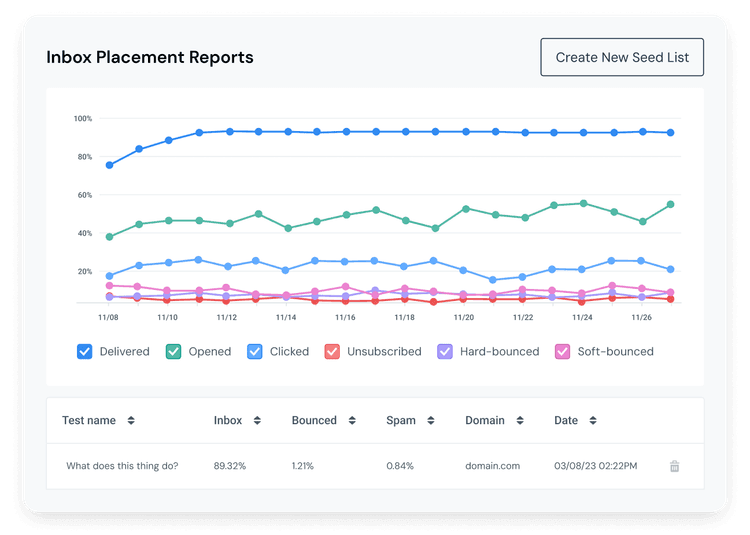
A high bounce rate can have a negative impact on your sender reputation and inbox placement. If left unchecked, it can lead to account suspensions, reduced sending limits, or your domain being blacklisted entirely.
This guide focuses on the symptoms of a high bounce rate and the steps that bring it back down. For the underlying mechanics of hard vs soft bounces (error codes, taxonomy, retry policies), see hard bounce vs soft bounce. For acceptable rate benchmarks by channel and industry (cold vs newsletter vs transactional, B2B vs B2C, by sector), see acceptable hard bounce rate for cold email. For the step-by-step fix playbook on an individual hard bounce, see how to fix hard bounce email.
What Is Email Bounce Rate?
Email bounce rate is the percentage of emails that have not successfully reached recipients. When an email bounces, it means the recipient's mail server rejected or could not accept the message. Your email service provider records the bounce and typically provides a reason for the failure.
Bounces come in two flavors: a hard bounce (permanent failure) and a soft bounce (temporary failure). Hard bounces are far more damaging to your bounce rate and sender reputation because they signal list quality problems. For the full mechanics behind each type, including SMTP error codes and retry behavior, see hard bounce vs soft bounce.
When Is a Bounce Rate "Too High"?
An acceptable bounce rate is less than 2% as a general working ceiling. The bands that decide whether to act:
| Bounce Rate | Status | Impact |
|---|---|---|
| Under 2% | Acceptable | Normal range. No action needed. |
| 2% - 5% | Needs attention | Investigate your list quality and data collection methods. |
| 5% - 10% | Problematic | Can cause issues with deliverability and inbox placement. |
| Over 10% | Critical | Can result in account suspension on most email marketing platforms. |
This is the universal ceiling. The acceptable rate is significantly stricter for cold outreach, transactional sends, and regulated industries — for the channel-by-channel and industry-specific benchmarks, see acceptable hard bounce rate for cold email.
The bigger the list size, the more sensitive a mailbox provider is to your bounce rate, because the percentage is more statistically significant on larger lists (over 10K contacts). All email lists also decay naturally over time — about 2% per year for B2C lists and 3% per year for B2B lists due to job changes and company turnover.
Symptoms: Why Your Bounce Rate Climbed
Emails bounce due to a variety of reasons. The most common root causes when a rate suddenly looks too high:
The email list is old and hasn't been engaged in a long time. An email list that is 12 months old without any sends can bounce at a rate of 20-40%, which is far too high. Email addresses go inactive, accounts get deleted, and domains expire.
The email list was purchased or scraped from the web. Purchased and scraped lists contain a large number of old and invalid email addresses, spam traps, and role-based accounts. Sending to these lists may also violate the terms of use for most major email marketing platforms and can lead to account suspensions.
Bot signups on webforms. Without proper protection like RECAPTCHA, bots can flood your signup forms with fake or invalid email addresses that will hard bounce on the first send.
Not cleaning the list regularly. Even organic lists accumulate invalid addresses over time. If you're not removing hard bounces, unsubscribed contacts, and inactive addresses, your bounce rate will climb.
Sending to a new or unverified list. If you've imported a list from another provider or a CRM without verifying the addresses first, you may see a high bounce rate on your first send.
What a High Bounce Rate Triggers on Your ESP Account
Just like your business reputation, a good sender reputation is easy to maintain but takes more effort to regain when negatively impacted. A small number of bounced emails is expected and can occur even if you've done everything to prevent them.
However, if your bounced email rate is higher than normal, your email service provider can take safety measures to minimize the negative impact:
Declined emails: Your ESP may decline distributing some of your email campaigns until you clean your mailing list and slowly rebuild your reputation as a sender.
Reduced email allowance: Your sending capacity (the number of contacts you can send email campaigns to) might be reduced if you have a large number of bounced emails.
Account suspension or deactivation: If you continue to have a high bounce rate over a long period of time, your account may be suspended or deactivated for a breach of terms of use. The ESP will investigate whether you're engaging in spammy practices.
How to Find and Review Bounced Emails
After each campaign, download the list of bounced emails to understand why certain recipients didn't receive your message. Most ESPs provide a bounce report that specifies whether each bounce was a soft or hard bounce, along with the reason.
Steps to review bounced emails in most platforms:
- Go to your email campaign reports or analytics dashboard.
- Select the campaign you want to review.
- Look for delivery statistics or a bounced email filter.
- Filter by "Bounced" to see all bounced recipients.
- Download the report to see each recipient and the specific reason for the bounce.
Understanding the reasons behind each bounce helps you address the right issues: typos need correction, invalid addresses need removal, and server-side problems may resolve on their own. For the individual-bounce remediation flow (decoding the error, deciding whether to contact the recipient, knowing when to suppress), see how to fix hard bounce email.
How to Reduce Your Bounce Rate
The number of bounced emails from your campaigns is used to establish your sender reputation and impacts how many recipients you can reach. The fastest moves to bring a rate back under 2%:
Create a Good Quality Mailing List
The quality of your subscribers is more important than the quantity. Build your mailing list organically by requiring active signup from each contact. Use double opt-in verification so that new subscribers confirm their email address before being added to your list. This helps you avoid fake addresses, typos, and bot signups.
Only import contacts from lists you've personally built with explicit permission. Never use purchased lists or addresses harvested from the web.
Validate Your List Before Sending
If you haven't engaged with your list in more than 1-2 months, it is best to run the list through a bulk verifier and remove invalid addresses before sending bulk campaigns. This is especially important for older lists, imported lists, or lists that have never been verified.
Check Bounced Emails After Every Campaign
After each send, review your bounced emails. Check for email address typos that can be corrected. Contact bounced subscribers through alternate channels if they're important contacts. Remove addresses that can't be corrected. Never re-add a bounced contact without first verifying the address and getting fresh permission.
Review Your Mailing List Regularly
Review your mailing lists at least every six months. Remove inactive contacts who haven't engaged in 12 months or longer. Clean out addresses that have previously bounced. Use email validation tools to check the health of your list before major campaigns.
Add RECAPTCHA to Your Webforms
If you're seeing bot signups contributing to your bounce rate, add RECAPTCHA or a similar bot-prevention tool to your signup forms. This blocks automated signups with fake or invalid addresses.
Monitor Soft Bounces by Provider
If you are seeing a high soft bounce rate for a particular mailbox provider, the two most likely reasons are:
- Inbox full due to storage limits. This is especially common for iCloud and me.com domains and is more typical on older lists.
- Mailbox provider service outage. Temporary issues on the provider's side can cause a spike in soft bounces that resolves on its own.
Frequently Asked Questions
What is an acceptable email bounce rate?
An acceptable bounce rate is less than 2% as a universal ceiling. Anything between 2% and 5% requires attention. Rates above 5% can cause deliverability problems, and rates above 10% can lead to account suspension. Cold outreach and transactional sends are held to stricter benchmarks — see the channel-specific benchmark guide for the by-industry breakdown.
How often should I clean my email list?
Review your mailing list at least every six months. Remove contacts who haven't engaged in 12 months or longer. Validate your list with an email verification tool before every major campaign, especially if you haven't sent to the list in more than 1-2 months.
Can purchased email lists cause a high bounce rate?
Yes. Purchased and scraped lists typically contain a high percentage of invalid, outdated, and spam trap addresses. Sending to these lists can result in bounce rates of 20-40% and may violate the terms of use of your email marketing platform, leading to account suspension.
Will my email service provider suspend my account for high bounces?
Most ESPs will take action if your bounce rate stays high. This can start with declining to send certain campaigns, then reducing your sending allowance, and eventually suspending or deactivating your account if the problem persists.
Lower Your Bounce Rate Before You Hit Send with BounceCheck
Most bounce rate problems come from addresses that were already invalid before the campaign went out. Verifying your list ahead of time is the fastest way to bring your rate back under 2%.
BounceCheck checks every address through a 30-step pipeline and returns a 0-100 score. Filter out anything below your threshold, remove the dead weight, and send with confidence. The stealth SMTP verification runs silently without alerting recipients or putting your domain at risk.
$9.99 for 10K verifications. Credits never expire.
§ Before your next send
Find the addresses that will bounce
Verify a single address free, or upload a CSV — the free plan includes 50 checks a month, no card needed.

BounceCheck Team
The team behind BounceCheck - helping businesses verify emails and improve deliverability.