How to Avoid an Email Blacklist and Protect Your Sender Reputation
 BounceCheck Team
Before your next send Find the addresses that will bounce.
Verify an email freeLanding on an email blacklist is one of the fastest ways to wreck your deliverability. One day your campaigns are reaching the inbox, the next they bounce or vanish into spam, and you often find out only when responses dry up. The reassuring part is that almost every cause is preventable. This guide covers what a blacklist is, what gets you flagged, and the sending habits that keep your domain off these lists in the first place.
What an email blacklist actually is
An email blacklist, now more commonly called a blocklist, is a real-time database of IP addresses and domains flagged as sources of spam or malicious content. The technical name is a DNS-based Blackhole List, or DNSBL, and it can be updated at any moment. When you send a message, the receiving server checks your sending IP and domain against these lists in milliseconds. If there is a match, your email is blocked or pushed to spam before the recipient ever sees it.
A few types are worth knowing. IP-based lists flag a specific sending address, domain-based lists target your domain or the links inside your emails, and private lists run by Gmail, Outlook, and Yahoo stay behind the scenes where you cannot check them directly. Public lists like Spamhaus and Barracuda are the ones most senders run into, and they carry the most weight on your deliverability.
What lands you on a blacklist
Blacklist operators watch for behavior that looks like spam, even when your intentions are good. A handful of triggers account for most listings:
- A sudden spike in sending volume, which looks like the ramp-up of a spam campaign rather than steady, legitimate mail.
- Content that reads as spammy, such as ALL CAPS subject lines, poorly formatted HTML, image-only emails, or a pile of exclamation points.
- A hacked or compromised account that a third party uses to blast spam in your name.
- Too many recipients marking your messages as spam, which is the single loudest signal you can send to a blocklist.
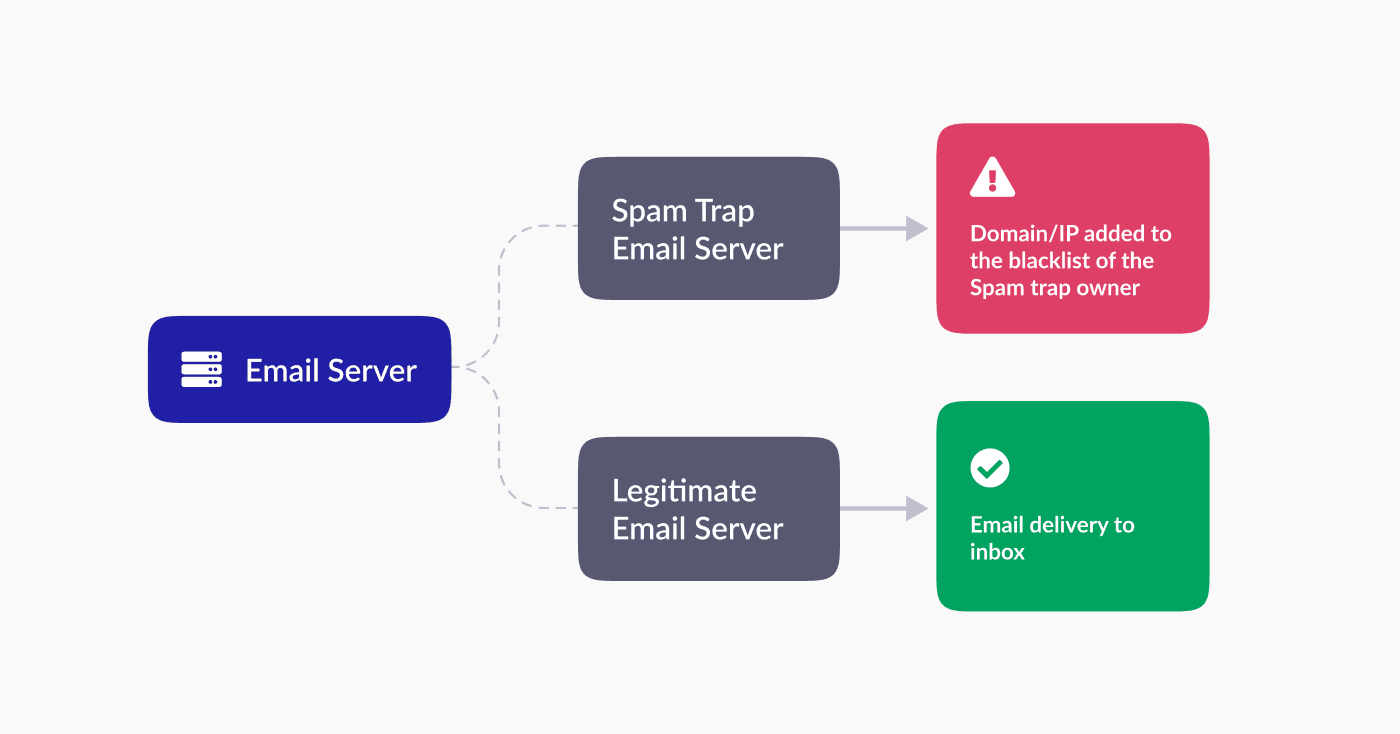
- Hitting spam traps, addresses created specifically to catch senders who scrape or buy lists.
Authenticate your domain
Major providers filter unauthenticated mail on sight. Since 2024, Google, Yahoo, and Microsoft have required authentication for bulk senders, so this is no longer optional. Three records do the work, and getting all three right is the baseline that keeps your mail from being throttled long before a blacklist enters the picture.
- SPF (Sender Policy Framework) lists the IP addresses allowed to send on your domain's behalf.
- DKIM (DomainKeys Identified Mail) adds a digital signature to every message so receivers can confirm it was not altered in transit.
- DMARC (Domain-based Message Authentication, Reporting, and Conformance) tells receiving servers how to handle mail that fails SPF or DKIM, and reports back on who is sending as your domain.
Proper email authentication also protects you from spoofing, where someone forges your domain to send spam that could otherwise get you listed.
Keep your list clean
A clean list is the best blacklist insurance there is. Sending to dead, mistyped, or unwilling addresses drives up bounces and complaints, the two metrics that get you flagged fastest.
- Never buy or scrape lists, since purchased lists are loaded with spam traps and people who never asked to hear from you.
- Use double opt-in so subscribers confirm their address and their interest before you mail them.
- Remove hard bounces right away and drop addresses that have bounced more than twice.
- Verify new addresses before you send, and prune subscribers who have not engaged in months.
Spam traps deserve special attention, since hitting even one pristine trap can land you on a major list with no warning.
Send like a sender, not a spammer
Your sending pattern tells inbox providers whether to trust you. Ramp new domains slowly: start with five to ten emails a day and build up over a few weeks rather than blasting from day one. Keep volume steady, because sudden spikes trip spam filters, and stay within your provider's limits, since Gmail caps standard accounts at 500 a day, Google Workspace at 2,000, and Microsoft 365 higher still. If your metrics look healthy, scale by only 10 to 15 percent per week.
On the content side, avoid the patterns that read as spam, write subject lines a real person would open, and watch your numbers. Keeping your bounce rate under 2 percent and spam complaints under 0.3 percent, which works out to about three reports per thousand emails, keeps you well clear of the thresholds that get senders flagged.
Monitor before you get flagged
You cannot fix what you are not watching. Check your blacklist status on a regular schedule using a tool like MXToolbox or Spamhaus, which scan your IP and domain against the lists that matter in one pass. Track your Sender Score and aim to stay above 80, and set up Google and Microsoft Postmaster Tools so you can see how the big providers view your mail. The usual warning signs of trouble are a steep, sudden drop in delivery rates and bounce messages carrying a 5.7.x SMTP error that names a specific list.
If you slip onto a list anyway
Even careful senders get listed once in a while, sometimes through no fault of their own, so do not take it personally. Stop sending, identify which list flagged you, fix the underlying cause, then follow that list's removal process. Most public blocklists delist quickly once the issue is resolved, while private ISP blocks clear on their own after a stretch of clean sending. How long recovery takes depends on how badly your reputation was hit and how consistently you send clean mail afterward.
Blacklist questions senders ask
How long does an email blacklist last?
Not years. Automated lists like SpamCop usually clear you within 24 to 48 hours of clean sending, Barracuda often within about 12 hours, and the Spamhaus SBL within roughly a week once you request removal. Private ISP blocks are the slowest, sometimes taking two to four weeks of consistent, legitimate sending before they lift.
Can you get blacklisted even if you never sent spam?
Yes. If your account is hacked or your domain is spoofed, someone else can send spam in your name and get you listed. Sharing an IP address with other senders who behave badly can also drag down your reputation, which is part of why listings are usually easy to resolve once you prove the problem is fixed.
How do you check if your domain is blacklisted?
Run your IP and domain through a lookup tool such as MXToolbox or Spamhaus, which check against dozens of lists at once. Bounce messages are another clue, since a blacklist block often arrives as a 5.7.x SMTP error that names the list doing the blocking, like "blocked using Spamhaus."
§ Before your next send
Find the addresses that will bounce
Verify a single address free, or upload a CSV — the free plan includes 50 checks a month, no card needed.

BounceCheck Team
The team behind BounceCheck - helping businesses verify emails and improve deliverability.

