SPF, DKIM, DMARC Explained for Marketers (2026 Setup Guide)
 BounceCheck Team
Before your next send Find the addresses that will bounce.
Verify an email freeTL;DR
If you send marketing email at any volume, you need all three authentication protocols configured - not one, not two. SPF says which servers can send for your domain. DKIM signs each message so it can't be tampered with. DMARC ties them together and tells inboxes what to do when something fails.
Since February 2024, Gmail, Yahoo, and Apple require SPF, DKIM, and DMARC for any sender pushing more than 5,000 emails per day to their inboxes. Skip them and your campaigns land in spam - or never get delivered at all. The good news: setup takes a few DNS records and a couple of hours, and senders who reach DMARC enforcement (p=quarantine or p=reject) typically see a 5–10% lift in delivery rates on top of the security benefit.
This guide explains each protocol in marketer language, walks through setup, and shows you how to check whether your current emails are actually passing.
Why marketers care about email authentication
Email authentication isn't an IT-only checkbox anymore - it directly controls how many of your campaigns reach the inbox.
- Phishing volume is at record levels. Roughly 3.4 billion phishing emails are sent per day, and the FBI now classifies Business Email Compromise as a $55 billion problem. Inbox providers responded by tightening the rules on every sender, not just the bad actors.
- The big four mailbox providers - Gmail, Yahoo, Microsoft, Apple - now require SPF, DKIM, and DMARC for bulk senders. No authentication, no inbox.
- Authenticated mail gets better placement. ISPs treat your DMARC posture as a reputation signal, on par with your bounce rate and complaint rate.
- Spoofing damages your brand. If attackers send phishing emails using your domain, your customers stop trusting your real campaigns - even after you fix the leak.
For a marketer, the practical translation: authentication is the price of admission, and it's also one of the few deliverability levers you can pull once and benefit from forever.
SPF, DKIM, DMARC at a glance
| Protocol | What it answers | What it checks | What happens if it fails alone |
|---|---|---|---|
| SPF | Where did this email come from? | Sending server's IP against your DNS allow-list | Mail may still deliver - SPF on its own carries no enforcement |
| DKIM | Was the message tampered with? | Cryptographic signature against your published public key | Same - DKIM is a trust signal, not a policy |
| DMARC | Who claims to have sent it, and what should the inbox do if SPF/DKIM fail? | Alignment between SPF/DKIM and the visible "From" domain | The policy you set runs: none, quarantine, or reject |
Memorize the three-word version: SPF = where. DKIM = what. DMARC = who + what to do.
What is SPF?
SPF (Sender Policy Framework) is a TXT record in your domain's DNS that lists every server allowed to send mail for you. When an inbox receives a message claiming to be from yourbrand.com, it pulls your SPF record and checks whether the sending server's IP is on the list.
If you use Google Workspace, Mailchimp, and Zendesk, all three need to appear in your SPF record - otherwise legitimate sends from those tools fail authentication and end up in spam.
Marketer takeaway: SPF is your "who is allowed to send" list. Every time you add a new ESP, support tool, or transactional service, the SPF record needs updating.
SPF strengths
- Easy to publish initially
- Stops attackers from spoofing your domain at the server level
- Universally supported by inbox providers
SPF weaknesses
- Only checks the technical "Return-Path" address - not the visible "From" your subscriber actually sees
- Limited to 10 DNS lookups per check; exceed that and SPF fails silently
- Breaks any time a third-party sender rotates IP addresses
Sample SPF record
Each part of the record has a specific job, and this breakdown of SPF record syntax explains every mechanism and qualifier. Here is a typical example:
v=spf1 include:_spf.google.com include:mail.zendesk.com include:spf.mandrillapp.com ~all
The ~all at the end is a soft-fail - anything not listed is suspicious but not auto-rejected. For most marketing programs, soft-fail is the right setting until you've confirmed every legitimate sender is included. Once you have, the choice between ~all vs -all is worth revisiting.
What is DKIM?
DKIM (DomainKeys Identified Mail) adds a cryptographic signature to every outgoing email's header. The signature is created with a private key on your sending server; the inbox verifies it using a public key you publish in DNS.
If anything in the message body or critical headers changes between send and receipt, the signature breaks - and the inbox knows the message was tampered with.
Marketer takeaway: DKIM is the tamper-evident seal on each message. It's also what unlocks BIMI (your logo next to the sender name in Gmail) once DMARC is at enforcement.
DKIM strengths
- Verifies the message hasn't been altered in transit
- Builds long-term sender reputation with mailbox providers
- Required for BIMI logo display
DKIM weaknesses
- Key rotation and management is non-trivial
- Can break in forwarding scenarios (mailing lists, "send to a friend" features)
- On its own, says nothing about what an inbox should do with a failed message
How DKIM gets enabled
Modern ESPs - Brevo, Mailchimp, Klaviyo, HubSpot, Salesforce Marketing Cloud - generate the DKIM key pair for you and tell you exactly which TXT record to publish under your domain (typically at selector._domainkey.yourdomain.com). It's a copy-paste job, not a cryptography exercise. If you want to see what a finished record looks like, these DKIM record examples cover the common formats.
What is DMARC?
DMARC (Domain-based Message Authentication, Reporting & Conformance) is the protocol that ties SPF and DKIM together and finally gives you policy and visibility.
Without DMARC, an attacker can pass SPF (using a different domain in the Return-Path) while spoofing your brand in the visible "From" line. DMARC closes that gap by requiring alignment - the domain in From has to match the domain that passed SPF or DKIM.
DMARC also gives you something the other two don't: reports. Mailbox providers send daily aggregate reports to the address you specify, telling you exactly who is sending mail claiming to be you, what's authenticating, and what's failing.
The three DMARC policies
p=none- monitor only. Receives reports but takes no action on failures. Use this for the first 2–4 weeks while you discover all your legitimate senders.p=quarantine- failed messages go to spam.p=reject- failed messages are dropped at the gateway and never delivered.
The hard truth about DMARC: according to Valimail's research, 75% to 80% of domains that publish a DMARC record never make it past p=none. They're getting reports but no protection - and no deliverability boost. Operating at p=none indefinitely is the email-authentication equivalent of installing a security camera with no recording.
Senders that do reach enforcement see real numbers: 5% to 10% improvement in marketing delivery rates is a commonly observed lift, on top of the brand-protection benefit.
Sample DMARC record (monitor mode)
v=DMARC1; p=none; rua=mailto:[email protected]; pct=100
Once you've reviewed reports for a few weeks and confirmed every legitimate sender is authenticating cleanly, ramp up: p=quarantine; pct=25 → p=quarantine; pct=100 → p=reject.
How SPF, DKIM, and DMARC work together
The point of using all three isn't redundancy - it's coverage. Here's the sequence when one of your marketing emails arrives at a Gmail inbox:
- The recipient's mail server checks for a DMARC record on your sending domain.
- It runs the SPF check - does the sending IP match your published list?
- It runs the DKIM check - does the cryptographic signature verify against your published public key?
- It checks alignment - does the domain in the visible "From" match the SPF or DKIM domain?
- If anything fails, the DMARC policy you published kicks in - none, quarantine, or reject.
- An aggregate report is sent back to you with the result, regardless of pass or fail.
If any one of the three is missing - say you have SPF and DKIM but no DMARC - attackers can still spoof your visible "From" address and there's no policy telling the inbox to reject it.
Setup walkthrough - what to actually do this week
You need access to your domain's DNS provider (Cloudflare, GoDaddy, Route 53, etc.) and a list of every service that sends email on your behalf.
1. Inventory your senders
Before touching DNS, list every tool that emails from your domain:
- Marketing ESP (Mailchimp, Klaviyo, HubSpot, Brevo, etc.)
- Transactional service (SendGrid, Postmark, Amazon SES)
- CRM (Salesforce, HubSpot)
- Support / helpdesk (Zendesk, Intercom, Front)
- Internal mail (Google Workspace, Microsoft 365)
- Any custom application sending from your domain
Miss one and its emails will start failing once you tighten your DMARC policy.
2. Publish SPF
Combine the SPF includes from each service into a single TXT record. If you'd rather not assemble it by hand, generate your SPF record from the senders in your inventory. Example for Google Workspace + Klaviyo + Zendesk:
v=spf1 include:_spf.google.com include:_spf.klaviyo.com include:mail.zendesk.com ~all
Watch the 10-lookup limit. Each include: typically counts as one lookup, and large ESPs sometimes nest their own includes. If you're at the limit, remove unused services rather than chaining a flattening service that goes stale.
For provider-specific steps, see the guide to a GoDaddy SPF record if your DNS lives there, or the SendGrid SPF record guide if you send through SendGrid.
3. Enable DKIM in every sending platform
For each tool in your inventory, find the DKIM settings and publish the TXT record they generate. Selectors look like s1._domainkey.yourbrand.com. Each ESP gets its own selector - they don't conflict. If your DNS is hosted at GoDaddy, follow this guide to adding a GoDaddy DKIM record.
Send a test email through each service afterward and look at the headers (see "How to check" below) to confirm DKIM is signing.
4. Publish DMARC in monitor mode
Start gentle. Add this TXT record at _dmarc.yourbrand.com:
v=DMARC1; p=none; rua=mailto:[email protected]; pct=100
Set up an inbox or DMARC report parser at the address in rua - the raw XML reports are unreadable, so a parser (free options exist) is essential.
5. Read reports for 2–4 weeks, fix gaps, then enforce
The reports will surface every sender claiming to be you, including services you forgot and any legitimate authentication issues. Fix those, then ramp:
p=quarantine; pct=25for a weekp=quarantine; pct=100for a weekp=rejectonce everything's clean
This is the step 75–80% of senders never finish - and the step that actually protects your brand and lifts your delivery rate.
How to check whether your existing emails pass
Send yourself a test email from each platform and inspect the headers.
Gmail: Click the three dots → Show original Outlook: File → Properties → look in Internet headers Apple Mail: View → Message → All Headers
Look for the Authentication-Results block:
Authentication-Results: spf=pass smtp.mailfrom=yourbrand.com;
                        dkim=pass header.d=yourbrand.com;
                        dmarc=pass (p=reject) header.from=yourbrand.com;
Three pass results and your message is fully authenticated. Anything other than pass is a problem worth fixing before your next campaign send. To find which record is causing it, check your current records and compare them against what each sending platform expects. A TXT record lookup also shows exactly what is published for SPF and DMARC at your domain.
How to read a DMARC report
To read a DMARC report, open it in a DMARC parser instead of the raw XML. Each row represents one sending source and shows its IP address, message volume, the policy the inbox applied (none, quarantine, or reject), and whether SPF and DKIM both passed and aligned with your visible "From" domain. Sources that fail are grouped as non-compliant, and that list is the one you work first.
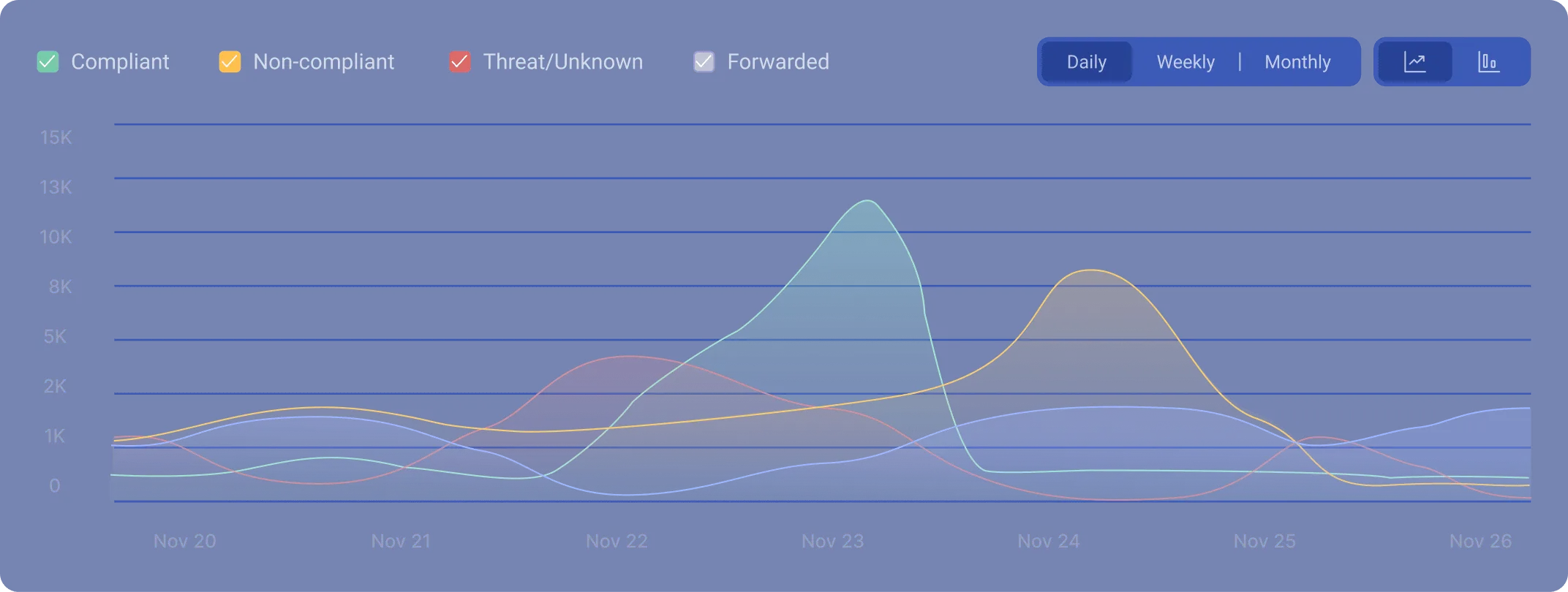
Once your rua= address starts collecting mail, you'll get one or more aggregate reports per day from each mailbox provider. They arrive as XML attachments, and raw XML is close to unreadable by hand. Upload the files to a DMARC report parser (free tiers exist) or point your domain at a reporting service, and the data turns into a sortable table.
A DMARC report comes in two flavors. Aggregate reports (the rua tag) summarize every sending source over a 24-hour window and contain no message content. Failure reports, sometimes called forensic reports (the ruf tag), are copies of individual messages that failed authentication. Most mailbox providers no longer send forensic reports for privacy reasons, so DMARC aggregate reports are the ones you'll actually work with.
Each row in an aggregate report describes one sending source. These are the fields worth reading:
| Field | What it tells you |
|---|---|
| Source IP / sending source | The server that sent mail as your domain. Parsers resolve the IP to a service name so you can tell Mailchimp from a stranger. |
| Volume | How many messages that source sent in the reporting window, usually a 24-hour span. |
| Disposition | What the inbox actually did: none (delivered), quarantine (spam folder), or reject (blocked), based on your policy. |
| SPF result + alignment | Whether SPF passed, and whether the SPF domain matches your visible "From" domain. |
| DKIM result + alignment | Whether the DKIM signature verified, and whether its d= domain aligns with your "From" domain. |
| DMARC result | The final pass or fail. It needs at least one of SPF or DKIM to both pass and align. |
The report lists raw IP addresses, not company names, so an unfamiliar source is just a number until you identify it. A reverse DNS lookup (or a parser that runs one for you) turns that IP into a recognizable host, which is how you separate a forgotten internal tool from an actual spoofing attempt.
Good parsers group sources into compliant and non-compliant buckets. Work the non-compliant list first: each entry is either a legitimate service you still need to authenticate (fix its SPF or DKIM and it moves to the compliant tab on the next report) or an unauthorized sender spoofing your domain. Only once every legitimate source sits in the compliant bucket is it safe to ramp your policy from p=none toward p=reject.
Marketer takeaway: read the report source by source, not message by message. The goal is a clean compliant list, because that's the green light to move to enforcement and start collecting the deliverability lift.
Authentication is half the deliverability story
SPF, DKIM, and DMARC stop spoofing and convince mailbox providers your domain is trustworthy. They don't, however, fix the other half of deliverability: list quality.
A perfectly authenticated campaign sent to a list full of invalid addresses still produces high bounce rates, which damages the same sender reputation authentication just protected. The two have to move together - clean authentication on a dirty list lifts you a few percent; clean authentication on a clean list is where the real inbox-placement gains live.
This is why senders who treat list verification as a quarterly habit see better ROI from their authentication work. BounceCheck runs a 30-step verification engine - syntax, MX, SMTP handshake, catch-all, disposable, role-based - and a stealth SMTP layer that checks deliverability without alerting recipients. Pair it with proper DMARC enforcement and you've covered both sides of the inbox-placement equation.
For more on the list-side of the equation, see the guides on improving email deliverability, sender reputation, and why bounce rates climb.
Frequently asked questions
Do I really need all three protocols, or is just SPF and DKIM enough?
You need all three. SPF and DKIM tell mailbox providers whether a message authenticated; only DMARC tells them what to do when authentication fails. Without DMARC, an attacker can pass SPF (using a different domain in the Return-Path) while still spoofing your brand in the visible "From" line. The big mailbox providers - Gmail, Yahoo, Microsoft, Apple - now require all three for any sender above the bulk threshold.
What's the bulk-sender threshold I keep hearing about?
Since February 2024, Gmail (and shortly after, Yahoo and Apple) require SPF, DKIM, and DMARC for senders pushing more than 5,000 messages per day to their inboxes. Microsoft has aligned with similar requirements. Below that threshold the rules are softer, but every serious marketing program is well above 5,000/day.
Can I set up DMARC without SPF or DKIM?
For a domain that sends email - no. DMARC requires at least one of SPF or DKIM to pass and align with the From domain. (The exception is "parked" domains that don't send mail at all; those can be locked down with DMARC alone to prevent abuse.)
Why are most domains stuck at p=none?
Because reaching enforcement requires fixing every legitimate sender that's failing - and most companies discover during the audit that 5–15 services are sending from their domain that they didn't know about. The work is real, but the deliverability lift (5–10%) and the spoofing protection are worth it.
How do I know if a source in my DMARC report is a spoofer or a real sender?
Start with the source IP and the SPF/DKIM columns. A legitimate service usually sends consistent volume from known IP ranges and fails only because you haven't authenticated it yet; a spoofer shows up as an unfamiliar IP with no aligned SPF or DKIM. Run a reverse DNS lookup on the IP, or let your parser name the source, then decide whether to authenticate it or treat it as abuse.
Will warming up a new domain replace authentication?
No - they solve different problems. Domain warm-up builds reputation with mailbox providers over time. Authentication proves to those providers you are who you say you are. You need both, and authentication should be in place from day one of the warm-up.
How does verification fit alongside SPF/DKIM/DMARC?
Authentication tells inboxes your domain is trustworthy. Email verification ensures the addresses you're sending to are real and accept mail. Authentication on a list full of invalid addresses still produces bounces, which erodes the reputation authentication just protected. Treat them as two halves of the same job.
Where can I check if my domain is set up correctly?
Send yourself a test from each sending platform and check the Authentication-Results header. For ongoing visibility, a DMARC report parser pointed at the rua= address in your DMARC record is the right long-term setup. You can also pair domain checks with our free disposable email checker to spot list-side problems alongside auth-side ones.
Final thoughts
Email authentication used to be an optional best practice. It isn't anymore - Gmail and Yahoo made that decision for you in 2024, and the big four mailbox providers all enforce it now. The good news is the work is bounded: a few DNS records, a couple of weeks of DMARC report review, and a careful ramp from p=none to p=reject. The senders who finish that walk pick up a 5–10% delivery lift and shut down brand spoofing in the same move.
Pair authentication with regular list hygiene and you've covered the two biggest inbox-placement levers a marketer can pull. Start free and run the same 1,000-email sample through BounceCheck before your next campaign - it's a cheaper way to find out where your list stands than learning from a spike in bounce rate after the send.
§ Before your next send
Find the addresses that will bounce
Verify a single address free, or upload a CSV — the free plan includes 50 checks a month, no card needed.

BounceCheck Team
The team behind BounceCheck - helping businesses verify emails and improve deliverability.

