Email Outreach 101: The 6-Step Framework That Actually Drives Replies
 BounceCheck Team
Before your next send Find the addresses that will bounce.
Verify an email freeMost email outreach 101 guides skip the boring half of the job and jump straight to copy tips. The boring half is what decides whether your message lands in the inbox at all. A campaign with average copy and clean infrastructure beats brilliant copy on a poorly warmed domain every single time. The plumbing matters more than the polish.
This 101 is the end-to-end framework: who email outreach is for, how to set up the sending domain, how to build a list, how to sequence and pace, and the compliance layer that quietly kills campaigns. For the deep dive on the writing craft itself (5-part body structure, subject-line patterns, CTA selection, A/B testing), see cold email copywriting. For a use-case-specific template set with 5 ready-to-adapt pitches, see blogger outreach email template.
What email outreach is (and what it is not)
Email outreach is sending targeted, personalised business messages to prospects with no prior relationship, aiming to start conversations that lead to a commercial outcome. The CAN-SPAM Act defines commercial email as any message whose primary purpose is advertising or promotion, so the legal status of outreach depends entirely on how you send it (honest headers, working unsubscribe, physical postal address), not on whether the recipient asked first.
The difference between cold outreach and spam is not the cold contact, it is the value delivery. An unsolicited message offering a relevant benefit to a well-targeted recipient is outreach. The same message blasted to a scraped list of wrong-fit prospects is spam, regardless of how the sender labels it.
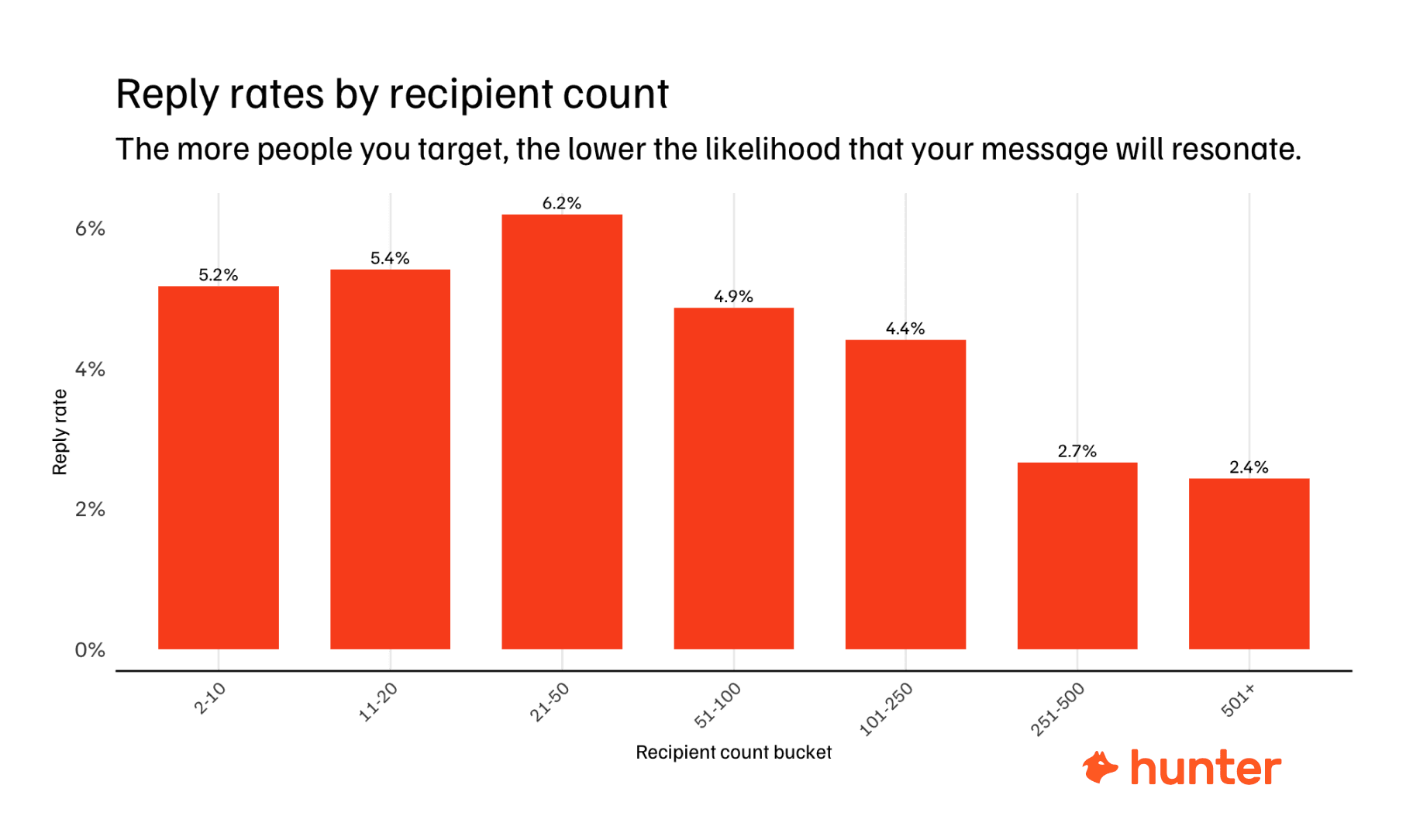
Good cold emails earn 2 to 10 percent reply rates. Exceptional campaigns can push past 40 percent. The industry average sits around 1 percent, which is the gap most teams spend their whole programme trying to close. Email outreach pays off fastest for high-margin offers (over $500 profit per deal), payback periods under two months, B2B SaaS, agencies, and early-stage startups that need cheap revenue.
The 6-step email outreach framework
Every campaign that survives long enough to compound moves through the same six steps. Skip one and you compensate for it on the other five.
- Technical setup: SPF, DKIM, DMARC, plus a 30-day warmup on a separate sending domain.
- List building: define one ICP, use waterfall enrichment and verification, keep bounce rate under 2 percent.
- Copywriting: short, personalised body following the 30/30/50 rule, a single clear CTA.
- Sequencing: 3 to 4 emails spaced 2 to 3 days apart with distinct angles.
- Launching and pacing: ramp from 10 to 20 emails per inbox per day up to 30 to 50 max.
- Optimisation: track open rate, reply rate, bounce rate, and iterate on the metric that drops.
The sequence below treats each step in turn.
Step 1: Set up deliverability infrastructure first
You cannot fake good deliverability. Mailbox providers grade every sender on authentication, engagement history, and complaint rates. Get the foundation wrong and no copywriting tweak rescues the campaign.
Configure SPF, DKIM, and DMARC
These three DNS records are your domain's ID card to receiving servers. SPF lists the IP addresses authorised to send for your domain. DKIM adds a digital signature proving the message was not altered. DMARC tells inbox providers what to do when either check fails. Skip any one of them and Gmail or Outlook will park your messages in promotions or spam without warning.
Use a dedicated outreach domain
Never send cold outreach from your primary business domain. If the company runs on company.com, buy companymail.com or trycompany.com for outreach. That way a deliverability hit on the outreach domain does not poison the executive or support inbox. Once the new domain is configured, the sender reputation you build there can be rebuilt or retired without touching the rest of the business.
Warm the domain for 30 days
A new domain has zero sending history, so mailbox providers treat it with suspicion. The standard ramp:
- Week 1: 2 to 5 emails per day
- Week 2: 10 to 15 emails per day
- Week 3: 20 to 30 emails per day
- Week 4 and beyond: 30 to 50 emails per day
Full maturity takes four to eight weeks. Automated warmup tools simulate real human engagement by exchanging messages with other warmed accounts, opening them, and moving them out of spam.
The February 2024 Google and Yahoo rules raised the stakes for anyone sending over 5,000 messages per day: strong authentication, one-click unsubscribe honoured within two days, and spam complaint rates below 0.3 percent. Repeat violations now trigger permanent blocks. Before your first send, run through this cold email deliverability checklist to confirm every layer is in place.
Step 2: Build a verified prospect list
Bad data destroys campaigns faster than bad copy. Every bounced email shaves points off sender reputation, and a noisy list with too many invalid addresses can blacklist a freshly-warmed domain in a single send. The fix is to verify the list before a single email goes out.
Define one ICP, not three
Start with the customers you already love. Note their company size, industry, tech stack, growth signals (recent funding, hiring spree), and the job titles of the actual decision makers. "Anyone who might buy" dilutes messaging across mismatched personas. Pick one ICP, run a campaign, measure, then expand. For a fuller walkthrough of turning an ICP into a working account list, see B2B list building.
Use waterfall enrichment
No single data provider has 100 percent coverage. Waterfall enrichment looks up a contact across five or more providers in sequence (when provider A misses, the system tries B, then C) until it returns a verified email or exhausts the chain. This pushes hit rates well above any single source. If you are still working out how to find email addresses for your prospects, that guide covers the methods behind each lookup.
Verify catch-all domains
Domains that accept any address (info@, sales@, hello@) need a second validation step. A bulk email verifier checks deliverability without actually sending the message and flags catch-all results separately. Running the full list through verification before the first send is what keeps bounce rates under the 2 percent ceiling. If the list pushes past the acceptable hard-bounce rate for cold email, Gmail and Outlook park future sends in spam regardless of copy quality.
Narrow ICPs (Series B SaaS CTOs in fintech, 50 to 200 employees) typically yield 500 to 1,000 contacts. Broader ICPs can produce 50,000-plus. Start narrow, validate the offer resonates, then scale.
Step 3: Write emails that get replies
The goal of the body is not clever wordplay, it is to start a conversation. Research analysing 34 million emails found 20 to 39 words optimal, with 1 to 2 paragraphs delivering a 3.8 percent response rate. The framework summary:
- Body length: keep it under 100 words, ideally 75.
- 30/30/50 rule: 30% personalisation, 30% value proposition, 50% cut everything else.
- One CTA: a low-friction question, not a calendar invite.
- Plain text: messages without images or attachments get nearly twice the reply rate of design-heavy emails.
That is the framework view. The full writing craft — subject-line patterns, the 5-part body structure (context, evidence, cost of inaction, social proof, CTA), CTA A/B test data, the worked line-by-line examples, and the deliverability-aware copy choices — lives in the dedicated guide: cold email copywriting. For a use-case-specific template set (guest post pitch, broken link, skyscraper, resource share, follow-up), see blogger outreach email template.
Step 4: Sequence the follow-ups
Single emails rarely convert. Seventy percent of replies come from emails 2 through 4 in a sequence, not the first send, and 80 percent of B2B sales require five or more touchpoints in total. A short, well-paced sequence beats a longer one that pesters.
Standard structure for cold outreach:
- Email 1 (Day 1): value-focused introduction with personalisation
- Email 2 (Day 3): different angle on the same value prop, short reminder
- Email 3 (Day 7): proof or case study, address a likely objection
- Email 4 (Day 14): permission-based breakup ("should I close your file?")
Each email needs a distinct angle: problem, solution, proof, breakup. Repeating the same value prop in different words trains the recipient to ignore you. Cap the sequence at three to four touches. If you want the data behind that cap, see how many follow-ups to send. Stop immediately if a prospect asks you to.
Step 5: Volume, pacing, and the KPIs that matter
Deliverability is a function of volume management. Send too much too fast and you trigger spam filters even on a warmed domain. Stay below 30 to 50 emails per inbox per day. For 1,000 emails per day total, that means 20 to 30 separate inboxes each sending 30 to 50. Horizontal scaling keeps every account below risk thresholds.
Three KPIs decide whether a campaign is working. For a deeper breakdown by industry and list type, see these cold email benchmarks.
| KPI | 2026 average | Strong target | What it tells you |
|---|---|---|---|
| Open rate | 27.7% | 40% to 50%+ | Subject line and inbox placement |
| Reply rate | 5.1% | 5% to 10%+ (top: 15%+) | Message relevance and ICP fit |
| Bounce rate | around 2% | Under 2%, aim for under 1% | List quality |
Use a diagnostic match when one number tanks: low open and low reply means deliverability, high open and low reply means the message, high bounce means data, high reply and low meeting means the CTA. Fix the broken layer, not the whole campaign.
Step 6: Compliance, the part that quietly kills campaigns
Cold email is legal in the United States under CAN-SPAM provided you follow the rules. Other jurisdictions (GDPR in the EU, CASL in Canada, the UK PECR) carry stricter requirements, and ignoring them is the fastest path to a fine or a domain ban.
The non-negotiables across CAN-SPAM and the Feb 2024 Google/Yahoo bulk-sender rules:
- Honest headers: the from name and reply-to address must match the actual sender.
- Honest subject lines: no
Re:orFwd:tricks to fake a thread. - A physical postal address in the footer of every commercial message.
- A working unsubscribe link, with opt-outs honoured within 10 business days (Google and Yahoo tighten this to 2 days for senders over 5,000/day).
- Spam complaint rate below 0.3 percent (Gmail and Yahoo), with under 0.1 percent the safe ceiling.
- Repeated violations now trigger permanent blocks at the major mailbox providers.
Compliance is the cheapest insurance in email outreach. It also forces good behaviour (clean lists, real personalisation, fast opt-outs), which is the same behaviour that makes campaigns convert.
Quick answers about email outreach 101
What are the 5 Cs of email outreach?
Clear, concise, correct, complete, and courteous. The five Cs apply to email writing in general, and in outreach specifically they translate to: one clear ask, under 150 words, factual references that survive a fact-check, no missing context that forces the reader to ask, and a tone that respects the recipient's time.
What is the 30/30/50 rule for cold emails?
The 30/30/50 rule splits the body into 30 percent personalisation, 30 percent value proposition, and 50 percent removal of fluff. It is the practical version of "short and personalised," and the reason most cold emails feel templated is that they reverse the ratios.
How do you do email outreach end to end?
Work through the six-step framework in this guide: set up SPF, DKIM, DMARC plus a 30-day warmup, build a verified list under 2 percent bounce, write a 20 to 39-word personalised body, sequence three to four emails over two weeks, cap volume at 30 to 50 per inbox per day, and track open, reply, and bounce rates weekly.
What is the 60/40 rule for email design?
A visual-design guideline for marketing emails: 60 percent imagery and 40 percent HTML text. It applies to newsletters and broadcast campaigns, not cold outreach. Cold outreach actively benefits from the opposite ratio because plain-text messages without images get nearly twice the reply rate.
§ Before your next send
Find the addresses that will bounce
Verify a single address free, or upload a CSV — the free plan includes 50 checks a month, no card needed.

BounceCheck Team
The team behind BounceCheck - helping businesses verify emails and improve deliverability.

