DMARC Aggregate Report: How to Read RUA Reports
 BounceCheck Team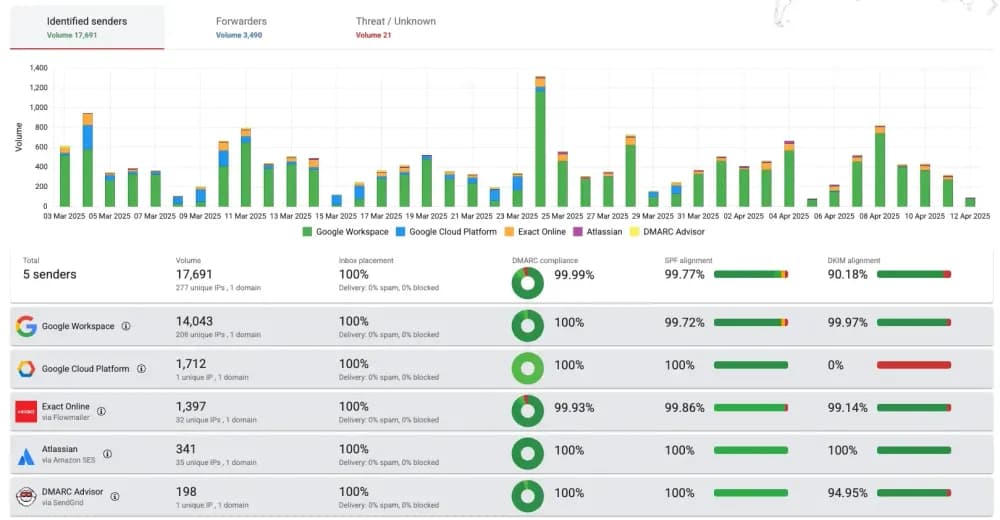
Before your next send Find the addresses that will bounce.
Verify an email freeA DMARC aggregate report is an XML file that mailbox providers like Gmail, Yahoo, and Microsoft send back to you, summarizing every message that used your domain in the From address over a set window (usually a single day). It tells you which sending sources passed or failed SPF and DKIM, whether those results aligned with your domain, and what the receiver did with the mail. Read correctly, it is the single best source of truth for who is sending email as your brand, including senders you never authorized.
The reports arrive at whatever address you put in the rua= tag of your DMARC record, which is why they are often called RUA reports. This guide breaks down what is inside one, how to read the raw XML field by field, why almost everyone runs the data through a DMARC monitoring service instead of reading it by hand, and what actions the data should drive.
What is a DMARC aggregate report?
DMARC (Domain-based Message Authentication, Reporting, and Conformance) does two things: it tells receivers how to handle mail that fails authentication, and it asks them to report back on what they saw. The aggregate report is the reporting half. Each participating receiver batches up every message claiming to come from your domain, groups those messages by sending IP and authentication outcome, and sends you one XML summary per reporting period. None of that arrives unless your DNS asks for it, so the first move is to create a DMARC record with rua pointing at the address where you want the reports delivered.
An aggregate report contains counts and results, never message content. It will tell you that 4,812 messages came from a given IP, that they passed DKIM but failed SPF alignment, and that your policy told the receiver to quarantine them. It will not show you subject lines, recipients, or the body of any message. That privacy-safe design is what lets providers send these reports at scale, and it is the reason the format is consistent enough to parse. The structure is defined by the DMARC specification published at dmarc.org, so every provider's report follows the same schema.
What is inside a DMARC aggregate report
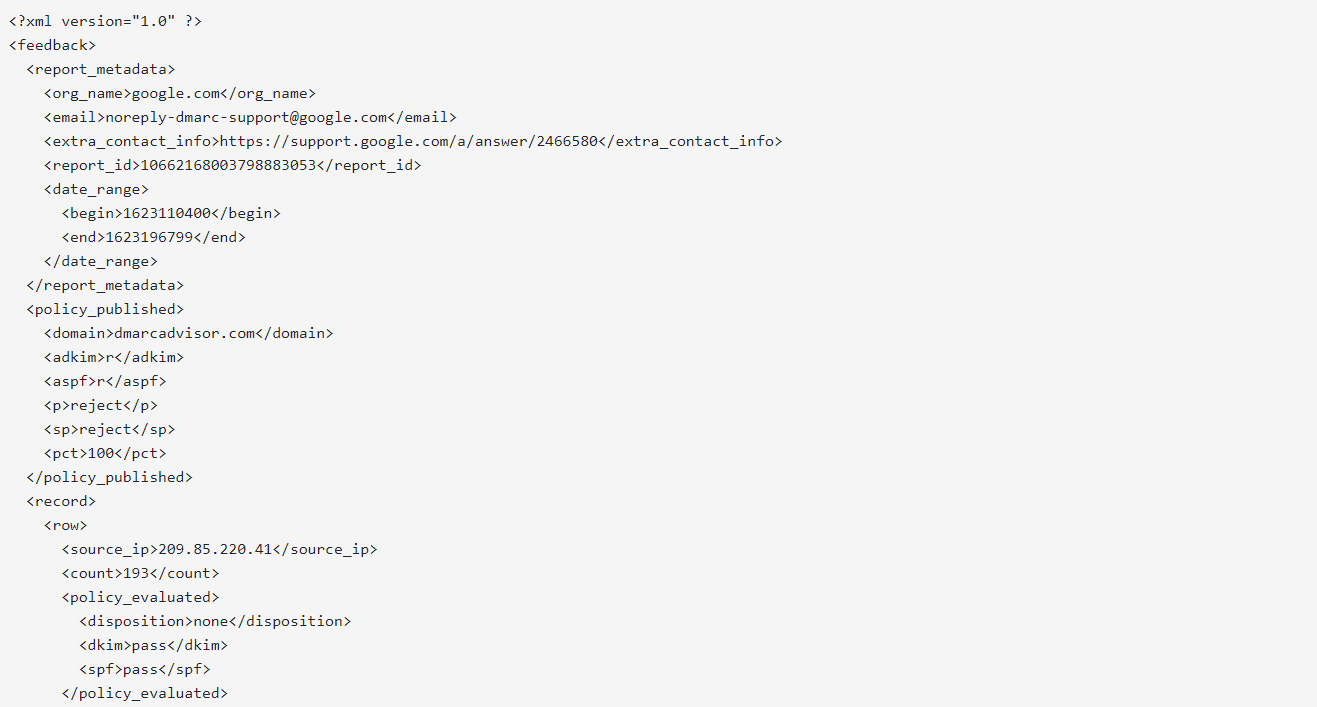
Open a raw report and you will find three logical blocks wrapped in a single <feedback> element: metadata about the report itself, the DMARC policy you had published when the report was generated, and one record per sending source. The record rows are where the value is.
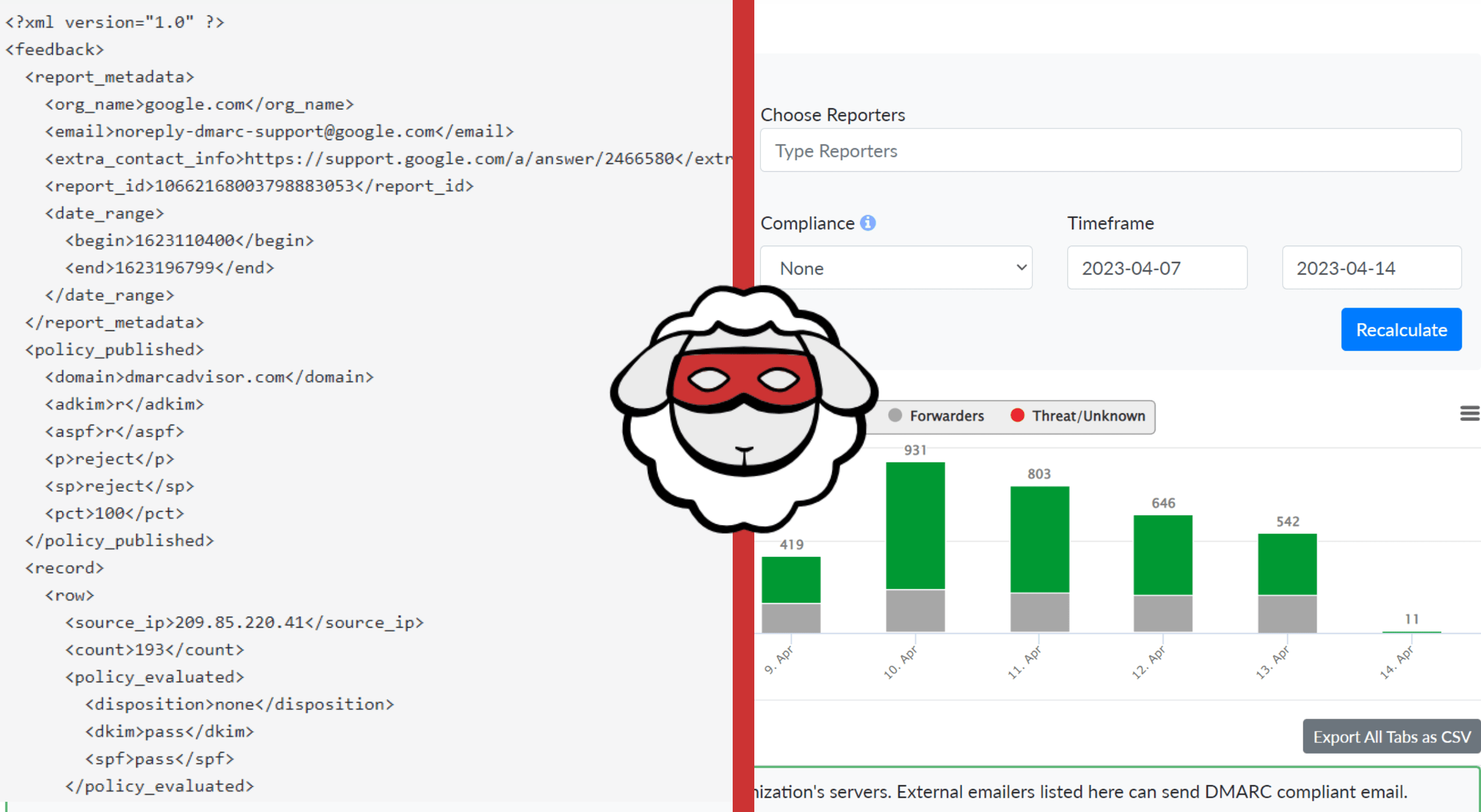
Here is what each part of the XML holds:
| XML block | Key fields | What it tells you |
|---|---|---|
report_metadata | org_name, email, report_id, date_range | Which receiver sent the report and the exact time window it covers |
policy_published | domain, adkim, aspf, p, sp, pct | The DMARC policy the receiver read from your DNS at report time |
record > row | source_ip, count, policy_evaluated (disposition, dkim, spf) | How many messages came from each IP and what the receiver did with them |
record > identifiers | header_from | The visible From domain those messages used |
record > auth_results | spf (domain, result), dkim (domain, result) | The raw SPF and DKIM outcome for each source, before alignment |
The distinction between auth_results and policy_evaluated trips up most first-time readers. The auth_results block shows whether SPF and DKIM passed on their own. The policy_evaluated block shows whether those passes aligned with the From domain, which is what DMARC actually judges. A message can pass SPF against the sender's own domain yet still fail DMARC because that domain does not match your From address.
How to read a DMARC aggregate report
To read a DMARC aggregate report, work through it in the same order every time: identify the reporting provider and time window in report_metadata, confirm the policy_published block matches your published DNS, review each record row by sending IP and volume, then investigate any row where authentication failed. Reading one report by hand at least once is worth doing so the fields stop being abstract.
Identify the reporter and the window
Start in report_metadata. The org_name tells you who generated the report (google.com, Yahoo, Enterprise Outlook, and so on), and the date_range gives you the start and end timestamps in Unix epoch seconds. Convert those to a date so you know which day's traffic you are looking at. Reports from different providers cover the same day but arrive separately, so you will process several files for any given date.
Check the policy the receiver saw
Move to policy_published and confirm it matches what you intended. If you set p=quarantine but the report shows p=none, your DNS change had not propagated when the report was generated. This block also shows your alignment modes (adkim and aspf, relaxed or strict) and the pct value controlling how much mail your policy applies to.
Review each sending source
Every record is one sending IP. Read the source_ip, look up who owns it, and match it against your known senders: your ESP, your CRM, your helpdesk, your own mail server. The count shows the message volume. This is where authorized infrastructure and unauthorized senders both surface in plain sight, which is the whole point of turning reporting on. Getting SPF and DKIM configured correctly across every legitimate source is the foundation of SPF, DKIM, and DMARC authentication, and the report is how you confirm that work landed.
Investigate the failures
For any row where policy_evaluated shows dkim and spf as fail, cross-check the auth_results. If SPF passed there but failed in policy_evaluated, you have an alignment problem, not an authentication problem. If both failed outright, either the source is misconfigured or it is not yours. A legitimate source that consistently fails needs its SPF record or DKIM signing fixed; an unknown source sending real volume is a spoofing or shadow-IT signal worth chasing down.
Aggregate (RUA) vs forensic (RUF) reports
DMARC defines two report types, and the rua= and ruf= tags request them separately. Aggregate (RUA) reports are the daily statistical summaries described above. Forensic (RUF), sometimes called failure reports, are near-real-time samples of individual messages that failed authentication, with content redacted for privacy.
| Attribute | Aggregate (RUA) | Forensic (RUF) |
|---|---|---|
| DMARC tag | rua= | ruf= |
| Content | Counts and results, grouped by source | Redacted samples of individual failed messages |
| Frequency | Typically once per day | Near real time, as failures occur |
| Format | Gzipped XML | AFRF (email forensic format) |
| Provider support | Broad (Gmail, Yahoo, Microsoft, others) | Rare, most major providers do not send it |
| Best for | Ongoing visibility and moving to enforcement | Debugging a specific failure sample |
In practice, aggregate reports do almost all of the work. Most mailbox providers stopped sending forensic reports over privacy concerns, so a monitoring setup built entirely on RUA data is normal and sufficient for reaching enforcement.
Why you need a DMARC monitoring service or report analyzer
You need a DMARC monitoring service because the daily volume and raw XML format of aggregate reports make manual reading impractical for any real domain. You can read one report by hand. You cannot read a hundred. A domain of any size receives separate XML files every day from every participating receiver, each gzipped, each covering a different slice of traffic. Reading them manually means unzipping files, parsing nested XML, resolving IP addresses to sender names, and reconciling the same source across dozens of reports. That workload is exactly why teams route the rua= address to a DMARC monitoring service instead of a mailbox.
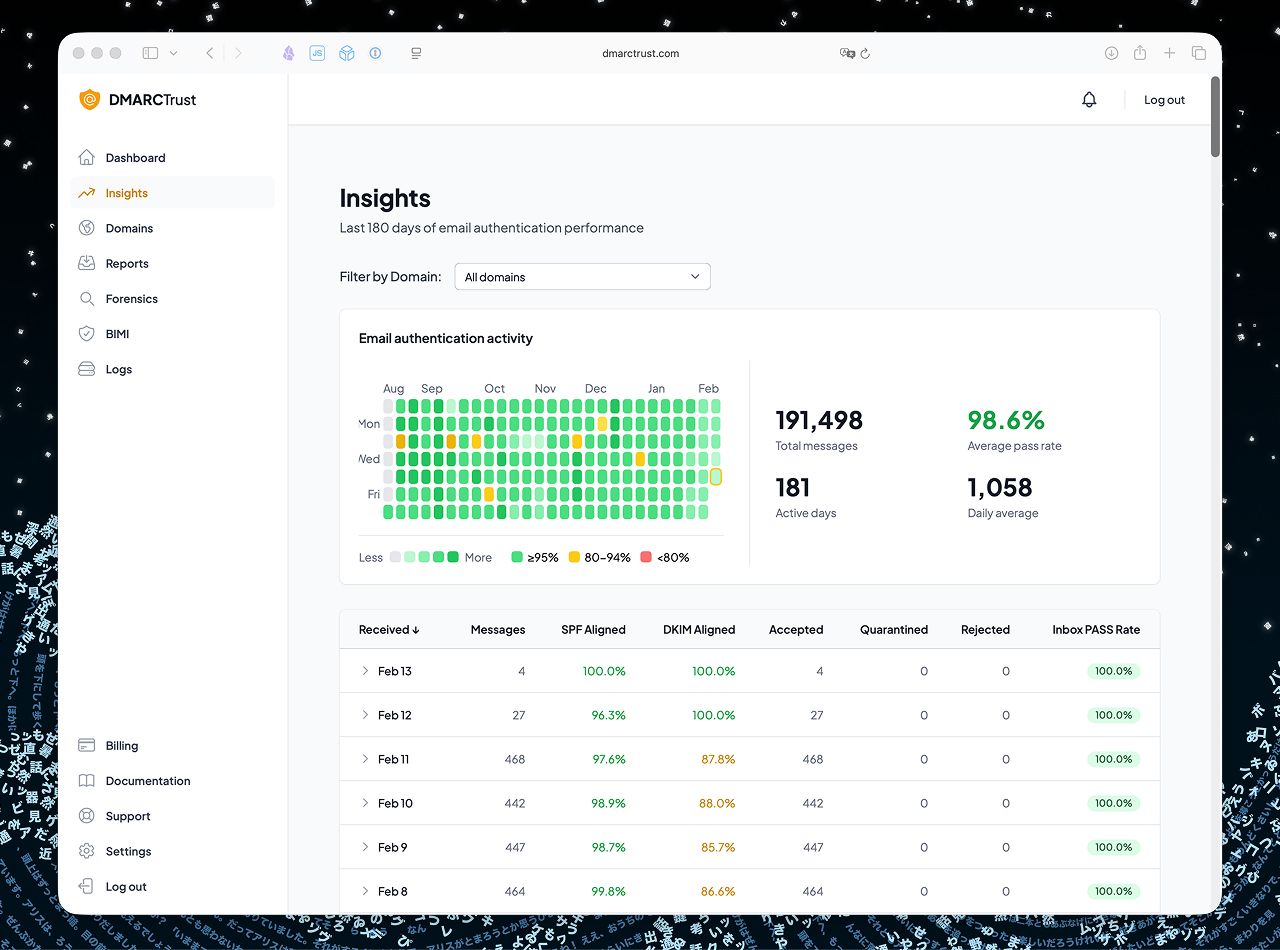
A DMARC report analyzer ingests every incoming report, parses the XML, and aggregates the data into a dashboard where each sending source is named, grouped, and charted over time. That turns a pile of machine-readable files into a view a human can act on. Just as important is what raw reports leave out. On their own, aggregate reports do not give you:
- Trend analysis across days or weeks, since each file is a single-day snapshot
- IP or sender reputation context beyond the bare source address
- Message samples or any content that would help debug a specific failure
- Automatic identification of which vendor owns a given sending IP
An analyzer fills those gaps by stitching reports together and enriching the source data, which is the difference between knowing a report exists and understanding what it means. For Gmail traffic, Google Postmaster Tools adds context that DMARC data cannot, such as why specific mail was rejected or delayed because of a rate limit or blocklist listing. Standalone analyzers and all-in-one platforms make different tradeoffs, a decision that sits alongside the rest of your email deliverability tools. Bulk senders in particular have little choice here, because the Gmail and Yahoo bulk sender requirements make a published DMARC record mandatory, and monitoring is how you verify it is actually protecting the domain.
What to do with aggregate report data
The report is a means, not an end. The goal is a domain where only authorized senders pass DMARC and everything else is rejected. The data drives three moves: spotting and shutting down unauthorized senders, fixing SPF and DKIM alignment on sources you own, and moving safely from p=none to enforcement.
Spot and shut down unauthorized senders
Any source in your reports that you cannot account for is a lead. It might be a legitimate internal tool nobody told you about, or it might be a spammer spoofing your domain. Trace each unknown IP, and either bring the legitimate ones under proper authentication or confirm the rest are being caught by your policy.
Fix SPF and DKIM alignment
When a source you own is failing, the report points at the cause. An SPF failure usually means the sending IP is not listed in your SPF record; add it. A DKIM failure means the source is not signing, or is signing with a key that does not match your published DNS record. Because DMARC requires alignment, the passing domain must also match your From domain, so a shared ESP sending domain that passes SPF for itself can still fail your DMARC until you configure a custom authentication domain. Alignment fixes are also one of the levers in a broader effort to improve email deliverability, since authenticated mail is treated more favorably by receivers.
Move from p=none to enforcement safely
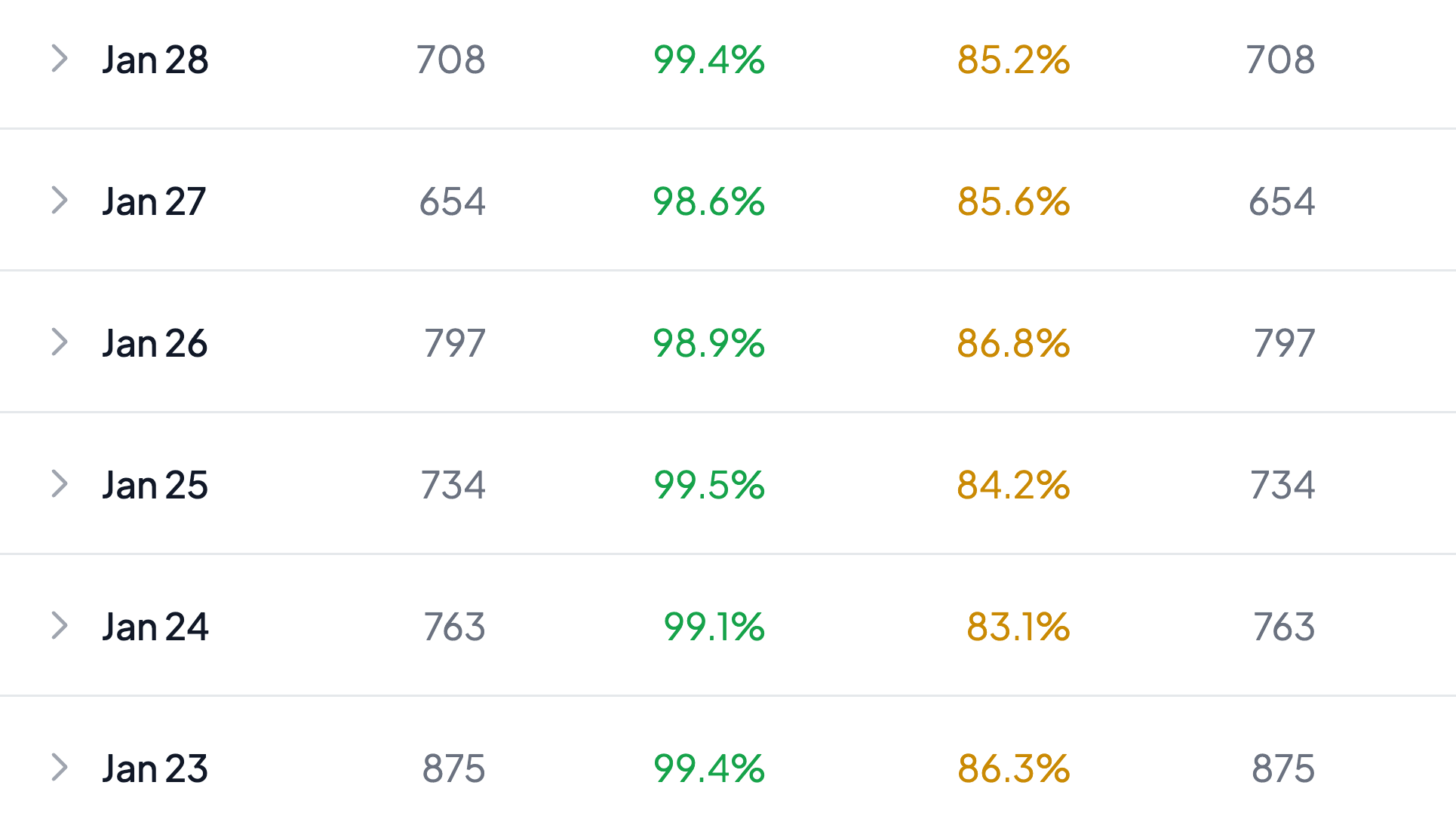
Most domains start at p=none, which monitors without affecting delivery. Once your reports show every legitimate source passing DMARC with alignment, tighten the policy in stages: move to p=quarantine, watch the reports for any authorized sender that starts failing, then move to p=reject. Using the pct tag to apply the policy to a fraction of mail first lets you ramp without risking a mass of legitimate messages. Enforcement is only safe once the aggregate data confirms you will not block your own mail.
FAQs
How often are DMARC aggregate reports sent?
Most mailbox providers send one aggregate report per domain per day, covering a 24-hour window. The DMARC record can request a different interval, but daily is the near-universal default, so expect a steady stream of separate files from each participating receiver.
Why am I not receiving DMARC aggregate reports?
The usual causes are a missing or malformed rua= tag in your DMARC record, a typo in the reporting address, or requesting reports at a domain you do not control without the required external authorization record. Confirm your DMARC TXT record is published correctly and that the rua= mailbox or service address actually exists and accepts mail.
What is the difference between RUA and RUF reports?
RUA reports are daily aggregate summaries of authentication results grouped by sending source, with no message content. RUF reports are individual forensic samples of failed messages, sent near real time with content redacted. RUA is broadly supported and does most of the work; RUF is rarely sent by major providers today.
What does a DMARC report analyzer do?
A DMARC report analyzer collects every incoming XML aggregate report, parses it, and consolidates the data into a dashboard that names each sending source, tracks pass and fail rates over time, and flags unauthorized senders. It turns raw, single-day XML files into a trend view a person can act on.
How do I fix SPF and DKIM alignment from aggregate reports?
Find the failing source in the report, then check whether the SPF or DKIM domain matches your From domain. For SPF, add the sending IP to your SPF record and, where needed, use a custom sending domain so the passing domain aligns. For DKIM, enable signing on the source with a key whose selector matches your published DNS record. Re-check the next day's reports to confirm the source now passes with alignment.
Authentication protects your domain from abuse, but it does not clean the list you are sending to. Run your list through BounceCheck before your next send so invalid addresses never get the chance to drag down the sender reputation your DMARC setup works to protect.
§ Before your next send
Find the addresses that will bounce
Verify a single address free, or upload a CSV — the free plan includes 50 checks a month, no card needed.

BounceCheck Team
The team behind BounceCheck - helping businesses verify emails and improve deliverability.