Gmail and Yahoo Bulk Sender Requirements: The 2024 Compliance Guide
 BounceCheck Team
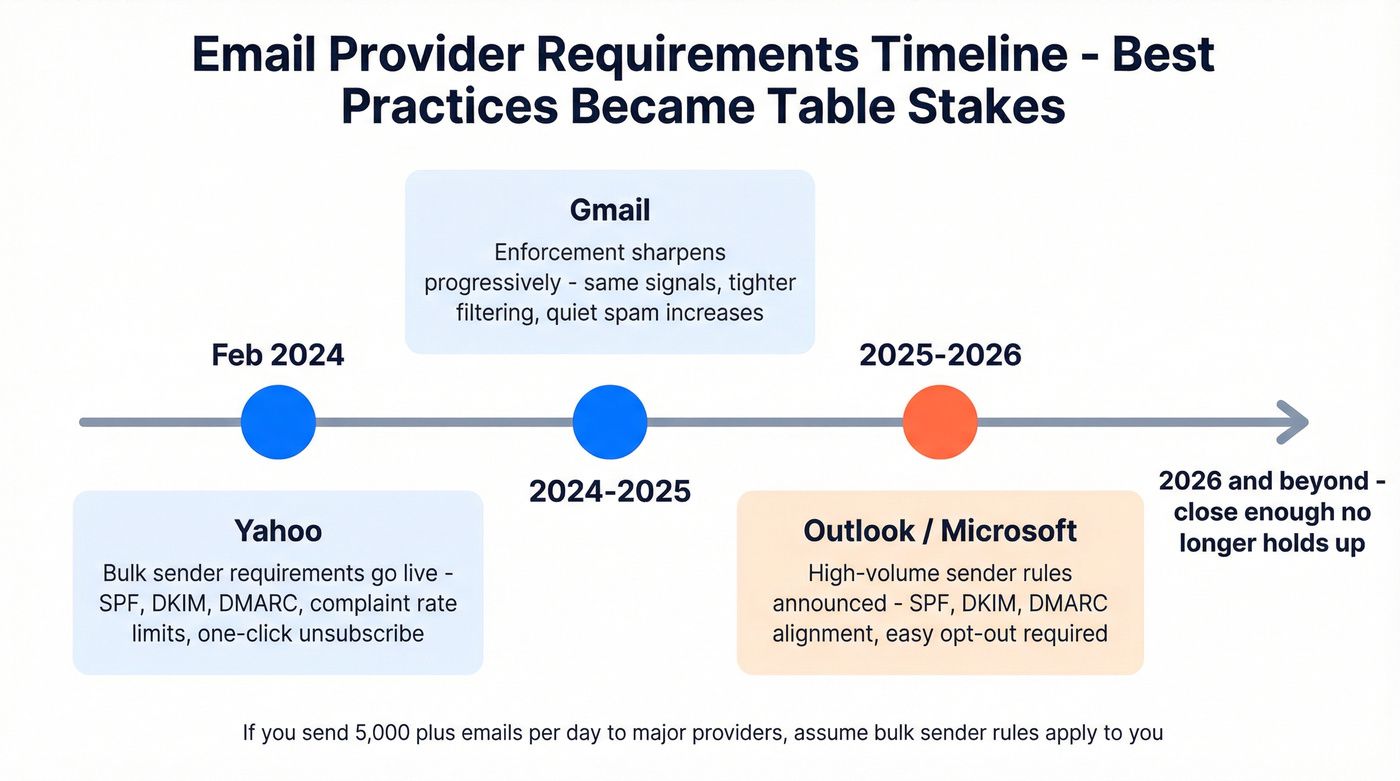
Starting February 2024, Gmail and Yahoo flipped a switch that reshaped commercial email overnight. If you send more than 5,000 messages a day to Gmail addresses, you now have to authenticate every domain, prove low spam rates, and offer one-click unsubscribe. Miss one requirement and your campaigns start landing in spam folders, or get rejected outright at the SMTP layer.
This guide breaks down what Gmail and Yahoo actually require, who counts as a bulk sender, and what to fix first so your mail keeps reaching the inbox.
Who counts as a bulk sender
Gmail defines bulk simply: anyone sending more than 5,000 messages per day to Gmail addresses falls under the bulk sender rules. The count is per day, per Gmail recipient base, not per campaign. A single 6,000-recipient blast on a Tuesday triggers the same rules as a steady stream of 6,000 daily.
Yahoo's definition is fuzzier. Yahoo applies the same set of bulk requirements to marketing and subscribed messages without publishing a hard volume cutoff, but in practice the 5,000-per-day Gmail threshold has become the industry's working line.
Two nuances trip people up:
- Volume is not the only trigger. Both providers also classify mail as bulk if spam complaints climb, regardless of volume. AWS's Amazon SES documentation puts it plainly: volume over 5,000 per day is one factor, but the primary factor mailbox providers use is whether the recipient actually wants to receive the mail.
- One-off blasts count too. If you send one email a month to 50,000 addresses, you are a bulk sender that day. Enforcement is per-day, not averaged.
If you are anywhere near the 5,000 line, treat yourself as bulk. The rules are stricter, but they are also what every well-run sender already does.
Authenticate your domain with SPF, DKIM, and DMARC

Authentication is the first thing Gmail and Yahoo check. Every sender must implement SPF or DKIM. Bulk senders must implement all three: SPF, DKIM, and DMARC, with the domain in the From header aligned to either the SPF or DKIM domain.
The setup boils down to publishing three DNS records:
- SPF: lists which IPs are allowed to send mail for your domain. Add every sender (your ESP, transactional service, internal mail server) to a single SPF record.
- DKIM: cryptographically signs each outgoing message with a key published in DNS. Yahoo and Google both require a minimum 1024-bit key, and Google recommends 2048-bit.
- DMARC: tells receivers what to do if SPF and DKIM both fail. A minimum policy of
p=noneis enough to satisfy the rule, but you should add anruatag to receive aggregate reports.
DMARC alignment is the part most senders miss. The domain in your visible From header must match either the SPF-authenticated sending domain or the DKIM-signing domain. If your From says [email protected] but your ESP signs with mail.esp.com, alignment fails even though SPF and DKIM individually pass. For a step-by-step walkthrough of each record, see our marketer's guide to SPF, DKIM, and DMARC.
Two practical tips from the official docs:
- Use a verified domain identity rather than an email-address identity if your ESP supports both. Domain identities produce domain-aligned DKIM signatures automatically.
- Segregate marketing mail from transactional mail using subdomains:
news.yourbrand.comfor marketing,receipts.yourbrand.comfor transactional. Each subdomain builds its own sending reputation, so a bad week on the marketing side will not poison your password resets.
Keep your spam complaint rate below 0.3%
The single most cited number in the new requirements is 0.3%. If more than 3 in every 1,000 delivered Gmail messages get reported as spam, Gmail starts treating you as a spammer. Yahoo uses the same threshold.
Two things to know about how this number works:
- The percentage is calculated against mail delivered to the inbox, not mail sent. Bounces and spam-folder placements are excluded from the denominator, which means a small absolute number of complaints can spike the rate fast on a list with mediocre sender reputation.
- 0.3% is the rejection line, not the target. Google's own documentation recommends keeping the rate below 0.1% and warns that maintaining a high spam rate leads to increased spam classification. Once your domain is flagged, it takes weeks of clean sending to recover.
Common causes of a creeping spam rate:
- Buying or scraping lists. Cold contacts mark new senders as spam at a much higher rate than opt-in subscribers.
- Reactivation campaigns to subscribers who have not opened anything in 12+ months.
- Subject lines that imply a reply or threading when the message is bulk promotional content.
Verify your list before every send. A clean list cuts complaint rate, bounce rate, and spam-trap hits all at once.
Add one-click unsubscribe to every marketing email

This is the requirement most marketers had to retrofit in 2024. Every marketing or subscribed message you send must include a one-click unsubscribe mechanism that does not require the recipient to log in or fill a form.
Mechanically, it means two headers in every bulk email:
List-Unsubscribe: <https://yourdomain.com/unsubscribe?id=xyz>
List-Unsubscribe-Post: List-Unsubscribe=One-Click
When a recipient clicks the Gmail or Yahoo native unsubscribe button, the mailbox provider sends a single HTTP POST to the URL in your List-Unsubscribe header. Your server must accept that POST and immediately suppress the address from future sends. The full spec is RFC 8058.
Three rules that trip senders up:
- The
List-Unsubscribeheader is not enough on its own. You must also sendList-Unsubscribe-Post: List-Unsubscribe=One-Clickso the mailbox provider knows your endpoint accepts the one-click POST. - A
mailto:value inList-Unsubscribeis acceptable to Yahoo but is not a one-click method. If you only shipmailto:, you fail the one-click requirement. - Unsubscribes must be honored within 2 days. Yahoo and Google both bake this into the rules. Process the POST in real time and remove the address from every active send queue.
You also need a visible unsubscribe link in the email body. The header is for the mailbox button, the body link is for everyone who scrolls.
Meet the technical baseline (RFC 5322, PTR, TLS)
Beyond the headline three rules (auth, spam rate, unsubscribe), the requirements include several technical hygiene items. Skip these and your mail can be rejected at the SMTP layer with errors like 550 5.7.26 or 421 4.7.0.
- Forward and reverse DNS: every sending IP needs a PTR record that resolves back to a hostname under your domain. The hostname must in turn resolve back to that same IP via an A or AAAA record. Generic ISP-style PTRs like
pool-12-34-56-78.example.netwill not pass. - TLS connection: as of December 2023, Gmail requires every connection delivering mail to be encrypted with TLS. Most modern ESPs handle this transparently. Self-hosted mailers may need a config change.
- RFC 5322 compliance: your messages must follow the Internet Message Format standard. The common violations are duplicate
From:orSubject:headers, missingMessage-ID:, and From headers that contain more than one address. - No Gmail impersonation: Gmail now publishes a DMARC quarantine policy on
gmail.comitself, so any message claiming to beFrom: [email protected]that you send through your ESP will be sent to Junk.
Most of this list is the kind of thing your sending infrastructure should already do. If you run your own mail servers, run a sample message through any DMARC checker and an RFC 5322 validator before scaling up.
Monitor compliance with Postmaster Tools and Yahoo Sender Hub
You cannot fix what you cannot see. Both providers offer free dashboards that show you your real, observed numbers.
- Google Postmaster Tools at gmail.com/postmaster shows your domain's spam rate, IP reputation, domain reputation, authentication pass rate, and delivery errors. Sign up the moment your domain hits 1,000 daily Gmail recipients, you will get populated dashboards within a week.
- Yahoo Sender Hub offers a Complaint Feedback Loop. Once you sign your mail with DKIM, enrolling in CFL means Yahoo forwards you a copy of every complaint, so you can suppress complainers immediately and watch the rate in real time.
Check both dashboards weekly. The combinations to watch:
- Spam rate climbing past 0.1% even though raw complaint count is flat: usually means delivered volume dropped, not that complaints spiked.
- Domain reputation falls from High to Medium: a 7-day-out warning that spam classification is about to kick in.
- Authentication pass rate below 99%: a misconfigured subdomain or third-party sender is leaking unauthenticated mail under your domain.
If your bounce rate is climbing alongside the spam rate, that is a list-hygiene problem rather than a content problem. Our guide on improving email deliverability walks through the diagnostic steps.
What happens if you fail
Non-compliance is not a binary block. Gmail and Yahoo throttle gradually, which makes the cliff hard to spot until you have fallen off it.
- Spam-folder placement: the first sign. Your delivery dashboards say delivered but engagement craters. Postmaster Tools confirms the spam rate is rising.
- 5.7.26 rejections: Gmail starts refusing unauthenticated messages outright with
Message not accepted because the sender's domain is not authenticating with DMARC. - Rate limiting: Gmail returns
4.7.28SMTP errors when your sending volume exceeds the trust your domain has earned. Stop sending for 10 minutes, then resume with a single connection per the official Google guidance. - Quarantine via DMARC: messages spoofing your From header, or your own messages if alignment fails, land in Junk for every recipient.
The recovery path is the same in every case: fix the underlying requirement, run a low volume of well-authenticated mail to engaged subscribers, and let the reputation rebuild for 2 to 4 weeks. There is no fast lane.
Your compliance checklist before the next send
The new bulk sender requirements are not theoretical. They are enforced live and silently, and the cost of failure is your entire program's deliverability. Before your next bulk send, work through this:
- SPF, DKIM, and DMARC all set on the sending domain, with the From header aligned.
- DKIM key at least 1024-bit, ideally 2048.
- Postmaster Tools and Yahoo CFL both enrolled, monitored weekly.
List-UnsubscribeandList-Unsubscribe-Postheaders shipping on every marketing email.- Unsubscribes processed within 2 days, ideally in real time.
- Spam rate sitting below 0.1% in Postmaster Tools, with a buffer for spikes.
- Marketing and transactional mail segregated by subdomain or sending IP.
Run the list before your next campaign. If any line is missing, fix that one first. Inbox placement after February 2024 is no longer luck, it is the sum of seven small operational habits.

BounceCheck Team
The team behind BounceCheck - helping businesses verify emails and improve deliverability.