What Is Email Spoofing? How It Works and How to Stop It
 BounceCheck Team
Email spoofing is the forging of a sender's identity so that a message appears to come from someone it does not. The attacker writes a false name or address into the parts of the email you actually read, and because the protocol that moves mail between servers was never designed to verify who a sender really is, a forged message can reach your inbox looking completely legitimate.
Spoofing is the technical trick behind a large share of phishing, business email compromise, and malware campaigns. Understanding what it is, how it works, and how the authentication standards SPF, DKIM, and DMARC shut it down is the difference between a domain attackers can freely impersonate and one they cannot.
What is email spoofing?
Email spoofing is the practice of sending a message with a forged sender address so the recipient believes it came from a trusted person or brand. The forgery happens in the header fields your mail client displays: the visible display name, the From address, and sometimes the Reply-To. None of these fields are checked for truthfulness by default, so a sender can write almost anything into them.
The forged identity is usually a domain the attacker does not own or control, such as a bank, a colleague, or a well known retailer. That is the core of the technique: the message claims to be from a domain, but nothing in the raw email proves the claim. A domain that criminals can freely impersonate is a domain whose reputation, and therefore its email deliverability, is exposed to damage you never caused.
How does email spoofing work?
Email spoofing works because the Simple Mail Transfer Protocol (SMTP) never verifies who a sender claims to be. The attacker fills the From header and the envelope sender with any values they choose, so the forged message routes normally and lands in the inbox looking authentic. No password, no mailbox access, and no compromise of the target domain is required.
SMTP was written in the early days of the internet, when the network was small and senders trusted each other. It asks the sending server for an envelope sender (the MAIL FROM command) and lets the message carry its own From header, but it does not require either value to be true. A sender can declare any address it likes.
There are two separate sender values, and spoofing exploits the gap between them. The envelope sender (also called the Return-Path) is used by servers to route bounces, while the From header is what your mail client shows you. An attacker can set a legitimate looking From header while the real envelope sender points somewhere else entirely. Because most people only ever see the From header, the deception works.
Preventing that abuse takes an extra layer of authentication built on top of SMTP, which is exactly what SPF, DKIM, and DMARC add.
Common types of email spoofing
Spoofing shows up in four main forms, and they differ mainly in which part of the sender identity is being faked. Display-name and exact-domain spoofing are the most common, and exact-domain spoofing is the one that domain authentication is built to stop.
| Type | What is forged | Example |
|---|---|---|
| Display-name spoofing | Only the friendly name shown next to the address | Inbox reads "PayPal Support" while the actual address is a random Gmail account |
| Exact-domain spoofing | The real domain in the From address | A message that genuinely reads from [email protected] |
| Look-alike / cousin-domain | A separate domain registered to resemble the real one | rnicrosoft.com in place of microsoft.com |
| Reply-To manipulation | The Reply-To field, while the From address stays trustworthy | Any reply quietly goes to an attacker-controlled inbox |
The boundary worth remembering: exact-domain spoofing forges the From header on a domain the attacker does not control, while a look-alike attack is a form of typosquatting that registers a separate domain and can pass authentication on it. Both feel identical to a rushed reader.
Email spoofing examples
Most real spoofing attacks fall into a handful of recognizable patterns, and in each one the forged identity does the heavy lifting: the reader trusts the name, so they act before they verify.
- Business email compromise (BEC), where a spoofed message from a CEO or finance lead instructs an employee to wire funds or change payment details. These messages often carry no link or attachment, which helps them slip past filters.
- Vendor and invoice fraud, where a spoofed supplier address sends an updated invoice with new bank details.
- Credential phishing, where a message spoofed to look like Microsoft, Google, or a bank drives the reader to a fake login page.
- Malware delivery, where a spoofed sender the recipient recognizes lends enough trust to get a malicious attachment opened.
How to spot a spoofed email
You can catch most spoofed emails by checking whether the display name matches the real address, watching for urgency or payment changes, and inspecting the raw headers. A failed SPF, DKIM, or DMARC result in the Authentication-Results header is the strongest single sign a message is forged.
- The display name and the actual email address do not match, or the address uses a public domain (like gmail.com) for a message that claims to be from a company.
- The message pushes urgency, secrecy, or a payment change, the classic pressure tactics of fraud.
- The domain is almost right but subtly wrong, with a swapped letter or an extra word.
- Links point to a domain unrelated to the supposed sender when you hover over them.
For a definitive check, open the raw email headers. The Received chain shows the servers the message actually passed through, the Return-Path reveals the true envelope sender, and the Authentication-Results header records whether SPF, DKIM, and DMARC passed or failed. A message that claims to be from a major brand but shows a DMARC failure is almost certainly spoofed.
How to prevent email spoofing
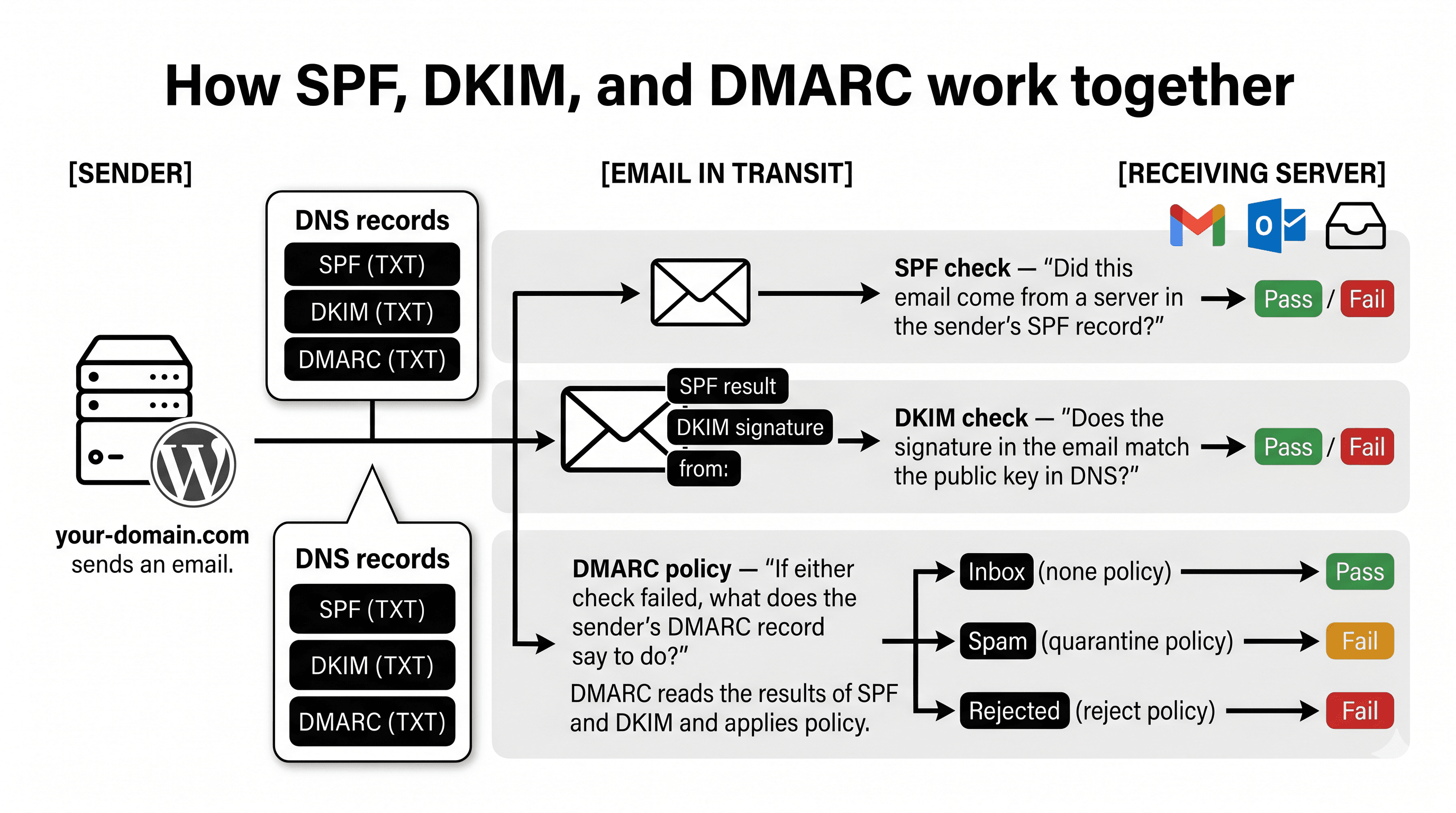
To prevent spoofing of your own domain, publish three DNS records: SPF, DKIM, and DMARC. SPF lists the servers allowed to send for you, DKIM cryptographically signs each message, and DMARC ties both to the visible From address and tells receivers to reject forgeries. A DMARC policy set to p=reject is what actually blocks exact-domain spoofing of your brand.
Setting up SPF, DKIM, and DMARC together closes the gap that makes forging your From address possible. Each record does a distinct job:
- SPF (Sender Policy Framework) lists the servers allowed to send mail for your domain, so a receiver can reject mail from any server not on the list. The standard is defined in RFC 7208.
- DKIM (DomainKeys Identified Mail) adds a cryptographic signature to each message, letting the receiver confirm the mail was really authorized by your domain and was not altered in transit.
- DMARC (Domain-based Message Authentication, Reporting and Conformance) ties SPF and DKIM to the visible From domain and tells receivers what to do when a message fails, from quarantine to outright rejection. Published in RFC 7489, a DMARC policy set to p=reject is what actually blocks exact-domain spoofing of your brand.
Two further records strengthen the setup. BIMI displays your verified logo next to authenticated mail once DMARC enforcement is in place, and MTA-STS enforces encrypted, authenticated connections between mail servers. Authentication protects the domains you own, but it cannot stop a look-alike domain the attacker registered separately, which is why user awareness still matters.
Spoofing versus phishing and typosquatting
Spoofing, phishing, and typosquatting overlap but describe different things: spoofing forges a sender identity, phishing is the goal of stealing money or credentials (often delivered by spoofing), and typosquatting registers a look-alike domain and sends authenticated mail from it. Defending against spoofing is a technical authentication problem, while defending against typosquatting depends on vigilance and monitoring.
| Term | What it is | Primary defense |
|---|---|---|
| Spoofing | Forging the sender identity on a domain the attacker does not own | SPF, DKIM, and DMARC on your domain |
| Phishing | Tricking someone into handing over money or credentials, frequently via spoofing | User awareness plus authentication |
| Typosquatting | Registering a genuine look-alike domain and sending authenticated mail from it | Vigilance and monitoring for domains that resemble yours |
Phishing is the broader goal, and a targeted version, spear phishing, tailors the forged message to a specific person using details about their role or company. Spoofing fakes an identity on someone else's domain, while typosquatting builds a convincing new one.
FAQs
What is the difference between spoofing and phishing?
Spoofing is the technique of forging a sender's identity, while phishing is the objective of stealing money or credentials. Phishing campaigns often rely on spoofing to make their messages look trustworthy, but a spoofed email is not always a phishing attempt.
Can email spoofing be stopped completely?
You can stop attackers from spoofing your own domain by enforcing SPF, DKIM, and DMARC with a reject policy. You cannot stop attackers from registering look-alike domains or spoofing domains that have no authentication, so recipient awareness remains part of the defense.
How can I tell if an email is spoofed?
Check whether the display name matches the real address, watch for urgency and payment changes, and inspect the raw headers. A failed SPF, DKIM, or DMARC result in the Authentication-Results header is a strong sign the message is forged.
How do SPF, DKIM, and DMARC prevent spoofing?
SPF verifies that mail came from an authorized server, DKIM confirms the message was signed by the domain and not altered, and DMARC ties both to the visible From address and tells receivers to reject messages that fail. Together they make exact-domain spoofing of your domain fail authentication.
Is a spoofed email a sign my account was hacked?
Usually not. Spoofing needs no access to your mailbox because the sender simply forges the From field, so receiving a spoofed message from your own address does not by itself mean your account was compromised.
Spoofing thrives on domains that are easy to impersonate and lists that are full of stale, invalid, and risky addresses. Before your next campaign, run your list through BounceCheck to clear the invalid addresses that drag down your reputation, then pair a clean list with SPF, DKIM, and DMARC so your domain is hard to forge in the first place.

BounceCheck Team
The team behind BounceCheck - helping businesses verify emails and improve deliverability.