HELO Meaning: What the SMTP HELO Command Does
 BounceCheck Team
The HELO command is the greeting a sending mail server issues to identify itself at the start of an SMTP session. It is a hello handshake defined in the Simple Mail Transfer Protocol: right after a connection opens, the client says HELO followed by its own hostname, and that single line tells the receiving server who is knocking before any message is transferred. The meaning of HELO is a name check at the door, not a password.
HELO looks trivial, but receiving servers read it closely. A greeting that names a proper hostname behaves one way; a greeting that names a bare IP, a made up label, or a name that does not line up with the connecting address behaves very differently, and that difference can decide whether your mail reaches the inbox or gets rejected.
What the HELO command means in SMTP
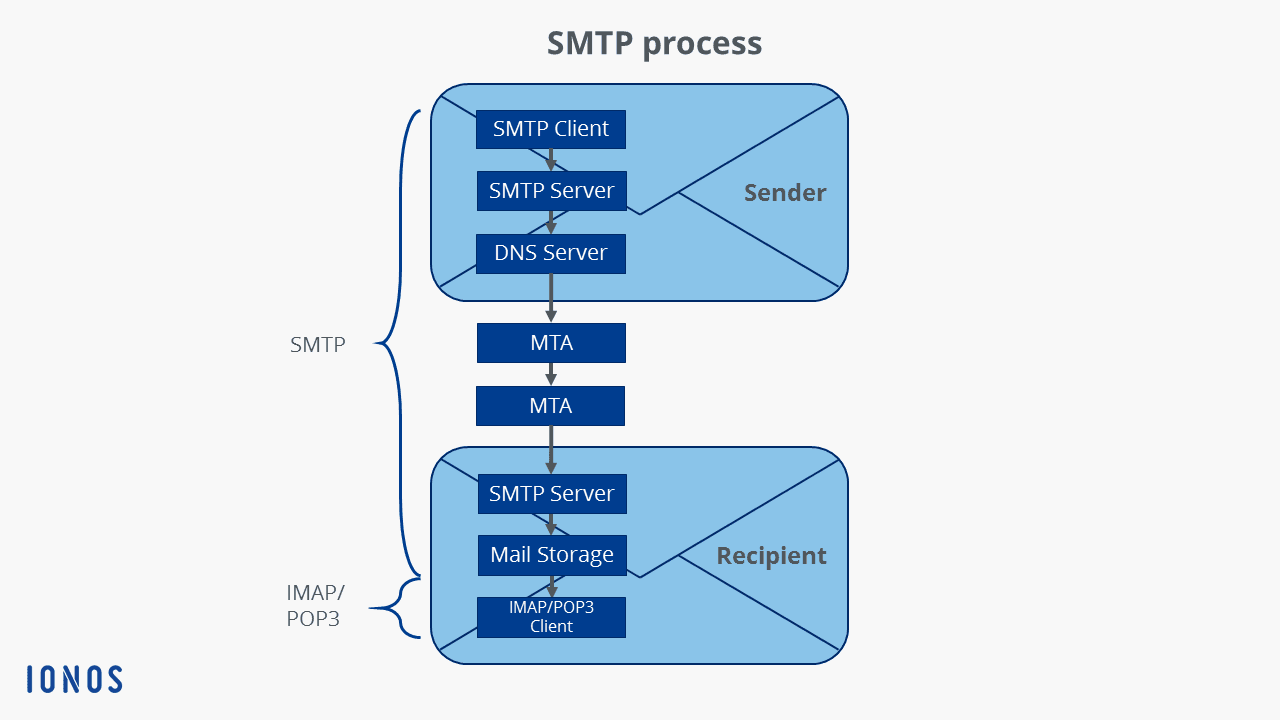
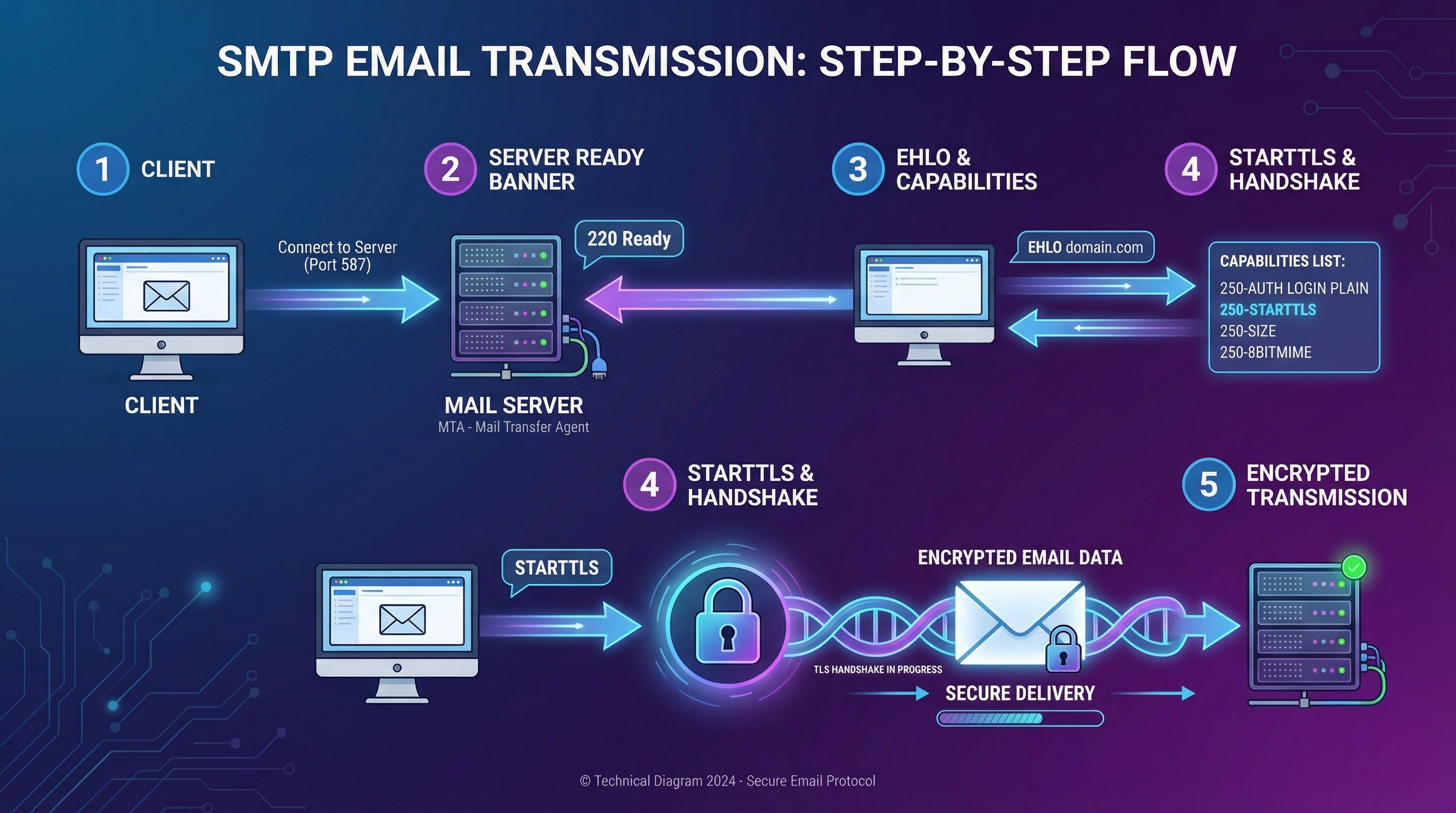
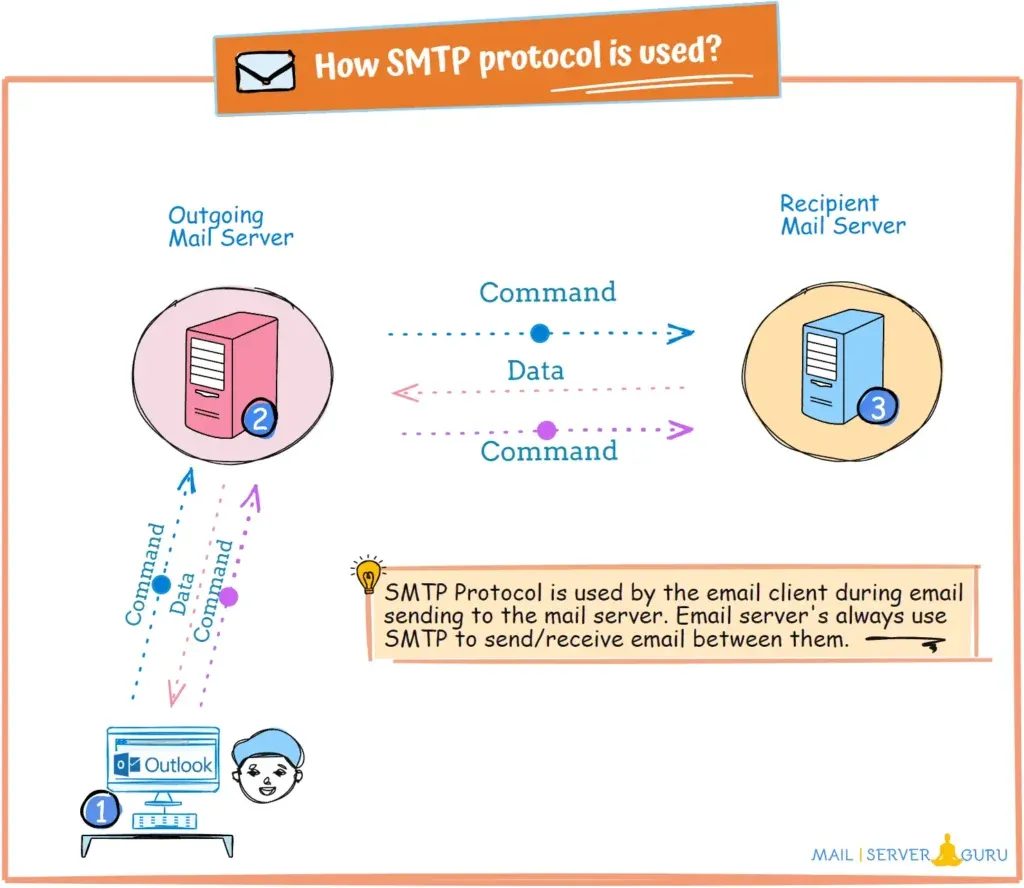
HELO is the first application level command in an SMTP conversation. Once a client opens a TCP connection to a receiving mail transfer agent, the server replies with a 220 banner, and the client answers with HELO plus the fully qualified domain name it wants to be known by. The command comes straight from the protocol standard: RFC 5321 defines HELO as the way the SMTP client identifies itself so the session can begin. You can read the exact grammar in the RFC 5321 specification.
The argument matters as much as the command. HELO is not a password and it does not authenticate the sender in any cryptographic sense. It is a declaration of identity that the receiving server can test against other signals, such as the IP the connection came from and what public DNS says about that name. That is why a careless HELO value is one of the earliest spam signals a receiver can act on, long before it ever looks at your subject line or body. HELO is one command inside the wider Simple Mail Transfer Protocol that moves mail between servers.
HELO vs EHLO: what is the difference?
The difference between HELO and EHLO is that EHLO (Extended HELO) opens an Extended SMTP session and asks the server to list the extensions it supports, while HELO opens a plain SMTP session and receives only a single line acknowledgement. Both identify the sending server by its hostname; only EHLO triggers capability discovery, and modern servers open with EHLO by default.
When you send EHLO, the server responds with a multi line reply advertising capabilities such as STARTTLS for encryption, SIZE for maximum message size, AUTH for authenticated submission, and PIPELINING. HELO gets a single line acknowledgement and none of that capability discovery. Servers fall back to plain HELO only if the receiver does not understand the extended greeting. In practice almost every legitimate server on the public internet speaks ESMTP, so EHLO is the normal opening and HELO is the legacy fallback.
| Aspect | HELO | EHLO |
|---|---|---|
| Protocol | Original SMTP | Extended SMTP (ESMTP) |
| Server reply | Single line 250 | Multi line 250, one per extension |
| Advertises capabilities | No | Yes (STARTTLS, SIZE, AUTH, PIPELINING) |
| Typical use today | Legacy fallback | Default greeting |
The identity rules are the same for both. Whether a server greets with HELO or EHLO, the hostname argument it supplies is what receivers validate, so everything below about the HELO name applies equally to EHLO.
HELO command syntax and the opening handshake
The HELO syntax is one line: the keyword, a space, and the sending server's fully qualified domain name, for example EHLO mail.example.com. RFC 5321 states that the argument should be the FQDN of the SMTP client, or if that is unavailable, an address literal in brackets such as [192.0.2.10]. There are no other arguments and no options.
The greeting is only the opening move. A normal SMTP session walks through a fixed order of commands after the connection is made on the standard SMTP port:
- Connect: the client opens a TCP connection (port 25 for server to server relay, 587 for authenticated submission) and the server returns a 220 banner.
- HELO or EHLO: the client greets and names itself; the server replies 250 and, for EHLO, lists its extensions.
- MAIL FROM: the client declares the envelope sender address.
- RCPT TO: the client declares each recipient; the server accepts or rejects per recipient.
- DATA: the client transfers the message headers and body, ending with a single dot on its own line.
If the greeting is rejected, the conversation never reaches MAIL FROM, so a bad HELO can stop mail before a single recipient is even named.
What should the HELO command be set to?
The HELO argument should be a fully qualified domain name (FQDN) that resolves in public DNS and genuinely belongs to the sending server, for example mail.yourdomain.com. It should not be a bare hostname like localhost, an internal name that only resolves inside your network, a generic default such as localhost.localdomain, or an unbracketed IP address. Microsoft documents that mailbox providers expect a valid FQDN in the HELO value and will treat a non conforming one as suspect.
A well set HELO name lines up with three things: the sending server's forward DNS (the name resolves to the IP), the reverse DNS of that IP (the PTR record points back to the same name), and the domain you send from. When those agree, receivers see a consistent identity. When they do not, the greeting looks improvised, which is exactly how throwaway spam infrastructure behaves.
HELO checks and reverse DNS alignment
A HELO check is one of the first filters a receiving server runs on a connection. The strongest version is forward confirmed reverse DNS (FCRDNS): the receiver takes the connecting IP, looks up its PTR record to get a hostname, then looks that hostname back up to confirm it resolves to the original IP. When the HELO name, the PTR record, and the IP all agree, the sender passes; when they disagree, the connection is treated as lower trust.
Running a reverse DNS lookup on your own sending IP is the quickest way to see what receivers see. What happens when HELO does not match reverse DNS depends on the receiver. Some tag the message with a lower reputation score and let content filters decide, some route it to the spam folder, and stricter servers reject the connection outright with a 5xx error. A HELO that is not an FQDN, or one that fails FCRDNS, is a classic signal of a misconfigured or malicious sender, so mail from it is far more likely to be junked or bounced.
How HELO affects deliverability
HELO affects deliverability because it is a connection time signal, evaluated before your message content, your subject line, or even your authentication headers are fully processed. A clean, consistent HELO name is part of the baseline that lets a receiver decide you are a real mail server worth accepting. It does not by itself land you in the inbox, but a broken one can keep you out.
HELO also connects to email authentication. A HELO check is a distinct, connection level test, separate from the content level checks in SPF, DKIM, and DMARC, though SPF can also be evaluated against the HELO identity. Treat the HELO name, reverse DNS, and your authentication records as one coherent identity story: they should all point at the same domain. Verification and list hygiene remove invalid recipients, but they cannot fix a mismatched HELO or missing PTR record, so server side configuration and list quality are separate levers you need to pull together.
Common HELO errors and misconfigurations
The most common HELO errors all break the identity match receivers test at connection time: a non resolvable greeting, a missing or mismatched PTR record, or a default value left in place. Each one makes the sender look improvised, and each is straightforward to fix once you know what receivers check.
- HELO is not an FQDN, sending
localhost, a short hostname, or a bare IP instead of a resolvable domain name. - HELO name has no matching PTR record, so the reverse DNS lookup returns nothing and FCRDNS cannot pass.
- HELO name and PTR disagree, where the greeting says one hostname and the IP's PTR record says another.
- Default or generic HELO left in place by an appliance or script, such as the vendor's out of the box hostname.
- HELO uses a dynamic or residential IP style name, which many receivers distrust for direct server to server mail.
FAQs
How do I check my HELO/EHLO value?
Open a connection to your mail server and watch the greeting, or send a test message to a diagnostic address that echoes the connecting details back to you. You can also run a reverse DNS lookup on your sending IP and confirm the PTR hostname matches the name your server sends in HELO or EHLO.
Does HELO need to be a fully qualified domain name?
Yes. RFC 5321 says the HELO argument should be the fully qualified domain name of the sending server, and mailbox providers expect a resolvable FQDN. If a real FQDN is genuinely unavailable, the standard permits a bracketed address literal, but a proper FQDN is what receivers want to see.
What happens if my HELO does not match reverse DNS?
The receiving server treats you as lower trust. Depending on its policy, the message may be scored down, filtered to spam, or rejected with a 5xx error. Aligning the HELO name, the PTR record, and the connecting IP through forward confirmed reverse DNS avoids this.
Is HELO still used, or has EHLO replaced it?
Both are still valid. Modern servers open with EHLO to discover extensions like STARTTLS and AUTH, and fall back to HELO only when the receiver does not support ESMTP. HELO remains the legacy baseline that every SMTP server must still understand.
Get your sending identity right before the next send
A correct HELO name is one piece of a clean sending setup, alongside reverse DNS, authentication, and a list free of addresses that will hard bounce. Run your list through BounceCheck before your next send to strip the invalid recipients that damage sender reputation, then keep your HELO, PTR, and authentication records pointing at the same domain.

BounceCheck Team
The team behind BounceCheck - helping businesses verify emails and improve deliverability.