How Email Verification Works: A Step-by-Step Guide
 BounceCheck Team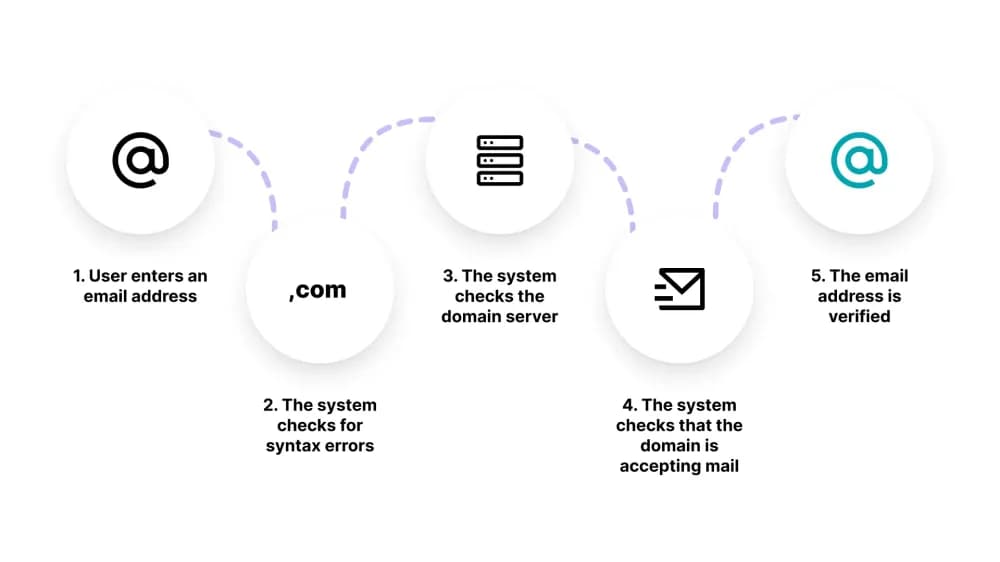
Before your next send Find the addresses that will bounce.
Verify an email freeEmail verification is the process of confirming whether an email address is valid, deliverable, and safe to send to. It is a critical step before any email campaign, bulk send, or user onboarding flow. Done right, it protects your sender reputation, keeps bounce rates low, and stops invalid addresses from quietly poisoning your list.
Skipping verification is the single most common reason cold email campaigns fail. A list with 15% dead addresses pushes hard bounces past the 2% threshold most ISPs treat as a spam signal, and once your domain gets flagged it takes weeks to recover.
Email Validation vs Email Verification: What's the Difference?
The two terms get used interchangeably, but they describe different layers of checking. Think of a mailman dropping off a letter: validation just confirms the address is written in a valid format. Verification confirms the address is written correctly AND that someone is actually home to receive the letter.
Email validation is a frontend check. It confirms the address follows email standards: an @ symbol, a domain, no invalid characters. Functions like PHP's FILTER_VALIDATE_EMAIL or a regex pattern can do this in milliseconds. Validation catches typos and bad formatting, but it cannot tell you if the mailbox actually exists.
Email verification goes further. It checks format, queries DNS, and pings the mail server to confirm the address belongs to a real, active mailbox. A proper verification service also identifies role-based, catch-all, and disposable addresses that simple validation will miss.
The practical difference matters because they catch different failures. Run only validation and your form will happily accept [email protected] because the format is fine. Run verification and the same address gets flagged because stripeee.com has no MX records. Here is how they line up:
| Validation | Verification | |
|---|---|---|
| Runs where | Browser or your server | External API hitting real mail servers |
| Speed | Milliseconds | Seconds per address |
| Cost | Zero | $0.001 to $0.01 per check, depending on provider |
| Catches typos | Yes | Yes |
| Catches dead mailboxes | No | Yes |
| Catches catch-all domains | No | Yes (flagged as risky) |
| Catches disposable inboxes | No | Yes |
| Catches spam traps | No | Sometimes (depends on provider's trap list) |
Most teams need both. Validation blocks junk at signup. Verification cleans the list periodically (and before big sends). One without the other leaves a measurable gap.
Syntax Check vs SMTP Check vs Deep Verification: The Three Layers
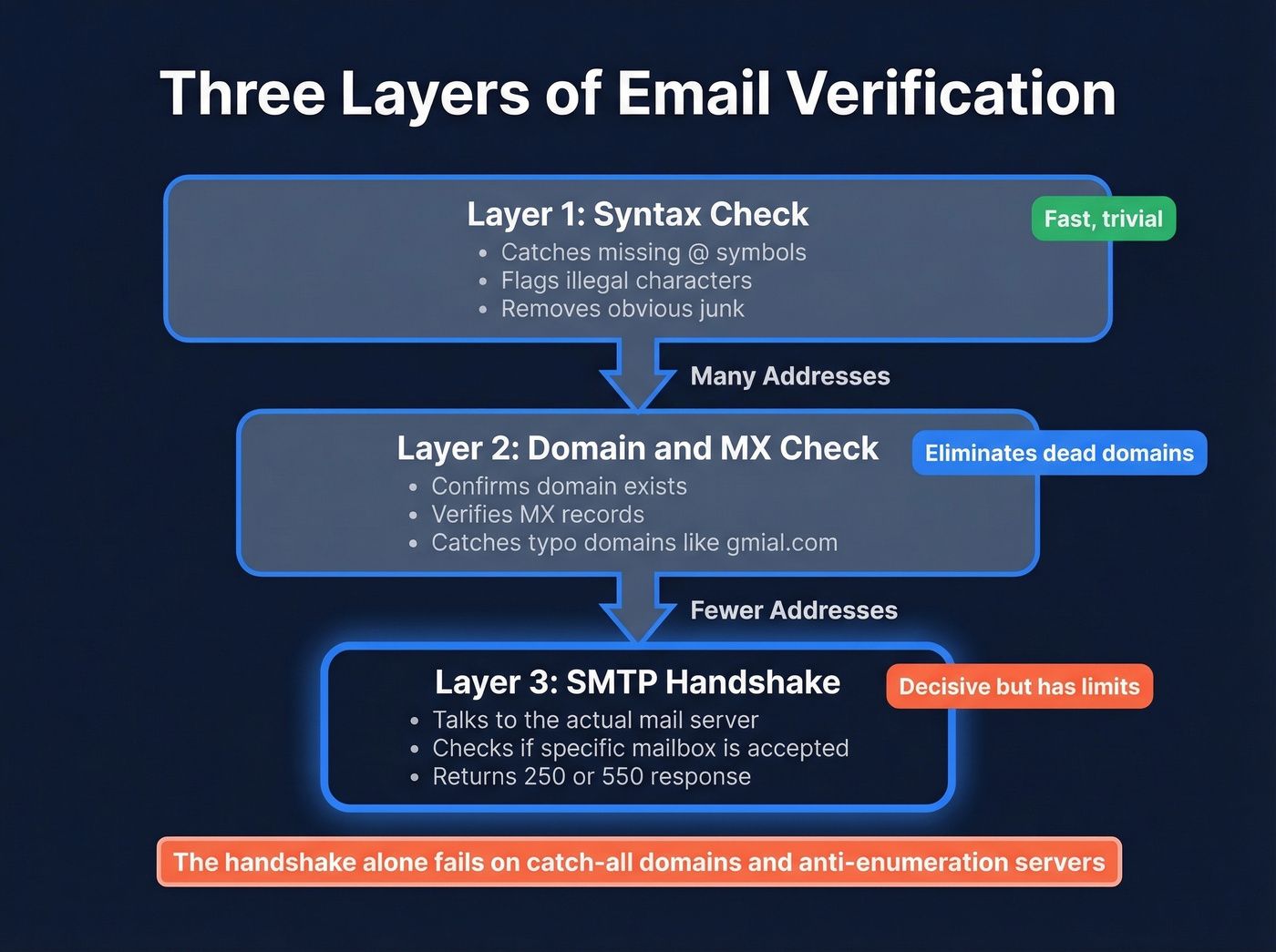
Verification is not one check, it is three layers stacked on top of each other. Each layer catches a different class of bad address and the layers run in order, cheapest first, so most invalid addresses get filtered out before they ever reach the expensive checks.
- Syntax check runs on your own server. Fast, free, catches obvious malformed strings. Misses anything with a valid format.
- SMTP check opens a connection to the recipient mail server and asks if the mailbox exists. The most reliable signal. Slowest of the three and the only one that can get rate-limited.
- Deep verification classifies addresses by risk: role-based, disposable, catch-all, or spam trap. Often the layer that justifies paying for a verifier instead of writing your own.
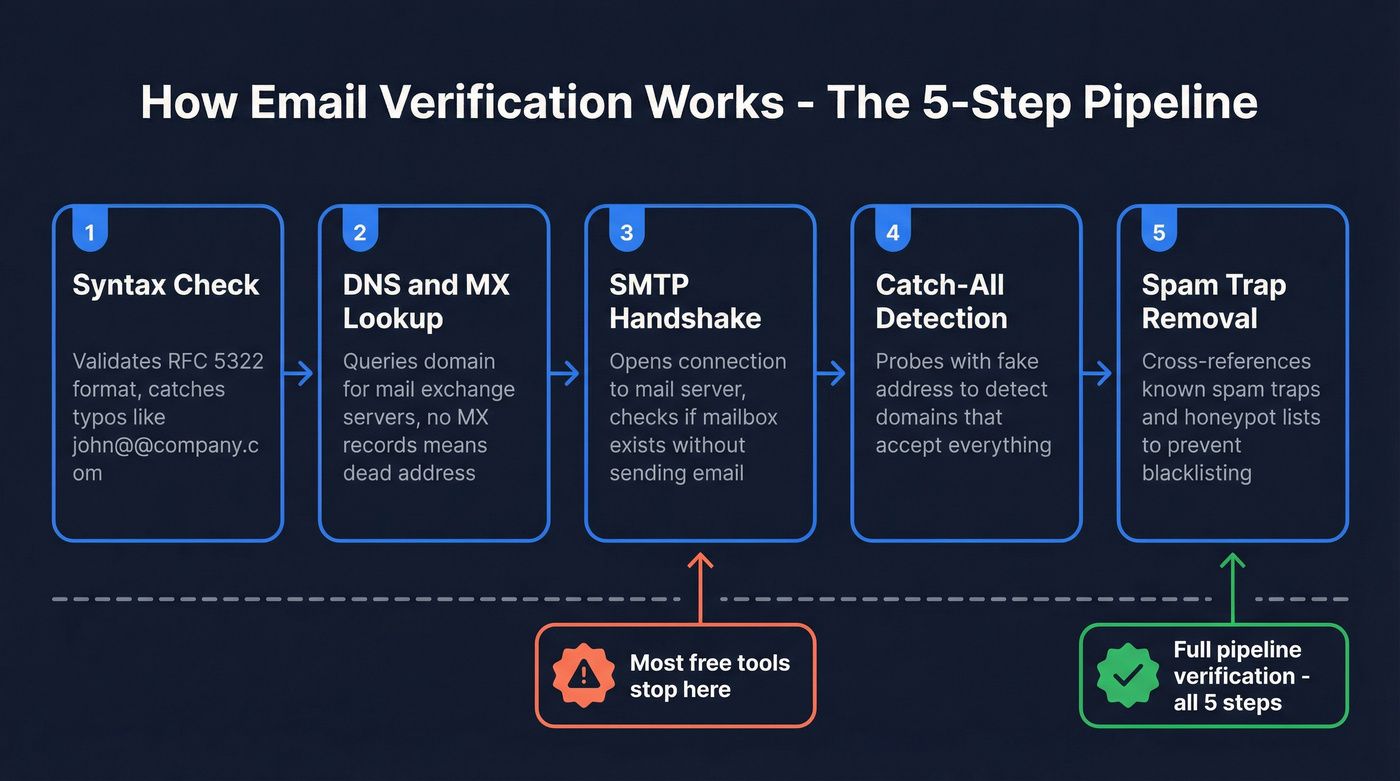
The next four sections show what happens inside each layer, with the actual checks, status codes, and edge cases.
Step 1: Syntax Check
The first pass checks whether the address follows the correct format defined in RFC 5322. The basic shape is [email protected] and the verifier rejects anything that breaks the rules:
- Missing @ sign or domain:
bobexample.com,bob@ - Spaces or unsupported characters in the local part:
bob [email protected] - Double dots or leading/trailing dots:
[email protected],[email protected] - Missing TLD:
bob@example - TLD too short or too long, IP-literal domains without the right brackets, etc.
A naive regex catches the obvious ones. A proper RFC-compliant parser also flags edge cases like quoted local parts ("bob smith"@example.com is technically valid but breaks most downstream systems) and IDN domains that need Punycode conversion.
Syntax checking is the cheapest verification step and the one most teams already do at signup. It catches roughly 80% of bad-data entries from form fills and zero percent of dead mailboxes. By itself, syntax check is useless for list cleaning, because every typo domain like gmial.com passes the check with flying colors.
Step 2: Domain & MX Record Lookup
Next, the verifier queries DNS for the domain's MX (Mail Exchanger) records. An MX record tells the rest of the internet which mail server is responsible for accepting email on behalf of a domain. When you send to [email protected], your mail server looks up example.com's MX records to find where to deliver the message.
A valid MX record looks like this when you query it with dig MX gmail.com:
gmail.com.  300  IN  MX  5  gmail-smtp-in.l.google.com.
gmail.com.  300  IN  MX  10 alt1.gmail-smtp-in.l.google.com.
gmail.com.  300  IN  MX  20 alt2.gmail-smtp-in.l.google.com.
gmail.com.  300  IN  MX  30 alt3.gmail-smtp-in.l.google.com.
gmail.com.  300  IN  MX  40 alt4.gmail-smtp-in.l.google.com.
The number before each hostname is the priority. Lower numbers are tried first. If the primary fails, the sender falls back to the next priority in order. Big providers like Gmail and Microsoft 365 publish four to five MX records for redundancy.
If no MX records exist, the domain cannot receive email at all. The address is undeliverable regardless of format. Common MX failures:
- Expired or parked domains. The domain used to host email but the owner let it lapse. DNS still resolves the A record but MX is empty.
- Typo domains.
gmial.com,yahooo.com,outlok.com. These pass syntax check but fail MX. - Subdomains without mail config. A user enters
[email protected]but onlyexample.comhas MX records. Verifier should fall back to the parent domain only if explicitly configured. - MX pointing at dead IPs. Record exists but the server behind it stopped responding. This fails at Step 3 rather than Step 2.
MX lookup is fast (under 100ms in most cases) and runs over standard DNS. No connection to the actual mail server is needed yet, that comes in Step 3. It is also the cheapest layer for a verifier to run at scale, which is why bulk tools always front-load MX checks before opening any SMTP connections.
Step 3: SMTP Handshake
The most reliable check. A verifier connects to the mail server on port 25 (or 587 for submission, sometimes 465 for SMTPS) and simulates sending an email without actually delivering one. The conversation looks like this:
S: 220 mail.example.com ESMTP ready
C: EHLO verifier.bouncecheck.email
S: 250-mail.example.com Hello
S: 250 STARTTLS
C: MAIL FROM:<[email protected]>
S: 250 OK
C: RCPT TO:<[email protected]>
S: 250 OK            <-- mailbox exists
C: RSET
C: QUIT
The verifier never sends DATA, so no email is actually delivered. It reads the response to RCPT TO and disconnects. To see this firsthand, you can run an SMTP handshake by hand against any mail server. The server's response tells the whole story:
- 250 address exists and accepts mail
- 550 mailbox does not exist (see bounce code 550 for details)
- 451 / 452 temporary rejection, usually a rate limit or a greylist asking the sender to retry in a few minutes
- 421 / 4xx temporary issue, try again later
- 553 / 554 permanent rejection, often a policy block or blocklist hit
SMTP handshake is the only layer that proves a mailbox is actually reachable, but it has three big limitations every verifier has to work around:
- Rate limiting. High-volume probing from one IP looks abusive. Google, Microsoft, and Yahoo will throttle or block aggressive verifiers within minutes. Good verifiers rotate dozens of IPs and pace requests.
- Catch-all servers. Some servers accept every
RCPT TOregardless of whether the mailbox exists, so SMTP returns 250 for both real and made-up addresses. The verifier detects this by sending a second probe to a guaranteed-fake address (e.g.[email protected]). If the fake one also returns 250, the domain is catch-all. - Graylist. Some servers reject the first attempt from an unknown sender with a 451 and accept on retry. Verifiers that quit after one 4xx miss these mailboxes entirely.
This is why two verifiers can return different results for the same address: how they handle catch-all detection, greylisting, and rate-limit retries differs by vendor.
Step 4: Risk Classification (Deep Verification)
The final layer goes beyond simple existence checks. Deep verification flags addresses that exist but are still risky to send to:
- Disposable addresses. Temporary inboxes from services like Mailinator, 10MinuteMail, or Guerrilla Mail. The mailbox is real but self-deactivates within hours, so messages either bounce shortly after sending or go to a dead inbox the user never returns to. Detection: maintain a domain blocklist of known disposable providers (a few thousand domains, updated weekly).
- Role addresses. Generic mailboxes like
admin@,info@,support@,noreply@,sales@. Often shared by a team or unmonitored. High complaint rates and low engagement make these risky for marketing sends. Detection: match the local part against a list of known role prefixes. - Catch-all domains. Servers that accept all mail regardless of whether the mailbox exists, so SMTP returns 250 even for typos. Sending to catch-alls is a gamble: some are real, many are not. Detection method described in Step 3.
- Spam traps. Addresses planted by ESPs and blocklist operators to catch senders who scrape lists or skip permission. One hit on a pristine trap can land your domain on Spamhaus for months. Detection: paid lists of known trap domains plus heuristics (long-dormant addresses that suddenly receive mail are likely traps).
- Mailbox full. The mailbox exists but cannot accept new mail. Usually a temporary state, but if it persists across sends the address is effectively dead.
Deep verification cannot give you a clean yes/no for every address, but it can tell you which ones to suppress, which to send to with caution, and which are safe to mail repeatedly.
How Verification Results Get Classified
Most verification tools group results into three buckets. The exact labels vary by vendor but the meaning is consistent:
- Valid / Safe to send. Syntax, MX, and SMTP all pass. No risk flags. Send freely.
- Risky / Send with caution. Catch-all, role-based, mailbox-full, or unknown (verifier could not get a clean signal). The address might work, but engagement and complaint risk are higher. Send only if the rest of your list is healthy.
- Invalid / Do not send. Syntax error, no MX, mailbox not found, disposable, or blocked. Suppress immediately and remove from active campaigns.
A clean list after verification usually breaks down to 75 to 90% valid, 5 to 15% risky, and 5 to 10% invalid. If your invalid percentage is above 20%, the list is bad enough that you should pause sends until you understand why (scraped data, very old list, or a leak somewhere in your signup flow). Vendors word their statuses differently, so this guide to what each verification status means is worth keeping open when you read your results.
Real-Time vs Bulk Verification: When to Use Each
Verification runs in two modes and most teams need both:
- Real-time verification hits a verifier API the moment a user submits a form. The signup page waits for the result (usually 200ms to 2 seconds) and rejects bad addresses before they enter your database. Use case: signup forms, lead capture, account creation. The whole point is to keep junk out of the CRM in the first place.
- Bulk verification processes a CSV or database list in batch. Slower per request (no need for low latency) but cheaper per address. Use case: cleaning an old list before a big send, periodic hygiene every 3 to 6 months, validating a list you bought or imported.
Running both is the safe pattern. Real-time keeps new junk out, bulk cleans the existing list as addresses age and decay. Database decay runs about 22% per year, so even a list that was clean six months ago has measurable rot by now. For a longer side-by-side, see real-time vs bulk verification.
Why It Matters
Sending to invalid addresses inflates your bounce rate. A bounce rate above 2% can damage your sender reputation, trigger spam filters, and get your sending domain blacklisted. Gmail's 2024 bulk sender rules ask you to keep spam complaints below 0.3% in Postmaster Tools, which is hard to maintain if your list is full of dead or trap addresses.
The cost case is just as strong. Most ESPs charge per email or per contact. Cleaning out 20% dead weight is a 20% bill cut, plus a measurable lift in deliverability because your engagement metrics improve when the denominator is real mailboxes instead of a bloated, half-dead list. On a 100,000-contact list at $0.001 per send, that is $200 saved per send and roughly $2,400 a year on monthly campaigns.
And verification keeps your analytics honest. Open rates, click rates, and reply rates all look better when bots, disposable accounts, and dead mailboxes are excluded. A 30% open rate on a clean list of 8,000 tells you more than a 22% open rate on a junked-up list of 10,000.
BounceCheck runs all four verification steps in real time and in bulk, giving you a clean, deliverable list before you hit send.
§ Before your next send
Find the addresses that will bounce
Verify a single address free, or upload a CSV — the free plan includes 50 checks a month, no card needed.

BounceCheck Team
The team behind BounceCheck - helping businesses verify emails and improve deliverability.

