What Is a Mailbox Provider? Meaning, Examples, and How It Differs from an ISP
 BounceCheck Team
Before your next send Find the addresses that will bounce.
Verify an email freeA mailbox provider is a company that hosts email inboxes: it runs the servers that send, receive, store, and deliver email on behalf of its users. Gmail, Outlook.com, Yahoo Mail, and Apple iCloud Mail are the largest examples. Your mailbox provider controls your inbox experience, including spam filtering, storage limits, and security, and it decides whether an incoming message lands in the inbox or the spam folder.
This guide explains what a mailbox provider is, gives examples, and clears up how it differs from an ISP and an email service provider (ESP), two terms it gets confused with.
What is a mailbox provider?
A mailbox provider (sometimes abbreviated MBP) is an organization that accepts, stores, and offers access to email messages for end users. The formal term "mail service provider" was defined in the internet mail architecture standard RFC 5598, and mailbox providers are the companies that fill that role in practice.
Under the hood, a mailbox provider runs email servers using SMTP to send and receive mail, and gives users access to their messages through IMAP, POP, webmail, or a mobile app. It administers the domain name in your email address and controls the MX records that tell other servers where to deliver mail for that domain. It also filters incoming spam and viruses, sets storage limits, and enforces security on the account.
Examples of mailbox providers
The best-known mailbox providers are the free consumer webmail services: Gmail, Outlook.com, Yahoo Mail, AOL Mail, and iCloud Mail. Beyond free webmail, the category spans paid, privacy-focused, and business-hosted email:
- Free webmail: Gmail, Outlook.com, Yahoo Mail, AOL Mail, and iCloud Mail. These are supported by advertising or by a wider product ecosystem, and they hold the large majority of consumer inboxes.
- Premium and privacy-focused mail: paid services such as Fastmail and Proton Mail that target users who want more storage, no ads, or stronger privacy.
- Business and hosted email: Google Workspace and Microsoft 365, which host email on a company's own domain, plus smaller specialist hosts.
Free consumer providers matter most to senders, because a handful of them (Gmail, Outlook, Yahoo, and Apple) receive the bulk of marketing and transactional email, and each applies its own filtering rules. If you're not sure which one a given address belongs to, you can see which provider hosts a domain rather than guessing from the domain name alone.
Mailbox provider vs ISP
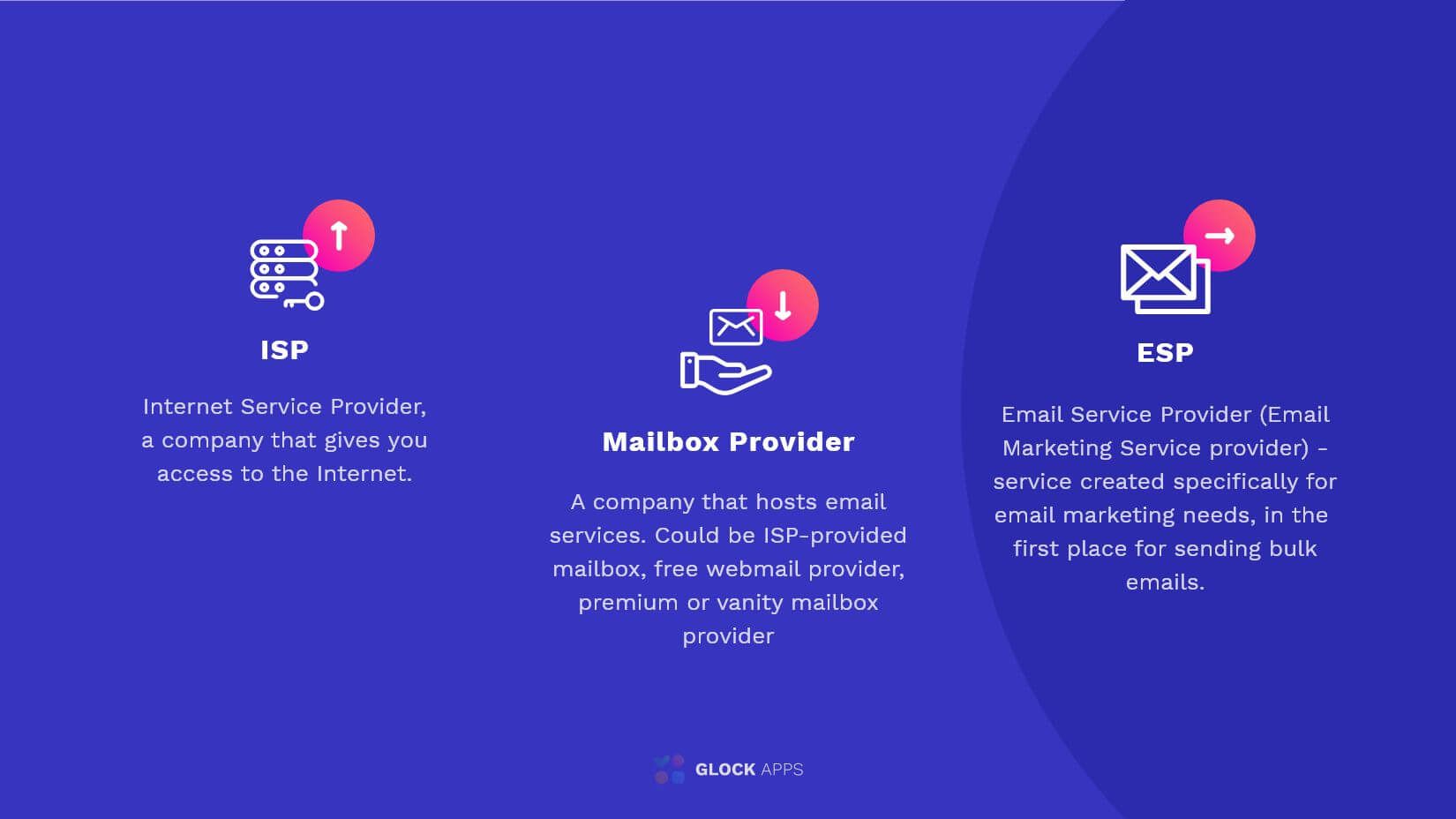
Mailbox provider and ISP are often used interchangeably, but they describe different things. A mailbox provider hosts email. An ISP (internet service provider) provides internet access, such as broadband, fiber, or mobile data.
The overlap exists for historical reasons. Many early access providers, like AOL and Comcast, also ran the email service their subscribers used, so one company played both roles. Deliverability jargon still carries that habit: phrases like "ISP feedback loop" or "the ISPs are filtering my mail" almost always mean the mailbox provider, not the company selling internet access. Today the roles are mostly separate. Comcast connects you to the internet; Gmail decides where your mail lands.
Mailbox provider vs ESP
A mailbox provider is also not the same as an email service provider (ESP). The difference is direction: a mailbox provider hosts the inboxes that receive mail, while an ESP is a platform businesses use to send mail at scale.
An ESP such as Mailchimp, iContact, or SendGrid stores your contact list, builds and sends campaigns, and reports on opens, clicks, and bounces. Gmail and Outlook, by contrast, are mailbox providers, not ESPs: they are built to receive and organize mail for individuals, not to run bulk marketing sends. When you send a campaign through an ESP, the recipients open it inside their mailbox providers. The two sit on opposite ends of the same message.
The table below summarizes how the three roles differ:
| Role | What it does | Direction | Examples |
|---|---|---|---|
| Mailbox provider | Hosts and stores email inboxes; filters incoming mail | Receives mail | Gmail, Outlook.com, Yahoo Mail, iCloud Mail |
| ISP | Provides internet access | Neither; connects you online | Comcast, AT&T, Verizon |
| ESP | Sends bulk email campaigns for businesses | Sends mail | Mailchimp, SendGrid, iContact |
Why mailbox providers matter for deliverability
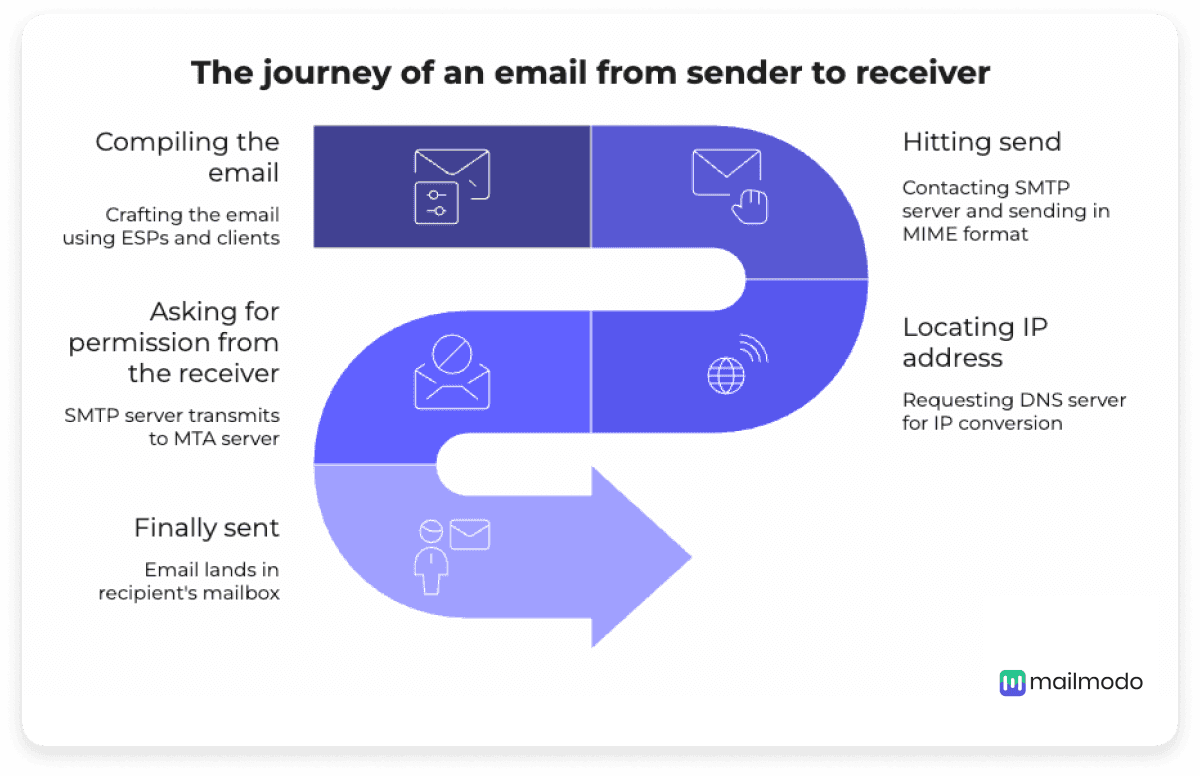
The mailbox provider is the gatekeeper of the inbox. After your message travels across the internet over SMTP, the recipient's mailbox provider decides what to do with it: deliver to the inbox, file it in spam, or reject it outright. That decision rests on authentication, your sending reputation, and the quality of the list you send to.
This is why senders talk about mailbox providers so much. Since 2024, Gmail and Yahoo require bulk senders to authenticate with SPF, DKIM, and DMARC, keep spam complaints low, and offer easy one-click unsubscribe. Sending to invalid addresses drives hard bounces, which lower your reputation and push more mail to spam. Verifying your list before you send removes the dead addresses that would otherwise bounce, so mailbox providers keep trusting your mail. Our guide on why emails go to spam covers the filtering side in more detail.
A quick note on terminology: "mailbox provider" here means an email host. It is unrelated to a virtual mailbox, which is a postal service that scans and forwards your physical mail.
Common questions about mailbox providers
Is Gmail a mailbox provider?
Yes. Gmail is a mailbox provider run by Google, and it is the largest email service in the world. It hosts inboxes, applies spam filtering, and gives access through webmail, mobile apps, and the IMAP and POP protocols. It is not an email service provider (ESP) in the marketing sense, because it is built to receive mail, not to run bulk campaigns.
How do I know who my mailbox provider is?
Look at the part of your email address after the @ sign. An address ending in @gmail.com is hosted by Gmail, @outlook.com or @hotmail.com by Microsoft, and @yahoo.com by Yahoo. If the domain is your own or your company's, your mailbox provider is whoever hosts that domain's email, often Google Workspace or Microsoft 365 — run the domain through BounceCheck's provider lookup tool to confirm it in one lookup.
What is the difference between a mailbox provider and an ISP?
A mailbox provider hosts your email inbox, while an ISP provides your internet connection. Gmail is a mailbox provider; Comcast is an ISP. The terms are sometimes used interchangeably because early ISPs also ran email services, but they describe two separate roles.
What is the difference between a mailbox provider and an email service provider?
A mailbox provider receives and hosts email inboxes, like Gmail or Outlook. An email service provider (ESP) is a platform, like Mailchimp or SendGrid, that businesses use to send email campaigns at scale. One receives mail, the other sends it.
§ Before your next send
Find the addresses that will bounce
Verify a single address free, or upload a CSV — the free plan includes 50 checks a month, no card needed.

BounceCheck Team
The team behind BounceCheck - helping businesses verify emails and improve deliverability.

