Mailinator Alternative: 6 Better Email Testing Tools Compared
 BounceCheck Team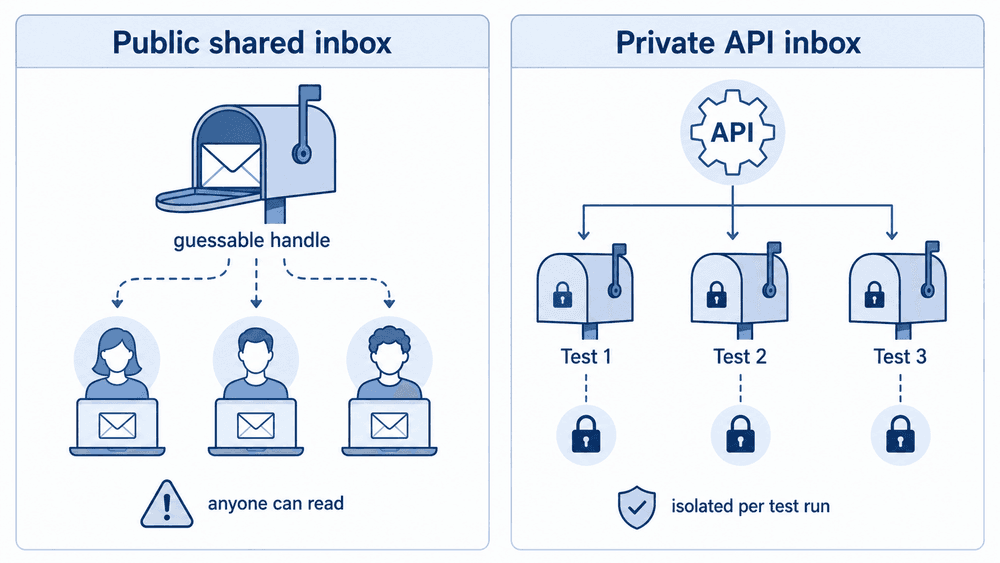
Run a signup form? Keep throwaway addresses out of your list.
Check an addressThe best Mailinator alternative depends on what your tests actually need: a private inbox you can drive from an API, a rendering and spam preview tool, or a plain throwaway address for a one-off signup. For automated QA on auth, billing, and password-reset flows, private API inbox platforms replace Mailinator most cleanly, and Mailtrap's Email Sandbox and MailSlurp are two of the tools compared here that create isolated inboxes on demand. For design and spam checks, Litmus and Mailgun cover ground Mailinator never did.
This comparison covers six tools, what each one is built to test, which ones offer a free tier, the public disposable inbox services that compete with Mailinator, and a migration order that does not break your test suite in one afternoon.
Why teams look for a Mailinator alternative
Mailinator is still fine for quick throwaway testing. Teams move on when the inbox stops being a scratchpad and becomes part of a release, auth, support, or billing workflow. That is the line where a public, receive-only inbox starts costing more than it saves, because the same handle anyone can guess is now holding real password resets and parallel test runs.
The specific gaps that push teams to switch:
- Mailinator is built around public mailbox workflows, so anyone who guesses the handle reads the same mail.
- Automation depth is thinner than testing-oriented mailbox platforms offer, which shows up fast in CI.
- There is no device or rendering preview, so HTML, links, images, and CTA visibility go unchecked.
- Usage is primarily test-mailbox only, with no path into a production inbound flow.
- Parallel test runs collide when several suites share the same public handle.
Categories of Mailinator alternatives
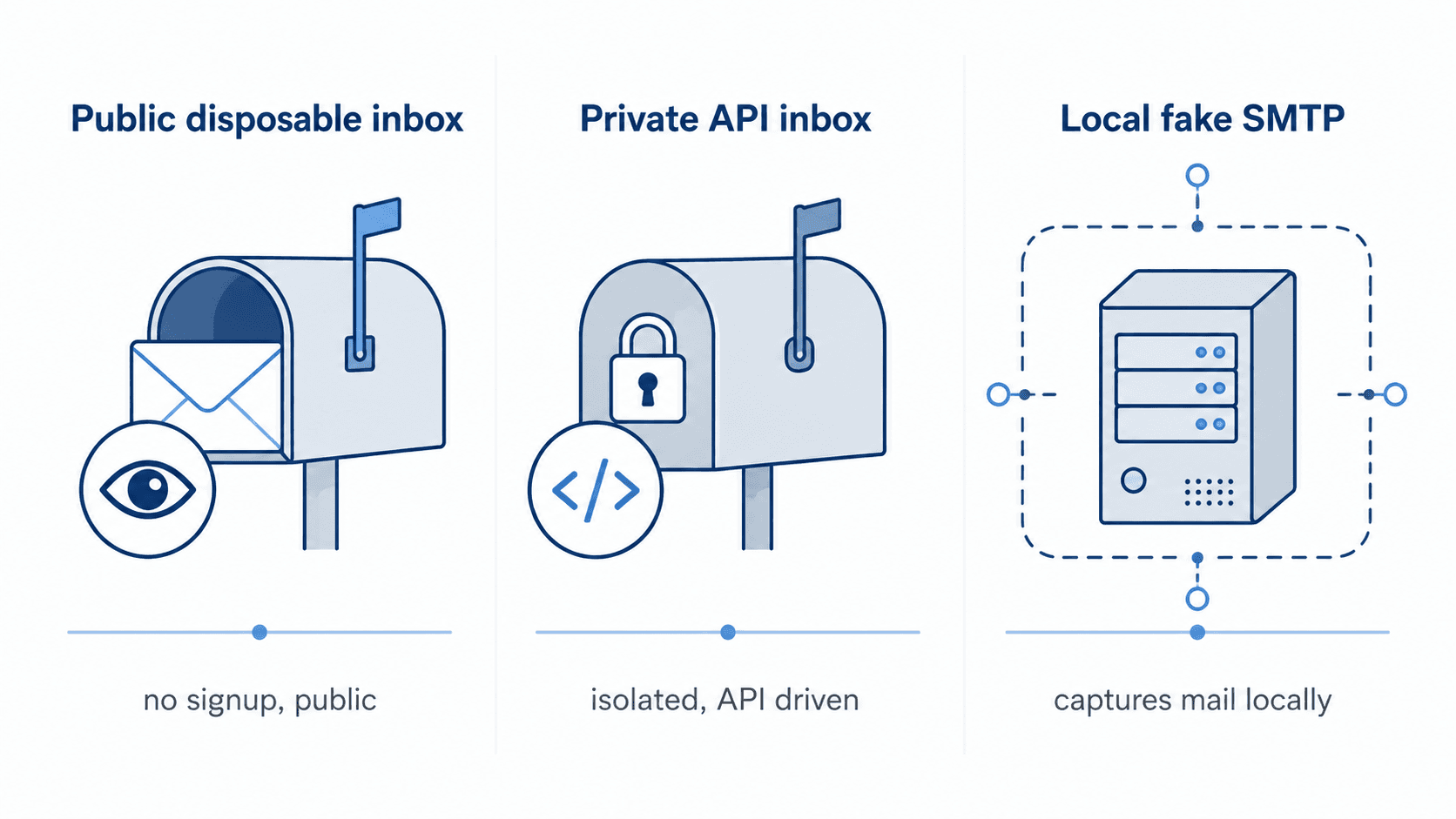
The tools compared below split into two working categories: public disposable inbox tools (the direct Mailinator swap) and private, testing-oriented platforms that add automation, previews, or sending-side checks. A third category exists in the wider market, local fake SMTP servers such as MailHog or Mailpit that capture mail on your own machine and never touch the network, but none of the six tools profiled here fall into that category, so it is not covered in the table below.
1) Public disposable inbox tools
These work exactly like Mailinator's free tier: type a handle, read the mail, no signup. They are the easiest swap and the weakest choice for sensitive automation, because the inbox is public by design.
2) Private, testing-oriented platforms
The other five tools in this comparison are private by account, and split further by job: Mailtrap's Email Sandbox and MailSlurp create isolated test inboxes on demand, Litmus previews rendering and spam scoring, and Mailgun, Wormly, and GMass sit on the sending side (validation, deliverability, and uptime). None of them is a public disposable-inbox tool.
How these Mailinator alternatives were compared
Five criteria decide whether a tool actually replaces Mailinator in a working test suite: range of testing features, ease of use, analysis and reporting, security and compliance, and pricing. Security and compliance is the criterion public disposable inboxes fail outright, no matter how the other four score.
- Range of testing features, meaning whether the tool handles inbox capture, HTML inspection, spam scoring, and automation rather than one slice.
- Ease of use, since a tool that needs a week of setup will not be adopted by the whole QA team.
- Analysis and reporting, covering header inspection, previews, and placement results you can hand to a developer.
- Security and compliance, which is the criterion public inboxes fail outright.
- Pricing and affordability, including whether the free tier is usable or a demo.
Mailinator alternatives compared
Six tools cover the Mailinator replacement tools profiled in this guide, and they separate by what they test rather than by price. Vendor list prices and free-tier terms change, so treat each vendor's own pricing page as the source of truth rather than any third-party roundup.
| Tool | Free tier | Test inboxes | Best for |
|---|---|---|---|
| Mailtrap Email Sandbox | Yes | Private, multiple | All-round QA sandbox |
| MailSlurp | Yes | Private and disposable, by API | API-driven and OTP testing |
| Litmus | No | Previews only | Rendering and spam previews |
| Mailgun | Yes | Sending platform | Deliverability testing on your own sends |
| Wormly | Free trial only | Server monitoring | SMTP, POP3, and IMAP uptime |
| GMass | Limited | Sending tools | Google-based sending checks |
The best Mailinator alternatives, tool by tool
Each of the six tools replaces a different part of what teams use Mailinator for. Email Sandbox and MailSlurp replace the test inbox itself, Litmus replaces the rendering and spam checks Mailinator never offered, Mailgun and GMass sit on the sending side and can flag deliverability problems in your own outgoing test sends (a different job from list-wide email verification), and Wormly monitors whether the mail server is up at all.
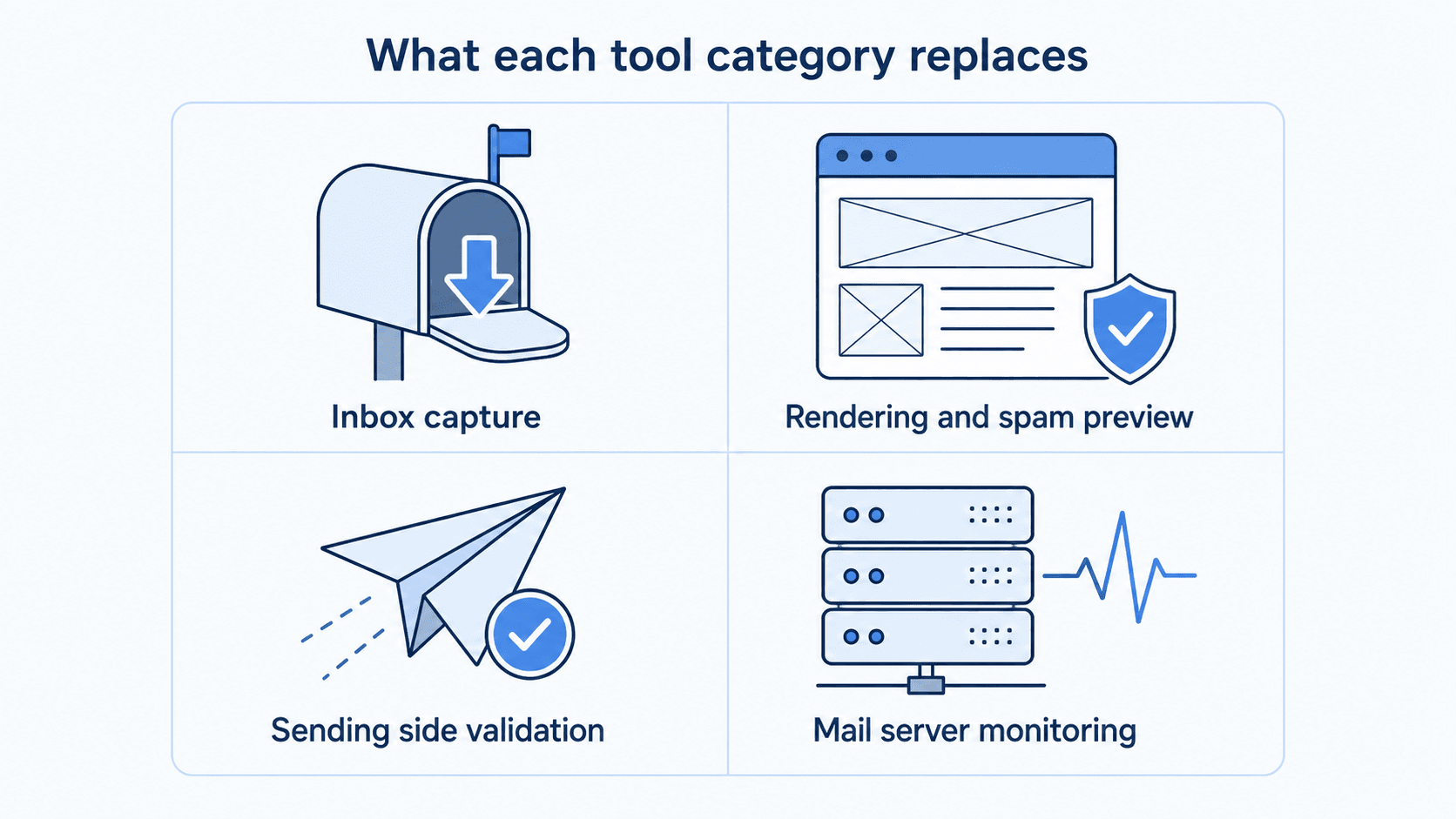
Mailtrap Email Sandbox
Email Sandbox is aimed at teams that want one place to catch and inspect test mail. It gives you multiple inboxes, template testing, email header inspection, HTML and CSS support, a spam checker, QA automation hooks, and both an Email API and SMTP transport. A free plan exists, with paid tiers above it. The gap to note: it does not do SMS testing, so OTP-over-SMS flows need a second tool.
MailSlurp
MailSlurp is the API-first option, and the one that maps most directly onto Mailinator's paid feature set. It provides private and disposable inboxes by API with isolation controls, wait-for and parser helpers, webhooks, and routing automations, plus device previews that check HTML, links, images, and CTA visibility. Email, SMS, and OTP flows run in the same platform, and SDKs cover Java, C#, Node.js, PHP, and Python. MailSlurp publishes tiered monthly pricing on its own pricing page rather than a single flat figure, so check there for current plans and limits.
Litmus
Litmus is not an inbox tool and does not pretend to be. It is a rendering and pre-send QA platform: an email builder, previews across more than 100 clients including dark mode, spam testing against more than 20 filters, accessibility checks, and AMP testing. There is no free plan, which makes it the wrong pick if all you wanted was a throwaway address.
Mailgun
Mailgun sits on the sending side. Alongside delivery it offers email preview across more than 100 devices, deliverability and inbox placement testing for the mail your own account sends, email parsing, and reputation monitoring. This is pre-send testing of your own outgoing mail, not a bulk list-verification service. Plans start free and move to paid tiers. It expects some comfort with code, so treat it as a sending platform with testing features attached rather than a QA sandbox.
Wormly
Wormly answers a different question: is the mail server up? It monitors SMTP, POP3, and IMAP, watches server health, runs DNS lookups and remote ping tests, and checks SSL. There is a free trial rather than an ongoing free plan, with paid monitoring tiers starting once the trial ends. It says nothing about email content, so it complements an inbox tool instead of replacing one.
GMass
GMass is Google-oriented, built around Gmail sending, with an email analyzer that checks SPF, DKIM, and DMARC, plus an extractor, deliverability and inbox placement testing for your own sends, a link checker, and an SMTP tester. The free plan is very limited. If your sending lives in Google Workspace, the analyzer is the useful part.
Mailinator competitors in the public disposable inbox category
Mailinator's closest competitors in the public disposable inbox category include fakemailgenerator.com, emailfake.com, fake-email.pro, and maildrop.cc. Each one hands you a throwaway address with no signup, which is the Mailinator free-tier experience under a different domain, so moving between them changes the hostname and nothing about how the inbox behaves. A directory of the providers we track shows how many domains each one rotates through, which is the number that actually determines whether a signup form catches it.
All four inherit Mailinator's core limitation: the inbox is public, so nothing sensitive belongs in it.
Privacy and compliance limits of public inboxes
Public inbox tools are weaker for sensitive automation for a structural reason, not a missing feature: no login guards the mailbox, so real password resets, personal data, and account mail sent to a public handle are readable by anyone who types it. Private inboxes with isolation controls cut that risk sharply, and platforms built around per-test inbox creation, such as MailSlurp and Email Sandbox, also stop parallel test runs from reading each other's mail.
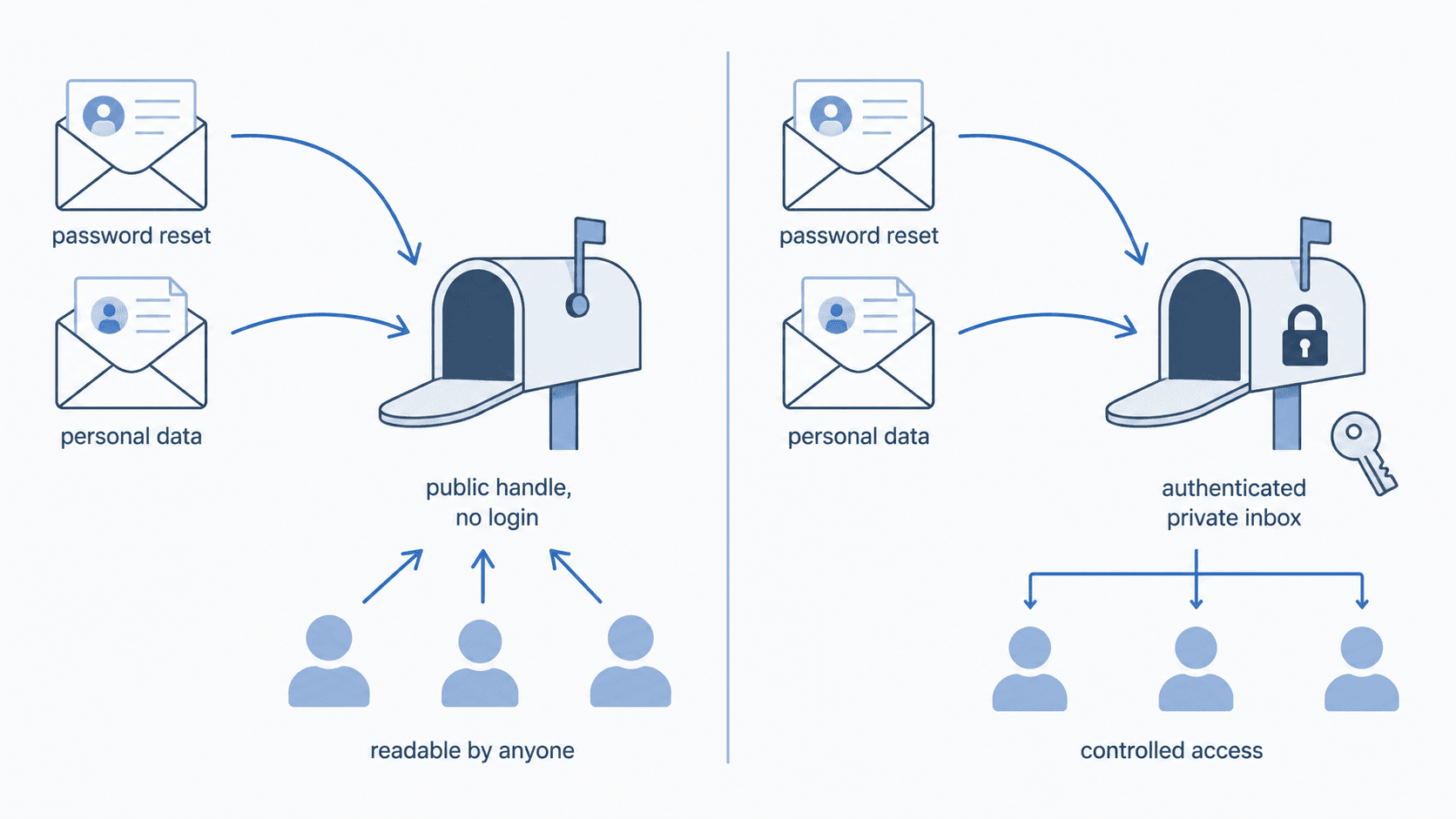
Compliance turns that into a hard requirement. If your test messages can contain health data, HIPAA privacy rules govern where that data may land, and personal data of EU residents falls under the GDPR even in a staging environment. A public test inbox is not a controlled processing location, which is why security and compliance is the criterion that eliminates the whole free-public category for regulated teams.
Mailinator's own answer is similar but not identical: a private domain is available on its free, verified Verified Pro tier, one step above the fully public tier, with paid Business and Enterprise tiers reserved for multiple domains and higher send volume.
How to choose a Mailinator alternative
Work backwards from the flow you are testing, not from the tool list. The flow decides which tool fits: CI tests that read a code or link need a private API inbox, rendering and dark-mode checks need a preview platform, pre-send deliverability checks on your own outgoing mail belong to a sending-side tool, and server uptime is a monitoring question. Regulated data rules out public inboxes at any budget.
- Automated CI tests that read a code or link need private inboxes and an API, which points to MailSlurp or Email Sandbox.
- OTP over SMS as well as email narrows it to a platform that tests both, since Email Sandbox has no SMS testing.
- Rendering, dark mode, and spam-filter checks are Litmus territory, not an inbox problem.
- Deliverability and inbox-placement testing on your own outgoing test sends are a sending-side question, which is where Mailgun and GMass sit; neither replaces list-wide email verification.
- Server uptime questions go to Wormly, which sits alongside whatever inbox tool you pick.
- Regulated data rules out public inboxes entirely, whatever the budget says.
Migration checklist from Mailinator
A phased migration keeps the suite green while you swap the inbox layer. Inventory every Mailinator address first, move one low-risk flow (usually signup confirmation), then migrate auth, billing, and support, and retire the Mailinator handles last. Do not move every test at once.
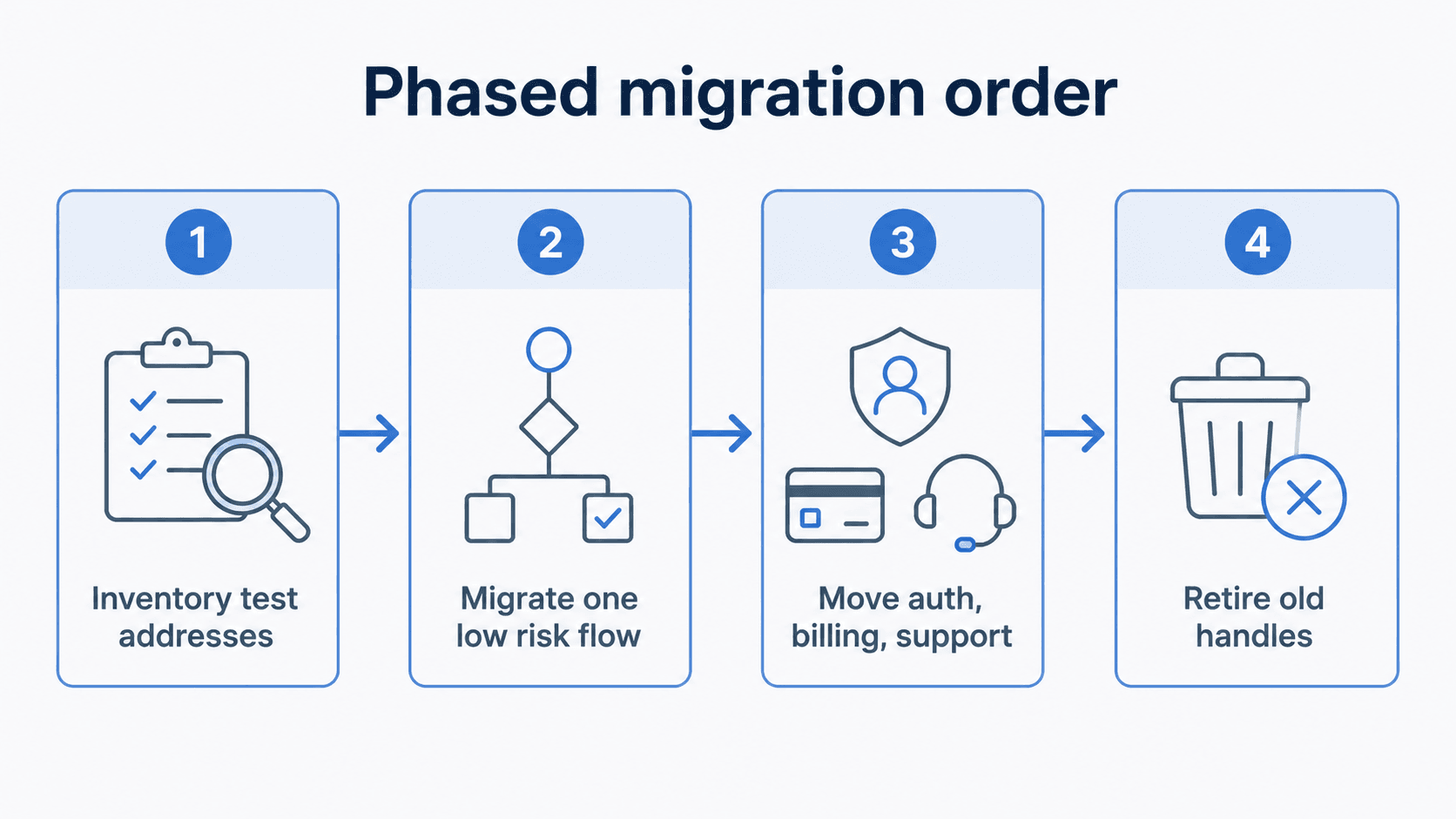
- Inventory every place a Mailinator address appears: test fixtures, CI variables, seed data, and manual QA notes.
- Pick a private API inbox platform (MailSlurp or Email Sandbox) if the goal is replacing the test mailbox itself.
- Move one flow, usually signup confirmation, and replace the handle with an inbox created per test run.
- Replace polling loops with the platform's wait-for helper so tests stop sleeping on arbitrary timers.
- Add webhooks or routing rules where a test needs an action, such as extracting a verification link.
- Migrate auth, billing, and support flows next, since those carry the data you least want in public.
- Set isolation per suite so parallel runs cannot read each other's mail.
- Retire the Mailinator handles last, once nothing references them.
Where email verification fits
Mailinator addresses do not only appear in your test suite, they appear in your signup forms, and test-inbox tools do nothing about that. A disposable address stops working within hours, so it never confirms, never opens anything, and never becomes a user, while the bounce it produces still counts against your sender reputation. That is a list-quality problem, not a QA problem, and it is solved on the other side of the send.
Verification checks whether an address is valid and whether it belongs to a known disposable provider, so you can block or challenge it at signup. BounceCheck is a real-time email verification tool that runs that check individually or in bulk, which means you can confirm an address is reachable without sending to it and reject throwaway domains before they enter the list. Teams that already run automated tests usually wire the same check into their signup path through an email verification API.
Verification is one lever, not the whole picture. It removes invalid and disposable addresses, and it does not repair authentication gaps or low engagement on its own. Run your signup list through BounceCheck before your next send and handle the rest with authentication and list hygiene.
FAQs
What is the best Mailinator alternative for automated testing?
A private API inbox platform. MailSlurp and Mailtrap's Email Sandbox both create isolated inboxes on demand, expose them over an API, and provide wait-for helpers so CI tests can read a verification code without sharing a public handle.
Is there a free alternative to Mailinator?
Yes. Email Sandbox, MailSlurp, and Mailgun offer free plans, GMass has a very limited free plan, and Wormly offers a free trial rather than an ongoing free tier. Free public disposable inbox services such as fakemailgenerator.com, emailfake.com, fake-email.pro, and maildrop.cc need no signup at all, with the same public-inbox trade-off as Mailinator.
Why should I use a Mailinator alternative?
Because the inbox usually outgrows its original purpose. Once a test inbox is part of a release, auth, support, or billing workflow, you need private inboxes, deeper automation, rendering previews, and test isolation, none of which the public tier provides.
What are the privacy concerns with Mailinator?
Public inboxes have no login, so any message sent to a public handle can be read by anyone who types the same handle. That rules out real password resets, personal data, and any regulated data covered by GDPR or HIPAA. A private domain on Mailinator's free, verified Verified Pro tier, or a private inbox platform, is the fix.
What is better than Mailinator for email design and spam testing?
Litmus for rendering, with previews across more than 100 clients including dark mode and spam testing against more than 20 filters. Email Sandbox includes a spam checker and HTML inspection, and Mailgun adds inbox placement testing on the sending side.
How does Mailinator pricing compare to its alternatives?
Mailinator's private-domain feature starts on its free, verified Verified Pro tier, one step above the fully public tier; its paid Business and Enterprise tiers add multiple private domains and higher send volume. Among the alternatives, Email Sandbox, MailSlurp, and Mailgun publish free plans, GMass has a very limited one, Wormly offers a free trial rather than a free plan, and Litmus has none. Paid prices move with plan, volume, and seats, so check each vendor's own pricing page rather than a third-party roundup.
§ Run a signup form?
Keep throwaway addresses out of your list
Check any address or domain against our nightly-updated list of disposable providers — free, no account needed.

BounceCheck Team
The team behind BounceCheck - helping businesses verify emails and improve deliverability.