Microsoft Outlook Bulk Sender Requirements: What Changed in May 2025 and How to Stay Compliant
 BounceCheck Team
Before your next send Find the addresses that will bounce.
Verify an email freeMicrosoft has joined Gmail and Yahoo in the bulk-sender rules club. Effective May 5, 2025, any domain sending more than 5,000 emails per day to Microsoft's consumer mailboxes has to authenticate with SPF, DKIM, and DMARC, or its mail is rejected outright at the SMTP layer. The full rollout is detailed in the Gmail and Yahoo bulk sender requirements post for the 2024 side, but Microsoft's version has its own quirks worth a separate look.
If you already meet Gmail and Yahoo's requirements you are almost certainly fine. If you do not, your mail to Outlook.com, Hotmail.com, Live.com, and MSN.com is now bouncing back with a very specific code most senders have never seen before.
Who counts as a Microsoft bulk sender
Microsoft draws the bulk-sender line at 5,000 emails per day to its consumer domains, the same threshold Gmail uses and roughly where Yahoo lands. The covered properties are Outlook.com, Hotmail.com, Live.com, and MSN.com. Mail to Microsoft 365 business tenants is governed separately. The threshold counts your daily volume across the domain and its subdomains, not per-IP and not per-mailbox, so splitting sends across multiple subdomains will not get you under the line if the parent domain is still pushing 5,000+ a day.
The rules apply even if you outsource sending to a third-party ESP. Authentication is tied to your domain, so SPF, DKIM, and DMARC have to be set up in your DNS regardless of whether the actual SMTP traffic leaves Mailgun, Sendgrid, Klaviyo, or your own MTA. Microsoft's own FAQ is explicit on this point.
The three required authentication standards (SPF, DKIM, DMARC)
The core requirement set is the same triangle Gmail and Yahoo enforce. The exact bar for each:
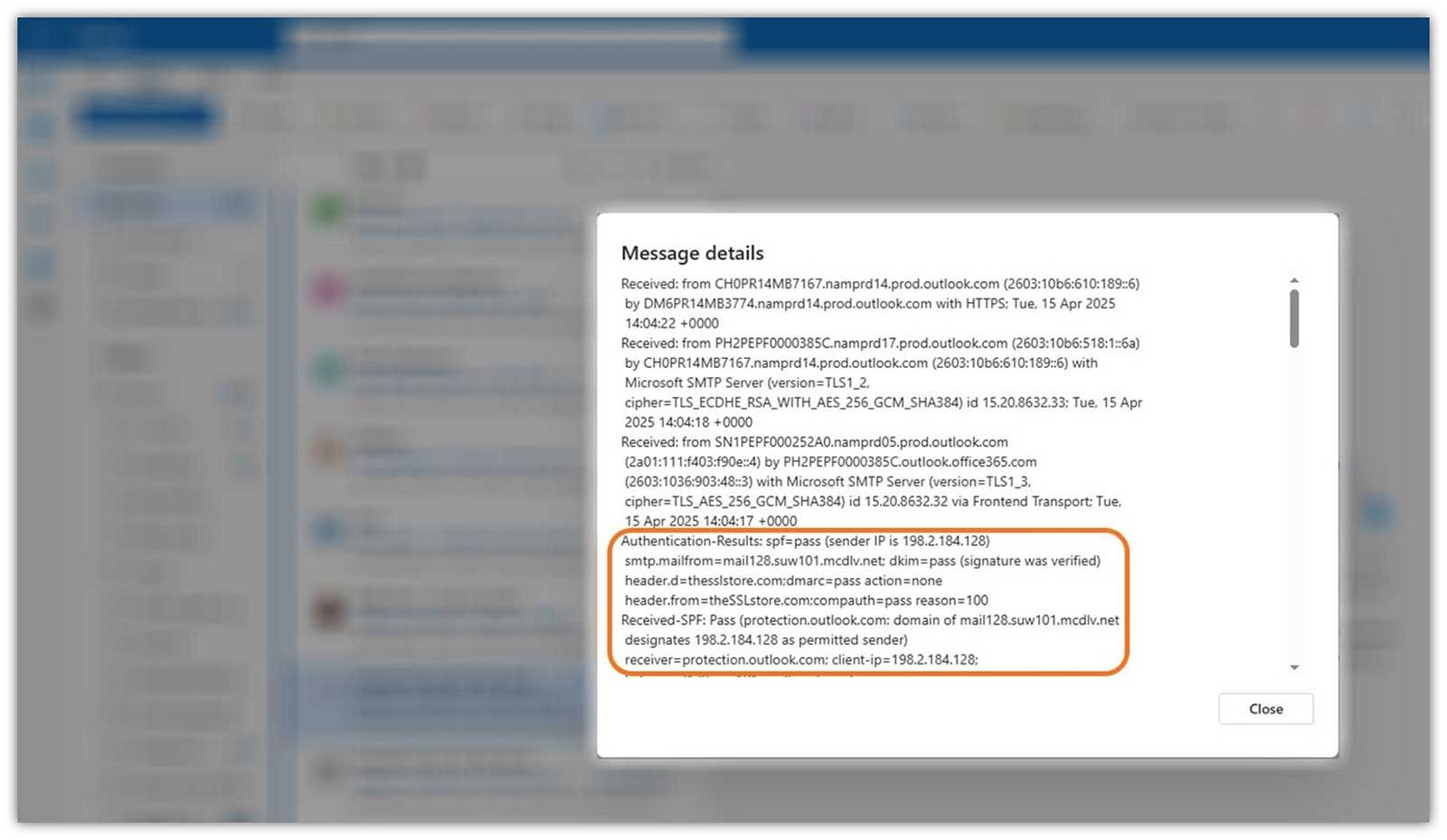
- SPF (Sender Policy Framework): must pass for the sending domain. Your DNS record needs to accurately list every authorized IP or host. Watch the 10-DNS-lookup limit, exceed it and SPF fails silently; flattening tools exist for senders with long include chains.
- DKIM (DomainKeys Identified Mail): must pass to validate message integrity and authenticity. Microsoft supports multiple selectors (selector1, selector2, and so on) so you can isolate reputation across business units or campaigns.
- DMARC (Domain-based Message Authentication, Reporting, and Conformance): publish a record with at least p=none and align with either SPF or DKIM, preferably both. Microsoft sends DMARC aggregate (RUA) reports to the addresses in your record. It does not plan to send forensic (RUF) reports. Microsoft recommends moving gradually from p=none through p=quarantine to p=reject rather than jumping straight to enforcement.
If SPF, DKIM, and DMARC are still unfamiliar territory, Validity's January 2025 DMARC adoption study makes the urgency tangible: 84 percent of From-domains had no DMARC record at all, and of the 16 percent that did, 7.64 percent were invalid. The base rate of unprepared senders is high, and Microsoft is now charging full price for that gap. Microsoft's own email authentication overview walks through the setup details if you want the spec view.
The 550 5.7.515 rejection: what it looks like and what triggers it
Microsoft initially planned to route non-compliant mail to the Junk folder. On April 29, 2025, it changed direction and switched to outright rejection at the SMTP envelope, which started taking effect on May 5. Non-compliant senders now get a very specific bounce string:
550; 5.7.515 Access denied, sending domain [SendingDomain] does not meet the required authentication level.
This is a permanent 5xx rejection, so the message is not retried and never reaches the inbox or the junk folder. If you see 5.7.515 for the first time in your bounce logs after May 2025, the cause is one of the three authentication checks above failing. Safe Senders lists on the recipient side will not bypass this; Microsoft explicitly stated that allowlists are not honored when the underlying authentication is broken.
The specific failure is in the bounce code's surrounding header. View the Authentication-Results header on a delivered message to a healthy mailbox to confirm SPF, DKIM, and DMARC are all passing for your sending domain. A consistent stream of 5.7.515 rejections also drags your overall bounce rate fast; if your bounce rate is climbing, the per-message fix will not stick until the underlying authentication is repaired.
Hygiene practices Microsoft signals next
Four additional practices are strongly recommended but not yet enforced. Validity's read, which matches the general industry expectation, is that these will become required in the next round.

- Compliant P2 (primary) sender addresses: the From or Reply-To address must be valid, reflect the true sending domain, and be capable of receiving replies. A no-reply@ is technically allowed if the domain is fully authenticated (A record, PTR record, the works), but Microsoft expects the mailbox to actually accept mail. Auto-responders count as reply-capable.
- Functional unsubscribe links: a visible, clearly placed opt-out is required in bulk marketing mail. Microsoft supports RFC 8058 one-click unsubscribe but does not yet require it (unlike Gmail and Yahoo). Whatever unsubscribe mechanism you use must be honored immediately.
- List hygiene and bounce management: remove invalid addresses regularly. Industry consensus is monthly or quarterly cleaning. High bounce rates flag your sending practices for deeper Microsoft review, even when each individual message authenticates correctly.
- Transparent mailing practices: accurate subject lines, no deceptive headers, and recipients who actually consented to be on the list. This part overlaps with CAN-SPAM and GDPR, so it is also a legal floor, not just a deliverability one.
Microsoft has been clear that even without a formal requirement, persistent complaints, high bounce rates, or deceptive practices can result in filtering or blocking at the policy layer. The hygiene list is less a future warning than a present-tense soft enforcement.
How Microsoft compares with Gmail and Yahoo
The three sets of bulk-sender rules look the same on the surface and differ on the edges. The differences matter because most senders publish one DNS configuration for all three.
| Requirement | Microsoft (Outlook.com) | Gmail | Yahoo |
|---|---|---|---|
| Bulk volume threshold | 5,000+/day | 5,000+/day | About 5,000+/day, not strictly specified |
| SPF | Required | Required | Required |
| DKIM | Required | Required | Required |
| DMARC policy | Required, p=none permitted | Required, p=none permitted | Required, p=none permitted |
| Spam rate threshold | Not defined | 0.3% or below | 0.3% or below |
| RFC 8058 one-click unsubscribe | Supported, not required | Required | Required |
| Visible unsubscribe link | Required | Required | Required |
| List-Unsubscribe header | Not explicitly required | Required (mailto: + URL) | Required |
| TLS for SMTP | Not mentioned in May 2025 policy | Required | Required |
| Valid HELO/EHLO | Not explicitly required | Required (no dynamic IP, no malformed hostname) | Required |
| From-header alignment | Recommended | Required | Required |
| Enforcement start | May 5, 2025 (rejections) | February 2024 (full) | February 2024 (full) |
The Microsoft column is mostly looser than Gmail's, which means a configuration that passes Gmail almost always passes Microsoft today. The opposite is not true. Setting your sending up to the Gmail bar by default is the simpler long-term play, because Microsoft has openly signaled that the hygiene recommendations are next in line for enforcement.
Your compliance checklist before the next bulk send
The minimum work to stop getting 5.7.515 rejections is short, in order:
- Confirm SPF for your sending domain returns
passin Authentication-Results. Stay under the 10-DNS-lookup limit, flatten if necessary. - Confirm DKIM is signing every message with a key that resolves and validates. Add a second selector if multiple platforms send under the same domain.
- Publish a DMARC record with at least p=none and an
rua=address that you actually read. Ensure From-domain alignment with SPF or DKIM. - Send a test message to an outlook.com mailbox you control. Open the source, view the Authentication-Results header, and verify all three show
pass. Microsoft's sender support portal is the right place to start when results are inconsistent. - Audit your From/Reply-To address. Make sure it accepts mail, even if only via an auto-responder.
- Add a visible unsubscribe link to every bulk send, and honor opt-outs immediately.
- Pre-validate the list with a verifier so inactive Outlook accounts (which can also trigger 552 5.2.2 rejections) are removed before you send.
- Watch your bounce dashboard for any new 5.7.515 spikes. A persistent stream means one of the three authentication legs is still failing intermittently, usually a DNS propagation delay or a missing key on one of multiple sending platforms.
Most organisations that already meet Gmail's bar finish this list in an afternoon. The ones that do not are the same ones whose sender reputation has been quietly eroding for a year, and the new Microsoft rejections will surface that very fast.
Why this is bigger than Outlook
Microsoft, Google, and Yahoo collectively cover the majority of consumer inboxes globally. Aligning three of the four largest providers on a single SPF + DKIM + DMARC floor effectively turns those three protocols into table-stakes for any sender of meaningful volume, with the hygiene list close behind. The 5.7.515 bounce code is just the visible symptom; the underlying shift is that the industry has agreed bulk mail without authentication does not get to ride for free anymore. Sorting authentication out once benefits every mailbox provider you touch, not just Outlook, and protects whatever overall deliverability work you have already invested in.
§ Before your next send
Find the addresses that will bounce
Verify a single address free, or upload a CSV — the free plan includes 50 checks a month, no card needed.

BounceCheck Team
The team behind BounceCheck - helping businesses verify emails and improve deliverability.

