421 4.7.28 Gmail Rate Limited: What It Means and How to Fix It
 BounceCheck Team
Before your next send Find the addresses that will bounce.
Verify an email freeA 421 4.7.28 response means Gmail has temporarily rate limited one of your sending identities. That identity could be your IP address, an IP netblock, your SPF domain, your DKIM domain, or even a link domain inside the message. It is not a judgment on your content. Gmail defers the message and expects your server to retry, so pause, confirm authentication is intact, and resume at a fraction of normal volume. Keep sending at full volume through the block, and the deferral tends to run longer, sometimes long enough to harden into the permanent 550 5.7.28 error.
What 421 4.7.28 means
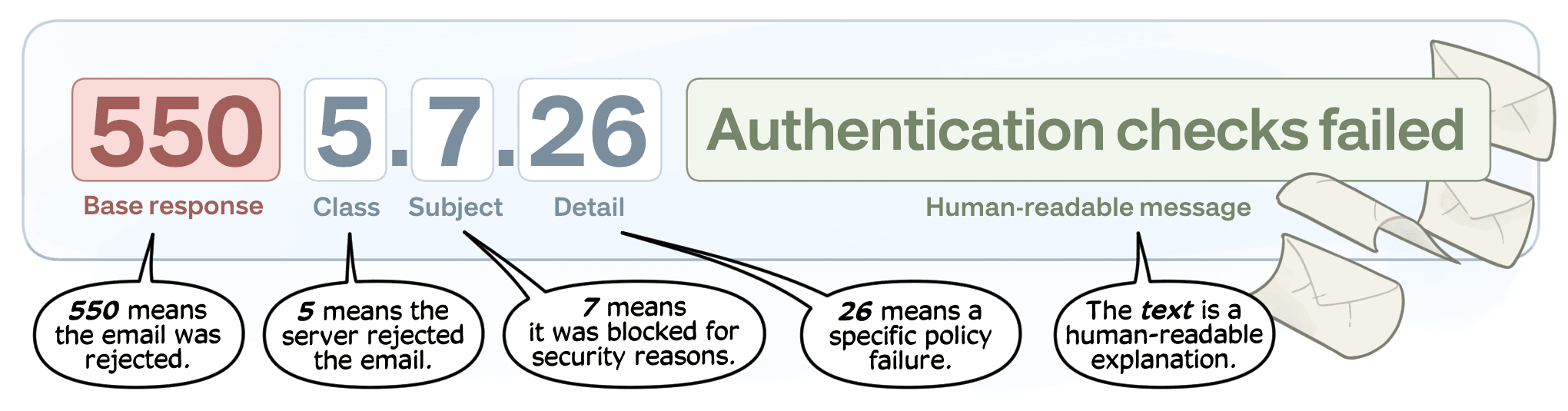
A 421 is an SMTP status code for a temporary, connection-level failure. The receiving server refuses the message for now but tells the sender to try again. The extended code 4.7.28 narrows that down to Gmail's own classification for an unusual rate of mail from a given sending identity. It's a policy-driven throttle, not a spam-filter verdict on your subject line or copy.
Google states this directly in its own documentation: "When you exceed your quota, Gmail typically rejects messages with SMTP error code 4.7.28." That's a volume and reputation signal. It sits apart from the reputation-based 5.7.1 deferral, which flags a sender whose bounce rate, spam complaints, or engagement have eroded trust over time. Rebuilding trust after a 5.7.1 reputation block takes sustained behavioral change. A 4.7.28 rate limit clears once volume drops, which is a shorter, more mechanical fix.
The seven identities Gmail can rate-limit (IP, IP netblock, SPF domain, DKIM domain, link domain, and more)
Google Workspace's own SMTP error reference lists seven distinct 421 4.7.28 message variants, and each one names a different entity Gmail is tracking:
| Identity Gmail is watching | What triggers the throttle | Why it matters |
|---|---|---|
| General unusual rate | Aggregate mail volume, before Gmail ties it to one identity | Often the first sign a spike is building |
| Sending IP address | Volume from a single IP | The classic per-IP throttle |
| IP netblock | Volume across a shared range of IPs | Other tenants on the block can drag you into it |
| SPF domain | Your Return-Path (bounce) domain | A shared ESP SPF domain can throttle every customer using it, not just the one sending too fast |
| DKIM domain | The signing domain in your DKIM-Signature header, and a message can carry more than one | Gmail doesn't disclose which signature tripped the limit |
| Link domain (URL domain) | A domain found inside a link in the message body | A bad link domain can throttle mail that's otherwise clean |
| Duplicate Message-ID | Reused Message-ID headers | Reads as broken retry logic or spam tooling |
Every one of these variants routes back to the same page: Google's Email sender guidelines.
This is also why switching sending IPs to dodge a rate limit often fails and can make things worse. Most posts about this error treat it as a single IP-level problem. But if Gmail's throttle is riding on your SPF domain or DKIM domain rather than your IP, a new IP still carries the same domain and signature. The identity Gmail flagged hasn't changed. Gmail also correlates sending infrastructure, and hopping IPs mid-block reads as an evasion attempt, which is its own spam signal.
Why this happens (volume spikes, poor reputation, shared IP/domain contamination)
The most common trigger is a sudden jump in volume. A sender jumping from 100 messages a day to 10,000 overnight, with no sending history at that scale, is the pattern deliverability research flags as a common trigger. Google's own guidance is narrower: it warns that suddenly doubling a previously sent volume, without a history of sending at that scale, can trigger rate limiting or reputation drops. Gmail and Yahoo Sender Requirements already puts a hard line at 5,000 messages a day, but you don't have to cross that bulk threshold to get throttled.
A documented case on Microsoft's community forum makes that point directly. A sender bcc'ing roughly 160 recipients, about 56 of them at Gmail, through Microsoft 365 was well under the bulk threshold. Still, the sender hit a 421 4.7.28 error citing an unusual rate from their SPF domain, and it recurred roughly every other mailing. SPF, DKIM, and DMARC all passed checks in MXToolbox and Gmail Postmaster Tools the entire time. Rate limiting on the SPF domain identity isn't reserved for bulk senders. A small sender sharing an SPF domain with other tenants can trip it too.
Poor reputation compounds the risk. Google recommends keeping your Postmaster Tools spam rate below 0.10% and treats 0.30% or higher as a hard warning sign. A history of hard bounces or spam-trap hits pushes you toward that line faster than volume alone. Shared-IP and shared-domain contamination adds a third path in. Google's guidance notes that on a shared IP, the sending quota applies to the whole IP, so one abusive tenant can throttle every domain sending from it. The same is true of a shared ESP-owned SPF or DKIM domain. A block against it can throttle every other customer, not only the one who caused it.
How to fix 421 4.7.28: pause, verify authentication, resume at reduced volume
- Stop sending immediately: Google's official minimum is a 10-minute pause before retrying. In practice, pausing for several hours to a full day clears more of the backlog before you resume.
- Verify authentication: confirm SPF, DKIM, and DMARC all still pass. The block message doesn't always specify which identity triggered it, so assume all three quotas (IP, DKIM, SPF) may be affected.
- Check your reputation signals: look at Google Postmaster Tools for spam rate and IP or domain reputation, and pull any recent hard bounces out of the list before you resume.
- Resume from a single connection first: add connections one at a time rather than reopening every sending thread at once, which is Google's own recommended recovery pattern.
- Cut volume to recently-engaged recipients: resume at roughly 10 to 20% of your normal send volume, and step it back up over one to two weeks rather than returning to full volume, following the same gradual approach used to warm up the domain properly from a cold start.
The step that trips people up most is the last one. Continuing to send at full volume while you're rate limited doesn't wait the block out. It extends it, because Gmail keeps reading the same excessive rate from the same identity. The correct first move isn't patience at full volume; it's cutting to the recipients who've opened or clicked recently and rebuilding from there. If your list is driving the bounce and complaint signals behind the throttle, running it through email verification before you resume helps. It removes dead addresses that would otherwise reignite the same reputation problem on the way back up.
How long a Gmail rate limit lasts
A rate limit typically clears in 24 to 48 hours if you stop sending and let it lapse. That window isn't fixed. It extends every time you keep pushing volume through it, since Gmail's throttle measures an ongoing rate rather than counting down a timer. Google's documented minimum pause is 10 minutes before you attempt to resume, but that's a floor for retrying the connection, not a guarantee the limit has lifted. Senders with heavier or more sustained volume issues should expect the fuller 24 to 48 hour range. It can run longer still if reputation problems, rather than a one-off spike, are behind it.
421 4.7.28 vs 550 5.7.28: when a deferral becomes a hard block
| 421 4.7.28 | 550 5.7.28 | |
|---|---|---|
| Type | Temporary deferral (4xx) | Permanent failure (5xx) |
| What it does | Delays acceptance and queues the message for retry | Rejects the message outright |
| What it signals | Unusual rate from a sending identity right now | Sustained unusual rate Gmail has stopped tolerating |
| Recovery | Pause, verify authentication, resume gradually | Requires resolving the underlying reputation issue before Gmail accepts mail again |
A 421 is Gmail's way of saying "not right now." The message stays queued on your sending server, which retries periodically before eventually giving up and logging it as undeliverable. That queuing behavior matters. A quiet inbox with no visible bounce yet doesn't mean delivery is fine; it can mean the message is still sitting in a retry loop. A 550 5.7.28 is the same underlying signal (an unusual rate of unsolicited mail) but escalated to a hard rejection instead of a deferral. In practice, a 421 4.7.28 that keeps recurring across multiple sends is Gmail warning you that the identity behind it is trending toward 550 5.7.28 territory. Treating repeated deferrals as background noise is how senders end up there.
How to prevent 421 4.7.28 from recurring
- Grow sending volume in stages, not jumps, and give Gmail a sending history at each level before pushing higher, mirroring how email warmup tools ramp accounts.
- Watch Google Postmaster Tools continuously, not just after an error, so a rising spam rate or dropping domain reputation shows up before it triggers a throttle.
- Separate mail streams by purpose (transactional, marketing, cold outreach), so a problem in one stream doesn't pull down the SPF or DKIM domain shared with the others.
- Know your shared infrastructure. If your ESP puts your SPF domain, DKIM domain, or IP on a range shared with other customers, their sending behavior is now part of your risk.
- Keep the list itself clean. A rising bounce rate is one of the fastest ways to push Postmaster Tools spam-rate metrics toward the 0.30% danger line. Reducing your bounce rate before volume increases is cheaper than recovering from a throttle after the fact.
FAQs
What does Gmail mean by "unusual rate of unsolicited mail"?
It means Gmail detected mail from one of your sending identities (IP, IP netblock, SPF domain, DKIM domain, or link domain) arriving faster than its history supports. It isn't a statement about spam content specifically. It's a volume and pattern signal, the same underlying condition behind both the temporary 421 4.7.28 deferral and the permanent 550 5.7.28 block.
Does switching to a new sending IP fix 421 4.7.28?
Rarely, and it can make things worse. If the throttle is bound to your SPF domain or DKIM domain rather than the IP, a new IP still carries the same domain and signature. Nothing Gmail is tracking has changed. Gmail also correlates infrastructure changes, and swapping IPs mid-block can itself read as an evasion pattern.
Can a low-volume sender get hit with 421 4.7.28?
Yes. A documented case involved a sender bcc'ing roughly 160 recipients, well under Gmail's 5,000-messages-a-day bulk threshold. That sender still tripped an SPF-domain rate limit repeatedly, despite SPF, DKIM, and DMARC all passing. Rate limiting tracks a rate of change and shared-domain exposure, not just absolute volume.
What's the first thing to check when I see 421 4.7.28?
Stop sending, then confirm SPF, DKIM, and DMARC are all passing, since Gmail's error message doesn't always specify which identity triggered the limit. From there, check Google Postmaster Tools for spam rate and reputation before you resume at reduced volume.
How is 421 4.7.28 different from 421 4.7.0?
4.7.28 specifically flags a rate or volume problem tied to a sending identity. 4.7.0 is a broader temporary policy code that can cover other issues, such as missing PTR records, authentication problems, or general reputation concerns unrelated to sending rate.
§ Before your next send
Find the addresses that will bounce
Verify a single address free, or upload a CSV — the free plan includes 50 checks a month, no card needed.

BounceCheck Team
The team behind BounceCheck - helping businesses verify emails and improve deliverability.