DKIM Record Example: Format, Tags, and Real Samples
 BounceCheck Team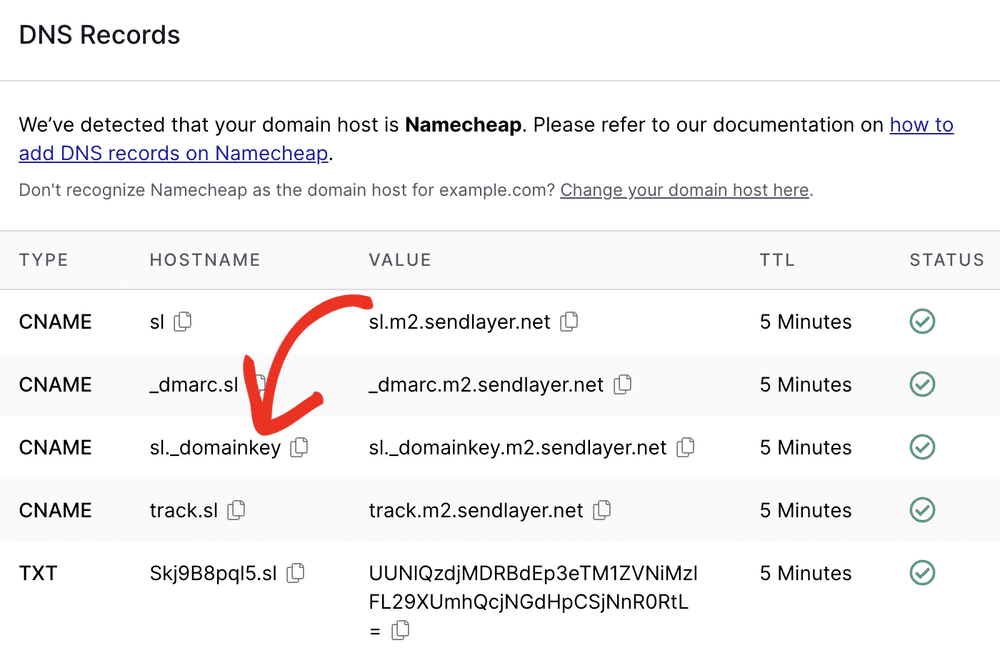
Before your next send Find the addresses that will bounce.
Verify an email freeA DKIM record is a single DNS TXT record that publishes the public half of the key your mail server uses to sign outgoing messages. It lives at a specific hostname, <selector>._domainkey.<yourdomain>, and its value almost always starts with v=DKIM1; k=rsa; p= followed by a long base64 public key. Here is what one actually looks like:
Name:  google._domainkey.example.com
Type:  TXT
Value: v=DKIM1; k=rsa; p=MIIBIjANBgkqhkiG9w0BAQEFAAOCAQ8AMIIBCgKCAQEA2Xd... (truncated base64 key)
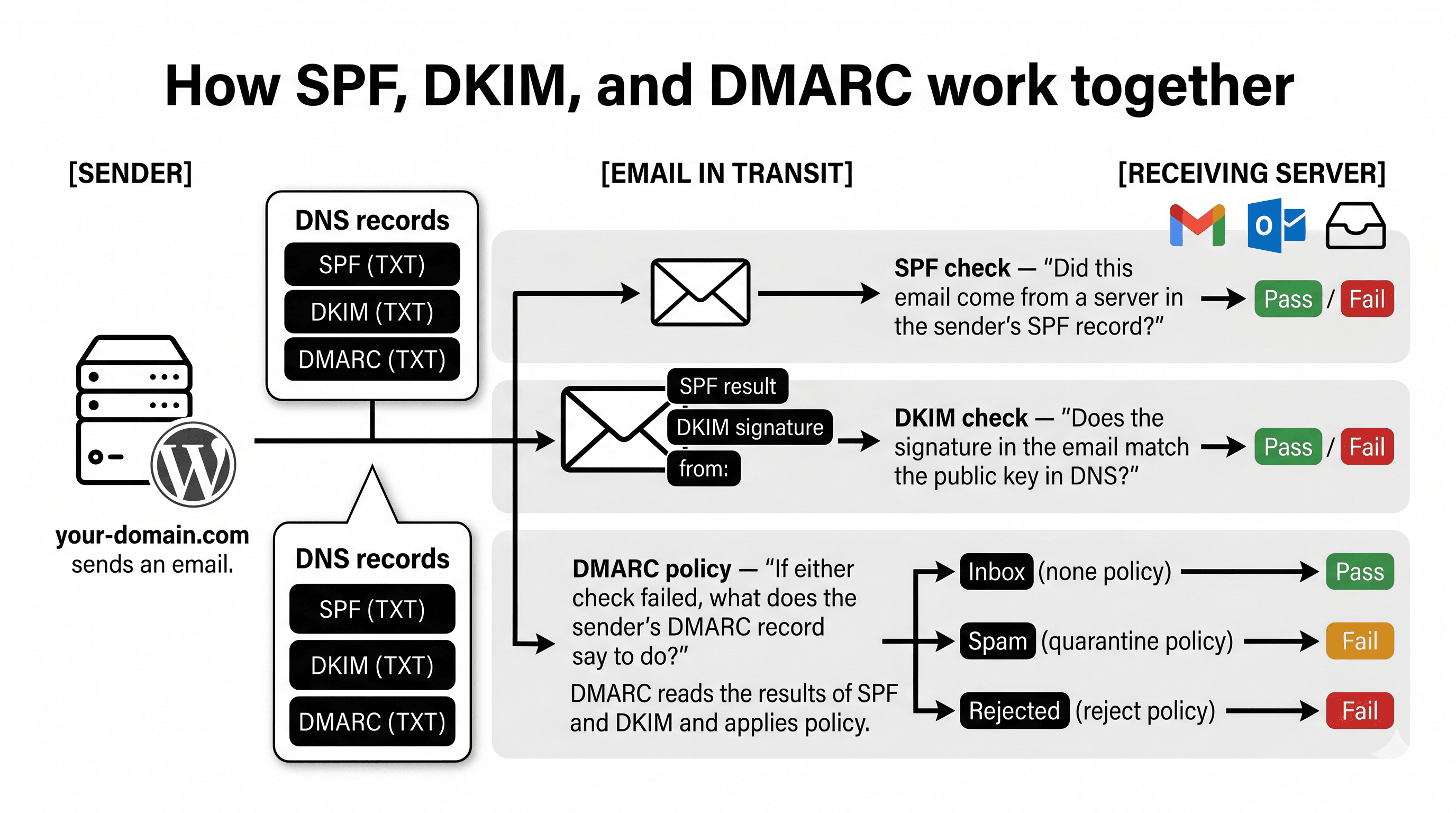
That is the whole thing: a hostname, a record type of TXT, and a value made of semicolon-separated tags. Everything else in this guide is just those three parts explained in detail, with real examples you can copy the shape of. DKIM is one of the three records that authenticate your mail, and it works alongside SPF and DMARC to prove a message genuinely came from your domain and was not altered in transit.
DKIM record format: name, type, and value
A DKIM record has three parts: a name of <selector>._domainkey.<domain>, a type of TXT (sometimes CNAME), and a value of semicolon-separated tag=value pairs that begins with v=DKIM1 and ends with the base64 public key in p=. Get all three right and the record resolves; get one wrong and receivers cannot find or read your key.
- Record name (host): always
<selector>._domainkey.<domain>. The literal string_domainkeyis required and is what tells a verifier this is a DKIM key. The selector is a label you choose, such asgoogle,selector1, ork1. - Record type:
TXT. Some providers instead give you aCNAMEthat points at a key they host for you, covered further down. - Record value: a set of
tag=valuepairs separated by semicolons. The version tag comes first, the public key comes last, and a few optional tags can sit in between.
When you enter the record at your DNS host, some panels ask only for the part before your domain (google._domainkey) because they append the domain automatically, while others want the fully qualified name. Both produce the same record. If your keys sit on a provider such as Microsoft 365, you will often publish the record type as a CNAME rather than a TXT, which changes the value but not the location. Once DKIM is in place, pair it with SPF and a policy record from BounceCheck's DMARC record generator to complete your domain's authentication setup.
The DKIM record tags explained
A DKIM record value is built from tag=value pairs separated by semicolons. Only two are mandatory in practice: v (version, always DKIM1) and p (the base64 public key). Optional tags such as k, t, h, and s set the key type and scope. The full set of tags is defined in the DKIM standard, RFC 6376.
| Tag | Meaning | Example |
|---|---|---|
v | Version. Must be the first tag and must read DKIM1. | v=DKIM1 |
k | Key type. Defaults to rsa; ed25519 is the modern alternative. | k=rsa |
p | Public key, base64 encoded. An empty p= means the key has been revoked. | p=MIGfMA0G... |
t | Flags. t=y marks the domain as testing; t=s stops subdomains from using the key. | t=y |
h | Acceptable hash algorithms for the signature. | h=sha256 |
s | Service type the key is valid for. email or * (any). | s=email |
The v and p tags carry almost all the weight: the version tells a receiver how to parse the record, and the public key is the material it uses to check the signature. The optional tags let you scope or throttle a key, but many production records ship with just v, k, and p. The full tag definitions live in RFC 6376, the standard that defines DKIM. This is the same tag-based value format that an SPF record's syntax uses, though SPF packs its logic into mechanisms and qualifiers rather than a public key.
Real DKIM record examples
A real DKIM record always keeps the same shape: the name <selector>._domainkey.<domain>, the type TXT, and a value of v=DKIM1; k=rsa; p=<key>. Only the selector and the public key change between providers. The three examples below show a Google Workspace record, a generic ESP record, and a record that carries optional tags.
Google Workspace (selector "google")
Name:  google._domainkey.example.com
Type:  TXT
Value: v=DKIM1; k=rsa; p=MIIBIjANBgkqhkiG9w0BAQEFAAOCAQ8AMIIBCgKCAQEA2Xd8n7bF... (2048-bit key, truncated)
Google Workspace generates a 2048-bit key and uses the selector google, so the record name is always google._domainkey followed by your domain.
Generic ESP (selector "selector1")
Name:  selector1._domainkey.example.com
Type:  TXT
Value: v=DKIM1; k=rsa; p=MIGfMA0GCSqGSIb3DQEBAQUAA4GNADCBiQKBgQC5f... (1024-bit key, truncated)
Selectors like selector1 and selector2 are common when a provider rotates between two keys. This example uses a shorter 1024-bit key, which fits inside a single DNS string.
Record with optional tags (selector "dkim")
Name:  dkim._domainkey.example.com
Type:  TXT
Value: v=DKIM1; k=rsa; t=y; s=email; p=MIGfMA0GCSqGSIb3DQEBAQUAA4GNADCBiQ... (truncated)
Here t=y flags the key as being in test mode and s=email restricts it to email use. You would remove t=y once you confirm signing works, because receivers may treat a testing key more leniently.
What is a DKIM selector?
A selector is the label at the front of the record name, and it exists so one domain can publish more than one DKIM key at once. Your mail server picks which key it signs with, then names that selector in the message's DKIM-Signature header. Because the selector is written into every signed message, a receiver knows exactly which record to look up.
Selectors are also how key rotation works without downtime: you publish a new key under a fresh selector, switch your signer to it, and retire the old record later. Providers set their own selector names, which is why you see google for Google Workspace, selector1 and selector2 for Microsoft 365, and short labels like k1 or s1 from various sending platforms.
How DKIM verification works
DKIM verification is a public-key signature check. Your server signs each message with the private key, and the receiver uses the matching public key from DNS to confirm the signature. The steps run in order:
- Your mail server hashes the message body and selected headers, signs that hash with your private key, and adds a
DKIM-Signatureheader that names your domain (d=), the selector (s=), and the signature itself (b=). - The receiving server reads the
d=ands=values and builds the lookup name<selector>._domainkey.<domain>. - It queries DNS for that TXT record and pulls the base64 public key out of the
p=tag. - It recomputes the hash of the received message and checks it against the decrypted signature. If they match, DKIM passes and the receiver knows the message was not altered after signing.
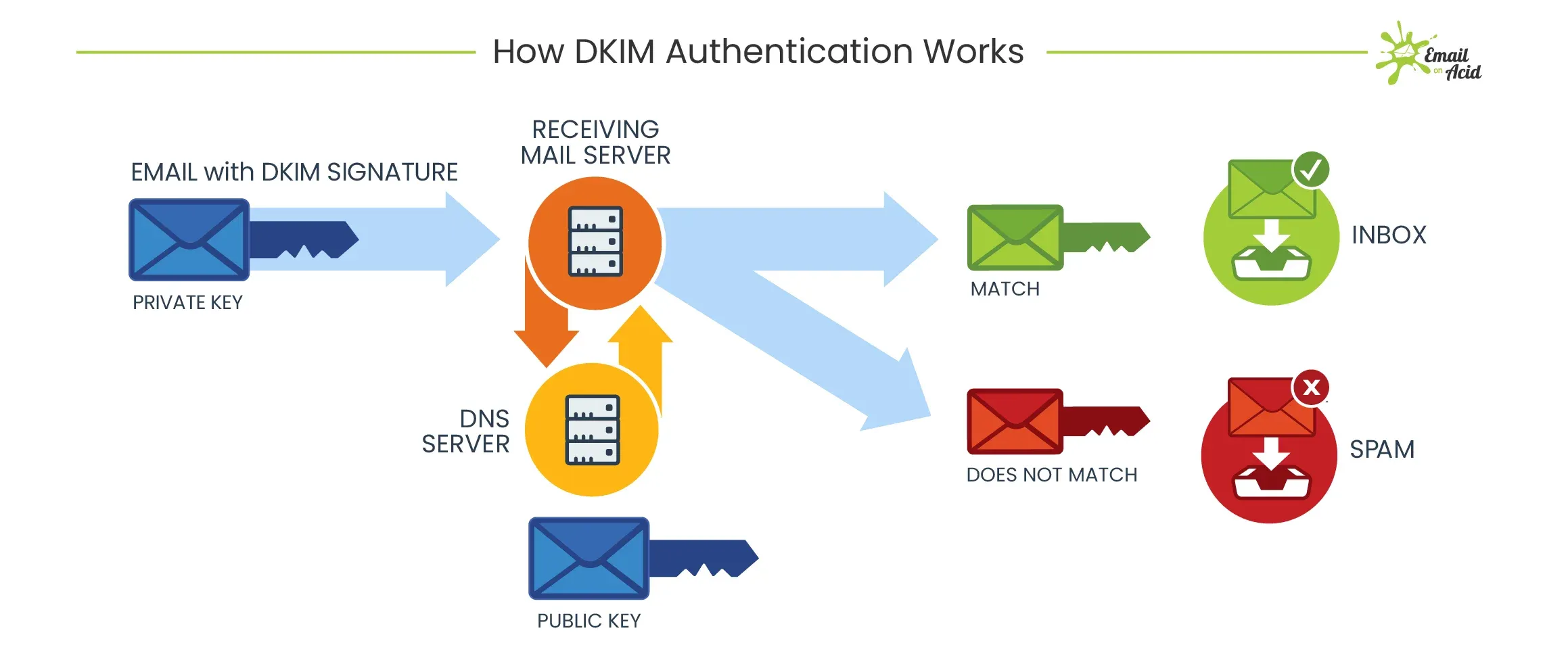
A pass means two things at once: the domain in the signature vouches for the message, and the content covered by the signature arrived unchanged. If the lookup fails or the key is malformed, verification can return a temporary error instead of a clean fail, which is a common and fixable DKIM temperror situation.
Common DKIM record formatting mistakes
Most broken DKIM records fail for mechanical reasons, not because the key itself is wrong. The four most common faults are splitting the long key incorrectly, pasting in stray characters, mixing up CNAME and TXT, and repeating the domain in the record name. Watch for these:
- Splitting the long key incorrectly: a 2048-bit
p=value is longer than the 255-character limit for a single DNS string, so it must be broken into several quoted chunks that DNS concatenates. Let your DNS host split it, and do not insert spaces or line breaks inside the base64. - Trailing spaces or stray characters: a space, quote, or newline pasted into the middle of the key changes it and the signature check fails. Copy the value cleanly.
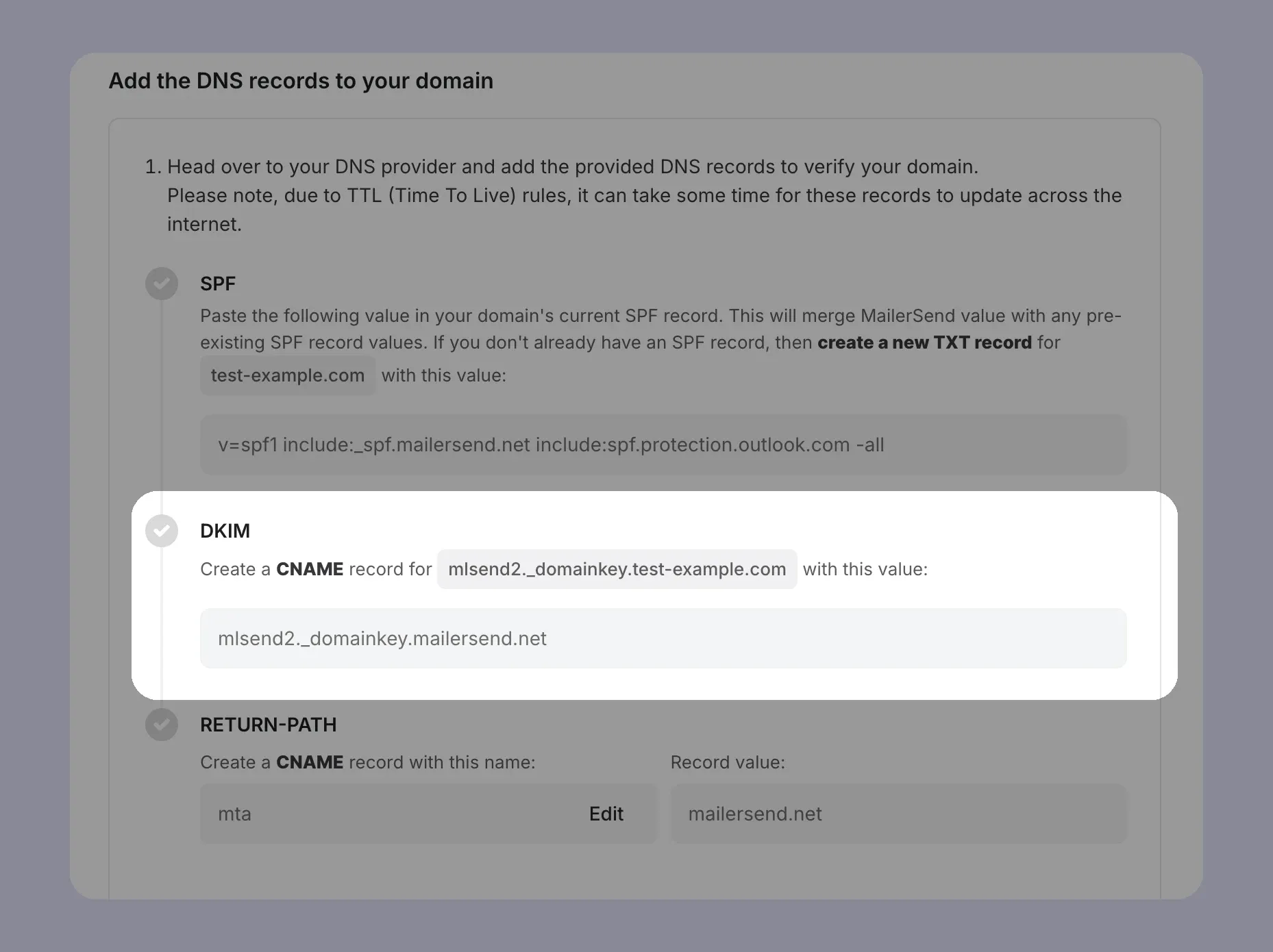
- Publishing a CNAME as a TXT (or both): providers like Microsoft 365 and Amazon SES have you publish a CNAME at the selector name that points to a key they host. Publish it exactly as given, and never keep both a CNAME and a TXT at the same selector.
- Repeating the domain in the record name: entering
selector._domainkey.example.comin a panel that already appends your domain producesselector._domainkey.example.com.example.com, which will not resolve.
How to check your published DKIM record
To check a published DKIM record, query its exact selector name as a TXT record: run dig TXT google._domainkey.example.com (or nslookup -type=TXT on Windows), substituting your own selector and domain. A correct response returns the full v=DKIM1; k=rsa; p=... value reassembled as a single string. If nothing comes back, the record was never saved or was overwritten.
Because DKIM lives in a TXT record, the same techniques that apply to any TXT record lookup work here, and a browser-based checker is handy when you do not have shell access. If the key you see does not match the one your provider issued, re-copy the public value from your provider and republish it.
FAQs
What does a DKIM record look like?
A DKIM record is a DNS TXT record at <selector>._domainkey.<domain> whose value reads v=DKIM1; k=rsa; p= followed by a long base64 public key. For example, Google Workspace publishes it at google._domainkey.yourdomain.com.
What is the DKIM public key format?
The p= tag holds a base64-encoded RSA public key, typically 1024 or 2048 bits, with 2048 recommended. An empty p= value signals that the key has been revoked and should no longer be used.
What are DKIM selectors?
A selector is the label at the start of the record name that lets one domain host several DKIM keys at once. Your server writes the active selector into each message's DKIM-Signature header so receivers know which record to fetch.
How does a receiving server verify DKIM?
It reads the domain and selector from the message's signature header, looks up the public key at selector._domainkey.domain, recomputes the message hash, and compares it to the signature. A match means the message is authenticated and unaltered.
How do I create a DKIM record?
Your email provider generates the key pair and gives you the public value; you publish it as a TXT (or CNAME) record at the selector name in your DNS. A DKIM generator produces a correctly formatted record you can paste directly into your DNS host.
§ Before your next send
Find the addresses that will bounce
Verify a single address free, or upload a CSV — the free plan includes 50 checks a month, no card needed.

BounceCheck Team
The team behind BounceCheck - helping businesses verify emails and improve deliverability.