SPF Syntax: Mechanisms, Qualifiers, and Record Rules Explained
 BounceCheck Team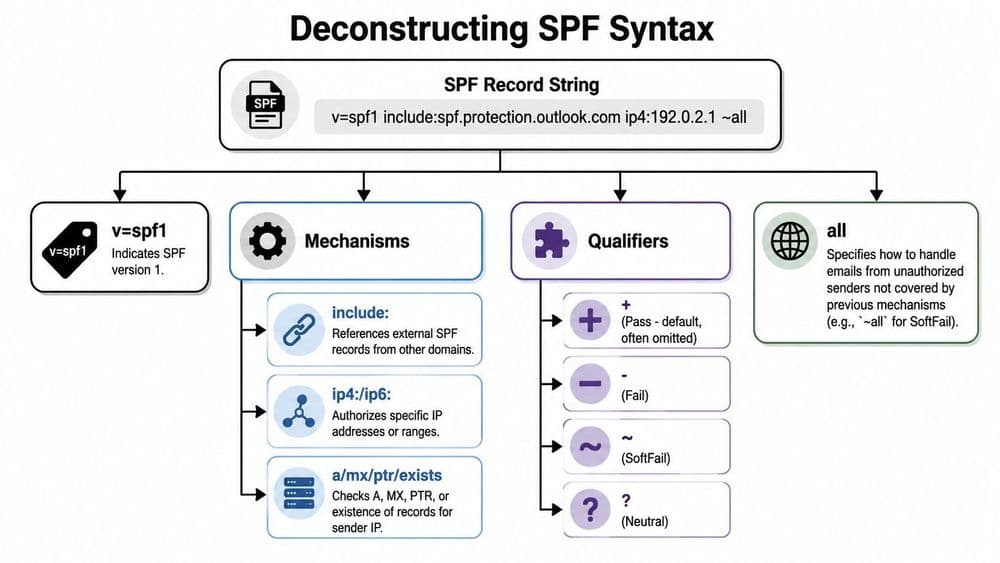
Before your next send Find the addresses that will bounce.
Verify an email freeSPF syntax is the set of rules that governs how a Sender Policy Framework record is written inside a DNS TXT record. A valid record starts with the version tag v=spf1, lists one or more mechanisms that describe which servers may send mail for the domain, attaches a qualifier to each mechanism that says what to do on a match, and ends with an all mechanism that catches everything else. A typical record looks like this:
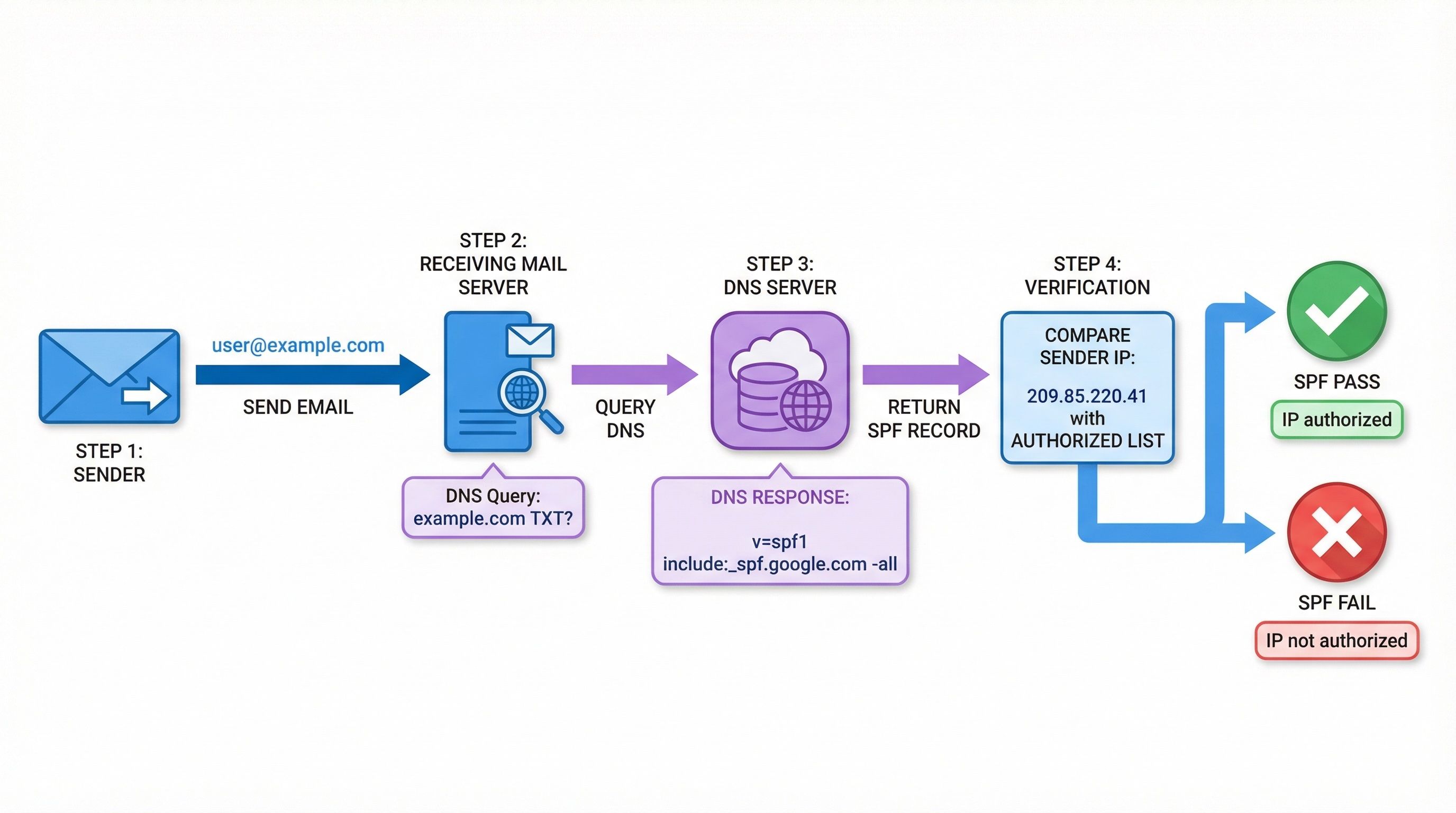
v=spf1 include:_spf.google.com ip4:198.51.100.10 ~all
Everything a receiving server needs to authorize your mail is packed into that one line, so a single misplaced token can silently break authentication. This guide covers every mechanism, every qualifier, the two modifiers, the 10 DNS lookup limit, and the one record per domain rule, following RFC 7208, the specification that defines SPF.
SPF record format and structure
An SPF record is a single plain-text string published as a DNS TXT record on the domain you send from, and it is built from four kinds of terms: a version tag, mechanisms, qualifiers, and modifiers. A receiving server reads the string left to right, and each term type has a distinct job in deciding whether a sending server is authorized. The four term types are:
- Version tag: every record must begin with
v=spf1. A TXT record that does not start with this is not treated as an SPF record. - Mechanisms: the tests a receiving server runs against the sending IP address, such as
ip4,a,mx, andinclude. - Qualifiers: the single-character prefix on a mechanism (
+,-,~, or?) that sets the result when that mechanism matches. - Modifiers: optional name=value terms,
redirectandexp, that change how the whole record is processed.
Terms are separated by single spaces and the record is not case sensitive. The full string, including the surrounding quotes a DNS provider adds, must fit within the 255-character limit of a single TXT character string. Rather than assembling the string by hand, you can generate an SPF record that follows these rules automatically.
SPF mechanisms explained
SPF defines eight mechanisms: all, a, mx, ip4, ip6, include, exists, and the deprecated ptr. Mechanisms are the building blocks that tell a receiving server which hosts are allowed to send mail for your domain. When SPF is checked, the server evaluates each mechanism in order against the connecting IP address and stops at the first one that matches.
| Mechanism | What it authorizes |
|---|---|
all | Matches every sender. Always placed last as the catch-all default result. |
a | Matches if the sending IP is one of the domain's A or AAAA (address) records. |
mx | Matches if the sending IP belongs to one of the domain's MX (mail exchanger) hosts. |
ip4 | Matches a specific IPv4 address or CIDR range, for example ip4:198.51.100.0/24. |
ip6 | Matches a specific IPv6 address or range. |
include | Authorizes another domain's SPF record, for example include:_spf.google.com. Used to add a provider's sending servers. |
exists | Matches if a DNS lookup on a constructed domain name returns any A record. Used for advanced, dynamic policies. |
ptr | Matches by reverse DNS on the sending IP. Deprecated by RFC 7208 because it is slow and unreliable, so avoid it. |
The ip4 and ip6 mechanisms name addresses directly and are the cheapest to evaluate. The a, mx, include, exists, and ptr mechanisms all require the receiving server to perform additional DNS lookups, which is why they are governed by the limit described below. Because ptr is deprecated, treat the working set as the other seven.
SPF qualifiers
SPF has four qualifiers that set the result a receiving server returns when a mechanism matches the sending IP: + (pass), - (fail), ~ (softfail), and ? (neutral). Every mechanism carries one, and if you write a mechanism with no prefix, the qualifier defaults to + (pass).
| Qualifier | Result | Meaning |
|---|---|---|
+ | Pass | The sender is authorized. This is the default, so +mx and mx are identical. |
- | Fail | The sender is not authorized. -all is a hardfail and tells receivers to reject unauthorized mail. |
~ | Softfail | The sender is probably not authorized. ~all asks receivers to accept but mark the message, usually to spam. |
? | Neutral | The record makes no assertion about the sender. Treated much like no SPF policy at all. |
The qualifier on your closing all mechanism is the most consequential choice in the whole record, because it decides how every source you did not list is handled. Choosing between ~all and -all is a deliberate tradeoff between blocking spoofed mail and risking false rejections during a migration, which is covered in depth in the guide to softfail and hardfail. Using +all authorizes the entire internet to send as your domain and should never be published.
SPF modifiers: redirect and exp
SPF defines two modifiers, redirect and exp. Modifiers are optional name=value terms that apply to the record as a whole rather than to a single IP test.
redirect hands off evaluation to another domain's SPF record, for example redirect=_spf.example.com. It is useful when many domains should share one centrally managed policy. Unlike include, a redirect replaces your record entirely, so it only takes effect when no mechanism has matched and there is no all term.
exp points to a domain whose TXT record holds an explanation string that a receiving server can return to the sender when mail fails SPF. It affects the bounce message only, not the pass or fail decision, and is rarely used in practice.
The 10 DNS lookup limit
SPF caps the number of DNS-querying terms a receiving server will evaluate at 10 per check. This limit exists to stop a single message from triggering an unbounded chain of DNS lookups. If evaluating your record requires more than 10 lookups, the result is a PermError and SPF is treated as broken, which can hurt delivery and DMARC alignment.
These terms each consume one or more of your 10 lookups:
include,a,mx,exists,ptr, and theredirectmodifier.
These terms do not count toward the limit because they require no DNS query:
ip4,ip6, andall.
The catch is that an include counts every lookup inside the record it points to, so a few provider includes can quietly exceed 10. The usual fix is to flatten unnecessary includes or replace them with the underlying ip4 ranges, which cost nothing against the limit.
One SPF record per domain
A domain may publish only one SPF record. RFC 7208 states that a domain name with multiple SPF (v=spf1) records produces a PermError, and receiving servers will treat the policy as invalid rather than merging them. This is the single most common SPF mistake, because adding a second provider often means pasting a second full record instead of extending the first.
The correct approach is to keep one record and add each new sender as another include inside it. If you have already ended up with two, see how to consolidate multiple SPF records back into a single valid string.
How SPF is evaluated, with examples
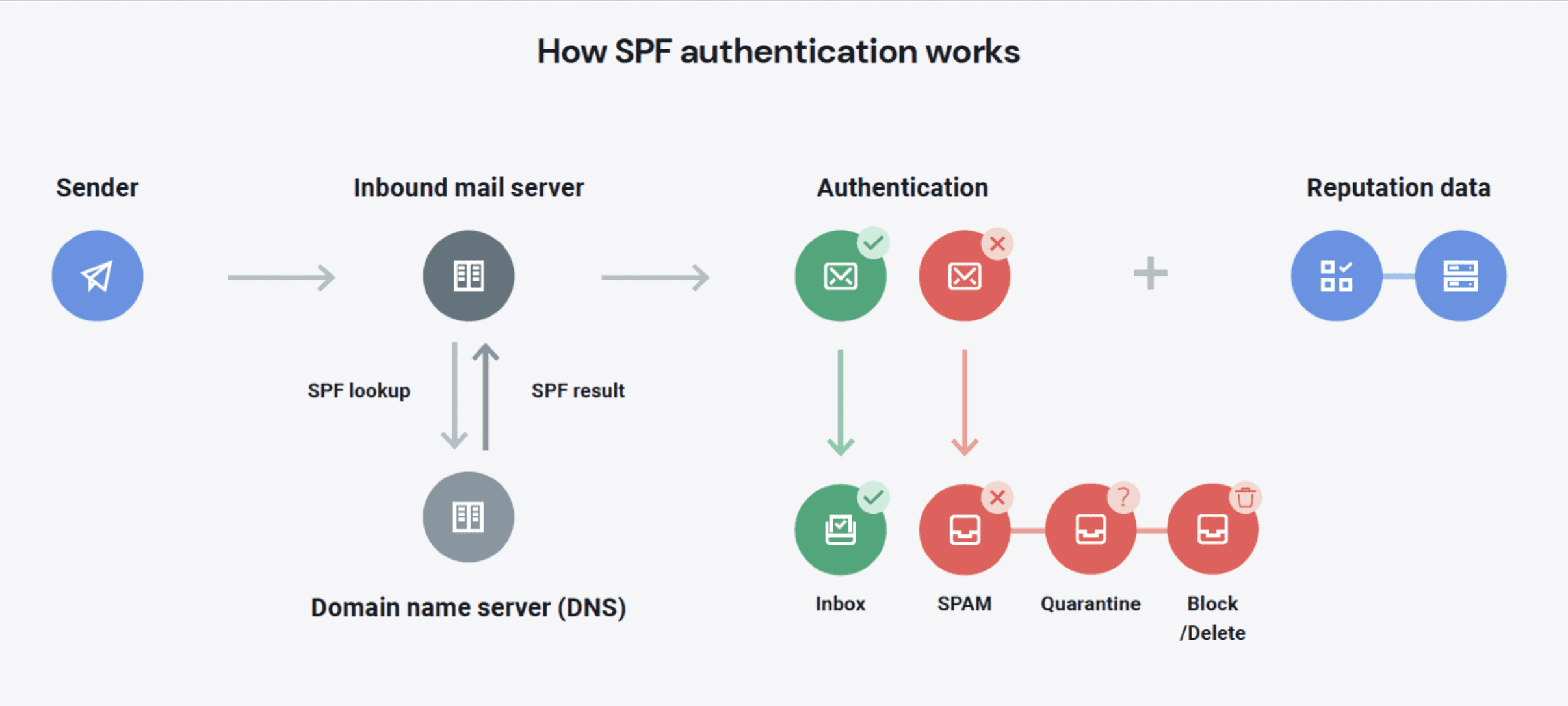
When mail arrives, the receiving server takes the domain from the envelope sender (the Return-Path), looks up its SPF record, and checks each mechanism left to right against the connecting IP. Evaluation stops at the first mechanism that matches, and that mechanism's qualifier becomes the result. If nothing matches before the all mechanism, the qualifier on all decides the outcome.
A few common records show how the syntax fits together:
v=spf1 -allsends no mail and rejects anything claiming to be from the domain. This is the correct record for a parked or non-sending domain.v=spf1 include:_spf.google.com ~allauthorizes Google Workspace and softfails everything else. This is the default Google Workspace SPF record.v=spf1 a mx include:sendgrid.net -allauthorizes the domain's own A and MX hosts plus SendGrid, then hardfails the rest.
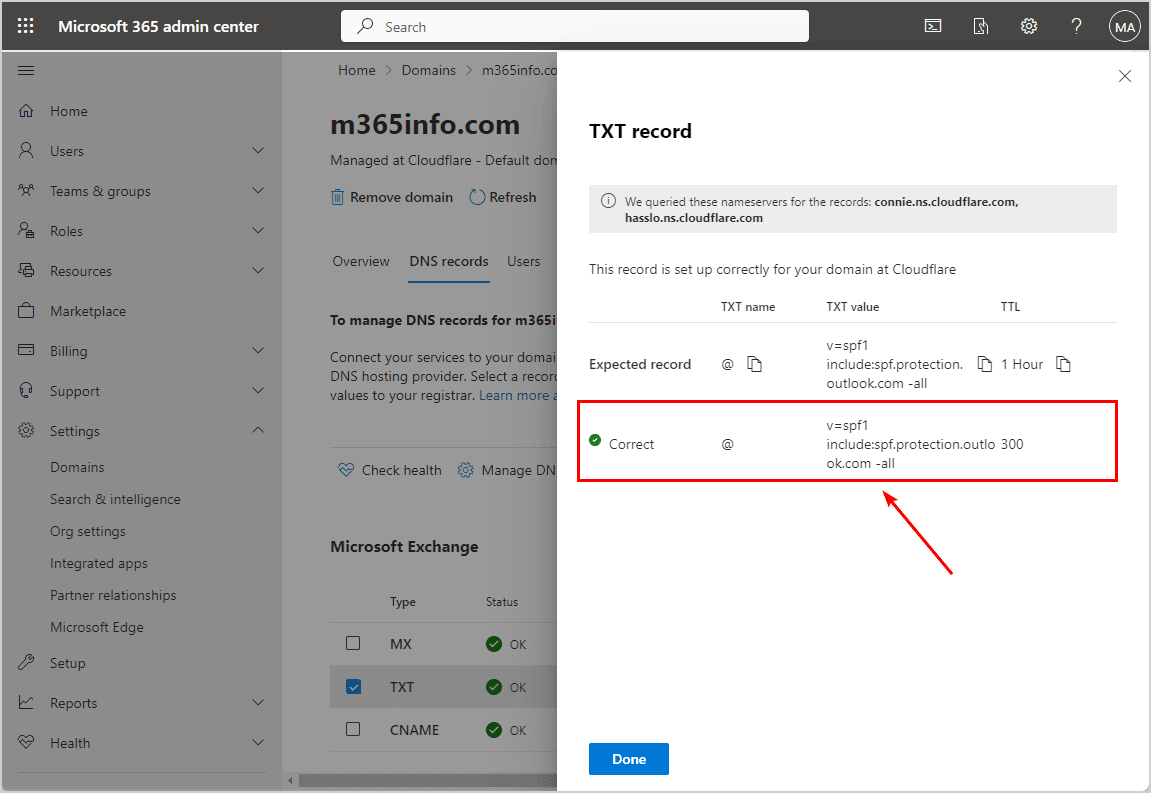
When you add a service such as an ESP, you extend the same record with that provider's include, for example the SendGrid SPF record uses include:sendgrid.net. After any change, look up the published TXT record to confirm it has one v=spf1 entry, resolves within the 10 lookup limit, and ends with the qualifier you intended.
FAQs
What is SPF syntax and how does it work?
SPF syntax is the format of a Sender Policy Framework record: a DNS TXT string that starts with v=spf1, lists mechanisms describing authorized senders, and ends with an all mechanism. A receiving server reads it left to right against the sending IP and returns pass, fail, softfail, or neutral based on the first mechanism that matches.
What are the SPF mechanisms?
There are eight: all, a, mx, ip4, ip6, include, exists, and the deprecated ptr. Each one describes a way to identify hosts that are allowed to send mail for the domain, from a single IP address to another provider's entire SPF record.
What do the SPF qualifiers mean?
+ is pass (authorized, and the default when no prefix is given), - is fail (reject), ~ is softfail (accept but mark), and ? is neutral (no assertion). They are written as a prefix on a mechanism, most importantly on the closing all.
What is the 10 DNS lookup limit in SPF?
A receiving server will evaluate at most 10 DNS-querying terms per SPF check. The include, a, mx, exists, ptr, and redirect terms count toward it, while ip4, ip6, and all do not. Exceeding 10 produces a PermError and invalidates the record.
Can a domain have more than one SPF record?
No. A domain must publish exactly one v=spf1 record. Two or more cause a PermError and the policy is treated as invalid. Add new senders as additional include terms inside the single existing record instead of creating a second one.
Get your SPF record right before you send
A clean SPF record is only useful if the list you send to is clean too. Run your list through BounceCheck before your next send to remove invalid addresses that drive up bounces and undo careful authentication work.
§ Before your next send
Find the addresses that will bounce
Verify a single address free, or upload a CSV — the free plan includes 50 checks a month, no card needed.

BounceCheck Team
The team behind BounceCheck - helping businesses verify emails and improve deliverability.