How to Know if Someone Read Your Email
 BounceCheck Team
You sent an important email and now you're waiting. Maybe you're following up on a job application, waiting for feedback on a proposal, or simply wondering if a friend got your message. Knowing whether your email has been opened can save you time, reduce anxiety, and help you decide when to follow up.
The honest answer is that there's no way to confirm with 100% certainty that an email was read. But there are methods that work some of the time, and there are tools that get you closer to an answer than guessing. This guide walks through what actually works, what doesn't, and what to expect from each option.
The short answer: you can't know for sure
There is no way to tell for certain that an email was delivered, opened, or read. You might as well have dropped it into a black hole.
That sounds harsh, but it's the most accurate starting point. The methods that exist for tracking emails work sometimes, in some situations, when the stars align. When they do work, they can tell you that an email was delivered or even opened. What they cannot do is reliably tell you when an email was not delivered or not opened.
If you hear that a message was opened, great, you know it was opened (though not necessarily read). If you hear nothing, you know nothing. It could have been opened and read, or it could have been ignored entirely. And hearing nothing is the norm.
The only true confirmation is a reply.
With that out of the way, here are the methods that come closest, along with why each one falls short.
Method 1: Read receipts in Gmail (Google Workspace only)
Gmail read receipts are a feature that allows senders to request a notification when their recipient opens their email. When the feature works, the recipient's mail client sends an automatic response back once the message is opened.
The catch: this is a Google Workspace feature, not a personal Gmail one.
Personal Gmail accounts (@gmail.com) don't have a native read receipt feature. If you're using a regular consumer Gmail address, this option isn't available to you and you'll need one of the alternative methods below.
Google Workspace accounts have built-in read receipt functionality. To enable it as an individual user in a Workspace account:
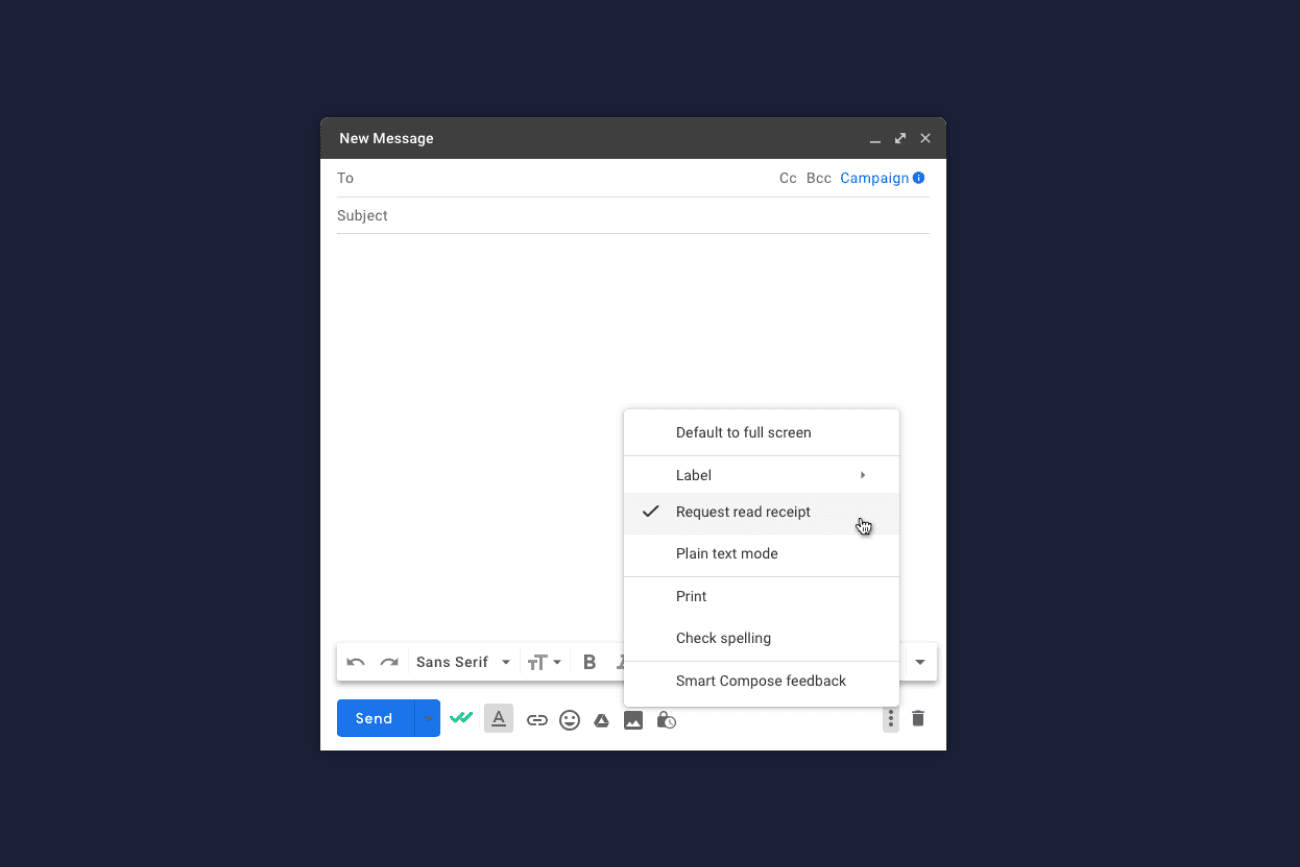
- Compose a new email
- Click the "More options" menu (three vertical dots) in the compose window
- Select "Request read receipt"
- Send the email as usual
For Workspace administrators, the feature is configured under Apps > Google Workspace > Gmail > User settings, in the "Email read receipts" section. Admins can allow read receipts for all addresses, only addresses inside the organization, or disable them entirely. Advanced configurations let admins enable or disable receipts per user or group, whitelist external domains, or customize settings by department.
Even when the feature is enabled, the recipient still has the option to decline sending a read receipt. That respects their privacy but means a missing receipt doesn't prove the email was unread.
Method 2: Delivery confirmation
Delivery confirmation is a feature that requests an automated return email when a message is delivered to the recipient's mail server.
The problem: almost all modern email clients now ignore delivery confirmation requests for privacy reasons. They may occasionally work, but most of the time they don't. If you request delivery confirmation and get nothing back, it tells you absolutely nothing about whether the message arrived.
Delivery confirmation also doesn't tell you anything about whether the email was opened or read. At best, it confirms the message reached the inbox.
Method 3: Image-based tracking (tracking pixels)
This is the technique that most third-party email tracking tools rely on. The sender includes a small image in an HTML email, often a tiny invisible pixel. The image file is hosted on a server controlled by the tracking tool. When the recipient opens the email, the image is fetched from the server, and the tracker logs the open.

It works more often than read receipts, but it's far from reliable. The main reasons it fails:
- Image blocking. Most email clients don't display images by default unless the recipient explicitly allows them. If images aren't loaded, no fetch is logged, and the tracker has no way to know the email was opened.
- Preview panes. If the recipient is using a preview pane, the read signal can fire even if they didn't really open or read the message.
- Offline reading. If a recipient downloads their mail to read offline, the open event might not register until the device reconnects to the internet, if it ever does.
- Forwarding. If your email gets forwarded, you'll register an open from the original recipient but not from anyone they forward it to.
- Multiple recipients. When you send to a group, image-based tracking generally can't tell which specific person opened the message.
Worth knowing: any service that claims to tell you whether an email was opened with 100% accuracy is using this technique or something similar, and is overstating what it can deliver. There's simply no way to be 100% accurate. If a service requires special infrastructure, like a custom mail-viewing program, or pushes recipients to a website to read the message, it's no longer really email at that point. Those workarounds also act as a disincentive for the recipient to engage, since the same techniques are used by spammers and phishers.
Tracking pixels can also affect how mailbox providers treat your messages. Heavy use of tracking, especially in cold outreach, is one of the patterns that pulls down overall email deliverability by triggering spam filters.
Method 4: Third-party tools and Gmail extensions
Third-party tools layer email tracking on top of Gmail and other clients, usually in the form of browser extensions. They use the tracking-pixel approach under the hood, but wrap it in a more usable interface.
Boomerang for Gmail is a popular example. After installing the extension, a "Track" button appears in the Gmail compose window. Click it before sending, and you'll be notified by email when the message is opened. The dashboard shows the number of opens, the number of clicks on links inside the message, the time of the first open, and the most recent open. Boomerang works with both personal Gmail accounts and Google Workspace accounts, which is one of the main reasons people use it instead of native receipts.
Other tools take similar approaches and ship as part of larger CRMs or sales platforms. The strengths and limitations are roughly the same:
- They give you more visibility than no tracking at all
- They don't work when images are blocked
- They can register false opens from preview panes
- A missing notification still doesn't prove the email was unread
A practical tip from Boomerang's own guidance: tell your recipients you've requested a read receipt and let them opt out. That respects privacy and avoids the negative perception that tends to attach to senders who track aggressively.
Method 5: Just ask, or watch for a reply
This isn't a tool, but it's the only method that gives you certainty. A reply is the only proof that someone actually read your message. Even an explicit read confirmation from a tracking tool only tells you the email was opened, not that the recipient took the time to read what you wrote.
If a response really matters, the most effective move is to write a short follow-up after a reasonable wait and ask directly. That's more reliable than any tracking pixel.
Why "opened" doesn't mean "read"
Even if every tracking method worked perfectly, an opened email isn't the same as a read email. Someone can open a message, glance at the subject line, and close it without absorbing a single word. They can have it open on screen while doing something else. They can open it on their phone, get distracted, and never come back to it.
A lack of a read receipt doesn't always mean the recipient ignored your message, and a registered open doesn't mean they actually read it. Treat tracking as a weak signal, not as proof.
Privacy considerations matter
Read receipts and tracking pixels track behavior. That's useful for the sender but can feel invasive to the recipient. In many jurisdictions, tracking without consent could violate privacy laws. Email is widely seen as private communication, and aggressive tracking creates pressure to respond, which can damage trust.
A few sensible boundaries:
- Be transparent when you're using tracking
- Use tools that allow the recipient to opt out
- Limit tracking to situations where it genuinely matters
- Don't ask twice if someone has already declined
Best practices for follow-up without read receipts
Since tracking is unreliable, the more useful skill is following up well. A few practical habits:
- Wait a reasonable amount of time before following up. What counts as reasonable depends on the relationship and context, but a few business days is usually a safe minimum for professional emails.
- Keep follow-ups short and specific. A two-line note that asks one clear question gets answered more often than a long restatement of the original message.
- Make sure your emails are actually arriving. If your follow-ups are silently going to spam, no amount of tracking will help. Watch your email bounce rate and check that your domain authentication is set up so your messages reach the inbox in the first place.
- For cold outreach, build a clean list. Sending follow-ups to addresses that don't exist or don't engage damages your sender reputation over time. A regular email list cleaning routine keeps follow-up campaigns landing where they should.
Conclusion
You can't know with certainty whether someone read your email. Read receipts work occasionally, mostly inside Google Workspace. Tracking pixels work some of the time, but image blocking, preview panes, and forwarding all distort the data. Third-party tools like Boomerang give you more visibility, but they're still subject to the same limits.
Use the tools where they help, but don't treat any of them as proof. The only signal that genuinely tells you a message was read is a reply. When the answer really matters, write a clear, short follow-up and ask directly.

BounceCheck Team
The team behind BounceCheck - helping businesses verify emails and improve deliverability.