What Is a Valid but Inactive Email? Definition, Risks, and Fixes

A valid email address looks deliverable on every technical level, the format is correct, the domain exists, and the mailbox accepts mail. But that doesn't always mean the person on the other side is reading. Many addresses on a typical marketing list are valid but inactive: real, deliverable, and yet completely silent.
Understanding the difference between an invalid address and a valid but inactive one matters, because the way you handle each is different. In this guide, we'll explain what a valid but inactive email actually is, why these addresses build up on your list, the impact they have on your campaigns, and how to detect, re-engage, or remove them before they damage your sender reputation.
What is a valid but inactive email?
A valid email address is one that passes all the necessary checks. It's properly formatted, connected to a real domain with active MX records, and linked to a mailbox that can receive messages.
An inactive email is a valid address belonging to a subscriber who hasn't engaged with your emails for a significant amount of time. While not technically invalid, these addresses can reduce your engagement metrics and quietly damage your performance over time.
In other words: the address still works, the mailbox still accepts the message, but the recipient is no longer opening, clicking, or interacting in any way. It's the email-marketing equivalent of shouting into an empty room.
Valid vs invalid vs inactive: clearing up the confusion
These three terms get mixed up constantly, but each one describes a different problem.
Valid email
- Passes syntax, format, domain, and mailbox checks
- Can successfully receive messages
- Linked to an active inbox
Invalid email
- Cannot successfully receive messages
- Bounces back with errors like "mailbox not found" or "domain doesn't exist"
- Common types include syntax errors, domain errors, mailbox errors, disposable or fake emails, and role-based addresses that are already broken
Inactive email (valid but inactive)
- Technically deliverable
- The recipient hasn't engaged in months
- Doesn't bounce, but produces no opens, clicks, or replies
The fix is also different. An invalid address needs to be removed or, when possible, corrected. An inactive address deserves a re-engagement attempt first, since the contact may simply have lost interest, changed roles, or stopped checking that inbox without telling anyone.
Why valid but inactive emails are still a problem
Skewed engagement metrics
If a large slice of your list is filled with valid but inactive addresses, your open rate, click-through rate, and conversion rate all get distorted. This makes it harder to evaluate campaign performance, segment properly, or make data-driven decisions.
Risk to sender reputation
Mailbox providers like Gmail and Yahoo watch engagement closely. When a steady portion of your sends go to addresses that never open or click, providers start treating your domain as low-quality. That signal alone can push more of your messages into the spam folder, even for engaged subscribers. Building back from this kind of slow drift is harder than fixing a single bounce spike, which is why ongoing sender reputation management depends on engagement, not just deliverability.
Wasted budget and resources
Each email you send to an inactive contact is still a paid send. You're consuming your ESP quota, depressing your metrics, and getting zero return. The cleaner your list, the better the data, and the better the ROI.
They can quietly turn into spam traps
This is the most dangerous outcome. Mailbox providers and anti-spam organizations sometimes repurpose long-abandoned addresses as spam traps to catch senders who don't clean their lists. An address that started as a normal subscriber can become a trap once enough time passes without engagement. Continuing to send to it tells ISPs you're not maintaining your list.
Damaged brand perception
If a real recipient eventually opens one of your messages months later, the message itself may feel stale or irrelevant. Repeated, irrelevant outreach to a half-engaged audience erodes trust. Even quiet inactivity can hurt how your brand is perceived when the recipient does reappear.
Common causes of valid but inactive emails
Several patterns lead to addresses ending up valid but inactive:
Outdated subscriber details. People change their contact details all the time. Someone may have lost access to an account, left the company that owned the address, or simply outgrown an old personal email. The address still exists, but the original owner is gone or has moved on. Subscribers rarely update their details, so the inactive address stays on your list.
Full mailbox. As emails pile up and a mailbox reaches capacity, it can stop accepting new messages. The address is technically valid, but incoming mail is rejected at the mailbox level. The inverse also happens: the mailbox accepts mail but the owner never digs through it.
People who lost interest. A subscriber may have signed up intentionally, stayed engaged for a while, then drifted off. The address is healthy. The relationship isn't.
Natural list decay. Even a perfectly collected email list will degrade over time. Industry estimates suggest that email lists can decay by 20-30% per year if they aren't actively maintained. Without regular cleanup, that decay shows up as a growing block of valid but inactive contacts.
Disposable emails that have aged out. Many people use disposable addresses to sign up to services or claim freebies. They might be delivered at first, but they have no engagement and often become inactive after a short period.
Role-based addresses that nobody monitors. Addresses like info@ or support@ are often valid but rarely reach an individual. They might deliver, but they often lead to low engagement and are essentially inactive from a marketing perspective.
How to detect valid but inactive emails
Detection is mostly an engagement question rather than a technical one, since these addresses pass standard verification.
Engagement tracking. The most reliable signal is straightforward: identify subscribers who haven't opened or clicked in the last 3 to 6 months. Anyone in that bucket is a candidate for the inactive segment.
Bounce and behavior patterns. Watch for subtle shifts. A mailbox that starts producing soft bounces because it's full, or an address that suddenly stops opening after months of regular engagement, is moving toward inactive status. Tracking your email bounce rate alongside engagement helps catch this drift early.
Verification tools for edge cases. Standard verification doesn't directly flag "inactive" since these addresses pass syntax, domain, and SMTP checks. But tools like MailerCheck and Mailerio can flag adjacent issues, including catch-all domains, role-based addresses, and full mailboxes, which often correlate with poor engagement and help you build a more accurate inactive segment.
How to handle valid but inactive emails

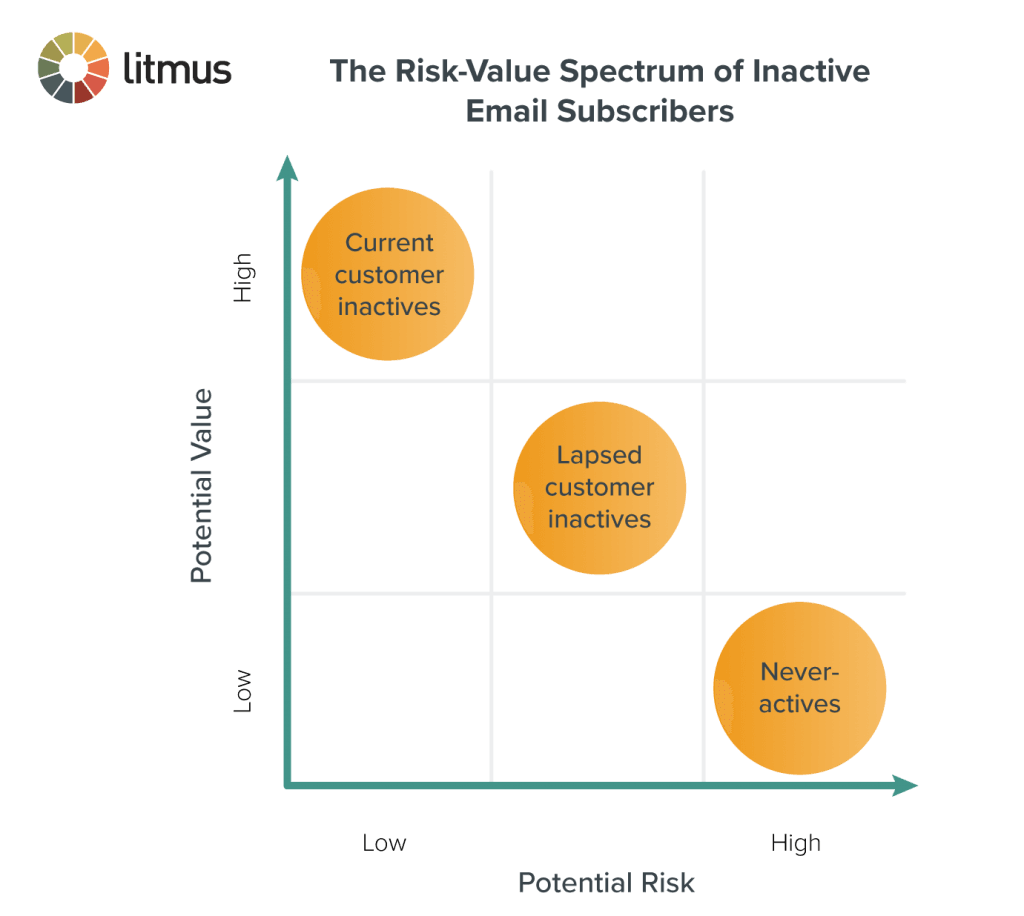
The instinct to immediately remove every silent address is the wrong one. Many of these contacts can come back if you give them a clear reason to.
1. Segment inactive subscribers
Pull anyone with no engagement in the last 3 to 6 months into a separate segment so they're no longer mixed into your main campaigns. Keeping them in your default sends drags down deliverability for the rest of your list.
2. Run a re-engagement campaign
Send a focused re-engagement email or confirmation email asking the subscriber to confirm they still want to hear from you. Make the value clear, keep it short, and give a single, obvious action. This step is what separates "lost interest" from "lost contact entirely."
3. Remove non-responders
If a subscriber doesn't respond to the re-engagement attempt within a reasonable window, remove them. Holding on to addresses that have ignored both regular sends and an explicit confirmation request only continues to hurt your metrics and reputation.
4. Exclude inactive segments from future campaigns
For subscribers you keep on file but who didn't re-engage, exclude them from regular email campaigns. Continuing to send to them with no response just reinforces the problem.
How to prevent inactive emails from piling up
Prevention is cheaper than recovery. A few habits keep inactive addresses from quietly accumulating.
Schedule regular list audits. Audit your list monthly or quarterly and segment it into active, inactive, and risky addresses. Build a consistent email list cleaning workflow so the audit isn't a one-off scramble whenever metrics start to slip.
Use double opt-in. Double opt-in requires the subscriber to confirm their address before being added to your list. This filters out typos and casual signups before they ever reach your campaigns, which means fewer addresses that go inactive within weeks.
Add real-time validation at signup. Real-time validation through an email verification API catches obvious problems at the point of entry: typos, disposable domains, malformed addresses. It won't predict future inactivity, but it stops a major source of low-quality signups that tend to disengage quickly.
Monitor engagement continuously. Track opens, clicks, and reply rates as a regular signal of list health, not just campaign performance. The earlier you spot a drop in engagement from a specific cohort, the easier the re-engagement attempt will be. Engagement is also one of the strongest inputs into overall email deliverability, so keeping it high pays off across every campaign.
Conclusion
A valid but inactive email isn't broken in any technical sense. The format is correct, the mailbox accepts mail, the domain is alive. But silent addresses still cost you: skewed metrics, wasted spend, reputation drift, and the eventual risk of an aging address turning into a spam trap.
The fix isn't to treat them like invalid addresses and delete them on sight. Segment first, run a clear re-engagement attempt, then remove the contacts who genuinely don't want to hear from you. Pair that with double opt-in, real-time validation, and a regular cleaning schedule, and your list stays full of people who actually open your emails, which is the only kind of list worth sending to.
BounceCheck Team
The team behind BounceCheck - helping businesses verify emails and improve deliverability.