How to Clean Up Your Email List: A Step-by-Step Process
 BounceCheck Team
Before your next send Find the addresses that will bounce.
Verify an email freeEmail list hygiene means maintaining a list of valid, permission-based, engaged recipients. Back up your list, remove obvious errors, verify the remaining addresses, re-engage inactive subscribers, preserve suppressions, and tighten signup controls.
A deliverable address does not prove its owner still wants your messages. Use this process to identify eligible subscribers and addresses to exclude, keeping existing suppressions active throughout. Never include suppressed contacts in verification-driven sends or re-engagement.
Step 1: Start email list hygiene with a complete backup
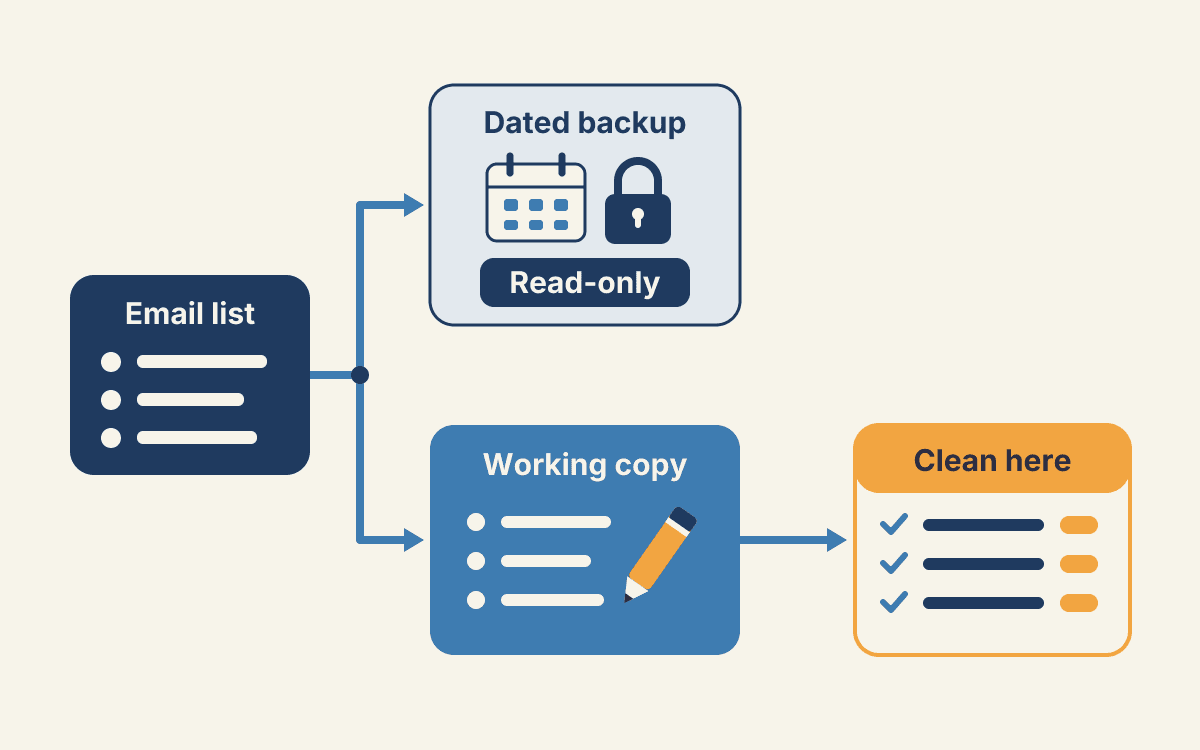
Export a dated, untouched backup before making changes. Keep the original read-only and clean a separate working copy. This gives you a record of each decision and lets you restore data if needed.
Preserve the fields that show each contact’s history and eligibility:
- Signup date, acquisition source, and consent records
- Last open and click activity
- Subscription status, bounce history, and existing suppression reasons
Log each exclusion and its reason as you edit the working copy. Retain excluded records and their history for audits or suppression purposes; remove them only from the sending audience.
Step 2: Remove duplicates, malformed addresses, and inappropriate role accounts
Resolve clear data problems before verification, and keep excluded records with their reasons in your audit or suppression data. For duplicate handling, follow the duplicate-removal instructions instead of creating a separate process.
Flag addresses with invalid formatting or likely typos, such as gmial.com. Don’t silently change a domain. Confirm the correct address using a reliable signup record or by contacting the person. If you can’t confirm it, exclude the address from the sending audience and retain the original record for audit.
Under your role-account policy, exclude shared addresses such as support@ and info@ from general marketing sends. They represent groups or aliases, not necessarily individual subscribers. That raises relevance and engagement concerns; it does not mean the address is malformed or invalid. Send only to people who want your messages. Spam complaints can damage your sender reputation and increase the chance that future mail will be marked as spam.
Step 3: Bulk-verify addresses and act on every result
Verification indicates whether a provider could confirm a mailbox response. It does not establish consent or guarantee inbox placement. Apply each result to your sending audience, and retain the original result in your audit records.
Valid, invalid, disposable, and role-based: retain or exclude
| Result | Meaning | Sending action |
|---|---|---|
| Valid | Verification passed; the address appears deliverable. | Retain only if the subscriber is eligible and engaged. Valid does not mean confirmed consent or guaranteed inbox placement. |
| Invalid | Verification indicates the address cannot accept mail. | Exclude from sends; retain the record and result for audit. |
| Disposable | The address may be temporary. | Exclude from ongoing marketing; retain the result for audit. |
| Role-based | The address serves a shared function. | Apply the marketing exclusion policy from step 2; retain the record and result. |
Catch-all/accept-all and unknown: quarantine rather than assume validity
| Result | Meaning | Sending action |
|---|---|---|
| Catch-all/accept-all | The domain accepts mail without confirming the individual mailbox. | Quarantine from the main send and reassess; do not label invalid. |
| Unknown | Verification was inconclusive. | Quarantine from the main send and reassess; do not treat as valid or invalid. |
Keep quarantined records out of campaigns until you make a separate decision. Preserve their results for review. Spam traps accept mail rather than bouncing, so bounce monitoring cannot identify them. Verification and sunsetting reduce risk, but cannot prove a list is trap-free.
For a structured verification workflow, use bulk email verification.
Step 4: Re-engage inactive subscribers, then sunset nonresponders
Keep subscribers in your marketing audience only if they remain eligible and have engaged recently or reconfirmed that they want your messages. Segment by last open or click, signup date, and acquisition source. Treat opens as a signal, not definitive proof of engagement.
Set an inactivity window that matches your normal sending cadence. Periodically ask inactive subscribers to confirm they still want your messages. Yahoo also recommends reconfirming inactive subscribers. It warns that emailing people who do not read your messages can harm delivery metrics and sender reputation.
For eligible inactive subscribers:
- Send a clear reconfirmation message with an easy unsubscribe option.
- Set a response deadline and keep the reconfirmation campaign separate from regular marketing.
- Retain responders who remain eligible; suppress nonresponders from future marketing.
Remove nonresponders from your sending audience, but retain their records and suppression status for audit and exclusion. Never send reconfirmation requests to existing unsubscribes, complainants, or hard-bounce suppressions.
Step 5: Preserve suppressions so excluded contacts stay excluded
Suppress confirmed invalid recipients, unsubscribes, and complainants. Retain suppression records for audits, and exclude suppressed contacts from every sending audience, including imports, integrations, campaigns, and re-engagement lists. Apply suppression rules before adding a contact to an audience, not after building a campaign.
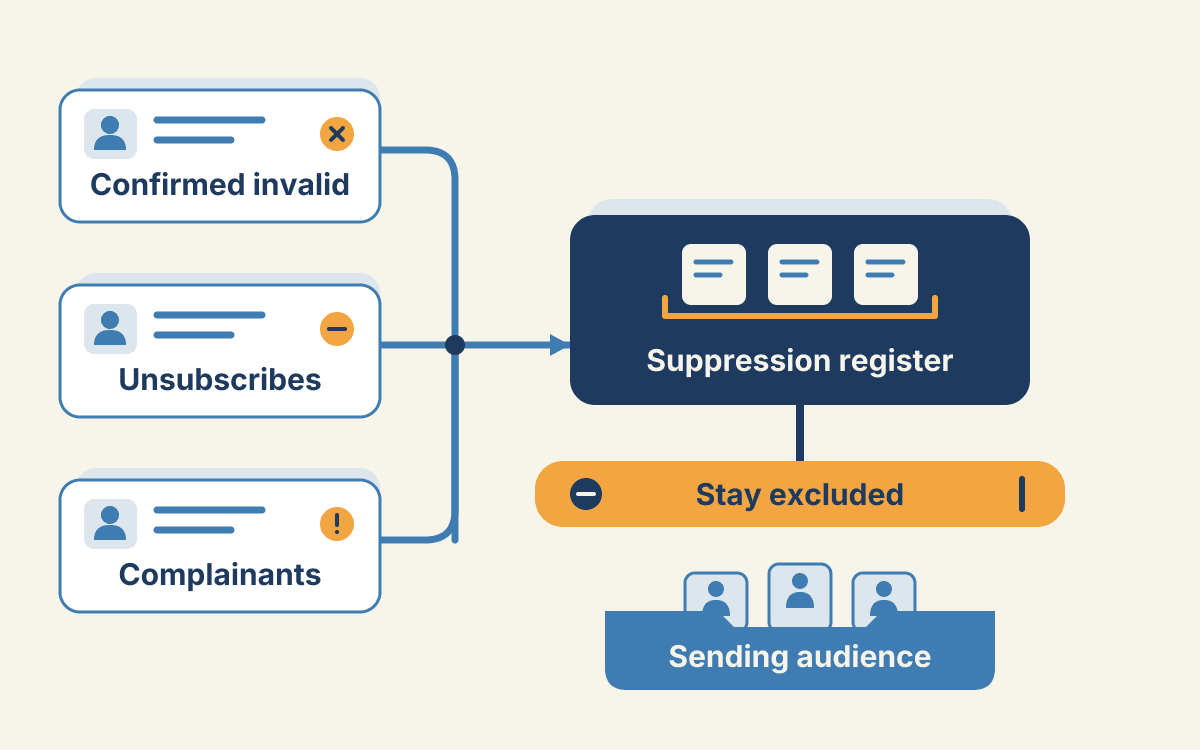
Separate recipient-invalid failures from sender-side or policy failures and temporary delays. Inspect the SMTP reply, enhanced status code, and diagnostic text before treating a hard bounce as an invalid address: 550 5.1.1 generally indicates a bad destination mailbox, while 550 5.7.1 indicates a policy or authorization rejection and does not establish that the recipient is invalid. Keep affected sends paused while you resolve sender-side failures. Suppress confirmed invalid recipients; suppress repeated soft bounces according to your policy, but do not mark a recipient as invalid because of a temporary 4xx delay. Yahoo recommends monitoring both hard and soft bounces and promptly removing invalid recipients.
If an import restores a suppressed address, leave it excluded and investigate which source or integration rule reintroduced it. For guidance on classifying bounce types, see hard bounce vs. soft bounce. If bounce levels spike and the cause remains unresolved, follow the high-bounce troubleshooting guide.
Step 6: Protect signups and schedule the next cleaning
Prevent future cleanup issues by checking addresses at signup, confirming subscriptions, and setting your cleaning cadence according to your list’s condition. Verification can flag risky or undeliverable addresses. It cannot establish consent or guarantee inbox placement.
Choose your cleaning cadence from list conditions
Use confirmed opt-in: ask people to subscribe, then require them to confirm their email address before adding them to active sends. Yahoo also recommends email confirmation to reduce accidental or malicious signups.
Validate addresses in real time on signup forms, then verify newly collected addresses before sending. Pay particular attention after events, promotions, acquisitions, or shared-lead campaigns. Schedule further cleanups when your list grows, inactivity persists, or bounce signals change. Avoid setting an arbitrary fixed interval.
Run a final pre-send checklist
Before each major send, confirm:
- Signup: Recipients confirmed their subscriptions. Verification is not proof of consent.
- Suppression: Unsubscribes, complainants, and confirmed invalid-recipient exclusions remain suppressed.
- Engagement: The audience meets your engagement criteria. Do not treat opens alone as definitive evidence.
- Verification: Newly added or changed addresses have been checked. Keep inconclusive results out of the main send pending reassessment.
- Reputation: Review the spam rate in Postmaster Tools. Google’s guidance is to keep reported spam rates below 0.1% and avoid ever reaching 0.3% or higher. These are Google-specific guidelines, not universal provider thresholds.
How quickly a list goes stale is covered in email list decay rate, and campaign-specific preparation in Black Friday email deliverability. When the working copy is ready, run it through bulk email verification.
§ Before your next send
Find the addresses that will bounce
Verify a single address free, or upload a CSV — the free plan includes 50 checks a month, no card needed.

BounceCheck Team
The team behind BounceCheck - helping businesses verify emails and improve deliverability.