What Is Email Enumeration? How Attackers Verify Accounts (and How to Stop Them)
 BounceCheck Team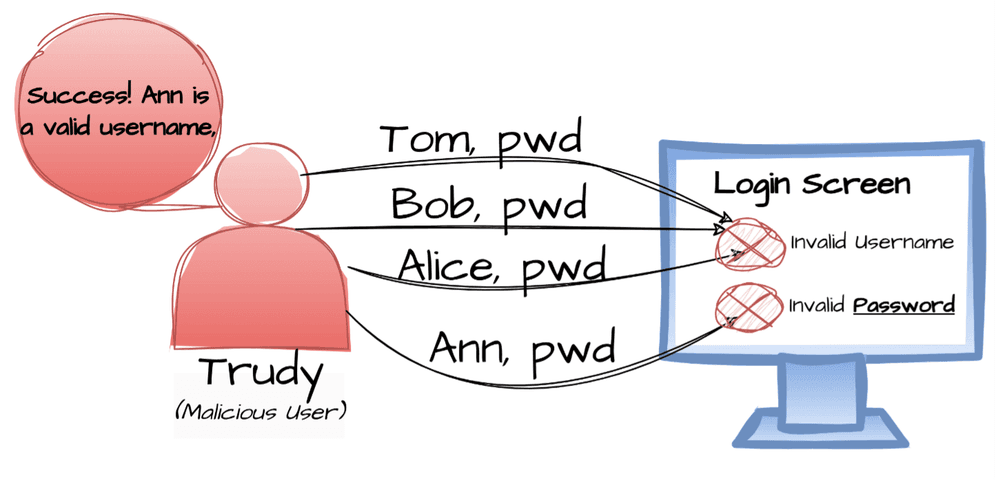
Email enumeration is one of the quietest reconnaissance techniques in modern web security, and most teams only notice it after the damage shows up somewhere else. A login form that says "email not found" for one address and "incorrect password" for another has just confirmed which addresses are real, and that single signal feeds phishing, credential stuffing, and account takeover further down the chain.
This guide explains what email enumeration is, how attackers run it across login forms, password resets, registration screens, and SMTP servers, and what defenders, including senders who care about email verification and deliverability, can do about it.
What email enumeration actually is
Email enumeration is a reconnaissance technique used to confirm whether a specific email address exists inside a system, application, or directory. Attackers do not need to break in. They simply pass an address to an API or a form and read the response. If the response changes based on whether the email is registered, the system has leaked an answer.
Google's Identity Platform documentation describes it as a brute-force attack where an actor "attempts to guess or confirm users in a system by passing an email address to the API and checking the response." Two responses give the game away:
- A sign-in with an unknown email returns
EMAIL_NOT_FOUND, while a wrong password returns a different error. The attacker now knows the address exists. - A sign-up with an existing email returns
EMAIL_EXISTS. The attacker has just verified another address.
That is the whole attack. No password is needed. No system is breached. The application itself does the confirming.
How attackers do it: the six probe vectors
Most enumeration campaigns work through the same handful of vectors. The ThreatNG security glossary catalogs them well, and they map cleanly to what any defender will see in production logs:
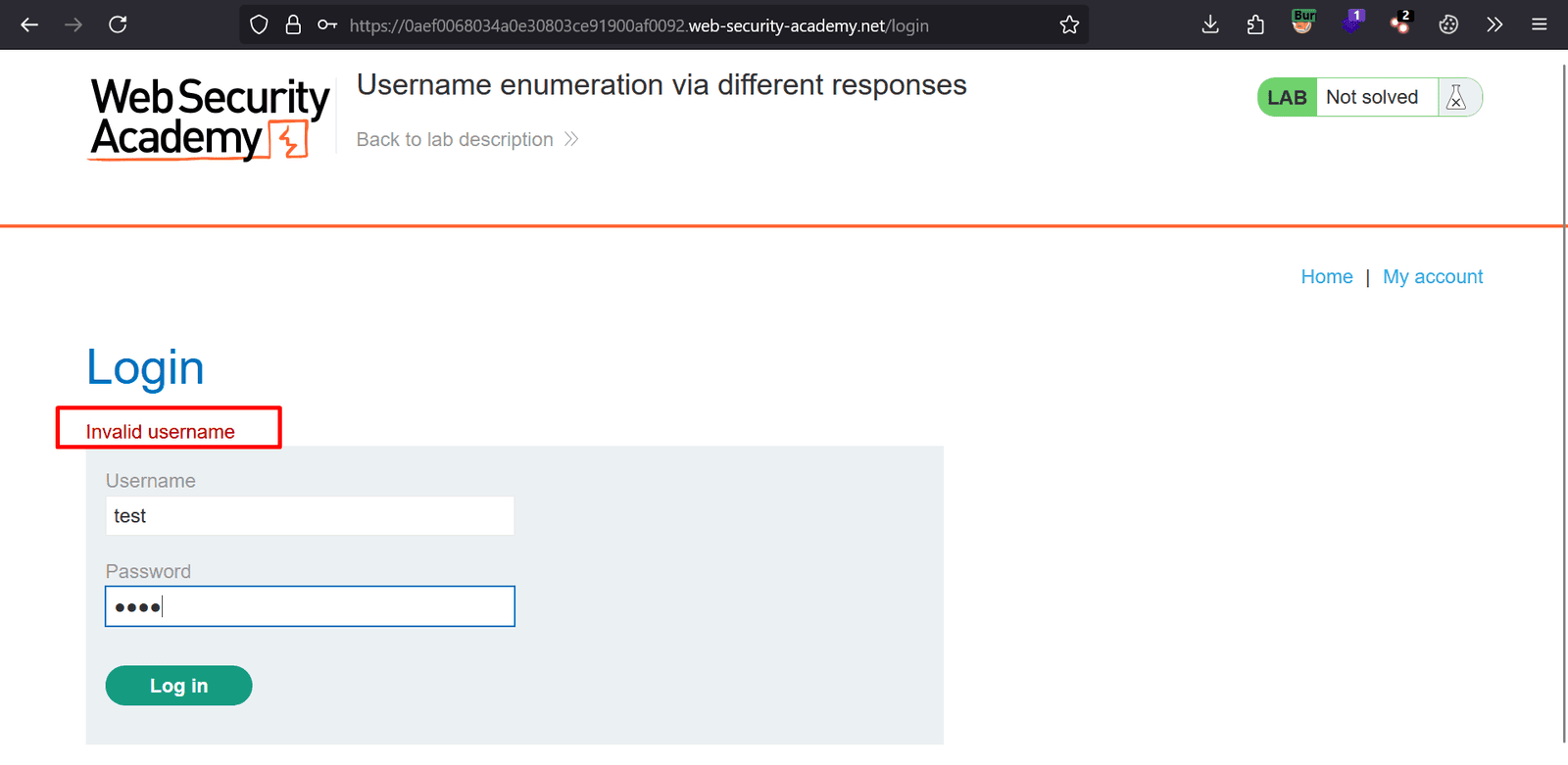
- Login form responses: Different error text for "email not found" versus "incorrect password" tells the attacker which addresses are valid.
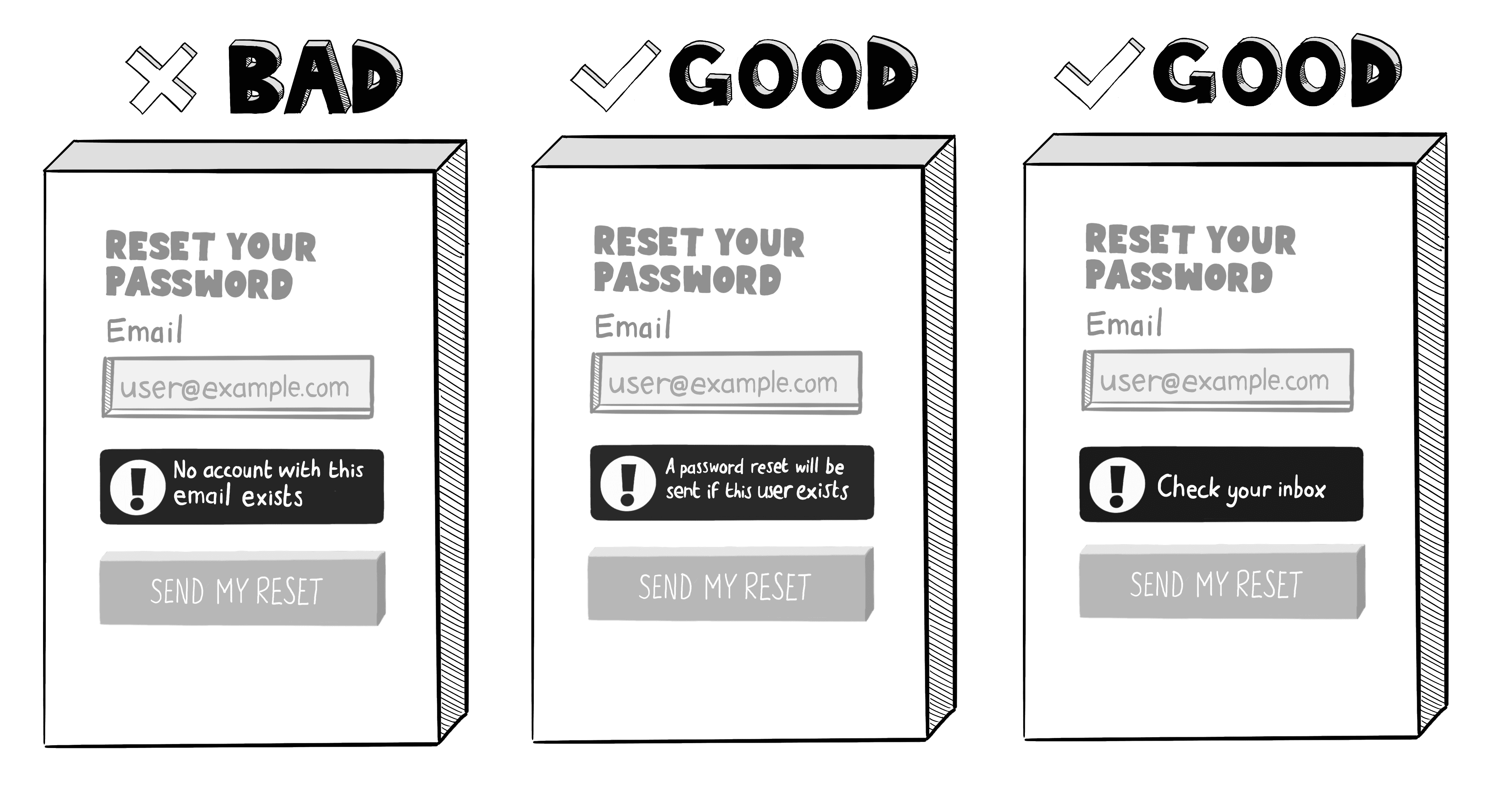
- Password reset feedback: A page that says "reset email sent" only when the address exists is functionally identical to a valid-account oracle.
- Account registration feedback: A duplicate-email warning during signup confirms that an address is already in use.
- SMTP probing: Attackers connect to a mail server and issue
VRFY,EXPN, orRCPT TOcommands. A250 OKresponse confirms the mailbox; a550 No such userdenies it. - Timing attacks: Even when error messages match, valid addresses often take slightly longer to process because the system fires an extra database or directory lookup. Scripted clients measure the delta.
- OSINT and predictable formats: Many organizations use
[email protected]. Attackers generate the list from LinkedIn, GitHub bios, conference pages, or breach dumps, then enumerate to filter it down to verified hits.
A concrete example: a script submits two thousand addresses to a forgot-password endpoint, logs which ones return the "instructions sent" page, and walks away with a verified target list. No alarm fires, no account is touched, and the attacker is one step closer to the next phase.
Why bulk SMTP probing gets your IP blocked
The SMTP probing vector is the one that pulls senders into the conversation, and it is the reason inbox providers treat aggressive recipient verification as hostile. When a connecting server runs RCPT TO against thousands of addresses on a single domain in a short window, the receiving mail provider does not know whether the source is a researcher, a verification service, or an attacker building a phishing list. The pattern looks identical from outside.
Mailbox providers respond with rate limiting, greylisting, and outright blocks on the sending IP. Major receivers such as Gmail, Outlook, and Yahoo, along with most enterprise gateways, now collapse responses to make VRFY and EXPN useless and to delay or randomize RCPT TO rejections so that no single probe yields a clean yes or no. They also feed unusual probe patterns into reputation systems that downgrade deliverability for the sender across the board.
The practical effect for legitimate senders is that any verification approach that probes recipient mailboxes at scale has to do so carefully: respect provider-specific limits, rotate sending IPs, and prefer batched, paced workflows over open-firehose verification. The decision between real-time vs bulk verification is partly an enumeration-defense decision, because the bulk model is what receivers most often flag as abusive when it is run without throttling.
What attackers do with a verified list
Confirmed addresses are the input, not the output, of the attack chain. Once the list exists, the rest of the kill chain becomes cheaper and more accurate:
- Phishing and spear phishing: A targeted message landing in a real inbox converts far better than a spray to invalid addresses.
- Credential stuffing: Verified emails are paired with passwords leaked from prior breaches and tested at scale against the target's login.
- Account takeover: Once the email is confirmed and a password is found or reset, the attacker walks in.
- Business email compromise: Verified executive and finance addresses fuel wire-fraud impersonation.
- Spam and malware delivery: Confirmed addresses get added to abuse lists or used for malware dropper campaigns.
The OneLogin security blog summarizes the pattern bluntly: enumeration is "less of a direct cyberattack and more a reconnaissance mission that precedes one." The damage shows up two or three steps later, which is why it is usually attributed to phishing or credential stuffing rather than to the enumeration that made both possible.
How to detect and prevent email enumeration

Defense is mostly about removing the signal. If valid and invalid addresses produce identical responses, the attacker learns nothing. Standard mitigations, recommended by both Google's Identity Platform team and the broader OWASP guidance on authentication, include:
- Generic responses everywhere: "If an account exists, we have sent reset instructions" for password resets.
INVALID_LOGIN_CREDENTIALSrather than separate "email not found" and "wrong password" errors. Same status code, same body size, same redirect for both cases. - Rate limiting on auth endpoints: Cap login, registration, and reset attempts per IP, per ASN, and per session.
- Bot challenges: CAPTCHA or App Check style attestation in front of high-risk forms; progressive delays after repeated failures rather than hard lockouts, which can be abused for denial of service.
- Tighten SMTP and mail responses: Disable
VRFYandEXPN, generalize bounce wording, and avoid catch-all behavior that lets attackers infer mailbox state. - Randomize timing: Add small artificial delays on the negative path so the response-time delta cannot be measured.
- Multi-factor authentication: Even if an address is enumerated and a password leaks, MFA is the last line of defense before takeover.
- Monitor patterns: Alphabetical sweeps,
firstname.lastnamewalks, and high reset volume from one ASN should all trigger alerts.
A common question from product teams is whether to disable enumeration protection because it complicates onboarding. The answer is almost always no. Google has shipped enumeration protection as the default for projects created since September 15, 2023, and the NIST digital identity guidelines treat account-existence disclosure as an authentication-grade information leak. Keep it on, and design recovery flows that work without confirming the account.
Where this lands for senders and verification services
Email enumeration sits at the intersection of application security and email deliverability, which is why it matters far beyond the security team. Authentication endpoints leak account existence on the application side. SMTP endpoints leak mailbox existence on the mail side. Both feed the same attacker workflow, and both have to be hardened together for the defense to hold.
For senders, the lesson is simple: a healthy program treats every recipient probe as a noisy operation that affects reputation, not a free lookup. Pacing, throttling, and using a reputable verification workflow keep you on the right side of provider abuse signals while still cleaning the list. For application owners, the lesson is even simpler: assume an attacker is enumerating your forms right now, and make sure the responses are boring.

BounceCheck Team
The team behind BounceCheck - helping businesses verify emails and improve deliverability.