JavaScript Email Validation: HTML5, Regex, and Verification
 BounceCheck Team
To validate email in JavaScript, use two layers: a format check in the browser and verification on your server. The format check (the HTML5 type="email" input or a short regular expression) confirms a string looks like an address and improves the sign-up experience in real time. Verification runs on your server and confirms the mailbox actually accepts mail. Format alone never proves an inbox exists. This guide covers the native HTML5 check, a pragmatic regex, why a full RFC 5322 regex is a bad idea, and where server-side verification takes over.
The HTML5 type="email" check
The fastest way to validate email format in JavaScript is the native HTML5 type="email" input. It makes the browser refuse to submit the form when the value is not a syntactically plausible address, and it costs one attribute, no script required.
<form>
  <input type="email" name="email" required />
  <button type="submit">Sign up</button>
</form>
To read the result from script rather than waiting for submit, use the Constraint Validation API on the element:
const input = document.querySelector('input[type="email"]');
if (input.validity.valid) {
  // passes the browser's built-in email check
}
The native check is permissive by design. It enforces the basic local@domain shape and rejects spaces, but it accepts addresses without a dot in the domain (a bare user@localhost passes). That is intentional, since intranet addresses are legal. Knowing how to check if an email is valid means adding the layers beyond syntax, DNS lookups and a mailbox probe, because a passing format test still says nothing about whether the inbox exists.
A pragmatic email regex in JavaScript
A pragmatic email regex in JavaScript is a short pattern like /^[^\s@]+@[^\s@]+\.[^\s@]+$/ that checks for one @ and a dotted domain. It handles the vast majority of real input and catches the mistakes users actually make (missing @, missing domain, stray spaces), while staying readable enough to debug.
function isValidEmailFormat(email) {
  const pattern = /^[^\s@]+@[^\s@]+\.[^\s@]+$/;
  return pattern.test(email.trim());
}

isValidEmailFormat('[email protected]'); // true
isValidEmailFormat('jane@@example');    // false
This pattern asks for three things: one or more characters that are not spaces or @, a single @, a domain, a dot, and a top-level part. Trimming first removes leading and trailing whitespace, the most common false negative. Keep the regex readable rather than exhaustive, because the exhaustive version is where things go wrong.
Why a full RFC 5322 regex is impractical
A full RFC 5322 regex is impractical because the standard's grammar permits quoted local parts, parenthetical comments, and characters most people never use. A pattern matching the full specification runs to thousands of characters, is effectively unreadable and unmaintainable, and still cannot tell you whether the address is real.
Chasing full compliance buys you almost nothing and costs you a pattern nobody on your team can debug. The more useful takeaway from the standard is that "valid syntax" and "will receive mail" are separate questions. A single regex cannot capture everything the RFC 5322 Internet Message Format permits, including quoted local parts, parenthetical comments, and folding whitespace. The primary source is the standard itself, published by the IETF as RFC 5322. Match the common shape with a simple pattern, then move deliverability to the server.
Client-side validation is not verification
Client-side validation is not verification: it only inspects the string. An address like [email protected] passes the HTML5 check, passes the regex, and passes any client-side rule you write, because the syntax is perfect. The mailbox does not exist. Client-side validation is a user-experience feature that stops typos before the form submits, not a data-quality guarantee.
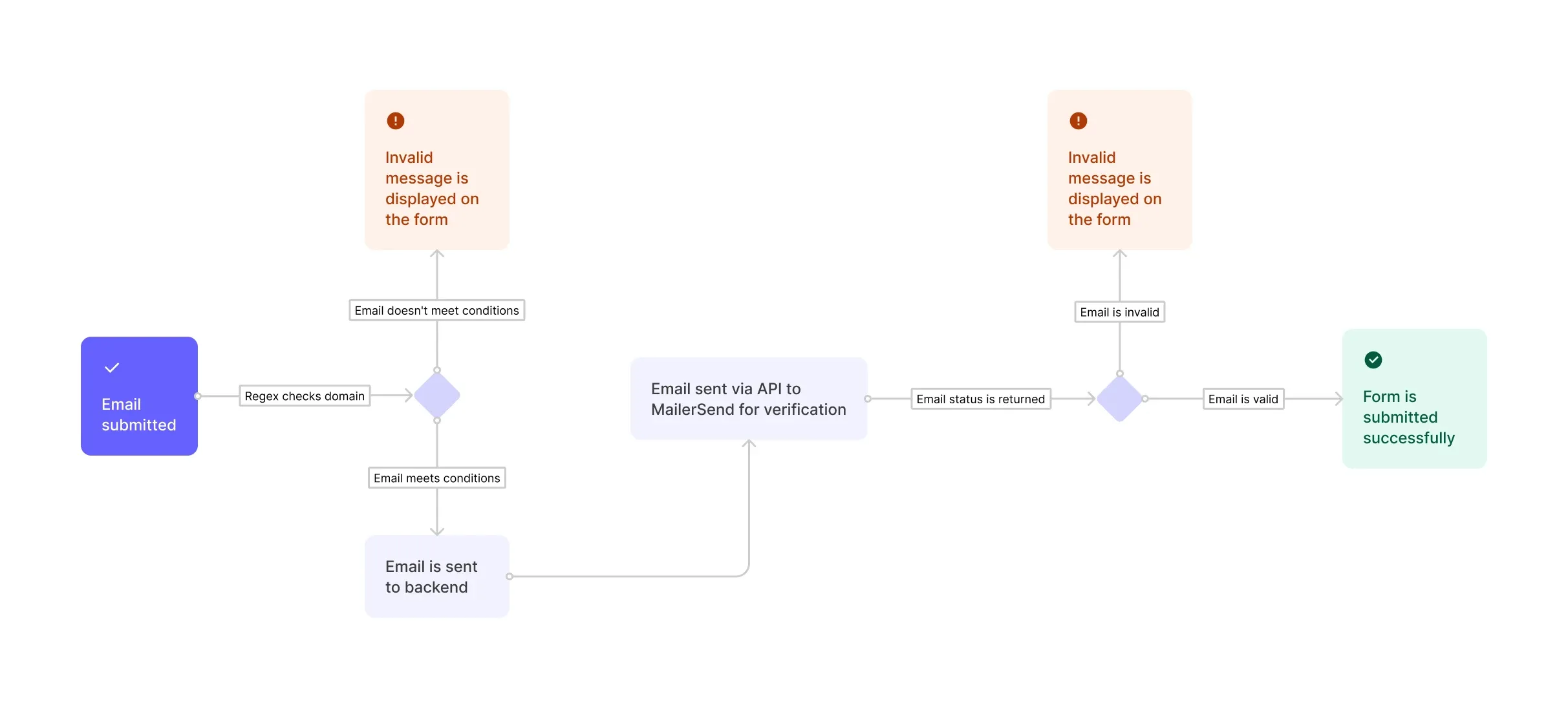
Two other reasons the browser cannot be the final word: a determined user can bypass any client-side script, and the browser has no way to reach the mail server that owns the domain. Confirming that an address can receive mail requires talking to that server, which only your backend can do.
Server-side verification: MX records and SMTP
Server-side verification moves an address from "looks valid" to "can receive mail" by checking it against the domain's mail infrastructure. It runs on your backend because it needs the DNS and SMTP access the browser does not have. The common steps are:
- MX record lookup, confirming the domain publishes mail-exchange records and therefore accepts email at all.
- SMTP handshake, opening a connection to the receiving server and checking whether it acknowledges the specific mailbox without sending a message.
- Disposable and role-address filtering, flagging throwaway domains and shared addresses that inflate bounce rates.
You can implement this yourself, though the SMTP step is fiddly and many providers rate-limit or cloak their responses. Checking a mailbox without delivering anything is exactly how you verify an email without sending a real message, so no test email ever lands in the recipient's inbox. For a JavaScript app, the practical route is to call an email verification API from your backend rather than reinventing that fiddly SMTP logic yourself.
Format for UX, verification for deliverability
The reliable pattern is layered: format checks for user experience, verification for deliverability. Use type="email" plus a simple regex in the browser so users fix typos instantly, then verify on the server (or through an API call from your server) before you store the address or add it to a sending list.
Format validation protects the form; verification protects your sender reputation by keeping invalid addresses out before they turn into hard bounces. Skipping the second layer is the mistake that ships clean-looking forms and dirty lists. A field that validates in the browser can still be a typo domain, an abandoned account, or a spam trap, and none of those show up until your bounce rate climbs.
FAQs
How do you validate an email address in JavaScript?
Use the HTML5 type="email" input for native browser validation, or test the value against a simple regular expression such as /^[^\s@]+@[^\s@]+\.[^\s@]+$/. Both confirm the format only. To confirm the address can receive mail, verify it server-side.
Can you validate an email with regex in JavaScript?
Yes, and a short pattern is enough for form input. Keep it simple rather than trying to match the full RFC 5322 grammar, because the exhaustive version is unreadable and still cannot prove the mailbox exists.
Is client-side email validation enough?
No. Client-side checks catch typos and improve the sign-up experience, but they only inspect the string. A perfectly formatted address can still be fake or undeliverable, so you need server-side verification for data quality.
What is the difference between email validation and verification?
Validation checks that an address is correctly formatted (syntax). Verification checks that the mailbox actually exists and accepts mail, using DNS and SMTP lookups. Validation runs in the browser; verification runs on the server.
How do you check email deliverability in JavaScript?
From your backend, look up the domain's MX records and run an SMTP check to confirm the mailbox, or call a verification API and act on its result. The browser cannot do this because it has no DNS or SMTP access.
Format checks keep your forms clean, but only verification keeps your list clean. Run your addresses through BounceCheck before your next send to catch the ones that pass every regex and still bounce.

BounceCheck Team
The team behind BounceCheck - helping businesses verify emails and improve deliverability.