What Is Mail Bombing? How Email Bomb Attacks Work
 BounceCheck Team
Mail bombing is a cyberattack that floods a target's inbox with a huge volume of email in a short time, enough to make the mailbox unusable. Most modern mail bombs work by signing your address up to thousands of legitimate newsletters and subscription forms at once, so the flood arrives from real companies and slips past spam filters. The attack is rarely the real goal: it is usually a smokescreen to bury a security alert, such as a password-reset or bank-transfer notification, while the attacker takes over an account behind the noise.
This guide explains what mail bombing is, how it works, why attackers use it, and how to protect yourself and respond if you are hit.
What is mail bombing?
Mail bombing (also called email bombing or, when done through sign-up forms, subscription bombing) is a form of net abuse that sends a large volume of messages to one address to overflow the mailbox, overwhelm the server, or distract the recipient from an important message. It is a type of denial-of-service attack aimed at a person's inbox rather than a website.
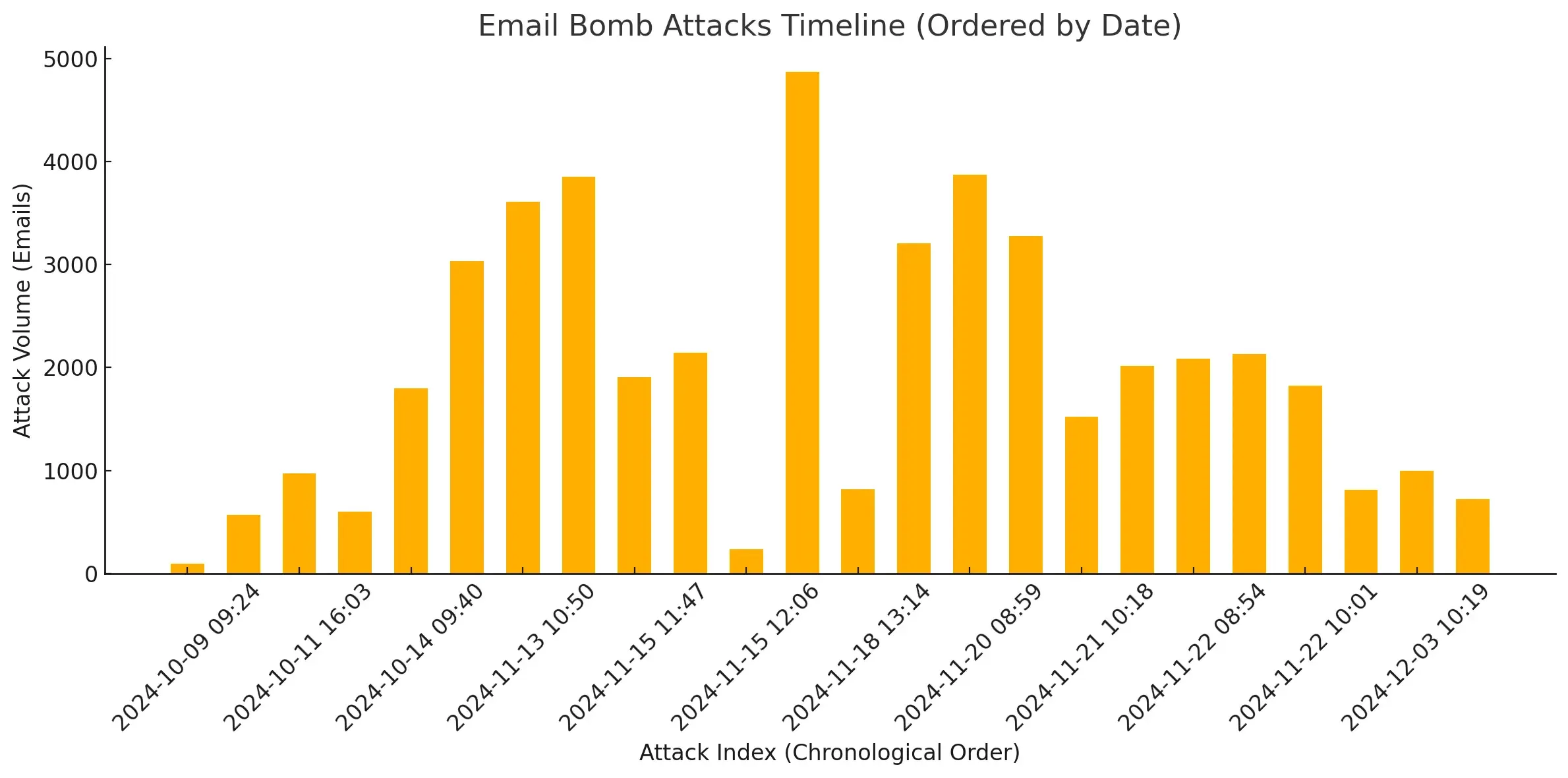
The scale is what makes it effective. According to Proofpoint, a bombing attack can deliver over 1,500 emails per hour, rendering an inbox unusable within minutes. MITRE, which catalogs the technique as T1667, notes that a single wave can reach thousands of messages and can also be used as a tool of harassment.
How mail bombing works
A modern mail bomb works by abusing legitimate sign-up forms rather than sending mail directly. An automated bot enters the victim's address into thousands of unprotected newsletter and subscription forms, and each service replies with its own confirmation email until the volume buries the inbox. Because the mail comes from real companies, it passes spam filters.

Older mail bombs sent thousands of messages directly from a script. Attacks as of 2026 are more clever: they weaponize legitimate marketing automation. The typical sequence is:
- An automated bot scans the web for newsletter and subscription forms that do not validate new signups (no CAPTCHA, no confirmation step).
- The bot enters the victim's email address into thousands of these forms at once.
- Each service sends its own "welcome" or "confirm your subscription" email, and in aggregate they bury the inbox.
Because the messages come from real companies on reputable platforms like Mailchimp and HubSpot, they carry valid SPF and DKIM authentication. To a filter that scores senders by reputation, it looks like the user simply signed up for a lot of newsletters, which is why traditional spam filtering often misses the attack.
Why attackers use mail bombs: the smokescreen
Attackers use mail bombing as a distraction, not an end in itself. While the victim is deleting thousands of junk emails, the flood hides a single critical alert, such as a password-change or wire-transfer notice from an account the attacker is taking over. The bombing often precedes a social-engineering call in which the attacker poses as IT support.
Subscription bombing is almost never the end goal. It is a distraction. While you are frantically deleting thousands of junk emails, the attacker is counting on you to miss the one message that matters, such as a "password changed" or "wire transfer initiated" alert from a compromised account.
The attack often comes paired with social engineering. Microsoft and Proofpoint both document a pattern where, right after the flood begins, the attacker contacts the victim on Microsoft Teams, Zoom, or by phone, posing as IT support offering to "fix the spam problem." If the victim accepts, they are guided into installing a remote-access tool such as Quick Assist or AnyDesk, which hands the attacker control of the device. The Black Basta ransomware group has used exactly this playbook. Executives and staff in finance and HR are the most common targets.
Related variants
Mail bombing belongs to a family of high-volume distraction attacks that share the same goal: bury a signal under noise. The main variants swap the delivery channel, using contact forms or phone-based 2FA prompts instead of newsletters, but each one floods a single target to hide or force a fraudulent action.
- Form bombing: instead of newsletters, bots target "contact us" or "request a quote" forms, so the victim gets thousands of auto-reply confirmations. These are harder to block because they lack a confirm-subscription step.
- SMS bombing, or MFA fatigue: the attacker floods a phone with 2FA codes or texts, either to annoy the victim into approving a fraudulent login or to mask a SIM-swap attack.
How to protect against and respond to mail bombing

If you are being bombed right now, treat it as a security incident, not just spam:
- Assume an account is under attack. Report it to your IT or security team, change the password on the targeted account, and turn on multi-factor authentication.
- Check for fraud. Review bank statements and any connected accounts for unauthorized password resets, purchases, or transfers, which the flood may be hiding.
- Be wary of "help." No legitimate IT team will call mid-attack asking you to install remote-access software. Treat any such offer as part of the attack.
- Do not mass-click unsubscribe. Many links simply confirm your address is live, and less reputable senders may sell it on. Filter instead of unsubscribing.
- Use inbox rules to triage. Route all new mail to a holding folder, then use rules to pull known-good senders into the inbox, so real messages are not lost in the flood.
To reduce your exposure before an attack, consider a privacy alias for sign-ups (so a bombed alias can be disabled without touching your main address), and at the organization level, enterprise tools like Microsoft Defender for Office 365 now detect high-velocity bursts and divert the flood to junk automatically.
If you run the sign-up forms
There is a second side to this attack. If your own newsletter or contact form has no CAPTCHA or confirmation step, bots can abuse it to bomb other people, and the flood of fake signups pollutes your list with invalid addresses and spam traps. Protect your forms with a CAPTCHA, a double opt-in confirmation, and email verification at the point of signup, so a real person has to own the address before it joins your list. BounceCheck is an email verification service that checks addresses at signup, keeping bombed forms from filling your list with invalid addresses and spam traps.
Common questions about mail bombing
Is email bombing illegal?
In most jurisdictions, yes. Deliberately flooding someone's inbox to disrupt access is a form of denial-of-service attack and can fall under computer-misuse and harassment laws, especially when it is tied to account takeover or fraud. The legitimate senders whose forms are abused are not the offenders; the attacker orchestrating the flood is.
How long does a mail bombing attack last?
It varies. An active burst can dump thousands of messages in a few hours, and the follow-on trickle of confirmation emails can continue for days as subscriptions settle. Filtering the flood into a separate folder and securing the targeted account are what end the disruption, not waiting it out.
How do I stop an email bomb?
You cannot easily block the mail at the source, because it comes from thousands of legitimate senders. The practical response is to protect the account first (change the password, enable MFA, check for fraud), then triage the flood with inbox rules or a mailbox provider's mail-bombing protection that moves the burst to junk.
Is mail bombing the same as spam?
No. Spam is unsolicited bulk mail sent to sell or scam at scale. Mail bombing targets one address on purpose, using volume itself as the weapon, usually to overwhelm the inbox and hide another attack rather than to sell anything.

BounceCheck Team
The team behind BounceCheck - helping businesses verify emails and improve deliverability.