550 5.1.1 User Unknown: What It Means and What to Do
 BounceCheck Team

Before your next send Find the addresses that will bounce.
Verify an email freeA 550 5.1.1 reply, often worded "user unknown" or "no such user", means the receiving server looked for the mailbox in your address and found none. The failure is permanent, so resending the same message will not work. Check the address, confirm it another way, and if it came from a list, stop sending to it.
This page covers the one-off sender and the list sender. It uses RFC 3463, RFC 5321, Google's Gmail Help, Microsoft Learn (pages updated in August 2026) and Yahoo's Sender Hub, read on November 17, 2026. Where they say nothing, we say so.
What does 550 5.1.1 user unknown mean?
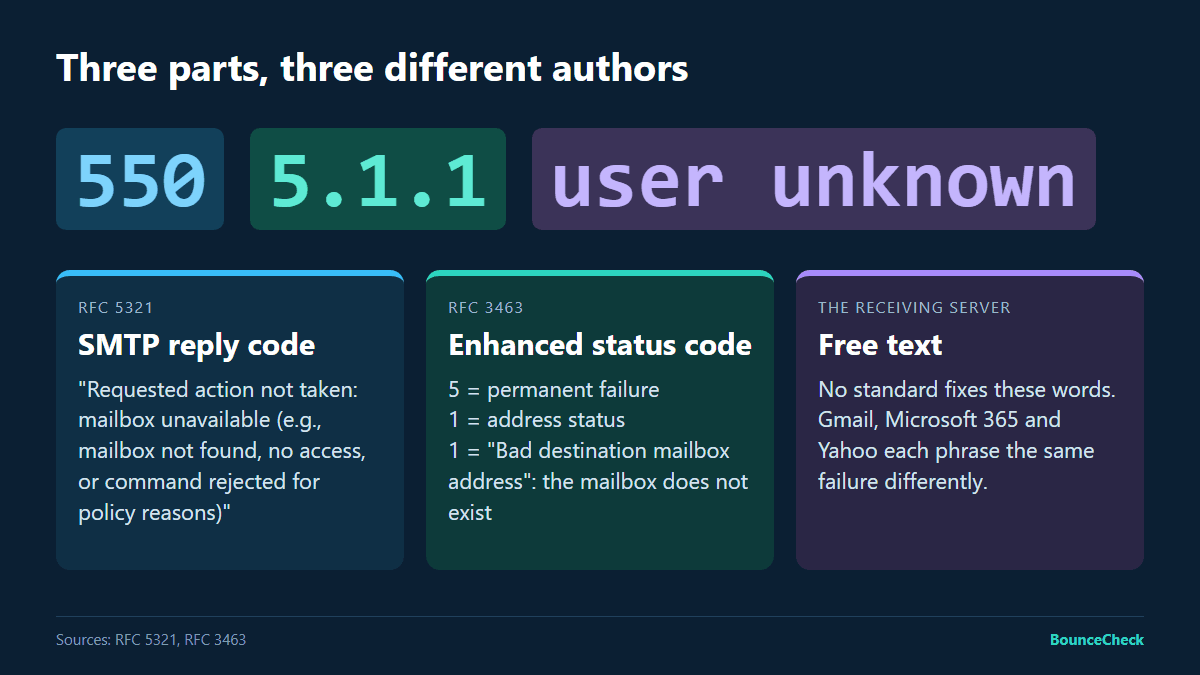
A different source defines each part of the reply. 550 is the SMTP reply code. RFC 5321 describes it as "Requested action not taken: mailbox unavailable (e.g., mailbox not found, no access, or command rejected for policy reasons)". It adds that a server that knows a recipient is not deliverable returns a 550 "typically with a string such as 'no such user - ' and the mailbox name".
5.1.1 is the enhanced status code from RFC 3463. The first 5 marks a permanent failure, one "not likely to be resolved by resending the message in the current form". The middle 1 is the subject, address status. The last 1 is "Bad destination mailbox address": the mailbox does not exist, and for Internet mail "the address portion to the left of the '@' sign is invalid". The words "user unknown" are the server's own text. No standard fixes them.
Each provider words the same failure differently.
| Provider | Code | Wording or label | Source |
|---|---|---|---|
| Gmail | 550 5.1.1 | The email account that you tried to reach does not exist | Gmail bounce quoted in a 2020 forum post |
| Microsoft 365 | 5.1.1 | Bad destination mailbox address | Microsoft Learn NDR list (the RFC 3463 title) |
| Yahoo | 554 | This user doesn't have a yahoo.com account | Old example bounce on Yahoo's Sender Hub |
Yahoo's own example, which carries 2010 timestamps, is a 554, and its error page lists 553 and 554 under permanent errors and 550 and 554 under other policy errors, so an unknown Yahoo address may not say 550. In that 2020 bounce, the Gmail text ended with a link to Google's page on bounced or rejected emails, which lists "The recipient's email address doesn't exist" as a cause. That page does not print the 5.1.1 string, so the table credits the forum post.
RFC 5321 notes that some servers check recipients only after receiving the message text, then report the failure in a separate bounce message, so the notice can arrive after you send.
Whose problem is a 550 5.1.1?
Usually the sender's. Microsoft says a wrong address is "the most common issue that causes 5.1.x errors". On the recipient's side your address is right, but their setup cannot resolve it.
On the sender side, Google's examples are a spelling error such as [email protected], a stray quotation mark, a dot at the end and a space before or after the address. Microsoft adds an address that was valid and was later changed or removed, and a stale Outlook Auto-Complete entry after the recipient's mailbox moved between Exchange servers.
On the recipient side, Microsoft's Exchange Online guidance for 5.1.1 lists the first two items. Its separate 550 5.1.10 page lists the last two:
- a stale or ambiguous MX record, for example one that points to an old mail server
- a forwarding Inbox rule or mail flow rule that passes your message on to an invalid address
- an accepted domain set to Authoritative while on-premises recipients are not represented in Exchange Online
- a mailbox hosted in Exchange Online with no license assigned
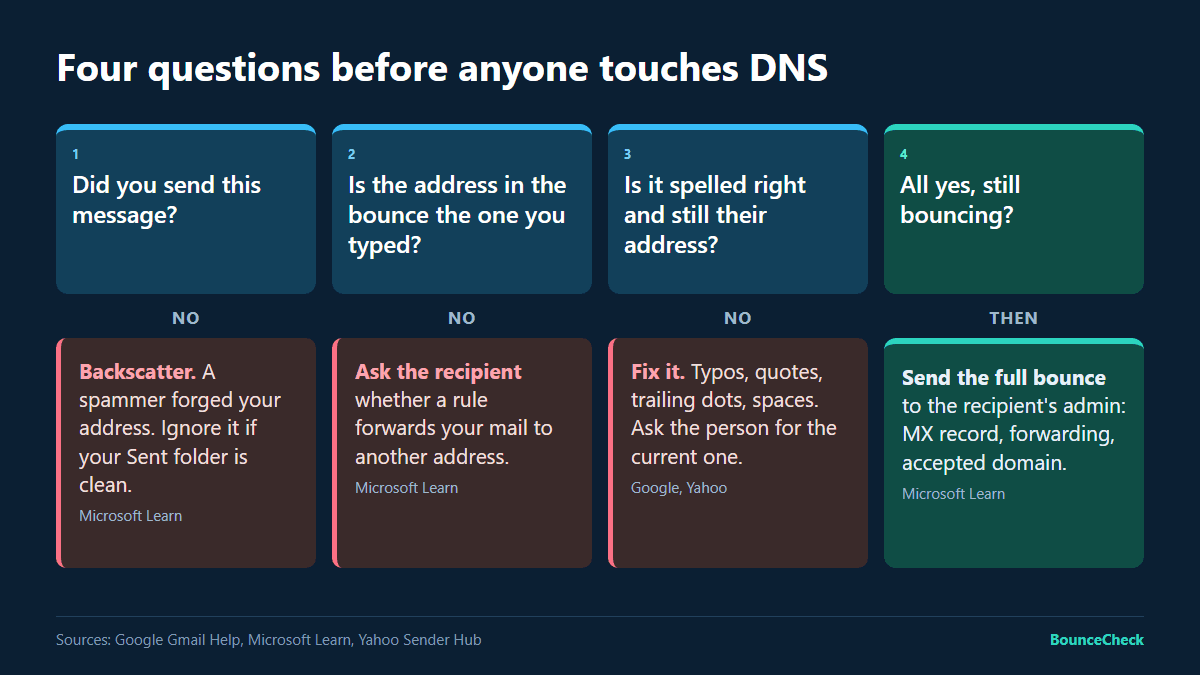
You may not have sent the message at all. Microsoft calls an NDR for a message you never sent backscatter: a spammer forged your address in the From field. If your Sent folder holds only mail you know you sent, ignore it. If it holds messages you did not send, Microsoft says the account might be compromised.
What should you do if you sent one email?
Do not resend the same message. In order:
- Compare the address in the bounce with the one you typed. If they differ, Microsoft says to ask the recipient whether a rule forwards your mail to another address.
- Fix the spelling using the list above.
- Ask the person for their current address. Google says to make sure you have the current one, and Yahoo recommends contacting the recipient directly.
- In Outlook, delete the recipient from the Auto-Complete list and type the address again. Microsoft warns that resending the original message causes the same failure.
- If the address is right, send the full bounce to the recipient or their administrator. After an administrator changes the MX record, Microsoft says to allow up to 72 hours for DNS changes to reach all servers.
What should you do with a list?
Treat the first 5.1.1 as final for that address: suppress it and stop sending, unless it is a known contact you can confirm first. Yahoo says a "recipient does not exist" error will never complete, you should not retry it, and you "should remove the email address from your mailing list". It also says list managers "should have a policy for removing email addresses that generate 5xx errors/bounces". Keeping them on a suppression list stops an old export from adding them back (our practice, not Yahoo's wording).
Volume matters. Yahoo lists "Excessive unknown recipients" as its own error group, for a mail server "sending to a large number of invalid recipients". None of the pages used here gives a hard bounce threshold, so we give no number.
In lists users checked on BounceCheck (pulled November 4, 2026), 33.8% of 597,834 addresses came back invalid and the median list was 34.5% invalid. That is not an average list: people verify lists they already distrust, three accounts hold about half of the addresses, and "invalid" is our verdict, not a measured bounce. The method is on the email list quality data page.
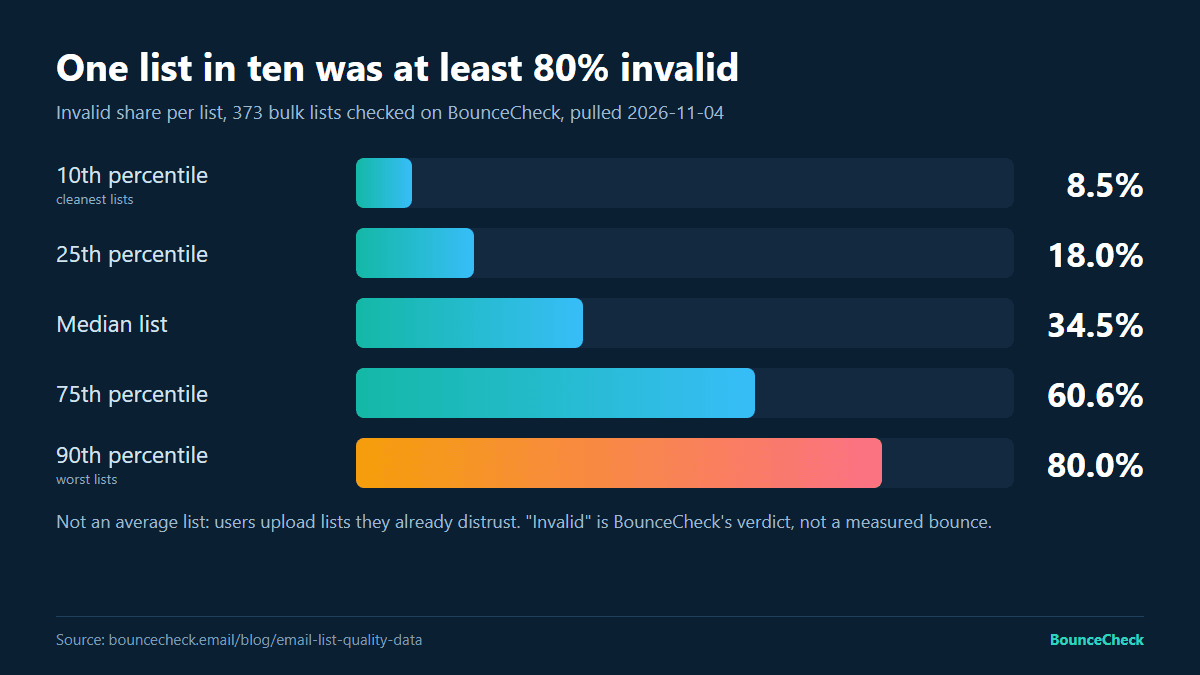
A verifier checks the address before you send, so dead addresses can be removed before they bounce. It cannot settle every address: 7.0% in the same data came back unknown, for example on catch-all domains or providers that refuse checks. Keep suppressing bounces after the send.
How do you tell 550 5.1.1 from similar codes?
The enhanced code shows which part of the delivery failed. These codes look similar to 5.1.1.
| Code | Name or wording | Whose move |
|---|---|---|
| 5.1.1 | Bad destination mailbox address (RFC 3463) | Sender checks the address |
| 5.1.2 | Bad destination system address (RFC 3463) | Sender checks the domain |
| 5.1.10 | Recipient not found (Exchange Online) | Same steps as 5.1.1 |
| 5.2.1 | Mailbox disabled, not accepting messages (RFC 3463) | Recipient |
| 5.2.2 | Mailbox full (RFC 3463); Submission quota exceeded (Exchange Online) | Recipient per RFC; sender if Exchange Online |
| 5.4.1 | Recipient address rejected: Access denied (Exchange Online) | Check the address, then the admin |
| 5.7.1 | Delivery not authorized (RFC 3463) | Permission, not address |
RFC 3463 defines 5.1.2 as a domain to the right of the "@" that is invalid for mail. With 5.2.1 the mailbox exists but is disabled, and RFC 3463 defines 5.2.2 as full. Exchange Online's NDR list uses 5.2.2 for "Submission quota exceeded", the sender's own rate limit. For 5.1.10, Microsoft says SMTP address lookup did not find the recipient, and it lists 550 5.5.0 as similar for @hotmail.com and @outlook.com recipients.
Microsoft's table says the 5.4.1 "Access denied" reply means the recipient's address does not exist, so check the address first. Our guide to 550 5.4.1 recipient address rejected covers that case. A 5.7.1 can mean the sender is not allowed to write to that recipient, for example a distribution group that only accepts mail from members. Microsoft's list also uses it for "Unable to relay". The whole 550 family is mapped in our email bounce code 550 guide.
FAQs
Can a valid address return 550 5.1.1?
Yes. A stale MX record, a forwarding rule to a bad address or a domain setting on the recipient's side can produce it. Ask their administrator to check.
Will it fix itself if I wait?
No. RFC 3463 says a permanent failure needs a change to the message or the destination.
Is 5.1.1 the same as a full mailbox?
No. RFC 3463 defines a full mailbox as 5.2.2, though on Exchange Online 5.2.2 means your own sending quota was exceeded. 5.2.1 means the mailbox exists but is disabled.
§ Before your next send
Find the addresses that will bounce
Verify a single address free, or upload a CSV — the free plan includes 50 checks a month, no card needed.

BounceCheck Team
The team behind BounceCheck - helping businesses verify emails and improve deliverability.