550 5.7.515 Access Denied: What It Means and How to Fix It
Before your next send Find the addresses that will bounce.
Verify an email freeThe 550 5.7.515 access denied bounce is a hard reject, not a spam-folder placement. Microsoft has checked the domain in your From address against its authentication requirements, decided it does not meet the bar, and refused the message outright. Retrying the send will not change the outcome. The fix runs in a fixed order: repair SPF first, sign with DKIM second, then publish a DMARC record at p=none with alignment between your visible From domain and whichever of SPF or DKIM you use to authenticate.
Quick checklist before you read on:
- Read the bounce text and the message headers to see which check failed (SPF, DKIM or DMARC).
- Make SPF authorize every server and ESP that sends for your domain, in a single record.
- Sign mail with DKIM using your own domain.
- Publish
v=DMARC1; p=nonewith SPF or DKIM aligned to the From domain. - Wait for DNS to refresh, send a test to an Outlook.com mailbox and confirm all three checks pass.
What the 550 5.7.515 "access denied" error means
This bounce means Microsoft's mail servers rejected your message at the SMTP handshake because the sending domain failed the authentication level Microsoft requires of high volume senders, not because a spam filter judged the content.
The rejection text, in full, reads: "550 5.7.515 Access denied, sending domain [SendingDomain] does not meet the required authentication level" (Microsoft Support). Search for that exact string and you have landed on the right error.
How to read the 550 5.7.515 code
The code has two parts. 550 is the SMTP reply code for a permanent failure: the receiving server will not accept the message, and sending it again meets the same answer. 5.7.515 is the enhanced status code. The leading 5 marks a permanent failure, the 7 places it in the security and policy category, and 515 is the specific reason Microsoft attaches to it, which is that the sending domain does not meet the required authentication level.
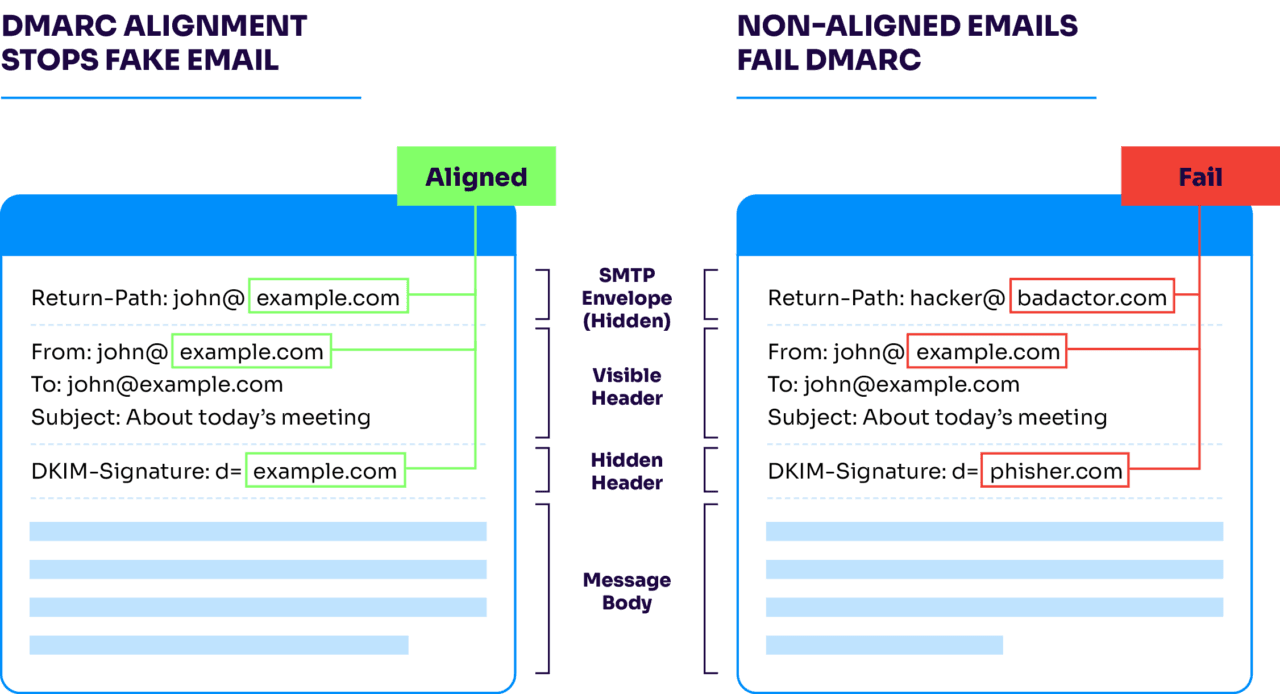
Outlook checks three things before it accepts a message from a domain sending in volume: does SPF pass for that domain, does DKIM pass and align, and is there a DMARC record published for it at all. Alignment here compares two domains, the 5321.MailFrom domain your server presents during the SMTP handshake and the 5322.From domain your recipient actually sees in the message header, and at least one of them needs to carry a passing SPF or DKIM check. A domain that fails any leg of that check, or has no DMARC record whatsoever, gets this rejection. For background on how SPF, DKIM, and DMARC work together, each protects a different layer of the same From-domain claim.
Who this affects: the 5,000-message high-volume sender threshold
You cross into Microsoft's high volume sender category once your domain sends 5,000 or more messages to Microsoft consumer email services (Outlook.com, Hotmail, Live) in a day, using the same domain in the visible From address (Microsoft Support). Microsoft began enforcing this requirement on May 5, 2025, for domains crossing that volume threshold (URIports). Below that threshold, the same misconfigured SPF or DKIM record produces a soft failure or spam-folder placement instead of this hard block.
Microsoft is not the only mailbox provider drawing this line. Gmail and Yahoo introduced comparable authentication requirements for bulk senders in 2024, ahead of Microsoft's own enforcement (URIports). If your list crosses several major providers, the same SPF and DKIM records generally need to satisfy all three, since none of them accept an unauthenticated domain at scale anymore.
Does Outlook require SPF, DKIM and DMARC?
For domains in the high volume category, yes. Both SPF and DKIM should pass, and a DMARC record must be published for the domain. The policy can be as relaxed as p=none, as long as at least one of SPF or DKIM aligns with the From domain. A domain with a perfect SPF record and no DMARC record still gets rejected.
Why it's a hard reject, not a spam-folder problem
Before this policy, a domain with a broken SPF or DKIM record still had a shot at the inbox, usually a reduced one, landing in Junk. Microsoft has removed that middle outcome for high volume senders: a domain that fails authentication is rejected at the SMTP level and the message is never delivered to any folder (Palisade).
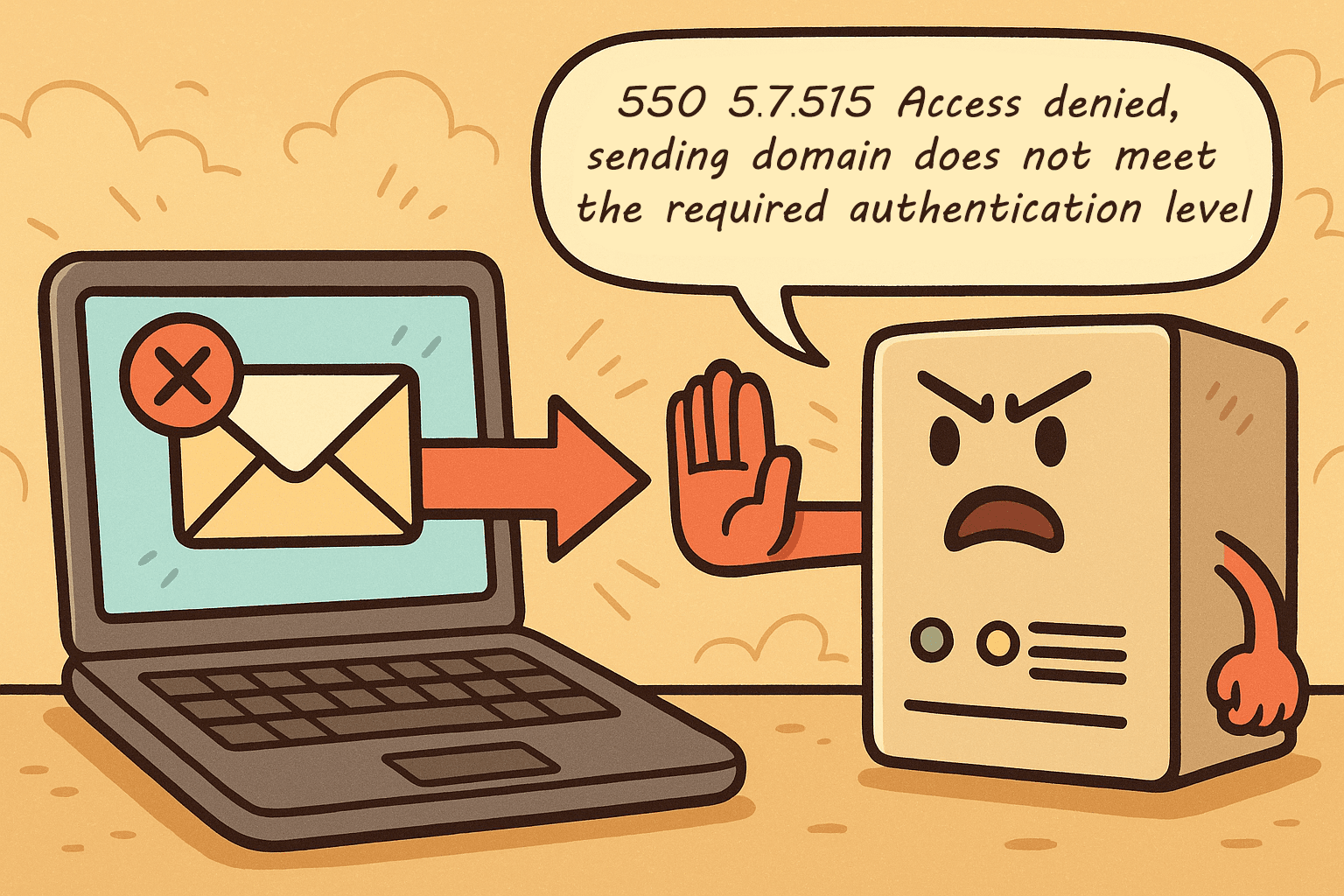
That distinction matters for how you diagnose it. A message sitting in spam is a sender reputation problem you can improve gradually through engagement and list hygiene. A 550 5.7.515 bounce is a binary authentication failure: the record is either correct and aligned, or the message does not arrive. There is no partial credit, and no amount of resending fixes a record that was never published correctly in the first place.
How to diagnose the failure before you change any DNS record
Guessing at a second fix before you have confirmed the first one actually failed just adds a new variable to the problem. Spend five minutes on diagnosis first.
- Open the bounce message and copy the full diagnostic text, including the sending domain Microsoft names in the error.
- Send a test message from the same domain and server to an Outlook.com mailbox you control, then open the message source or headers.
- Find the
Authentication-Resultsheader. It listsspf=,dkim=anddmarc=results, each with the domain it checked (smtp.mailfrom,header.d,header.from). - Note which result is not "pass" and which domain it names. A DKIM pass on a domain that differs from your From domain is not aligned, even though the signature is valid.
- Look up the live records with a TXT record lookup instead of trusting what you typed into your DNS panel.
Fix order: SPF, then DKIM, then DMARC alignment
Work through these in sequence. Each layer depends on the one before it, so skipping ahead to DMARC before SPF and DKIM both pass just produces a DMARC failure instead of an SPF failure.
- Confirm SPF authorizes every server that sends on your domain's behalf, including your own mail servers and any ESP, then confirm the record resolves with a TXT record lookup rather than trusting what you typed into the DNS panel.
- Sign every outbound message with DKIM under your own domain, not a shared or default signing domain from your ESP, since Microsoft checks whether the DKIM signature's domain aligns with your visible From domain.
- Publish a DMARC record at v=DMARC1; p=none as the minimum viable policy, with either SPF or DKIM aligned to the 5322.From domain (Microsoft Support requires only one of the two to align, not both).
Step 1: SPF record example
An SPF record is a single TXT record on your domain that lists every sender allowed to use it. A domain sending through Microsoft 365 and one ESP could look like this, with the ESP include taken from that provider's own documentation:
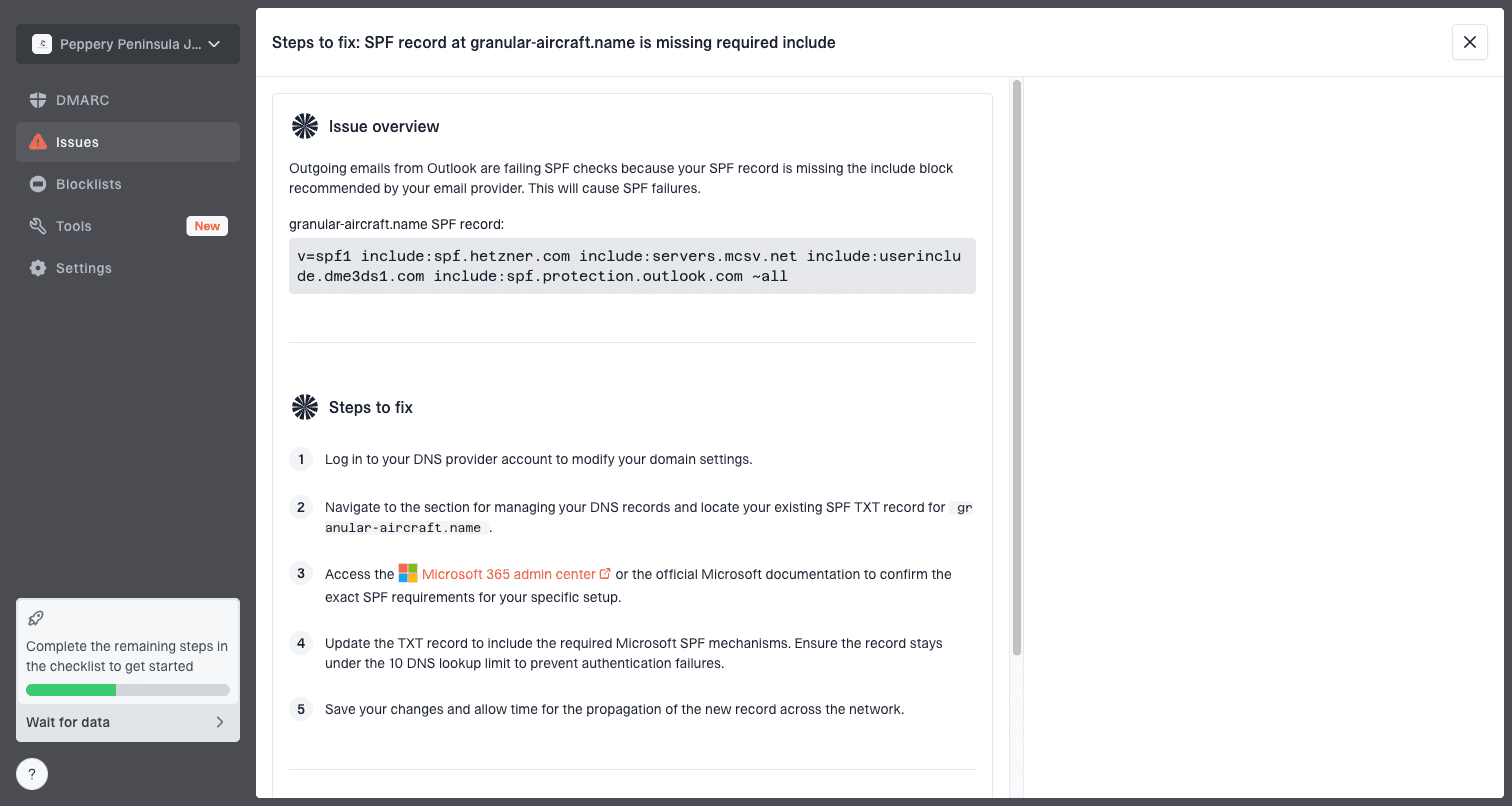
v=spf1 include:spf.protection.outlook.com include:spf.your-esp.example ~allKeep everything in one record. The sections on ESPs below explain why two separate SPF records break the check.
Step 2: DKIM setup
DKIM adds a cryptographic signature to each message, and the receiving server verifies it against a public key in your DNS. Your sending platform generates the key and tells you which record to publish, usually one or two CNAME or TXT records on a selector subdomain such as selector1._domainkey.yourdomain.com. In Microsoft 365 you enable DKIM per domain in the Microsoft Defender portal after publishing the two CNAME records it gives you. In Google Workspace you generate the key in the Admin console and publish it as a TXT record. Either way, the signing domain (the d= value) must be your own domain, or at least a subdomain of it.
Step 3: DMARC record and alignment
DMARC is a TXT record published at _dmarc.yourdomain.com. The minimum that satisfies Microsoft is:
v=DMARC1; p=none; rua=mailto:[email protected]DMARC passes when SPF or DKIM passes and the domain it authenticated matches the visible From domain. With the default relaxed alignment, a subdomain such as mail.yourdomain.com aligns with yourdomain.com. Strict alignment requires an exact match.
Start DMARC at p=none and read your DMARC aggregate reports for a few weeks before you consider moving to p=quarantine or p=reject (Valimail). p=none still satisfies Microsoft's minimum requirement while you confirm your own legitimate traffic is passing before you start rejecting anything that fails.
Configuring third-party ESPs so they don't break your alignment
Every ESP sending on your behalf, whether that's your CRM, your transactional mail provider, or a marketing platform, has to be added to your SPF record and configured to sign with DKIM under your domain, not theirs (Microsoft Support). Adding a new ESP without doing both is the single most common way this bounce reappears after you thought it was fixed.
Watch for multiple SPF records on the same domain as you add senders. Two separate v=spf1 lines for one domain is invalid by the SPF specification and will fail the check even if each line individually looks correct; every ESP and mail server needs to live inside a single merged record. Each ESP you add through an include mechanism also counts against SPF's 10 DNS lookup limit, so a domain with several ESPs stacked into one record can hit a permanent SPF failure purely from lookup count, independent of whether any individual sender is misconfigured (URIports). If you send through several ESPs and want to keep a mistake in one from touching your primary domain's reputation, isolating that ESP on a subdomain, such as marketing.yourdomain.com, keeps its authentication separate from your root domain's alignment (Valimail).
Sending from a personal domain like Yahoo? Why you can't fix this yourself
If you are sending from a personal Yahoo, Outlook.com, or similar consumer mailbox rather than a domain you control, you cannot edit that domain's SPF, DKIM, or DMARC records: only the mailbox provider itself holds those DNS records, and it manages authentication policy for every user on that domain at once (Microsoft Q&A). There is no per-account setting that gets your individual messages exempted.
Microsoft does not manually bypass the 550 5.7.515 block for individual senders, and a consumer provider is unlikely to change domain-wide authentication because one user is sending in volume (Microsoft Q&A). The two practical options are to move your sending to a custom domain where you control SPF, DKIM, and DMARC directly, or to keep your volume under the threshold on a provider like Gmail or Outlook.com where the authentication is already handled for you.
Why authentication can still fail after you think you've fixed it
Some senders publish correct-looking SPF and DKIM records and still get this bounce. Microsoft checks alignment at final delivery, not at the moment you sent the message, so a handful of conditions between your server and the recipient's inbox can break the check (Suped):
- One-leg DMARC passes hide a weak spot: DMARC passes if either SPF or DKIM aligns, so a domain can look compliant while its SPF is actually broken and only DKIM is carrying the pass, or the reverse.
- Forwarding changes what Microsoft sees: a message forwarded through another mailbox before reaching Microsoft often loses its original SPF pass, because the forwarding server is now the one connecting, not your original sending IP.
- Content modification breaks DKIM signatures: any system that rewrites the message body or headers after signing, including some forwarding and mailing-list software, invalidates the signature and produces a DKIM temperror or outright fail.
- DNS resolver variance returns stale records: a record you just corrected can still fail checks for a period if Microsoft's resolvers cached the previous, broken version.
- Recipient-specific or tenant-level restrictions sit outside authentication entirely: an individual mailbox, account, or tenant-level block can produce a similar-looking rejection that no SPF, DKIM, or DMARC change will resolve (Palisade).
Before changing any DNS record again, pull the full message headers or the bounce's diagnostic information and confirm exactly which check failed and on which domain.
After the fix: how to confirm it worked
DNS changes take effect once the old record's TTL expires, which can be minutes or several hours depending on how your DNS host is set up. After that window, send a fresh test message to an Outlook.com mailbox and check the Authentication-Results header again. You want spf=pass, dkim=pass and dmarc=pass, with the domains matching your From address. Re-send the original messages only after the test passes, because Microsoft evaluates each attempt on its own.
If every check passes and the 5.7.515 bounce keeps coming back, collect the full bounce text and a sample set of headers and contact Microsoft's sender support for Outlook.com. Check for the tenant or mailbox restrictions listed above first, since those produce similar-looking rejections.
550 5.7.515 compared with other Microsoft bounce codes
Several Microsoft errors look alike and are easy to mix up. Only 5.7.515 is about the authentication of your sending domain. The table shows what the neighbors usually mean, so you can tell whether DNS changes will help.
| Error | Usual meaning | Where to look |
|---|---|---|
| 550 5.7.515 Access denied | Sending domain fails Microsoft's required authentication level | SPF, DKIM, DMARC and alignment |
| 550 5.7.511 Access denied, banned sender | The sender or sending IP is blocked because of reputation | Reputation, complaint rates, list hygiene |
| 550 5.7.606 Access denied, banned sending IP | The IP address is on Microsoft's block list | IP reputation and delisting request |
| 550 5.7.705 Access denied, tenant has exceeded threshold | A Microsoft 365 tenant hit its sending limit or was flagged for spam | Tenant admin, compromised accounts |
| 550 5.1.8 Access denied, bad outbound sender | An account or tenant was restricted for outbound spam | Tenant admin, compromised accounts |
| 550 5.7.1 (various texts) | Generic policy or permission refusal; the text after the code gives the cause | The rest of the bounce message |
| 550 5.4.1 Recipient address rejected | The recipient address is not recognized | The recipient address itself |
| 535 5.7.3 Authentication unsuccessful | SMTP login to submit mail failed | Username, password, SMTP AUTH settings |
FAQ
What does the 550 5.7.515 error mean?
It means Microsoft rejected your message because the sending domain in your From address failed the SPF, DKIM, or DMARC checks required of high volume senders. It is an outright block at delivery, not a spam-folder placement, and the exact rejection text is "550 5.7.515 Access denied, sending domain [SendingDomain] does not meet the required authentication level."
Will retrying the send fix a 550 5.7.515 bounce?
No. Retrying sends the identical message from the identical unauthenticated domain, so Microsoft rejects it again. The message only goes through once SPF, DKIM, and DMARC are corrected and aligned to your 5322.From domain.
Does Outlook require SPF, DKIM and DMARC?
For domains that send 5,000 or more messages a day to Microsoft consumer services, yes. SPF and DKIM should pass, and a DMARC record must exist. A policy of p=none is enough as long as SPF or DKIM aligns with the From domain.
Is p=none enough to fix 550 5.7.515?
Yes. p=none meets Microsoft's minimum requirement. It lets you collect aggregate reports and confirm your legitimate mail passes before you move to p=quarantine or p=reject.
How long does it take for the 550 5.7.515 error to stop after I fix DNS?
It stops once the corrected records are visible to Microsoft's resolvers, which depends on the TTL of the old record and can take from a few minutes to several hours. Send a test to an Outlook.com mailbox and confirm spf, dkim and dmarc all pass before re-sending real mail.
Is 550 5.4.1 the same error as 550 5.7.515?
No. 550 5.4.1 is a recipient address rejection, meaning the mailbox provider does not recognize the recipient's address as valid. 550 5.7.515 is a sender authentication failure and has nothing to do with whether the recipient's address exists. Treat them as unrelated problems with unrelated fixes.
Can I still hit this error sending from Gmail or Yahoo?
It is possible when high volume mail goes out with a personal Gmail or Yahoo address in the From line, because the provider's shared domain-wide authentication applies to every user. You cannot adjust SPF, DKIM, or DMARC for an individual Gmail or Yahoo account; a custom domain is the only way to control those records yourself.
Is the 5,000-message threshold still enforced in 2026?
Yes. Microsoft's high volume sender requirements, in place since May 2025, remain active in 2026 with no signaled rollback, and Gmail and Yahoo continue to enforce their own comparable bulk sender rules alongside it.
§ Before your next send
Find the addresses that will bounce
Verify a single address free, or upload a CSV — the free plan includes 50 checks a month, no card needed.