Email Bounce Codes 421, 451, and 552: What They Mean and How to Fix Each One
 BounceCheck Team
Most senders only worry about email bounce codes when something breaks. The 550 hard bounce is the famous one, covered in our deep dive on the 550 mailbox-unavailable error. But the 4xx siblings, 421 and 451, plus the underrated 552, account for a large slice of real-world deferrals and outright rejections, and most people misread them.
421 and 451 are temporary, 4xx soft bounces. The receiving server is telling your sending server to back off and retry. 552 is permanent, a 5xx hard bounce, and means the message will never be delivered in its current form. Reading these three correctly is the difference between a clean queue and a sender reputation in free fall.
What 421, 451, and 552 mean at a glance
The first digit of an SMTP reply tells you whether the failure is transient or permanent. 4yz is a transient negative reply, meaning the action did not complete but the sender SHOULD retry. 5yz is a permanent negative reply, meaning the sender SHOULD NOT repeat the exact request. That single digit decides whether you wait or whether you remove the address.
| Code | Class | Type | Typical meaning | Action |
|---|---|---|---|---|
| 421 | 4yz transient | Soft bounce | Service not available, closing transmission channel | Retry with backoff; investigate IP reputation or rate limit |
| 451 | 4yz transient | Soft bounce | Requested action aborted, local error in processing | Retry; check SPF, DMARC, PTR, and SMTP protocol compliance |
| 552 | 5yz permanent | Hard bounce | Requested mail action aborted, exceeded storage allocation | Reduce message size, strip blocked attachments, or remove the recipient |
All three codes are defined in RFC 5321, the current SMTP standard. The enhanced status codes that often accompany them (the X.Y.Z form like 5.2.2) come from RFC 3463 and are maintained by IANA in the SMTP enhanced status codes registry.
Bounce code 421: temporary system or rate-limit failures
A 421 reply means the receiving service is busy, throttling you, or shutting down the connection on purpose. It is a transient error, so retry is appropriate, but the cause usually traces back to something on the sender side that needs fixing before the retry succeeds.

Yahoo lumps 421 reasons into a handful of categories: unusual traffic patterns from the sending IP, spam-like message characteristics, complaints from Yahoo users, busy Yahoo mail servers, dynamic deprioritization, name-server unavailability, and temporary authentication-result failures. Gmail's published table is more granular and tells you exactly which 421 enhanced status applies to which root cause.
- 421 4.3.0 or 4.4.5: temporary system problem or server busy. Pure infrastructure transient, safe to retry.
- 421 4.7.0 with "No PTR record": the sending IP has no reverse DNS, or the forward lookup does not match. Gmail rate-limits the whole IP.
- 421 4.7.0 with "TLS required": Gmail wants the connection encrypted to that recipient domain.
- 421 4.7.0 with "very low IP reputation" or "very low domain reputation": your sending identity has been flagged.
- 421 4.7.26: the message is unauthenticated; Gmail requires SPF or DKIM on every send.
- 421 4.7.27: SPF did not pass for a bulk send.
- 421 4.7.28: Gmail has detected an unusual rate of unsolicited email, scoped to your IP, IP netblock, DKIM domain, SPF domain, or even the URL domains inside the message.
- 421 4.7.29: no TLS connection used for a bulk send.
- 421 4.7.30: DKIM did not pass for a bulk send.
- 421 4.7.40: the sending domain has no DMARC record. This became a hard requirement for bulk senders under Gmail and Yahoo's February 2024 policy.
- 421 4.7.32: the From header is not aligned with the SPF or DKIM organisational domain.
The pattern is clear: 421 is rarely "the server happened to be busy." Most modern 421 replies are dressed-up rate-limit messages from receivers who do not trust the sending identity. Treating 421 as a transient email error and retrying without fixing the underlying authentication or reputation issue will just keep producing the same code.
Bounce code 451: SMTP protocol violations and DNS auth hiccups
451 means "requested action aborted, local error in processing." In practice, 451 is what receivers return when something about the SMTP transaction or the sending domain's DNS is not quite right, but the receiver is willing to try again later.
The Yahoo 4XX bucket explicitly groups 451 with 421, citing the same set of triggers: unusual traffic, spam-like content, user complaints, busy servers, dynamic deprioritization, and temporary auth-result failures. Yahoo also notes that an unresolvable RFC.5321 or RFC.5322 from-domain can be returned either as 451 (timeout or servfail) or as 554 (permfail). The same DNS problem, two different SMTP codes depending on whether the receiver thinks the failure is temporary or permanent.
Gmail's table breaks 451 into specific enhanced status codes that map cleanly to causes you can act on.
- 451 4.3.0: email server has temporarily rejected the message; sometimes also signals that you tried multiple destination domains in one transaction, which is not supported.
- 451 4.4.2: timeout, closing connection. The TCP-level chat between your MTA and Gmail's stalled.
- 451 4.5.0: SMTP protocol violation. Fix the sending MTA's command sequence, not anything on the recipient side.
- 451 4.7.23: the sending IP has no PTR record, or the forward DNS lookup does not match. Same fix as the 421 PTR variant, but Gmail is still hedging on temporary vs permanent.
- 451 4.7.24: the SPF record of the sending domain has suspicious entries (open
+allmechanisms, broken includes). - 451 4.7.26: an unauthenticated message would fail DMARC, but temporary DNS failures are preventing a clean check.
If the same 451 fires again on retry, the message is queued for further attempts but the underlying SPF, DKIM, DMARC, or PTR record needs to be fixed before the receiver will accept the send. A 451 that turns into a 550 after several retries is a signal that the receiver gave up and converted the soft bounce into a hard bounce.
Bounce code 552: storage and message-size rejections
552 is a permanent 5xx failure. The original RFC 5321 phrasing is "Requested mail action aborted: exceeded storage allocation," which historically meant the recipient's mailbox was full. Modern receivers, especially Gmail, also use 552 for any size-related rejection: oversize messages, oversize headers, too many attachments, or attachment types that are blocked outright.
- 552 5.2.2: the recipient's inbox is out of storage space and the account is inactive. This is the closest match to the historic "mailbox full" meaning, and it is permanent because the account itself is dead. Its temporary twin is 452 4.2.2, which means the mailbox is full but the account is still active.
- 552 5.3.4 (message size): the message body, attachments, or both exceeded the receiver's message-size limit. Gmail's default receive limit is 25 MB for users, with internal limits closer to 50 MB once header overhead is counted.
- 552 5.3.4 (header size): the message's combined headers, individual header values, or header names exceeded Gmail's header-size limits. Long Authentication-Results, Received chains, or List-Unsubscribe values cause this.
- 552 5.3.4 (attachment count): the number of attachments exceeded Gmail's per-message limit.
- 552 5.7.0: the message content presents a potential security issue. Gmail uses this for blocked file types (executables, certain scripts, encrypted archives that cannot be scanned) and for content patterns that scan as malware.
552 is a hard bounce, so the sending MTA should not retry the same payload. The fix is on the payload itself: shrink the message, drop the blocked attachment type, host the file externally and link to it, or split the recipient list. The recipient address is usually fine. This is one of the few hard bounces that does not mean the address is dead, which makes 552 easy to misclassify in bounce-handling logic.
Reading enhanced status codes (the X.Y.Z form)
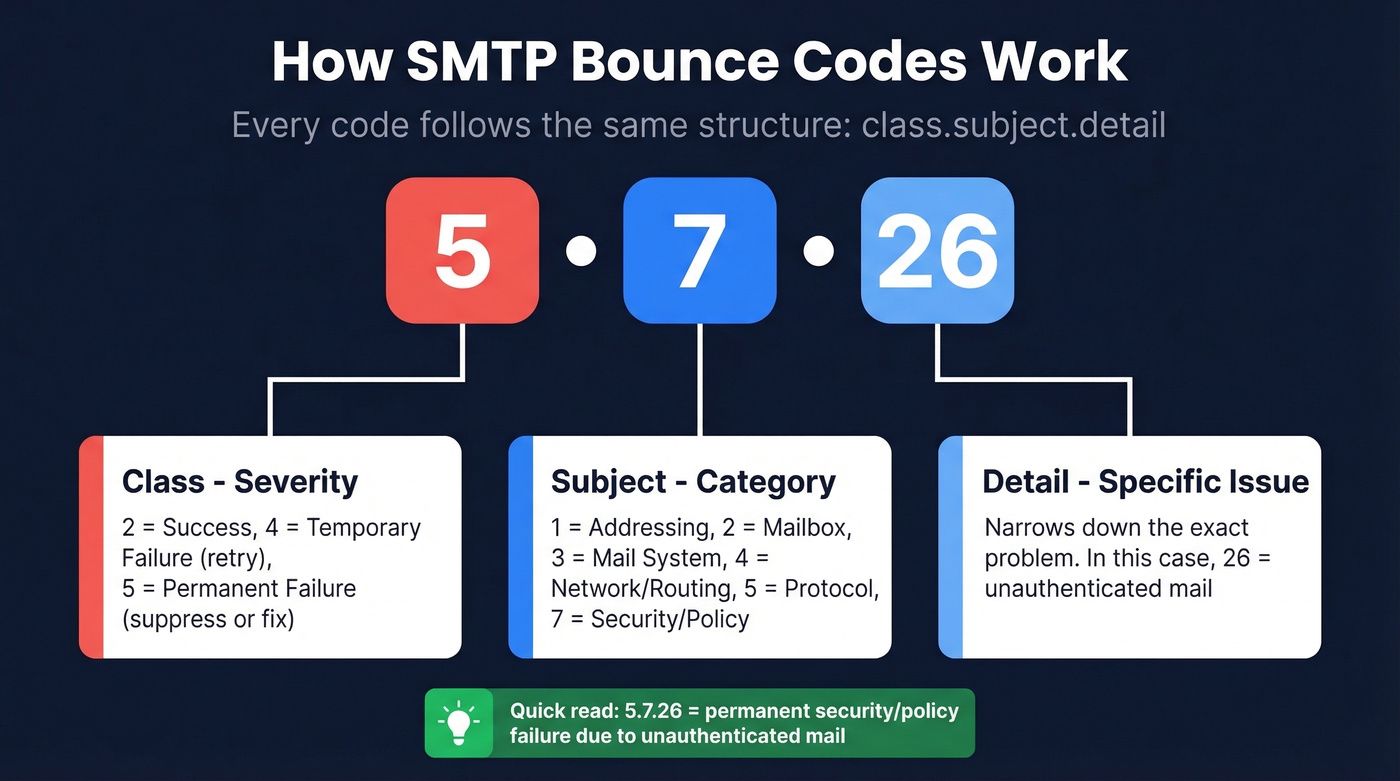
The three-digit basic code (421, 451, 552) tells you the broad class. The enhanced status code that often follows tells you the specific reason. RFC 3463 defines the structure as class.subject.detail:
- The class digit (2, 4, or 5) must match the first digit of the basic code. A 421 reply paired with an enhanced 5.x.x is malformed.
- The subject digit identifies the category: X.1 addressing, X.2 mailbox status, X.3 mail system status, X.4 network and routing, X.5 mail delivery protocol, X.6 message content or media, X.7 security or policy.
- The detail digit narrows the cause inside that category.
Reading the subject digit first is the fastest way to triage. A 552 5.2.2 is a mailbox-status problem (the address itself), while a 552 5.3.4 is a mail-system problem (the payload size or attachment policy). They share the same basic code but require completely different fixes. The same pattern holds for 421 4.7.x replies, where the 7 immediately tells you the receiver flagged a security or policy issue, almost always an authentication or reputation failure that no amount of retry will solve on its own.
Fixing each bounce: a per-code checklist
The action depends on the code and on its enhanced status. The general rule is: retry 4xx with backoff, investigate the underlying signal, and never retry 5xx without fixing the payload first.
Fixing 421
- Read the enhanced status. A 4.3.0 or 4.4.5 is safe to retry. Anything in the 4.7.x range is a security or policy flag and needs a fix.
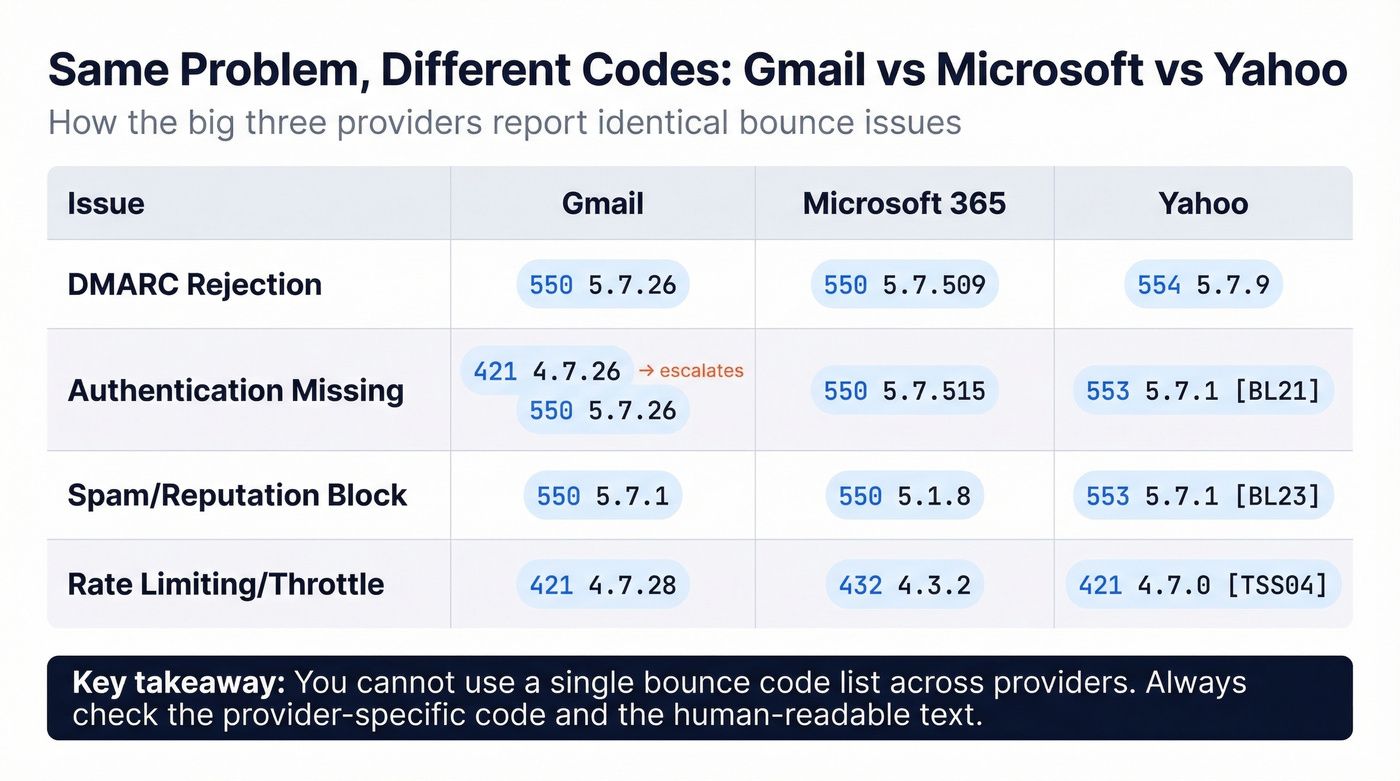
- Confirm SPF, DKIM, and DMARC are all aligned to your sending domain. The 421 4.7.26 to 4.7.40 range and the matching 5.7.x permanent forms are all variations on "your authentication is not strong enough for the volume you are sending."
- Check your PTR record. The sending IP must have reverse DNS, and the forward A lookup of that PTR must match the IP. Missing PTR is a common cause of 421 4.7.0.
- Confirm TLS is enabled for outbound traffic. Gmail and Yahoo bulk-sender policy now requires TLS for any volume sender.
- If the 421 references reputation or unsolicited mail (4.7.0 with reputation wording, or any 4.7.28), pause sending, reduce volume, and work on recovering your sender reputation before retrying at the same rate.
Fixing 451
- If the enhanced status is 4.5.0 (SMTP protocol violation), the fix is in your sending software. Update your MTA, check that EHLO is being issued correctly, and verify command order.
- If 4.4.2 (timeout), the network path between you and the receiver is slow or flapping. Retry usually clears it; persistent timeouts suggest an MTU or firewall issue.
- If 4.7.23 (PTR mismatch), fix reverse DNS the same way you would for 421 4.7.0.
- If 4.7.24 (SPF record issues), tighten your SPF record. Remove broken includes, drop any
+allmechanism, and consolidate to a single SPF record. - If 4.7.26 (DMARC with DNS error), publish a clean DMARC record and confirm DNS is resolving reliably from public resolvers.
Fixing 552
- If 5.2.2 (inbox out of storage, inactive), treat the address as dead. Remove it from your list to avoid further hard bounces.
- If 5.3.4 (size), shrink the message. Compress images, drop large attachments, and link to externally hosted files instead. Stay under 25 MB for safety.
- If 5.3.4 (header size), trim long custom headers, especially List-Unsubscribe, Received chains, and Authentication-Results.
- If 5.3.4 (attachment count), reduce the number of attachments per message.
- If 5.7.0 (security), check whether your message contains a blocked attachment type. Gmail blocks
.exe,.bat,.cmd, certain.zipcontents, and other scriptable formats. Either remove the attachment or send a link instead.
For any code, repeat hard bounces from the same domain inflate your bounce rate quickly. If your overall bounce rate is getting too high, the per-code fixes above will not be enough on their own; the list itself needs cleaning.
Building a sending stack that avoids 4xx and 5xx bounces
Most 421, 451, and 552 replies share an upstream cause: the receiver does not trust the sending identity, or the sending stack is not configured to current bulk-sender standards. Tightening a handful of things prevents most of these codes from ever firing.
Verify the list before sending. Pre-validating addresses with a bulk verifier catches inactive mailboxes (552 5.2.2), syntactically invalid addresses, and domains with no MX. Authenticate every send, with SPF, DKIM, and DMARC configured for marketers and aligned to the From header. Publish a reverse DNS record for every sending IP, and confirm the forward lookup matches. Use TLS for every outbound connection. Warm up new IPs gradually rather than blasting from cold. Monitor bounce reasons by enhanced status, not just by basic code, so a wave of 421 4.7.28 is recognised as a reputation event rather than a transient blip. And keep overall deliverability practices in regular review, because the codes evolve faster than most senders' playbooks do.
The three codes have very different meanings, but they reward the same discipline: read the enhanced status, fix the cause, and treat the basic code as the headline rather than the whole story.

BounceCheck Team
The team behind BounceCheck - helping businesses verify emails and improve deliverability.