Email Verification Status Meaning: Every Result Explained
 BounceCheck Team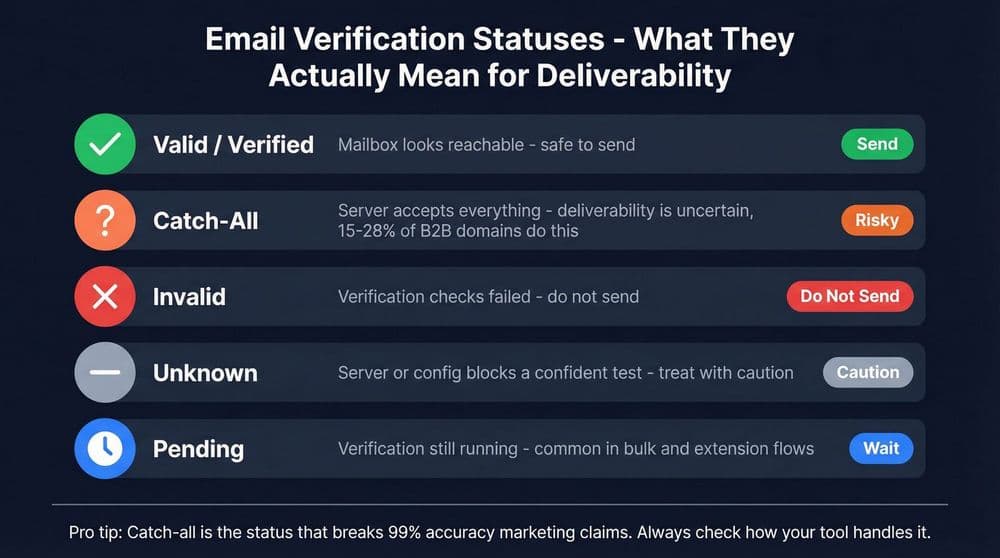
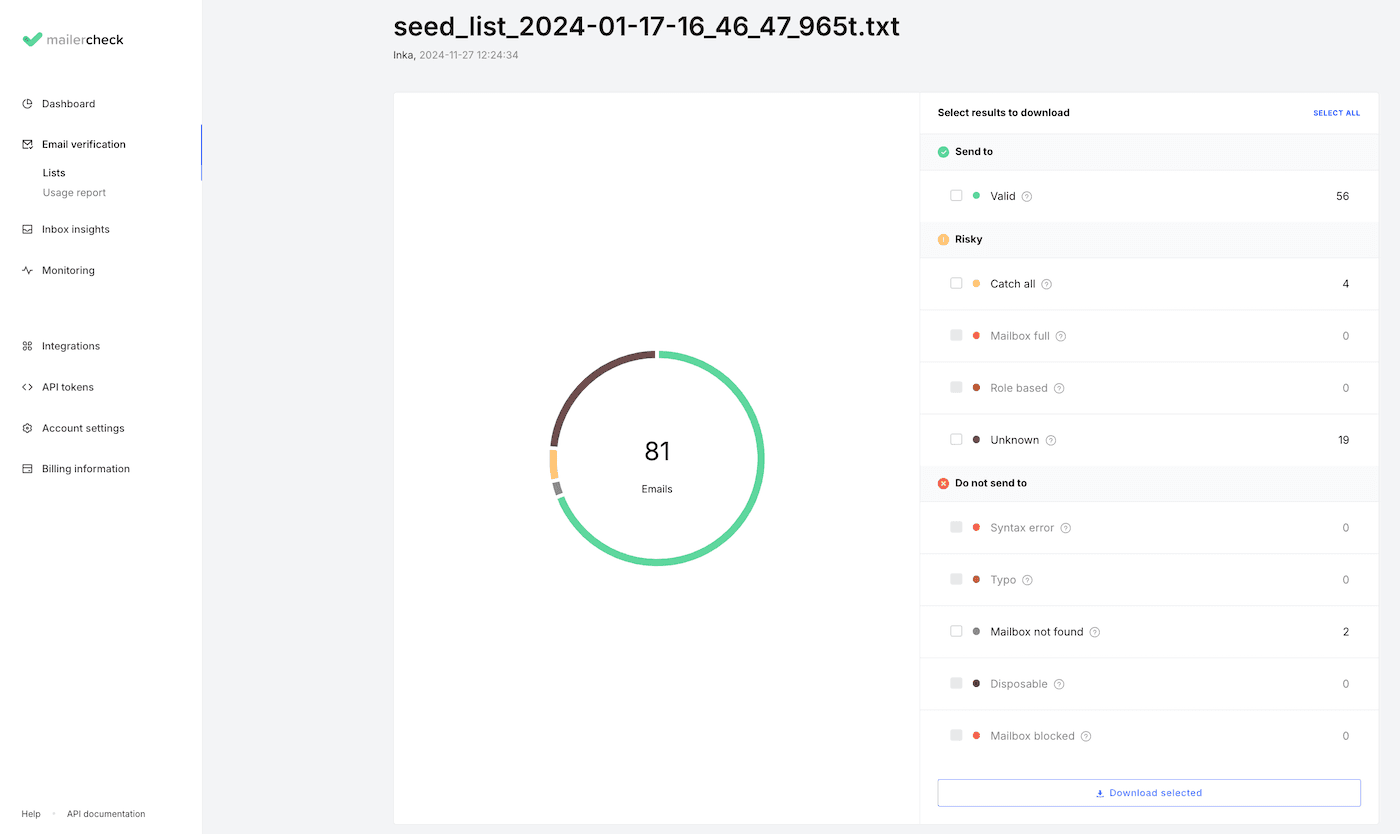
An email verification status is the label a verification tool assigns to an address to tell you whether it is safe to send to. Almost every tool sorts results into four standard buckets: valid (the mailbox exists and accepts mail), invalid (the mailbox does not exist), risky (deliverable but uncertain, like a catch-all or disposable address), and unknown (the check could not be completed). Each label traces back to how the address behaved during a technical check, right down to a numeric SMTP response from the receiving server.
The wording differs from tool to tool, which is where the confusion starts. One verifier's "accepted" is another's "valid" is a third's "deliverable." This guide explains what each status actually means, the SMTP codes underneath them, why two tools can label the same address differently, and what to do with every result.
What an email verification status means
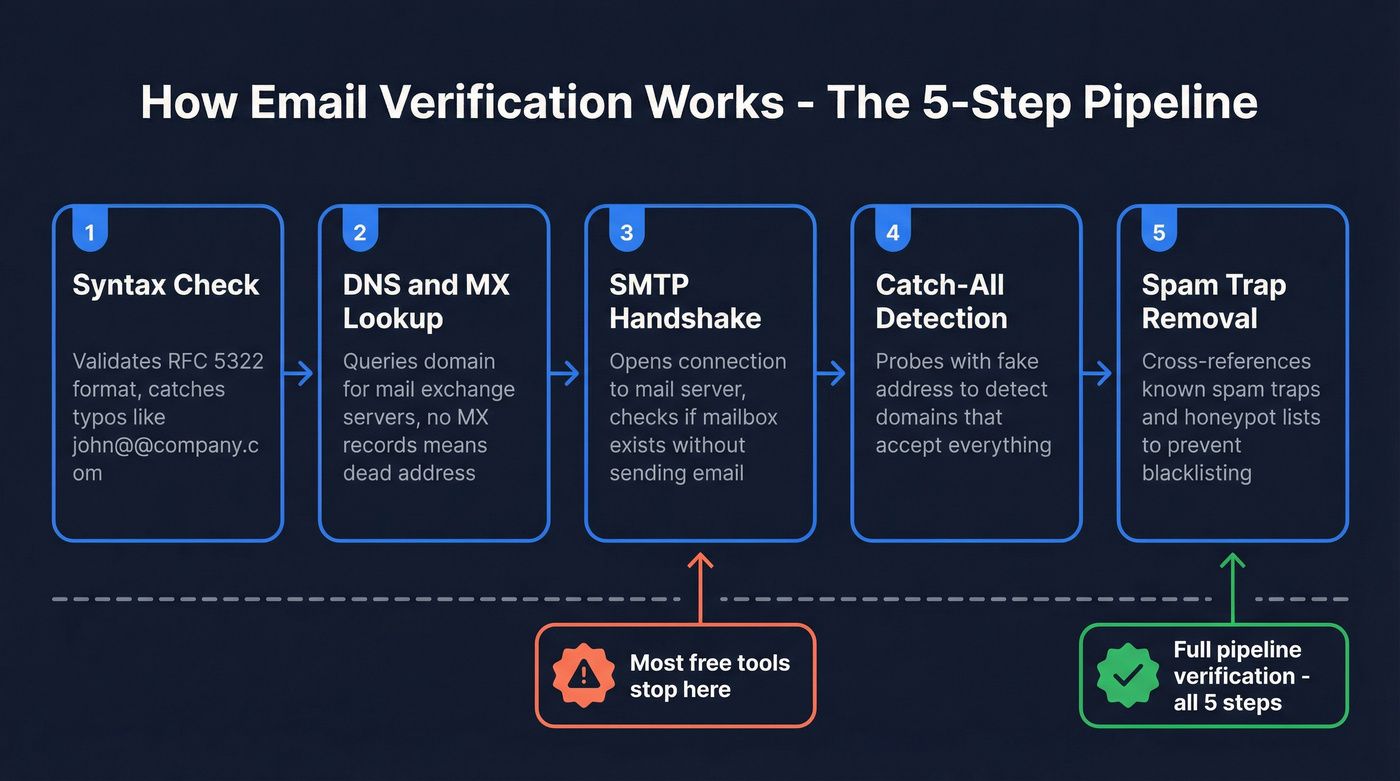
A status is the end product of a short technical process, not a guess. A verifier runs each address through roughly four steps, and the status reflects how far the address gets and how the recipient server responds. The steps are a syntax check (is the format valid?), a DNS and MX check (does the domain accept mail at all?), an SMTP probe (the core step, where the tool asks the mail server whether the mailbox exists without sending anything), and risk detection (catch-all, disposable, role-based, or spam-trap signals). A positive response confirms the mailbox, though it does not always guarantee final deliverability. For the full sequence, see how email verification works.
The important mental model: valid and invalid are hard facts that come straight from the SMTP layer, while risky and unknown are softer. Risky is a judgment the tool makes by layering extra signals on top of the raw result, and unknown means the check simply could not finish. That split explains most of the disagreement you will see between tools.
The four standard status categories
Despite the different names across tools, nearly every verifier maps results to these four top-level categories. Learn these and you can read any tool's output.
| Category | What it means | Safe to send? | Other names you will see |
|---|---|---|---|
| Valid | Mailbox exists and accepts mail | Yes | Deliverable, Accepted, OK |
| Invalid | Mailbox does not exist | Never | Undeliverable, Rejected, Bad, No MX |
| Risky | Deliverable but uncertain or low quality | With caution | Accept-all, Catch-all, Disposable, Low quality |
| Unknown | Verification could not complete | Retry first | Unverifiable, Blocked, Greylisted |
The risky bucket is also where you will see the term accept-all, which is the same idea as catch-all viewed from a slightly different angle. It helps to know how accept-all and catch-all differ when a tool uses one label over the other.
Risky statuses and what they mean
Risky is not a single server response. It is a group of subtypes that are technically deliverable but carry elevated risk, and each one needs different handling.
- Catch-all: the domain is configured to accept mail for every address, even mailboxes that do not exist, so the server returns a positive response regardless and the tool cannot confirm a specific mailbox. Segment these and send carefully. Here is what a catch-all email is and why it is hard to verify.
- Disposable: the address comes from a temporary or burner provider designed to expire soon after creation. It may deliver for a short window but is worthless for a real campaign, so remove or block it at signup.
- Role-based: addresses like info@, sales@, or support@ reach a group rather than a person and tend to draw higher complaint rates. Many tools flag role-based addresses as risky by default.
- Limited: the mailbox is real but over its storage quota or hitting a rate limit, so delivery may be deferred. Treat it as deliverable but monitor it.
Some verifiers also surface spam-trap and abuse flags here. A hit on those is more serious than ordinary risk, because spam traps are addresses used specifically to catch senders with poor list hygiene.
Unknown statuses and what they mean
Unknown does not mean an address is bad. It means the verification could not be completed, usually because the recipient server prevented a clear answer. These addresses often deserve a retry rather than removal.
- Greylisted: the server temporarily defers unfamiliar senders, an anti-spam technique that expects legitimate senders to retry, which blocks the probe on the first pass. Often deliverable, so retry.
- Timeout: the mail server did not respond within the expected window. The address may be fine; the server was slow or briefly unreachable.
- Spam block: the server has strong anti-harvesting protection that refused the probe, hiding whether the mailbox exists. Retry or treat with caution.
- MX error: the domain has mail records, but a connection or configuration fault interrupted the check. Unlike a no-MX result, the records exist, so a second attempt often resolves it.
The SMTP codes behind each status
Every status ultimately traces to a numeric SMTP response from the recipient server. These are the same codes you see in bounce messages, and the first digit tells you the category at a glance.
| SMTP code | Meaning | Resulting status | Type |
|---|---|---|---|
| 250 | Action completed, mailbox exists | Valid / Accepted | Success (2xx) |
| 421 | Service not available, try later | Unknown / Timeout | Temporary (4xx) |
| 450 | Mailbox busy or temporarily blocked | Greylisted / Unknown | Temporary (4xx) |
| 452 | Insufficient storage | Limited | Temporary (4xx) |
| 550 | Mailbox not found or access denied | Invalid / Rejected | Permanent (5xx) |
| 552 | Mailbox full, storage exceeded | Limited / Invalid | Permanent (5xx) |
| 553 | Mailbox name not allowed, bad format | Invalid | Permanent (5xx) |
The pattern is simple. A 2xx code means success, a 4xx code is a temporary failure that means try again later, and a 5xx code is a permanent failure that means remove the address. Confusing the two is costly: deleting addresses that returned a temporary 4xx code throws away deliverable contacts, while repeatedly mailing 5xx addresses generates hard bounces that damage your reputation.
Why two verifiers disagree on one address
If you have run the same address through two tools and gotten different answers, you are not imagining it. Valid and invalid come straight from the SMTP response and rarely differ. Risky and unknown are where tools diverge, because each one folds in its own secondary signals: the reputation of its probe IP addresses, historical delivery data, and business rules such as whether role-based addresses count as risky.
Catch-all domains make this worse. Because every address on a catch-all domain returns a positive response, how a tool labels that result, whether valid, risky, catch-all, or unknown, is a design choice rather than a fact. The practical takeaway is to trust valid and invalid results across tools, and to treat risky and unknown as probability estimates that you segment and handle carefully rather than as absolute verdicts.
How to act on each status
Knowing what a status means is only half the value. The other half is a consistent policy for each one.
| Status | Policy | Why |
|---|---|---|
| Valid / Accepted | Send freely | Confirmed deliverable, lowest risk |
| Invalid / Rejected / No MX | Remove immediately | Guaranteed hard bounce |
| Catch-all | Segment, send carefully | May be valid, carries bounce risk |
| Disposable | Remove or block at signup | Goes dead quickly, no engagement |
| Unknown | Retry, then decide | Often deliverable, just needs another pass |
Two nuances are worth keeping in mind. A valid status confirms the mailbox exists, not that the person still uses it, so a quiet address can be a valid but inactive contact that drags down engagement. And invalid addresses are the ones that turn into hard bounces, so clearing them is the single fastest way to protect deliverability. Running your list through one of the top bounce checker tools automates that cleanup.
Build status handling into your workflow
Statuses are only useful if you act on them the same way every time. The most effective habit is to make the policy automatic: valid addresses get sent, invalid ones get blocked, catch-all gets segmented, and unknown gets held for a recheck. BounceCheck is an email verification service that returns these same statuses for a single address or a full list, so the labels in this guide map directly to its results. Verify at the point of capture, ideally right in your sign-up form, and again before each major send. That keeps the bad data out at the source and turns a wall of confusing labels into a clean, repeatable decision for every address on your list.
Frequently asked questions
What does email verification status mean?
It is the label a verification tool assigns to an address to show whether it is safe to send to. The four standard categories are valid (deliverable), invalid (undeliverable), risky (deliverable but uncertain), and unknown (could not be verified). The status reflects how the address behaved during the technical check, from syntax and DNS through the SMTP mailbox probe.
What does a risky email status mean?
Risky means the address is technically deliverable but carries elevated risk. It is a judgment the tool makes, not a single server response. The risky bucket usually includes catch-all addresses, disposable addresses, and role-based addresses like info@ or sales@. Each subtype needs its own handling rather than blanket removal.
What does unknown mean in email verification?
Unknown means the check could not be completed, usually because the recipient server blocked a clear answer. Common causes are greylisting, timeouts, spam blocks, and mail server errors. An unknown result does not mean the address is bad, so these addresses usually deserve a retry rather than removal.
Why do two verifiers give different statuses for the same email?
They agree on valid and invalid because those come straight from the SMTP response. They diverge on risky and unknown because each tool folds in its own signals: probe IP reputation, historical data, and business rules. On catch-all domains especially, how a tool labels the positive response is a design choice, so the same address can land in different buckets.
Should I delete unknown and risky emails?
Not automatically. Always remove invalid addresses, since they guarantee bounces. Unknown addresses usually deserve a retry, because many are deliverable and just need another pass. Risky addresses should be segmented by subtype: remove disposable ones, but consider sending carefully to catch-all addresses, since some are valid.

BounceCheck Team
The team behind BounceCheck - helping businesses verify emails and improve deliverability.