What Is a Mail Transfer Agent (MTA)? How Email Servers Route Mail
 BounceCheck Team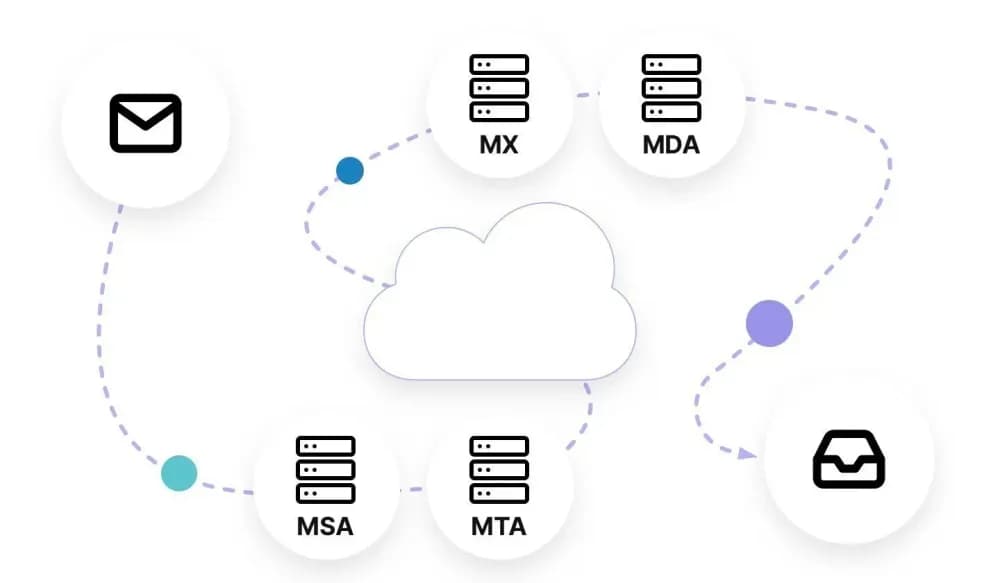
Before your next send Find the addresses that will bounce.
Verify an email freeA mail transfer agent (MTA) is the server software that routes and relays email between mail servers, moving a message from the sender's system toward the recipient's using the Simple Mail Transfer Protocol. It is the piece of email infrastructure most people never see, yet nearly every message you send passes through at least one. When you hit send, your email client hands the message off, and one or more MTAs carry it across the internet until it reaches the server that hosts the recipient's mailbox.
Understanding what an MTA does clears up a lot of confusion about why email sometimes lands in spam, why it bounces, and why authentication records matter. This guide explains what a mail transfer agent is, how it fits into the send path alongside the MUA and MDA, the hop-by-hop journey a message takes, the software that actually runs as an MTA, and how the MTA layer shapes deliverability.
What is a mail transfer agent?
A mail transfer agent is software that transfers electronic mail from one computer to another using a client and server model. It accepts a formatted message, decides where it should go by looking up the recipient domain, and relays it toward that destination over SMTP. The abbreviation MTA stands for mail transfer agent, though you will also see it written as message transfer agent or mail transport agent.
The same component is sometimes called a mail relay or mail router, because relaying messages between servers is its core job. An MTA implements both halves of SMTP: the client side that sends a message and the server side that receives one. The U.S. National Institute of Standards and Technology defines an MTA in its glossary as a program responsible for accepting, routing, and delivering email messages, which captures the role precisely. In practice the MTA is one participant in a larger delivery chain, not the whole system.
MTA vs MUA, MSA, and MDA
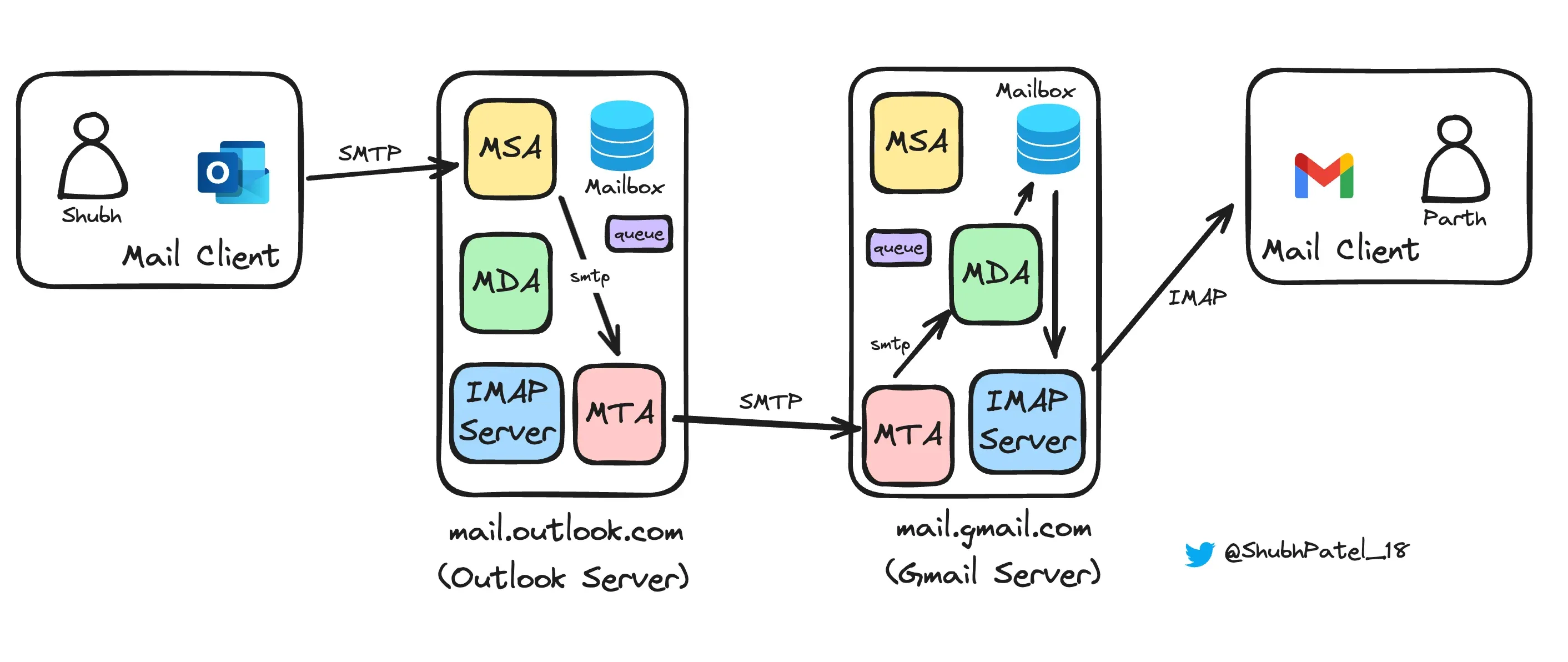
An MTA differs from the other mail agents by the stage it owns. The MUA (mail user agent) is the client you read and write in, the MSA (mail submission agent) accepts and formats your outgoing message, the MTA (mail transfer agent) routes it between servers, and the MDA (mail delivery agent) files it into the recipient's mailbox. Email works only because these four hand off to each other in order.
| Agent | What it stands for | Role |
|---|---|---|
| MUA | Mail user agent | The email client you interact with, such as Outlook or the Gmail app, where you write and read mail. |
| MSA | Mail submission agent | Accepts the message from the MUA and formats it to meet SMTP standards before handing it to the MTA. |
| MTA | Mail transfer agent | Routes and relays the message between mail servers until it reaches the recipient's server. |
| MDA | Mail delivery agent | Takes the message from the final MTA and deposits it into the recipient's mailbox. |
The short version: the MUA is where a human touches the message, the MSA gets it ready to travel, the MTA does the traveling, and the MDA delivers it to the mailbox. The recipient then opens the message in their own MUA, closing the loop.
How a message travels: the hop-by-hop journey
A message travels by relay: your MUA hands it to the MSA, which formats it and passes it to an MTA. The MTA looks up the recipient domain's MX records in DNS, connects to that server over SMTP, and relays the message through one or more MTAs until the final one gives it to the recipient's MDA. A message with the sender and recipient on different providers, which is the normal case, moves like this:
- Your MUA passes the message you composed to the mail submission agent.
- The MSA formats it to meet the SMTP standard defined in RFC 5321 and hands it to the MTA.
- The MTA looks up the recipient domain's MX records in DNS to find which server accepts its mail, then connects to that server on port 25, one of the SMTP ports reserved for server-to-server transfer.
- The message may pass through several MTAs before reaching its destination. Each relay stamps a Received header recording where the message came from and when, which is why a delivered email carries a trail of these headers.
- The receiving MTA hands the message to the mail delivery agent, which files it in the correct mailbox.
- The recipient's MUA fetches the message over IMAP or POP3 for reading.
If the recipient happens to sit on the same server as the sender, the MTA skips the relay step and hands the message straight to the local MDA. Most real traffic crosses provider boundaries, so the relay hop is where the interesting work happens.
Popular mail transfer agent software
The most widely used MTAs are Postfix, Exim, Sendmail, and Qmail on the open-source side, and Microsoft Exchange as the commercial option. Postfix and Exim dominate Linux mail servers, Sendmail is the veteran that many older systems still rely on, and cloud providers such as Twilio SendGrid run their own proprietary MTAs so you send through their infrastructure instead of hosting a server yourself.
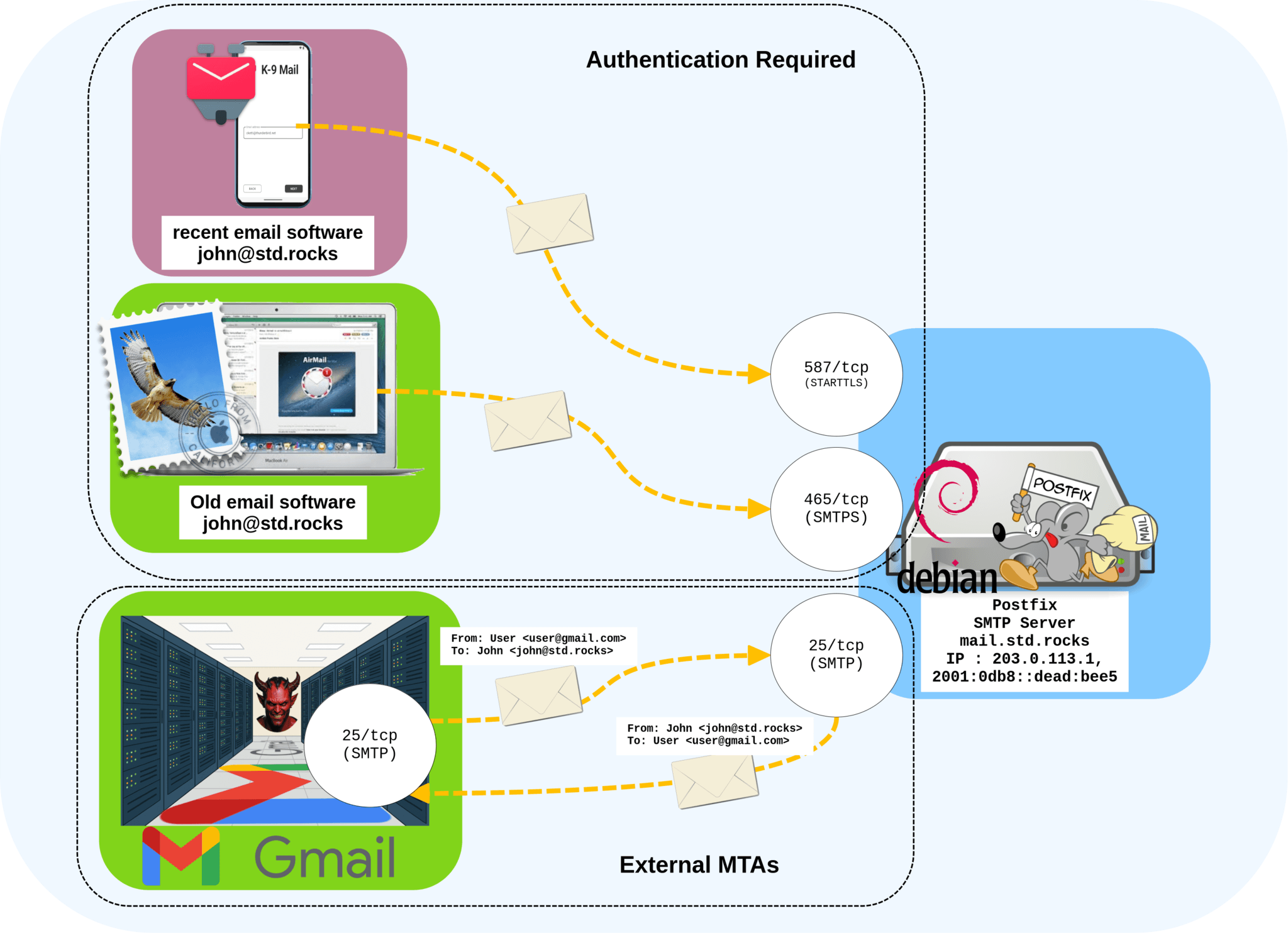
| MTA | Type | OS support | SMTP over TLS |
|---|---|---|---|
| Postfix | Open source | Cross-platform | Yes |
| Exim | Open source | Unix-like | Yes |
| Sendmail | Open source (now Proofpoint) | Cross-platform | Yes |
| Qmail | Open source | Unix-like | No |
| Microsoft Exchange | Commercial | Windows Server | Yes |
Microsoft Exchange is the enterprise commercial option, bundling calendaring and collaboration alongside mail transport. Beyond self-hosting, sending through a cloud provider means you rely on its proprietary MTA rather than maintaining and patching your own.
MTA vs SMTP server, and mail relay services
An MTA and an SMTP server are effectively the same thing described two ways: SMTP is the protocol, the set of rules for moving mail between systems, and the MTA is the software that speaks that protocol. So an SMTP server is an MTA doing its job. The distinction is protocol versus program: SMTP is the language, the MTA is the speaker.
A mail relay service is a specific way of running an MTA. Because relaying is what an MTA does, "mail relay" is often just another name for it, and in common usage a relay service means a cloud-based MTA you send through rather than one you host. An on-premise MTA gives you full control over configuration and sending volume but demands hardware, setup time, and ongoing maintenance. A cloud relay is quicker to start with and cheaper up front, at the cost of sharing infrastructure and ceding some control. Which fits depends on your sending volume and the technical resources you have.
How MTAs shape email deliverability
The MTA layer is where much of email deliverability is decided, because the MTA is the component that receiving servers actually talk to. It builds the Received header trail filters inspect, checks sender authentication at relay, returns the reply codes that surface as bounces, and controls queueing and send rate. Several of these behaviors directly affect whether your mail reaches the inbox:
- Received headers and the audit trail: each MTA stamps a Received header as it relays a message, building the header trail that receiving servers and spam filters inspect to judge the message's path and legitimacy.
- Authentication at relay: the receiving MTA checks SPF and DKIM against the sending domain, and applies DMARC policy, to verify the sender is who they claim to be and reject spoofed mail.
- SMTP reply codes: when the receiving MTA cannot accept a message, it returns a reply code. A 4xx code signals a transient failure the sender should retry, while a 5xx code is a permanent rejection; these are the SMTP bounce codes that surface as bounces in your reports.
- Queueing and retries: MTAs use a store-and-forward model, holding a message in a queue and retrying delivery over a set period when the receiving server is busy or temporarily rejects it, rather than failing on the first attempt.
- IP warming and rate limiting: a dedicated MTA lets you ramp a new IP address gradually and cap how fast you send to each receiving domain, so you build sending reputation instead of tripping volume-based blocks.
None of this means the MTA alone controls whether you reach the inbox. Mailbox providers weigh many signals, and a clean sending setup still fails if you are mailing invalid addresses that bounce and erode your reputation. Verifying your list before a send keeps those dead addresses from ever reaching the relay stage. Run your list through BounceCheck before your next campaign so the MTAs handling your mail see low bounce rates and a sender worth trusting.
FAQs
What does MTA stand for?
MTA stands for mail transfer agent. The same software is also called a message transfer agent or mail transport agent, and informally a mail relay or mail router.
What is the difference between an MTA and an SMTP server?
SMTP is the protocol used to move mail between systems, and an MTA is the software that implements it. An SMTP server is an MTA performing its role, so the terms describe the same thing from two angles: the language versus the program that speaks it.
Is a mail transfer agent the same as a mail relay service?
Relaying is the core function of an MTA, so "mail relay" is often another name for it. In everyday use, a mail relay service usually refers to a cloud-based MTA you send through instead of hosting your own server.
What are common examples of MTA software?
Widely used MTAs include the open-source packages Postfix, Exim, Sendmail, and Qmail, plus the commercial Microsoft Exchange. Cloud providers such as Twilio SendGrid also operate their own proprietary MTAs as a service.
Do I need to run my own MTA to send email?
No. You can host an MTA like Postfix yourself for full control, or send through a cloud relay service that runs the MTA for you. Smaller senders usually choose the cloud option to avoid the hardware and maintenance an on-premise MTA requires.
§ Before your next send
Find the addresses that will bounce
Verify a single address free, or upload a CSV — the free plan includes 50 checks a month, no card needed.

BounceCheck Team
The team behind BounceCheck - helping businesses verify emails and improve deliverability.