Podcast Guest Email Templates: Pitch Yourself or Invite a Guest
 BounceCheck Team
Before your next send Find the addresses that will bounce.
Verify an email freeA podcast guest email is an outreach message with one of two goals: pitching yourself to appear on someone's show, or inviting an expert onto yours. Either way, the message that gets a reply is short, personalized, and built around what the audience gains, not what you want. With more than 2.8 million podcasts on Apple Podcasts alone, hosts and guests get pitched constantly, so the email has to earn its yes in a few seconds. Below are the rules that work, two templates you can copy, and the steps that keep your message out of spam.
What makes a podcast guest email work
Two things separate an email that gets booked from one that gets ignored: personalization and clarity. Personalization means the message could only have been written to that one person. A pitch that reads like a copy-paste loses credibility the moment it lands, so reference a specific episode, a recent post, or a shared interest. Clarity means the recipient knows exactly what you are asking and what is involved without re-reading. The same fundamentals that drive any cold email that gets replies apply here: lead with relevance, keep it tight, and make the benefit to the audience obvious. Podcasts are popular for a reason, around 70% of Americans have listened to one, so hosts protect their audience and book guests who clearly add value.
How to pitch yourself as a podcast guest
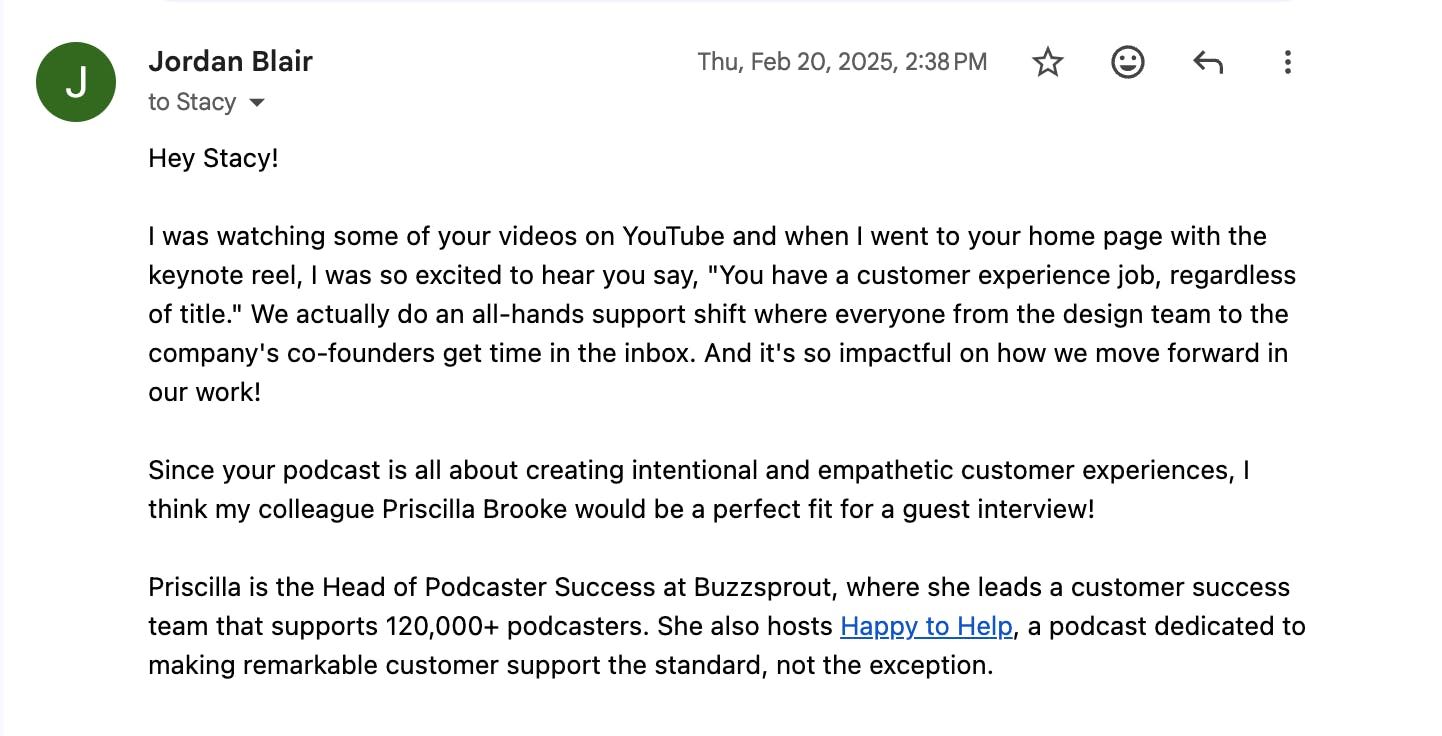
When you pitch yourself, the host is silently asking "why should this person be on my show?" Answer it fast and make the value about their listeners. A strong pitch covers these points:
- Clear subject line: something simple like "Potential guest on [Podcast Name]" so the ask is obvious before they open it.
- A personalized opening: use the host's name and reference a recent episode you actually listened to.
- A succinct intro: who you are and the area you specialize in, in a sentence or two.
- Why you fit: tie your expertise to the show's theme and its audience, not your own promotion.
- Up to three topic ideas: suggesting angles saves the host from having to think, and gives them a choice.
- Proof: links to past appearances so they can hear your style and feel safe booking you.
- A no-pressure sign-off: it is their show and their call, so close graciously.
If you do not have the host's address yet, there are reliable ways to find their email address rather than guessing. Guest-matching services such as PodMatch can also connect you with shows that are actively looking for guests.
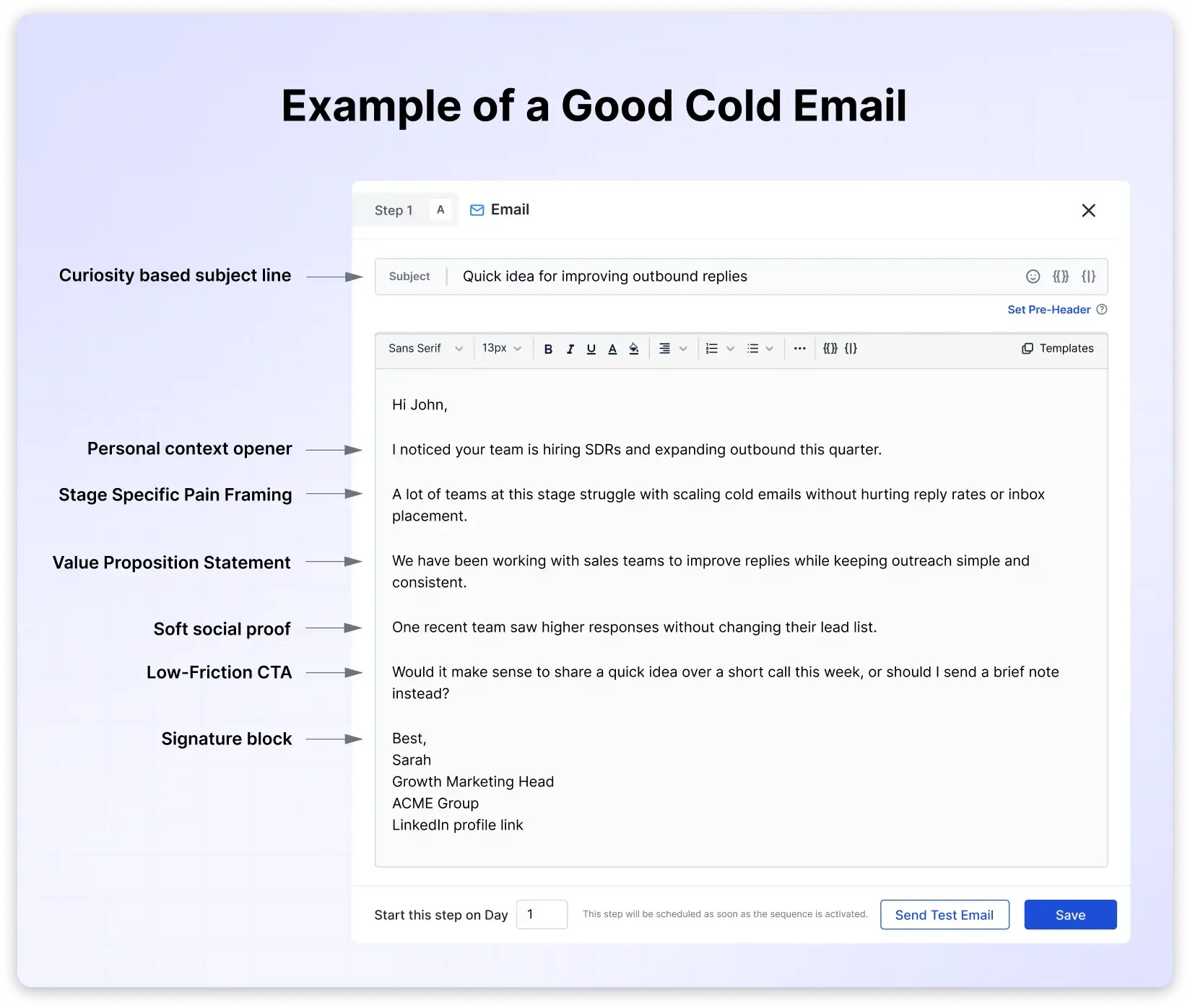
Subject: Potential guest on [Podcast Name]: [Your Topic]
Hi [Host First Name],
I listened to your recent episode with [Guest Name] on [Topic] and loved the point about [specific detail]. Your focus on [niche] is exactly the kind of thing I follow.
I am a [your role] at [company] and I specialize in [your expertise]. Are you taking guests at the moment? I think your audience would get a lot from a conversation on:
- [Angle 1]
- [Angle 2]
- [Angle 3]
You can hear how I sound as a guest here: [link to a past appearance]. No pressure at all if your calendar is full, but I would love to explore it.
Best,
[Your Name]
[Website or social link]
How to invite a guest onto your show
Inviting an expert is the same skill in reverse: flatter them genuinely, establish that your podcast is credible, and make it easy to say yes. Keep the first email to two or three short paragraphs. Open with who you are and a one-line description of the show, give a specific, sincere reason you want them, then make a concrete ask with the practical details attached. State the format (audio or video), the rough length, and how you record, since for some people appearing on camera is a dealbreaker. End by offering a way to book a time directly, which removes a round of back-and-forth.
Subject: Invitation to join [Podcast Name]
Hi [First Name],
My name is [Your Name] and I host [Podcast Name], a show about [short description]. I have admired your work on [specific detail], and I think our listeners would really value your perspective.
Episodes run about [X] minutes and we record over [Zoom or Riverside], with full flexibility on timing. Past guests include [Name] and [Name].
Would you be open to joining us? Here is a link to grab a time that suits you: [scheduling link].
Thanks,
[Your Name]
[Podcast name and link]
Write a subject line that gets opened
The subject line decides whether the rest of your work gets read. Keep it clear first and clever second. A few patterns that perform:
- State the ask plainly: "Potential guest on [Podcast Name]" or "Interview request: [Guest Name]."
- Use their first name: a name in the subject line pulls attention right away.
- Create a little curiosity: hint at the topic or value without turning it into clickbait.
- Keep it short: long subject lines get cut off on mobile, so front-load the important words.
If you want more patterns to model, these subject line examples translate directly to podcast outreach.
Make sure your email actually reaches them
A perfect pitch is worthless if it bounces. People change roles and email addresses constantly, and a hard bounce does more than miss one guest: repeated bounce-backs hurt your sender reputation and push your future emails toward spam folders. Before you send, confirm the address is real. BounceCheck is an email verification service that checks whether an address exists before you hit send. You can check if the address is valid and verify it without sending anything, so the host never knows you checked. Keeping outreach lists clean is the single easiest way to keep your bounce rate low and your messages landing in the inbox.
Follow up without being pushy
Silence usually means busy, not no. If you do not hear back, wait four days to a week before following up, then keep the nudge gracious and low-pressure. A good follow-up adds something rather than just repeating the ask: offer extra dates, suggest a shorter segment, or mention a new angle. Piling on pressure tends to earn a fast decline, so give the person room. The right follow-up cadence for outreach is a couple of polite touches spaced out, not a daily barrage.
After they say yes
Once a guest accepts, confirm the details immediately so the momentum does not fade. Lock in the date and time, send the recording link or calendar invite, and tell them what to expect: how long the episode runs, the rough flow, and anything you need from them such as a headshot or bio for promotion. Setting clear expectations on timing and pacing makes the recording smoother, and a short pre-interview call can help if you are unsure how a guest communicates. The tone you set in that very first email tends to carry all the way through the episode, so keep it warm and respectful from the start.
Quick answers
What should a podcast guest email include?
A clear subject line, a personalized opening that references the show, a one or two sentence introduction, a specific reason the guest or host is a good fit, the practical details (format, length, scheduling), and an easy way to respond. Proof such as past appearances helps when you are pitching yourself.
How long should a podcast guest email be?
Short. Aim for two or three brief paragraphs. Hosts and guests are busy, so get to the point quickly, make the value obvious, and save the longer background for links they can click if they want more.
What is a good subject line for a podcast guest email?
Something clear and specific, like "Potential guest on [Podcast Name]" or "Interview request: [Guest Name]." Including the recipient's first name and hinting at the topic raises open rates, while vague or clickbait lines tend to get ignored or filtered.
How do I follow up if I do not hear back?
Wait four days to a week, then send one gracious follow-up that adds something, such as extra dates or a shorter format option. Keep it low-pressure. If you still hear nothing after a second polite nudge, move on to another prospect.
How do I find a podcast host's email address?
Check the show notes, the podcast website, and the host's social profiles first. Email-finding tools and guest-matching platforms can surface a contact when it is not listed, and verifying the address before you send keeps your pitch from bouncing.
§ Before your next send
Find the addresses that will bounce
Verify a single address free, or upload a CSV — the free plan includes 50 checks a month, no card needed.

BounceCheck Team
The team behind BounceCheck - helping businesses verify emails and improve deliverability.