The Best MxToolbox Alternatives for Email Deliverability
 BounceCheck Team
Before your next send Find the addresses that will bounce.
Verify an email freeThere is no single best MxToolbox alternative; the right one depends on the gap you need to close, whether that is inbox placement, DMARC and authentication reporting, or fast blacklist and DNS checks. MxToolbox itself is a dependable tool for quick DNS lookups, blacklist checks, SMTP diagnostics, and SPF, DKIM, and DMARC verification. Where it frustrates people is everything after that: the interface is dense for non-technical users, inbox placement testing sits behind its paid Delivery Center, and it reports on your sending infrastructure without telling you where your emails actually land. This guide groups the strongest options by job so you can match a tool to the specific problem you have.
Why look for an MxToolbox alternative?
MxToolbox answers "is my domain configured correctly," but modern deliverability also depends on "do mailbox providers actually trust me," and that is where teams outgrow it. The common reasons for switching or supplementing it are consistent across reviews:
- The reports are technical and hard to act on without SPF, DKIM, and DMARC knowledge.
- Inbox placement testing and multi-domain monitoring require higher-priced plans.
- It validates DNS records but does not show where messages land across Gmail, Outlook, and Yahoo.
- The free tier only covers basic ad-hoc lookups.
None of that makes MxToolbox bad. It means most senders need a tool built around inbox placement, authentication reporting, or reputation monitoring instead of raw DNS lookups.
MxToolbox alternatives at a glance (2026)
Here is how the main alternatives compare, grouped by what they do best. Prices are the vendors' published starting points and change often, so treat them as ballparks.
| Tool | Best for | Category | Free tier | Starting price |
|---|---|---|---|---|
| GlockApps | Inbox placement and spam testing | Deliverability | Yes | around $59/mo |
| MailReach | Warmup plus inbox placement (B2B) | Deliverability | No | around $25/inbox/mo |
| Inbox Radar (Saleshandy) | Cold-outreach placement | Deliverability | 2 free tests | around $34/mo |
| EasyDMARC | Guided DMARC setup and testing | Authentication | Yes | around $36/mo |
| PowerDMARC | DMARC, SPF, BIMI at scale | Authentication | Yes | around $8/mo |
| Spamhaus | Reputation and blacklist checks | Blacklist | Yes | Free |
| Google Admin Toolbox | DNS and auth checks (Workspace) | DNS | Yes | Free |
| Mailtrap | Testing email content before send | Email QA | Yes | around $14/mo |
| BounceCheck | Verifying your recipient list | Verification | Yes | Free tier |
Best for inbox placement testing
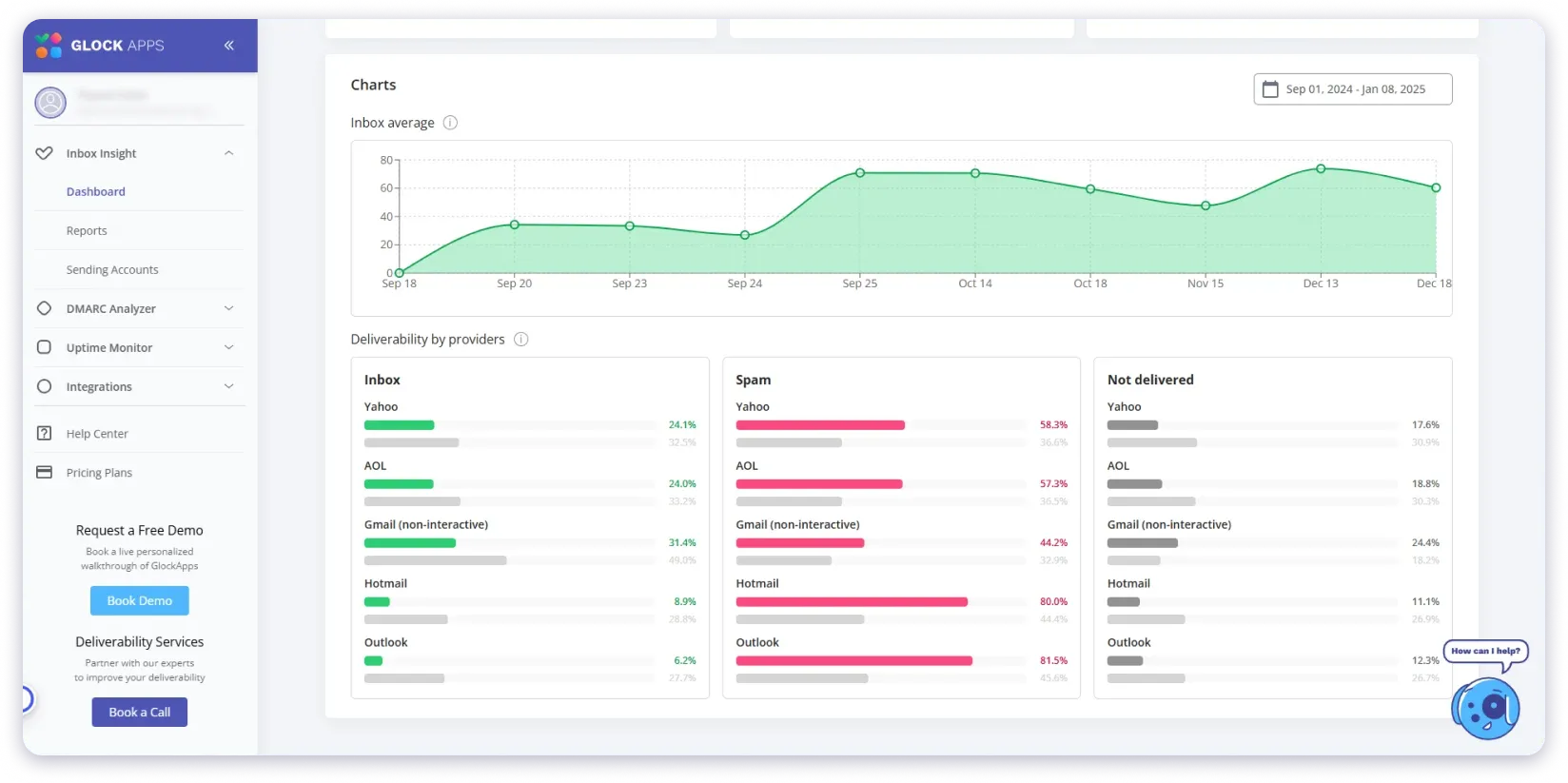
If your real question is "will this email hit the inbox," these tools send seed emails to real mailboxes and report where they land, something MxToolbox does not do at its free tier.
GlockApps
GlockApps runs seed-list tests across 10+ mailbox providers, including regional ISPs, and scores your content against filters like Google, Microsoft Exchange Online Protection, and SpamAssassin. Its "Action Steps" view spells out what to fix, which makes it a strong fit for marketers testing newsletters and campaigns. Paid plans start around $59 a month, with a free tier for basic tests.
MailReach
MailReach pairs inbox placement testing with automated warmup, routing engagement through a network of real Google Workspace and Microsoft 365 inboxes to build sender reputation for B2B cold outreach. It validates SPF and DKIM inside a live test send rather than a static lookup, so the results reflect real sending conditions. Pricing starts around $25 per inbox per month.
Inbox Radar by Saleshandy
Inbox Radar tests placement across Gmail, Outlook, Yahoo, Zoho, and more, then shows sender health, blacklist status across 30+ databases, and SpamAssassin scores in one dashboard. Its provider-to-provider report is useful when one mailbox provider inboxes you and another sends you to spam. Plans start around $34 a month, with two free tests.
Best for DMARC and authentication

MxToolbox confirms your SPF, DKIM, and DMARC records exist but not how providers enforce them. These platforms turn raw DMARC reports into something you can act on.
EasyDMARC
EasyDMARC simplifies DMARC, SPF, and DKIM with guided setup, aggregate and forensic reporting, and a multi-tenant dashboard for agencies managing many domains. It also bundles inbox placement testing through its EasySender feature, so authentication and deliverability live in one place. Paid plans start around $36 a month billed annually, with a free monitoring tier.
PowerDMARC
PowerDMARC is the more advanced authentication suite, covering DMARC, dynamic SPF flattening to stay under the 10-lookup limit, BIMI, and MTA-STS. It converts complex DMARC XML into readable charts and scales to multi-tenant use for MSPs. Paid plans start around $8 a month, with a free tier.
Best for blacklist, DNS, and email QA
If you only need one specific MxToolbox function, a focused free tool often beats a full platform.
Spamhaus
When placement drops suddenly, Spamhaus tells you directly whether your domain or IP is listed in a major reputation database. Since Spamhaus is one of the sources MxToolbox itself checks, going straight to it skips a step. It is free for basic checks and is the fastest way to run an email blacklist check.
Google Admin Toolbox
For Google Workspace admins, the Admin Toolbox runs SPF, DKIM, and DMARC checks and detailed DNS diagnostics tailored to Google's infrastructure, all free. DNSChecker is a similar free option for verifying DNS and MX propagation globally in real time.
Mailtrap
Mailtrap solves a different problem: it lets developers and QA teams preview an email in a safe test inbox, checking links, formatting, and images before it reaches real users. A message can pass every DNS check and still break inside the inbox, and Mailtrap catches that. Plans start around $14 a month with a free tier.
How to choose the right MxToolbox alternative
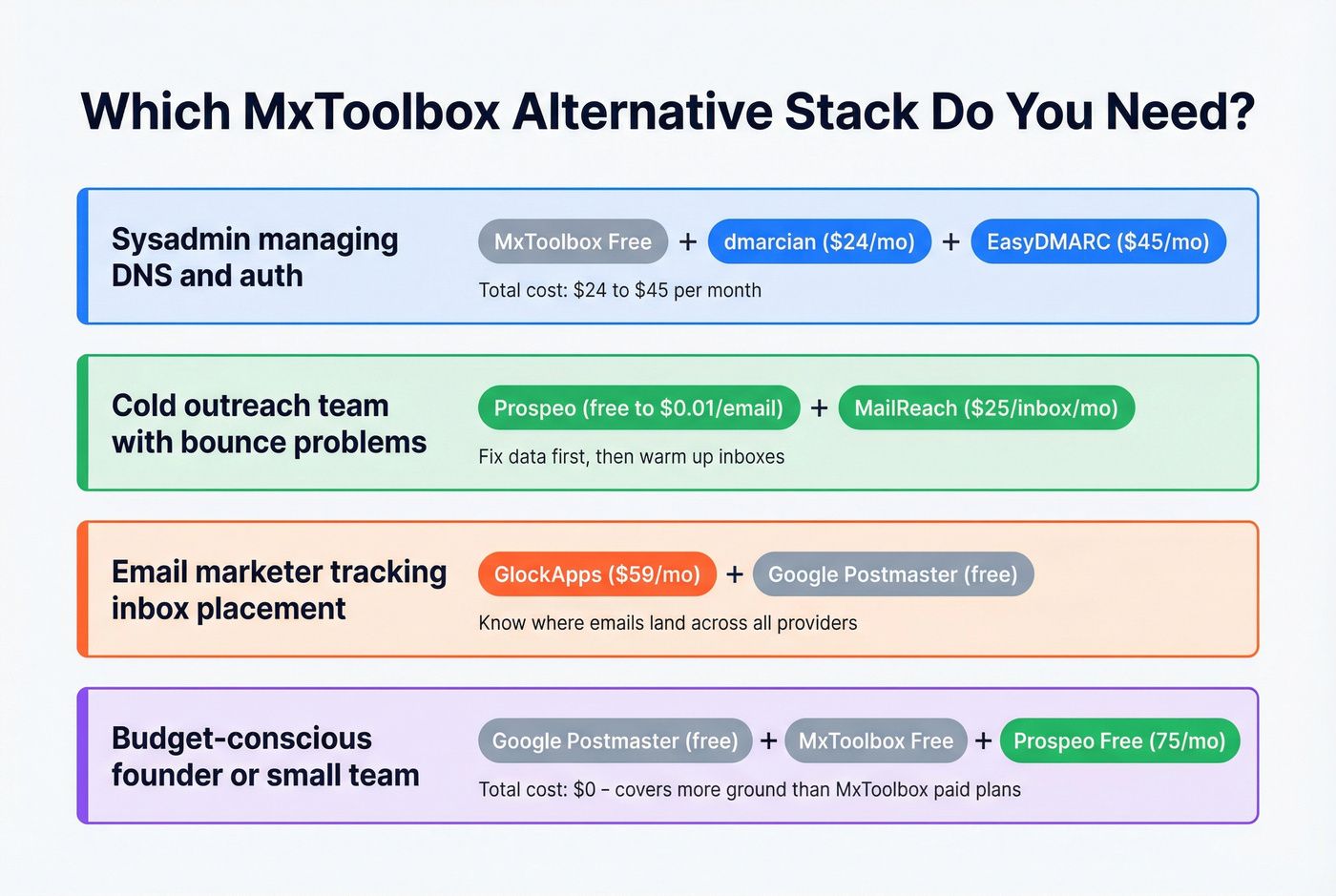
Match the tool to the problem you actually have:
- Cold outreach and sender health: Inbox Radar or MailReach, which combine placement testing with warmup.
- Newsletters and marketing campaigns: GlockApps, for its cross-ISP spam testing.
- Managing DMARC across domains: PowerDMARC or EasyDMARC.
- A sudden placement drop: Spamhaus, to confirm a listing fast.
- DNS and Workspace authentication: Google Admin Toolbox or DNSChecker.
Many teams keep MxToolbox for quick DNS checks and add one of these for the deliverability layer it does not cover. The two are complementary, and stacking a diagnostics tool with a monitoring tool usually beats trying to make one do everything. If your emails are landing in spam despite a clean setup, start with a full deliverability review before buying another tool.
Where BounceCheck fits: verify the list, not just the setup
Every tool above diagnoses your sending side: DNS, authentication, reputation, and where your mail lands. None of them check the addresses you are sending to. That is a separate and equally common cause of bounces, because even a perfectly configured domain will bounce hard against invalid, mistyped, or long-dead addresses.
BounceCheck is an email verification service that checks each recipient address for syntax, domain, and mailbox validity before you send, and flags accept-all, role-based, and disposable addresses. It does not do MX diagnostics or DMARC reporting, so it is not a drop-in MxToolbox replacement. It covers the step those tools skip: cleaning the recipient list so your carefully tuned deliverability is not wasted on addresses that were never going to accept mail. Used together, an MxToolbox alternative fixes your setup and BounceCheck protects the list you send to.
MxToolbox alternatives: quick answers
Is MxToolbox worth it?
Yes, for what it is built for. MxToolbox is a reliable, no-frills tool for instant DNS lookups, blacklist checks, SMTP diagnostics, and email header analysis. It becomes less worth it when you need inbox placement testing or multi-domain monitoring, which sit behind its paid plans and are cheaper or clearer elsewhere.
Is MxToolbox free?
MxToolbox has a free tier for basic ad-hoc lookups like MX records and blacklist checks. Inbox placement and sender reputation monitoring through its Delivery Center are paid. Several alternatives, including Spamhaus, Google Admin Toolbox, and DNSChecker, cover the free-lookup use case at no cost.
Can you use an alternative alongside MxToolbox?
Yes, and many teams do. MxToolbox confirms technical correctness while a tool like GlockApps or MailReach measures real-world inbox placement. They are complementary rather than mutually exclusive, so a common setup is MxToolbox for DNS plus a deliverability platform for placement.
Which MxToolbox alternative is most accurate for inbox placement?
Accuracy depends on your sending type. For cold outreach, Inbox Radar and MailReach test against real professional inboxes, and for marketing campaigns, GlockApps tests across many ISPs including regional providers. Whatever you pick, verifying your recipient list first removes invalid addresses that would skew any placement test.
§ Before your next send
Find the addresses that will bounce
Verify a single address free, or upload a CSV — the free plan includes 50 checks a month, no card needed.

BounceCheck Team
The team behind BounceCheck - helping businesses verify emails and improve deliverability.

