How to Increase Engagement Using Reverse Email Lookup
 BounceCheck Team
Reverse email lookup is a method that takes an email address you already have and matches it against public and linked records to reveal who owns it: their name, job title, company, location, and social profiles. That enrichment is what makes real engagement possible. Instead of sending the same generic blast to everyone, you can segment and personalize by who each subscriber actually is, which is where open and reply rates start to climb.
An email address on its own tells you very little. It sits in your database without context, leaving you to guess who the person is or how to reach them. Reverse email lookup turns that anonymous contact into a fuller profile you can act on, without asking the subscriber to fill in another form.
What reverse email lookup actually does
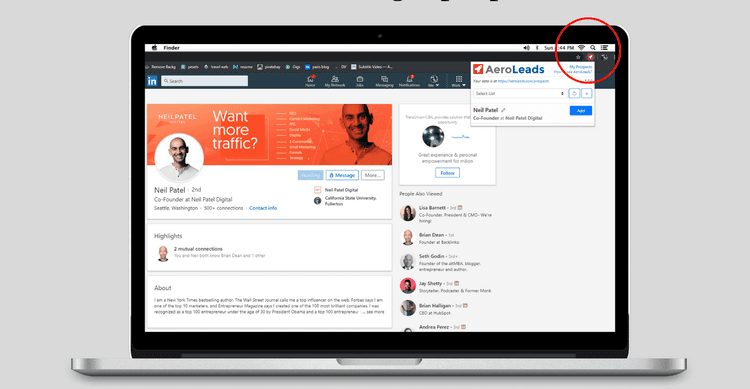
Reverse email lookup is a method for finding information about the owner of an email address by matching it against existing records and publicly available data, instead of asking the person to fill in more fields. Tools scan sources like public records, website mentions, social media profiles, business listings, and verification databases, then compile whatever is linked to that address.
Depending on the tool, you can surface a first and last name, job title, company, location, and social profiles. The accuracy depends on how much is publicly tied to the address. Business emails usually return richer data because they are connected to websites and professional profiles, while a purely personal address may return less. Modern enrichment tools work on both corporate and personal addresses, so a Gmail signup is not a dead end.
Reverse lookup vs email verification
Reverse lookup and verification get confused often, but they answer two different questions. Lookup tells you who is behind an address; verification tells you whether the address is real and can receive mail. You want both, and they work best together: verify the address, then enrich it.

| Reverse email lookup | Email verification | |
|---|---|---|
| Question it answers | Who owns this address? | Does this address exist and accept mail? |
| What you get back | Name, role, company, social profiles | Valid, invalid, risky, or unknown |
| Main payoff | Personalization and segmentation | Deliverability and a clean list |
Using the two as a pair gives you a list that is both deliverable and understood. If you are new to the second half, our guide on how email verification works walks through the checks involved.
Three ways it increases engagement
Reverse email lookup lifts engagement in three concrete ways: it builds richer subscriber profiles, it powers personalization beyond a first name, and it helps you clean and re-segment a decaying list. Each one turns enriched data into measurable gains in open and reply rates.
Build richer subscriber profiles
Many signup forms capture only an email address, and basic tools store little beyond a name. A reverse lookup fills in the gaps. Paste a new subscriber's address into a lookup tool, export what it finds, and import those details into your CRM so each record carries a job title, company, and location. Most CRMs let you store these as contact properties, which gives your team the context to qualify leads and write relevant emails.
Personalize past the first name
Personalized emails speak directly to the reader, and they perform. Putting a first name in the subject line lifts opens, and tailoring the body to someone's role or industry makes the whole message feel written for them. Personalization has been shown to cut customer acquisition costs by as much as 50%. When a form only captured an email, a lookup recovers the missing name so your personalization attempts do not fall flat with a hollow "Hi there."
Clean and re-segment your list
Email lists decay by roughly 30% a year as people change jobs and abandon inboxes. A lookup helps you spot and remove addresses that are stale or no longer match a real person, which lowers your bounce rate, raises your open rate, and protects your sender reputation. The enriched data also lets you regroup the contacts who remain into tighter, more relevant segments.
Where enrichment fits in your funnel
Once addresses carry real profiles, enrichment pays off at four points in the funnel: smarter signup flows, sharper segmentation, better lead scoring, and account-based marketing. Each one reuses the same enriched fields to send the right message to the right contact.

- Smarter signup flows: because enrichment fills in role and company behind the scenes, you can ask for just an email and still capture the context you need. Teams report conversion lifts of 15 to 30% after trimming forms this way.
- Sharper segmentation: group your audience by job role, industry, or company size so each campaign lands with the right people. Our segmentation guide covers how to structure those groups.
- Better lead scoring: feed seniority, company size, and industry into your scoring model to route high-value prospects first instead of guessing from a form.
- Account-based marketing: when someone from a target account engages, enriched company data lets you trigger a tailored campaign automatically.
Pair lookup with verification
Enrichment makes a list smarter, but verification keeps it deliverable, and engagement needs both. BounceCheck is an email verification service that checks whether an address is real and can receive mail before you send. Validating addresses first protects the metrics that decide whether your emails reach the inbox at all:
- It cuts hard bounces, so more of your campaign actually lands.
- It keeps your spam complaint rate low. The accepted benchmark is no higher than 0.1%, or fewer than one complaint per 1,000 emails.
- It defends your sender reputation, since mailing an unverified list raises bounces and tells inbox providers you are a careless sender.
Practical sequence: verify the address, enrich it, then segment. You can validate in real time or in bulk depending on whether you are catching signups at the form or cleaning an existing database. To see how your sending is landing, free tools like Google Postmaster report your domain reputation and spam rates.
Keep it compliant and realistic
Reverse lookup is effective, but it works within clear limits worth respecting before you scale it:
- Only enrich addresses you have a legitimate business reason to contact, and stay aligned with GDPR, CCPA, and similar rules.
- No tool returns complete data every time. Disposable and throwaway addresses in particular yield little, so build for partial results.
- Treat enriched data as perishable. People switch jobs and companies change, so refresh your records every 90 to 180 days to keep them accurate.
Turn unknown addresses into engaged subscribers
Every address on your list is a person you could understand better. Reverse email lookup is the step that turns a column of unknown contacts into profiles you can speak to directly, and pairing it with verification keeps that list both clean and deliverable. Start small, perhaps by enriching new signups or filling in missing names before your next campaign, then measure the lift in opens and replies. The work is not glamorous, but a list you actually understand is the difference between a generic blast and an email someone is glad to open.
Questions marketers ask about reverse lookup
Is reverse email lookup legal?
Yes. In the US it is governed by the Fair Credit Reporting Act, and reputable tools operate within data-protection frameworks like GDPR and CCPA. The rule of thumb is to only look up addresses you have a legitimate business reason to contact.
Can you do a reverse email lookup for free?
You can. Several tools offer free tiers or limited monthly lookups, which are fine for small lists or occasional checks. The trade-off is that free tiers are usually capped and return less complete data than paid plans, so high-volume teams tend to outgrow them.
Does reverse email lookup work on personal Gmail addresses?
It can. Modern enrichment tools match personal addresses such as Gmail or Yahoo to professional profiles, so you can often still uncover a person's current role and company even when they did not sign up with a work email. Results are simply less guaranteed than with corporate domains.
How often should you refresh enriched contact data?
Every 90 to 180 days. Enriched data is perishable because people change jobs and companies restructure, so a record that was accurate at signup drifts out of date within months. Re-running lookups on a fixed cycle keeps names, roles, and companies current and stops your personalization from referencing a job the contact has already left.

BounceCheck Team
The team behind BounceCheck - helping businesses verify emails and improve deliverability.