Anatomy of an Email Address: Every Part Explained
 BounceCheck Team
Before your next send Find the addresses that will bounce.
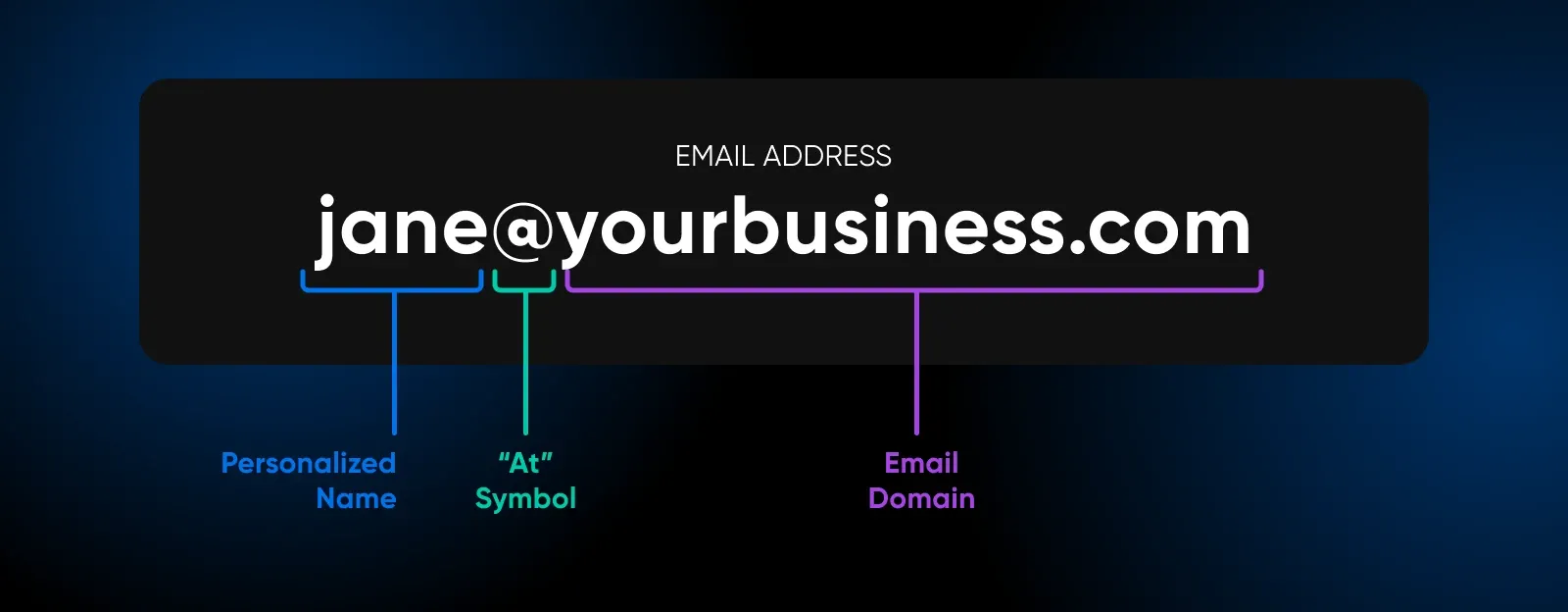
Verify an email freeAn email address has three parts: a local part (the username, to the left of the @), the @ symbol, and a domain (the mail server plus its top-level domain, to the right of the @). The format is local-part@domain, as in [email protected]. The local part can be up to 64 characters and is case-insensitive in practice; the domain follows stricter letters-digits-hyphen rules and is looked up in DNS to find the mail server that accepts the message. A correctly formatted address is not guaranteed to be a working one, which is why a syntax check alone never confirms deliverability.
This guide walks through every part of an email address, the characters each part allows, and what separates a valid format from an invalid one.
The two parts of every email address
An email address is made up of two pieces joined by the @ symbol: a local part on the left and a domain on the right. In practice, this split matters most when you are working with a batch of addresses rather than one, for example pulling contacts out of a pasted list or an old export file. BounceCheck's email extractor automates that separation, scanning raw text and returning each address broken cleanly into its local part and domain.
The general format is local-part@domain, as in [email protected]. That is the whole structure. When people ask what the parts of an email address are called, this is the answer: the local part, the @ sign, and the domain, with the domain itself splitting into a mail server name and a top-level domain.
The three parts of an email address are:
- Local part (the username): everything to the left of the @, such as
jane.smith. - The @ symbol: the separator that means "at", splitting the username from the destination.
- The domain: the mail server name plus its top-level domain, such as
example.com.
It helps to separate two ideas that often get mixed up. The parts of an email address are the local part, the @ symbol, and the domain. The parts of an email message are different things entirely: the subject line, the sender and recipient, the body, and the signature. This article is about the address, the string you send mail to, not the message you write inside it.
Each address is unique within its domain. There cannot be two identical addresses on the same mail server, which is why your preferred username is sometimes already taken.
The local part: your username
The local part is everything to the left of the @ symbol. It identifies the specific mailbox at the receiving organisation, so it usually doubles as your username. In [email protected], the local part is jane.smith.
In the early days of email people picked playful handles, but in professional settings the local part has shifted toward real names and initials. An address like jfernandez@ reads as more credible than heavymetallover42628@, and the same logic applies to shared mailboxes such as info@, sales@, or support@, which are common enough that they form a category of their own. Those shared addresses, known as role-based addresses, behave differently from personal ones and are worth handling with care.
An unquoted local part can be up to 64 characters long and may use:
- Uppercase and lowercase letters A to Z
- Digits 0 to 9
- A dot, as long as it is not the first or last character and does not appear twice in a row
- The printable symbols
! # $ % & ' * + - / = ? ^ _{ | } ~`
That list means a hyphen is perfectly legal inside the local part, and so are several symbols most people never use. In practice, mail providers restrict the choice. Many services only allow letters, numbers, dots, underscores, and hyphens, and common advice is to avoid the more exotic symbols to reduce the risk of rejected mail.
The @ symbol
The @ symbol is the separator that splits the username from the domain. That single-symbol rule has one narrow exception: a local part wrapped in quotation marks is technically allowed to contain an extra @ or other unusual characters, since the quotes tell the mail system to treat everything inside as literal text rather than syntax. Almost no mail provider accepts a quoted local part in practice, so outside of testing edge cases you will only ever see the unquoted, single-@ form.
It stands for the word "at", so [email protected] reads as "jane.smith at example.com". Its job is purely structural: it tells the mail system where the username ends and the destination begins. When a server receives a message, it reads everything after the @ to work out which mail server should handle delivery. An address is only valid with exactly one @ outside of quotation marks, which is why a@b@[email protected] is rejected.
The domain: mail server and TLD
The domain is the entire section to the right of the @ symbol, and it identifies the mail server that hosts the account. In [email protected], the domain is example.com. It breaks down into two pieces:
- Mail server name: the organisation or provider, such as
example,gmail, oryahoo. Companies often run their own domain, while free providers supply a shared one. - Top-level domain (TLD): the extension at the very end, which signals the type of organisation.
The common top-level domains read like a shorthand for what an organisation does:
- .com: commercial company
- .org: non-profit organisation
- .edu: educational institution
- .gov: government body
- .net: network provider
- .mil: military organisation
The domain part follows stricter rules than the local part. Each label can hold letters, digits, and hyphens, with a hyphen never sitting at the start or end, a convention known as the letters-digits-hyphen rule. The domain can run up to 255 characters, and the whole address tops out at 320 (64 for the local part, 1 for the @ symbol, and 255 for the domain). The domain is also the piece that gets looked up in the DNS: when a message is sent, mail servers query the recipient's domain for its mail exchange record to find the server that accepts its mail. That single lookup is what turns @example.com into an actual destination on the internet.
What makes an email address valid
A valid email address is one whose format follows the rules above, which come from RFC 5322, the standard that defines what counts as a valid address: a local part of 64 characters or fewer, exactly one unquoted @, and a domain that obeys the letters-digits-hyphen rule. A common edge case is an address that passes every character rule but still fails for a subtler reason, such as a domain with no dot (user@localhost) or a local part ending in a dot ([email protected]). Both look plausible at a glance, which is why format checks need to test the full rule set rather than eyeballing the string.
The examples below, drawn from the official specification, show where the line sits.
| Address | Valid? | Why |
|---|---|---|
[email protected] |
Yes | Standard local part and domain |
[email protected] |
Yes | A single dot inside the local part is fine |
[email protected] |
Yes | Hyphens and subdomains are allowed |
[email protected] |
Yes | A plus tag is a valid local part |
[email protected] |
Yes | A one-letter local part is allowed |
abc.example.com |
No | No @ symbol at all |
a@b@[email protected] |
No | Only one unquoted @ is permitted |
[email protected] |
No | Two consecutive dots are not allowed unquoted |
name@domain_name.com |
No | Underscores are not allowed in the domain |
One caveat matters more than any rule on this list: a correctly formatted address is not the same as a working one. The format can be flawless while the mailbox behind it does not exist. Confirming that an address can actually receive mail is a separate step from checking its shape, which is why list cleaning relies on more than a syntax check.
Dots, capital letters, and plus signs
Three features of the local part trip people up often enough to deserve their own explanation.
Dots
A dot is a normal character in the local part, but its meaning depends on the provider. Gmail, for example, ignores every dot in the username when it decides which account you mean, so [email protected] and [email protected] reach the same inbox. Other providers treat dots as significant, so you cannot assume the behaviour is universal.
Capital letters
The specification technically treats the local part as case-sensitive, which would make [email protected] and [email protected] different mailboxes. In practice almost no provider does this, and the standard itself urges servers to treat the two as equivalent. The domain is always case-insensitive. The safe assumption is that capitalisation does not change where a message lands, so you can use it for readability without worrying.
Plus signs
Many providers support a tag after a plus sign, a feature called subaddressing or plus addressing. An address like [email protected] delivers to [email protected], with the tag left intact so you can filter on it. Gmail, Outlook.com, iCloud, Proton Mail, and Fastmail all support it, and it is a handy way to label incoming mail or to create disposable, single-use addresses.
Why email structure affects deliverability
The shape of an address is not only a technical curiosity, it influences whether your mail reaches the inbox. An address stuffed with random capitals or numbers, such as R3m.1ten.te@, looks untrustworthy to filters even when it is technically valid, and messages from it are more likely to be flagged as spam. Sending from a recognisable corporate domain rather than a free webmail account carries more trust for business mail.
Structure also shapes how you keep a contact list healthy. Because a valid format guarantees nothing about whether a mailbox exists, addresses decay over time as people change jobs and abandon accounts. Knowing the anatomy makes it easier to reason about which addresses are worth keeping and how email verification confirms that a well-formed address is also a live one before you hit send.
The short version
Every email address comes down to three things: a local part that names the mailbox, an @ symbol that separates it from its destination, and a domain that points to the mail server, finished with a top-level domain. The local part is flexible and mostly case-insensitive in practice, the domain follows tighter rules, and a clean format is necessary but never sufficient for delivery. Once you can read an address this way, the difference between a typo, a risky address, and a solid one becomes much easier to see.
§ Before your next send
Find the addresses that will bounce
Verify a single address free, or upload a CSV — the free plan includes 50 checks a month, no card needed.

BounceCheck Team
The team behind BounceCheck - helping businesses verify emails and improve deliverability.

