Email Bounce Back Error Codes: Full SMTP & NDR Lookup Table
Before your next send Find the addresses that will bounce.
Verify an email freeA bounced email always arrives with a code attached, and that code is the actual diagnosis. The three-digit SMTP code, and its enhanced X.Y.Z counterpart, tells you whether the failure is permanent or temporary, which part of the mail system broke, and what to do next. This guide puts every common code, its class, cause, and fix into one lookup table, and walks through what each digit in an enhanced code actually means.
What Are Email Bounce Codes (NDRs)?
When a receiving mail server can't deliver your message, it sends back a numeric bounce code over SMTP. Email marketers call the resulting message a bounce; the mail server itself calls it a Non-Delivery Report, or NDR. The code inside that NDR, not the plain-language summary above it, is what actually tells you what went wrong.
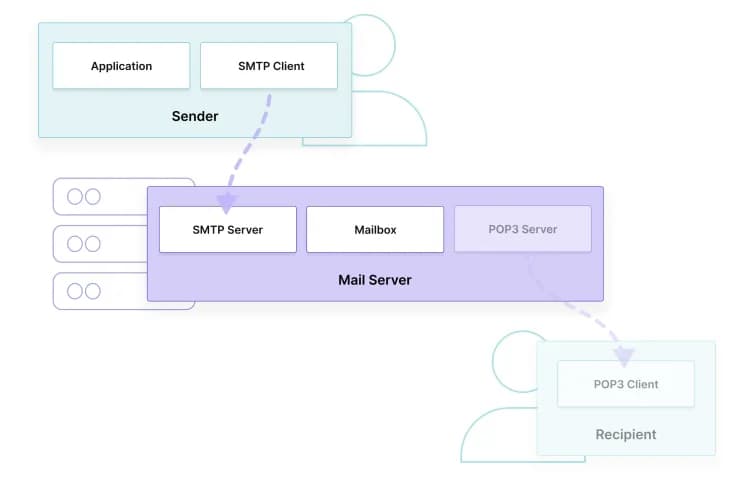
The NDR usually shows up in your own inbox as an automated message, forwarded by your email service provider (ESP), with the original message attached and a status line copied straight from the receiving server. That status line is built on SMTP, the protocol every mail server uses to hand messages to one another, and it always carries a numeric code, no matter which provider generated it.
Scale is why the code matters. Radicati projected 375 billion emails sent daily by 2025, and at even a 1% bounce rate that works out to 3.75 billion individual NDRs a day, per figures compiled by Clearout. Separately, a ReturnPath study reported via Retail Dive found that one in five marketing emails, roughly 20%, never reaches an inbox at all. Reading the code, not just the summary, is the only way to know which of those failures you can fix and which you can't.
Hard Bounces vs. Soft Bounces
When you get a hard bounce, it's permanent: the receiving server has confirmed it can never deliver your message to that address, and sending it again only damages your sender reputation further. A soft bounce is temporary: the mailbox or server is unavailable right now, and your identical message may go through on a later retry.
Most ESPs and mailbox providers retry a soft bounce automatically for a set window before giving up and converting it to a hard bounce. That window is provider-specific: per Clearout, many soft bounces get retried for up to 24 hours, and AOL extends that window to 36 hours before it stops trying. A hard bounce carries no such grace period. It signals to remove the address from your list immediately, because resending won't change the outcome, and mailbox providers do track how often you try anyway.
Common triggers for each type:
- Hard bounce triggers: a nonexistent mailbox, a domain that doesn't exist, or a recipient server that has permanently blocked your sending domain.
- Soft bounce triggers: a full mailbox, a message too large for the recipient's limits, a receiving server that's temporarily down, greylisting, or rate limiting.
Keep total bounces, hard and soft combined, under 2% of a campaign; per Clearout, that is the range mailbox providers consider healthy. Cross 10%, per that same benchmark, and most receiving servers start throttling or blocking the sending domain outright, regardless of which individual codes are showing up.
Traditional vs. Enhanced SMTP Status Codes (What the X.Y.Z Digits Mean)
You'll see traditional SMTP status codes as three digits, like 550, that only say success, temporary failure, or permanent failure. Enhanced status codes add a decimal-separated X.Y.Z format defined in RFC 3463, where the second digit names the specific failure class, addressing, mailbox, or mail system, so you know not just that something failed but where.
The first digit carries the same information a traditional code does: 2 means success, 4 means a temporary failure, 5 means a permanent one. The second digit is what enhanced codes add, and it names the class of the problem:
- X.1.Y, addressing status: the recipient's address itself is the problem.
- X.2.Y, mailbox status: the recipient's mailbox is the problem (full, disabled, moved).
- X.3.Y, mail system status: the receiving server's own software or configuration is the problem.
- X.4.Y, network or routing status: the message couldn't find or reach the destination server.
- X.5.Y, mail delivery protocol status: the SMTP conversation itself broke down mid-transaction.
- X.6.Y, message content or media status: something about the message itself was rejected.
- X.7.Y, security or policy status: authentication or a sending policy blocked the message.
The third digit narrows the diagnosis further, down to the specific condition inside that class. Enhanced codes were introduced in 2003, per GMass, to give senders that extra layer of detail beyond the traditional three digits, and RFC 3463 remains the governing spec for the X.Y.Z format today.
The categories above hold regardless of who sent the NDR, but each mailbox provider layers its own conventions on top of the base spec: Gmail, Microsoft's Outlook/Exchange Online, and Yahoo each publish their own postmaster guidance, and the same numeric code doesn't always map to identical guidance across the three. Check the receiving provider's own postmaster documentation before treating a cause as confirmed.
Common Causes of Email Bounces
Most bounces you'll see trace back to a handful of causes: an address that never existed or has since been abandoned, a mailbox that's full or disabled, a receiving server blocking your domain on reputation or authentication grounds, or a message that trips a content filter. Fixing the cause, not just resending, is what actually lowers your bounce rate.
- Invalid or mistyped addresses: the address never existed, or a typo at signup created one that doesn't. This is one of the most common sources of hard bounces on most lists.
- Abandoned mailboxes: the address existed, but the owner stopped using it. People change jobs and close accounts constantly, so a database that was accurate last quarter is measurably worse this quarter.
- Full or disabled mailboxes: the recipient's mailbox has hit its storage limit or been deactivated by the mailbox provider.
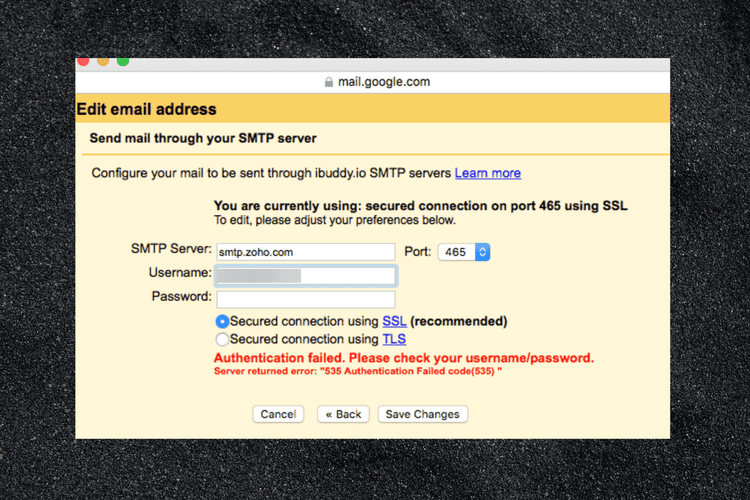
- Authentication failures: missing or misconfigured SPF, DKIM, and DMARC records give the receiving server no way to confirm you're allowed to send as your domain, so it rejects the message outright.
- Reputation and rate-limit blocks: sending too fast, or from a domain or IP with a poor sending history, triggers a temporary block rather than a content-based one.
- Content and policy filters: attachments, flagged phrasing, or a message that otherwise matches spam heuristics gets refused independent of who the recipient is.
Which of these applies also depends on the mailbox provider on the other end: a large mailbox provider like Gmail enforces stricter authentication requirements than a smaller regional host does. Per GMass's breakdown of Gmail's sending limits, Gmail caps free Gmail accounts at 500 outgoing messages a day and Google Workspace accounts at 2,000, while incoming mail per recipient is capped at 60 messages a minute, 3,600 an hour, or 86,400 a day. Cross those thresholds and Gmail returns a temporary rate-limit bounce rather than rejecting the content itself.
Full Bounce Code Lookup Table (Code → Class → Cause → Fix)
The table below covers the enhanced and traditional codes you'll see most often. The Class column follows RFC 3463's defined subject-code system directly: the standard specifies what each X.Y.Z class means (addressing, mailbox, mail system, and so on), and the split between success, temporary failure, and permanent failure comes from that same first-digit spec. The Likely Cause and Fix columns describe patterns commonly seen in practice for each code, not text quoted from the RFC itself, since the standard defines the classification, not every real-world trigger. Where BounceCheck has a deeper walkthrough of a specific fix, the link is in the last column.
| Code | Class | Likely Cause | Fix |
|---|---|---|---|
| 550 / 5.1.1 | Hard, addressing | The recipient mailbox doesn't exist | Remove the address; run new signups through email verification before you ever send to them |
| 551 / 5.1.6 | Hard, addressing | Commonly indicates the mailbox has moved with no forwarding address set | Update to the new address if the NDR includes one; otherwise remove it |
| 553 / 5.1.3 | Hard, addressing | Recipient address is malformed (bad syntax) | Run a syntax check at the point of capture, not after the send |
| 554 / 5.7.1 | Hard, policy | Commonly a blocklist match, a blank envelope sender, or another policy rule blocking the message | Confirm you're not IP-blocklisted and fix authentication; see relay access denied for the full fix |
| 550 / 5.7.1 (PermError) | Hard, policy | SPF record fails to resolve, usually from multiple v=spf1 lines or a broken include chain | Consolidate to a single SPF record |
| 550 / 5.7.515 | Hard, policy | Sending domain failed Microsoft's required SPF/DKIM/DMARC authentication level for high-volume senders (5,000+ messages/day to Microsoft consumer accounts) | Fix SPF, then DKIM, then publish DMARC with alignment; see 550 5.7.515 access denied |
| 550 / 5.4.1 | Hard, mail system | Domain has no valid MX record, or the mail server can't be reached at all | Confirm the domain resolves and has an MX record before you send |
| 550 / 5.4.300 | Hard (Exchange Online wrapper) | Exchange Online's queue lifetime expired before delivery succeeded; the real cause is a second, nested status code inside the same NDR (for example Gmail's 421 4.7.28, or a 4.4.2 unreachable server) | Read the nested inner code before acting; see 550 5.4.300 message expired |
| 552 / 5.2.2 | Hard after repeats, mailbox | Mailbox is over quota and staying that way | Suppress the address once 5.2.2 shows up across more than one send |
| 421 / 4.7.0 | Soft, policy | Receiving server is throttling you for sending too fast or too low a sender reputation | Slow your send rate and check domain reputation |
| 421 / 4.7.28 | Soft, policy | Gmail rate-limited one of your sending identities (IP, SPF domain, DKIM domain, or link domain) for an unusual rate of mail | Pause sending, verify authentication, then resume at reduced volume; see 421 4.7.28 Gmail rate limited |
| 450 / 4.2.1 | Soft, mailbox | Mailbox temporarily unavailable: greylisting, temporary full, or an authentication hiccup | Let your ESP's automatic retry run; if it repeats on every send, walk through fixing a DKIM temporary error |
| 452 / 4.2.2 | Soft, mailbox | Mailbox is full right now | Automatic retry usually clears it; treat as risky if it recurs on every send |
Codes outside this table still follow the same logic: read the first digit for permanent versus temporary, the second for which part of the system failed, and treat the third as the specific detail a deep-dive can walk you through.
How to Fix and Reduce Bounce Rates
Reducing a bounce rate comes down to catching bad addresses before you send, keeping authentication current, and pacing sends to match your reputation. None of this is a one-time fix. List decay is continuous, so the same steps repeat every time you add new contacts.
- Verify every address before first send: Running new contacts through real-time email verification catches invalid, disposable, and role-based addresses before they ever generate a bounce code. BounceCheck's Stealth SMTP engine checks a mailbox in real time without notifying the recipient, running the address through a 30-Step Engine and returning a Confidence Score before it costs you a hard bounce, and credits don't expire between clean-up passes.
- Keep SPF, DKIM, and DMARC current: A single broken or duplicated record produces the exact 5.7.1 and 4.7.1 codes covered above, independent of address quality.
- Segment retries by bounce type: Automatically suppress every 5.X.X hard bounce after one attempt; let 4.X.X soft bounces retry on your ESP's normal schedule instead of resending manually.
- Pace new domains and IPs: A warm-up schedule keeps volume inside what a new sending reputation can support, which is what most 421 and 450 rate-limit codes are actually reporting.
- Re-verify dormant segments on a schedule, not just at signup: Addresses that were valid a year ago decay at a steady rate, so a list you trusted last quarter is measurably worse this quarter if nothing has been rechecked. Running the full list through a bulk email verifier before your next campaign clears out that decay in one pass. See email verification vs. validation for why the two checks catch different problems.
Frequently Asked Questions About Email Bounce Codes in 2026
What does an email bounce code mean? An email bounce code is the numeric part of an NDR that a receiving mail server returns when it can't deliver a message. The first digit says whether the failure is permanent or temporary, and in an enhanced code the second digit names the specific class, addressing, mailbox, or mail system, that caused it.
What is the difference between a bounce code and an NDR? The NDR is the whole automated message announcing the failure; the bounce code is the specific numeric line inside it, like 550 5.1.1, that a mail system parses to classify the failure. The plain-language summary in the NDR is written for people; the code is written for machines and is more precise.
Is a 550 error always permanent? Yes. A code starting with 5 is a hard bounce by definition under both traditional and enhanced SMTP status codes, meaning the receiving server has confirmed the message will never go through as sent. Resending without changing the address or fixing the underlying policy issue won't produce a different result.
What SMTP error codes indicate a temporary problem? Any code starting with 4, such as 421, 450, or 452, is a soft bounce and temporary by definition. Most ESPs retry these automatically for a set window, commonly 24 hours and longer at some mailbox providers, before converting a persistent 4.X.X into a hard bounce.
Do Gmail, Outlook, and Yahoo use the same bounce codes? All three follow the RFC 3463 enhanced code format, so the three-digit structure looks identical across Gmail, Microsoft's Outlook/Exchange Online, and Yahoo. Check the specific mailbox provider's own postmaster documentation before treating a cause as confirmed, since the code alone is a starting point for diagnosis, not the full answer.
What counts as a good email bounce rate? Below 2% total bounces (hard and soft combined) is the range mailbox providers treat as healthy, per Clearout. Above 10%, expect throttling or outright blocking on the sending domain, independent of which specific codes are appearing in your NDRs.
§ Before your next send
Find the addresses that will bounce
Verify a single address free, or upload a CSV — the free plan includes 50 checks a month, no card needed.